MagicMirror Forum
    • Recent
    • Tags
    • Unsolved
    • Solved
    • MagicMirror² Repository
    • Documentation
    • 3rd-Party-Modules
    • Donate
    • Discord
    • Register
    • Login
    1. Home
    2. ninjabreadman
    3. Posts
    A New Chapter for MagicMirror: The Community Takes the Lead
    Read the statement by Michael Teeuw here.
    N
    Offline
    • Profile
    • Following 0
    • Followers 3
    • Topics 4
    • Posts 201
    • Groups 0

    Posts

    Recent Best Controversial
    • RE: GIF update from URL with MMM-EyeCandy

      @Mykle1 @JRWJR

      I think this should work; add the following at the bottom of the start function in MMM-EyeCandy.js:

        start: function () {
        
          ...
            
          // ADDED: Schedule update timer
          setInterval(function() {
          self.updateDom(self.config.fadeSpeed || 0); // use config.fadeSpeed or revert to zero
          }, this.config.updateInterval);
      
        }, // this was line 83
      
      posted in Troubleshooting
      N
      ninjabreadman
    • RE: access filesystem

      @MichaelTomTom @Leobaillard Is it possible fs is already defined (as a constant)? Are you getting any error messages in the logs?

      posted in Development
      N
      ninjabreadman
    • RE: change font of modules (local fonts)

      @bekirs My first question: Is Verdana actually located in ~/MagicMirror/fonts/Verdana.ttf? If so, you might try url("file:///home/pi/MagicMirror/fonts/Verdana.ttf"). When you run npm start dev in Terminal while in ~/MagicMirror, are there any console errors (in Terminal or Electron)?

      posted in Custom CSS
      N
      ninjabreadman
    • RE: worldclock - nobody made this, so I did.

      @Peter This should work:

      .worldclock {
        font-size: 73%; /* adjust value as needed */
      }
      
      posted in Productivity
      N
      ninjabreadman
    • RE: Schedule Module with XML/Feed source

      Hi @shakir, I suggest you switch to using a JSON (vs XML) response. You just need to add &format=json to your query URL, according to the API documentation from CTA. Then you can look at any of the transit modules for MM, most of which handle a JSON response. It might even be easier to modify one of those than MMM-WeeklySchedule. Personally, I did something similar with MMM-json-feed customizing the output to show what I wanted from the json feed for my nearest bus stop.

      posted in Requests
      N
      ninjabreadman
    • RE: Not reading RSS

      @goncalovsc Is that your full newsfeed.js file? That is definitely not the complete file. Suggest running git checkout ~/MagicMirror/modules/newsfeed.js in Terminal.

      Best practice is to not edit your module files (e.g. newsfeed.js). Instead, override the defaults with your own settings in config/config.js.

      posted in Troubleshooting
      N
      ninjabreadman
    • RE: change font of modules (local fonts)

      @bekirs @font-face is not a style rule, but declaration (“at-rule”). Here’s an explanation of how it works.

      So your code should instead be:

      @font-face {
        font-family: Verdana;
        font-style: normal;
        font-weight: 100;
        src:
          local("Verdana"),
          url("/home/pi/MagicMirror/fonts/Verdana.ttf") format("truetype");
      }
      
      .newsfeed {
        font-family: Verdana;
      }
      

      This avoids using the local version of the Verdana font. Why not use the local Verdana font (or install your desired alternative) and use the below instead?

      .newsfeed {
        font-family: Verdana;
      }
      
      posted in Custom CSS
      N
      ninjabreadman
    • RE: Not reading RSS

      @goncalovsc That was just to check that the MM could reach cmjornal.pt.

      Hmm, if it works with NYT, it may have a problem parsing your RSS feed. Start your MM with npm start dev to see errors in both Terminal and the Chrome/Electron JavaScript console.

      The RSS feed contains errors, but it still loads for me:

      0_1521165345095_Screen Shot 2018-03-15 at 9.54.56 PM.png

      posted in Troubleshooting
      N
      ninjabreadman
    • RE: MMM-CalendarExt

      @simzdk Seems @nn1mda is having the same problem here. @Sean is busy, but maybe we can convince him to have a look. As @modderhut suggests, best to open an issue on Github.

      posted in Productivity
      N
      ninjabreadman
    • RE: How much cpu/ram usage does mm use

      Hey @robmcc83,

      There’s not really a right answer; it will depend on the configuration of MM and what modules you have installed. Because the RPi runs both the server and client, either the front or back end can be processor or memory intensive.

      For reference, I have reasonable MM load on an RPi3B … in fact, low CPU usage but mid memory use (945K total, 304K used, 505K cache). I admit I’ve not even tried to optimize it and likely have more running than I need. But I’m not sure that I would try to also stream video or transfer large files as well.

      For that, I would look at more powerful RPi alternatives or scrounge up some outdated laptop hardware.

      posted in General Discussion
      N
      ninjabreadman
    • RE: Not reading RSS

      @goncalovsc Does the default config work, showing NYT headlines?

      module: "newsfeed",
      position: "bottom_bar",
        config: {
          feeds: [{
            title: "New York Times",
            url: "http://www.nytimes.com/services/xml/rss/nyt/HomePage.xml",
          }]
        }
      

      What happens when you run the following in the terminal from your MM?

      curl http://www.cmjornal.pt/rss
      

      Does this mean you succeeded in installing MM given your earlier post?

      posted in Troubleshooting
      N
      ninjabreadman
    • RE: helo every one

      @jonhcenami Have a look at MMM-pages. You can then also install MMM-Remote-Control. It’s a very useful module, but will also install a listener to send notifications to MM, as referenced in this (and other) posts. You can then use that listener to send notifications to your mirror, including to switch to the various pages you’ve configured.

      posted in Development
      N
      ninjabreadman
    • RE: [FIXED] MMM-CalendarExt Facebook birtday events shown on two days

      @nn1mda What is the time zone of the calendar, and of your mirror?

      posted in Troubleshooting
      N
      ninjabreadman
    • RE: Starting MagicMirror with `DISPLAY=:0 npm start` throws ERR!

      @loonix You might check to see that run-start.sh is executable:

      chmod +x ~/MagicMirror/run-start.sh
      

      You can also try :

      npm cache clean
      npm install
      npm start
      

      Finally, the MM project doesn’t run well on Raspbian Lite. Jessie Full is the recommended build. Check out this thread for a few other tips.

      posted in Troubleshooting
      N
      ninjabreadman
    • RE: MMM-cryptocurrency side by side top bar

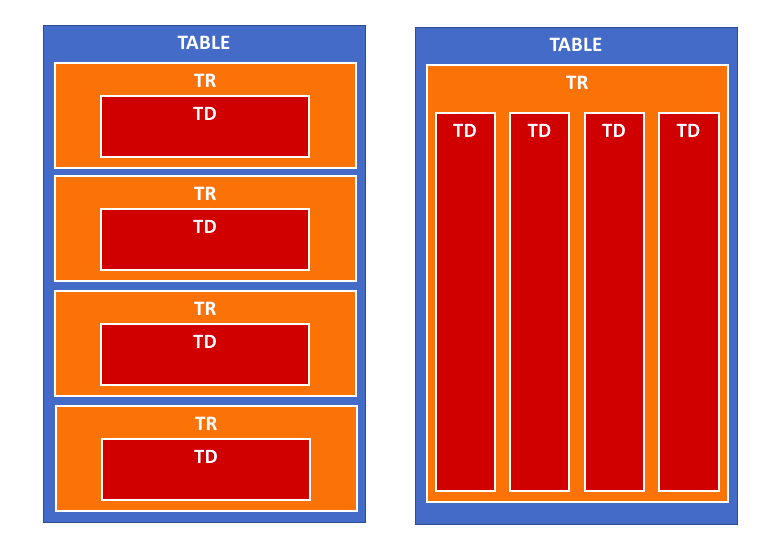
      @StacheEnthusiast You’re right. Tables don’t take styling very well; table rows (tr) insist on taking their own line, so there’s no easy way to move them beside each other. The proposed solution above should circumvent this, putting all the cells (td) into a single row.

      posted in Troubleshooting
      N
      ninjabreadman
    • RE: Modules assistance for MM newbie! Help!

      @Fookes No problem. No, all of the above will be done from your separate Mac/PC. The directions explain how to use Terminal and SFTP Client to make changes as through you were in front of the machine. All of the apps (Text Editor, SFTP Client, and VNC Viewer) should be installed on your Mac/PC (read: not MM) remote machine.

      Otherwise, you can just follow the excellent How to add modules for absolute beginners thread which covers everything as done on the RPi.

      posted in Troubleshooting
      N
      ninjabreadman
    • RE: Is there a module that conditionally shows/hides one module based on the state of another?

      @j.e.f.f Not that I’m aware. What about injecting JavaScript with a timer, such that "if Module 2 has an offsetHeight of greater than x, hide Module 1; else, show Module 1? Otherwise, I can imagine using the module notification system to advise Module 2 has content and to have Module 1 hide itself, and vice-versa.

      posted in Requests
      N
      ninjabreadman
    • RE: MMM-cryptocurrency side by side top bar

      Hi @StacheEnthusiast, in getDom() at MMM-cryptocurrency.js:164 it creates the layout for the module in a table. It loops through, and for each currency creates a tr (table row) and td (table cell).

      It looks a bit like this:
      0_1520721637727_Screen Shot 2018-03-10 at 5.33.03 PM.png

      So I think if you take the tr creation outside of the loop, it should work:

      getDom: function() {
          if (this.config.displayType == 'logo' || this.config.displayType == 'logoWithChanges') {
              this.folder = (this.config.coloredLogos ? 'colored/' : 'black-white/')
              return this.buildIconView(this.result, this.config.displayType)
          }
          var data = this.result
      
          var wrapper = document.createElement('table')
          wrapper.className = 'small mmm-cryptocurrency'
      
          var tableHeader = document.createElement('tr')
          tableHeader.className = 'header-row'
      
          var tableHeaderValues = [
              this.translate('CURRENCY'),
              this.translate('PRICE')
          ]
          if (this.config.headers.indexOf('change1h') > -1) {
              tableHeaderValues.push(this.translate('CHANGE') + ' (1h)')
          }
          if (this.config.headers.indexOf('change24h') > -1) {
              tableHeaderValues.push(this.translate('CHANGE') + ' (24h)')
          }
          if (this.config.headers.indexOf('change7d') > -1) {
              tableHeaderValues.push(this.translate('CHANGE') + ' (7d)')
          }
          for (var i = 0; i < tableHeaderValues.length; i++) {
              var tableHeadSetup = document.createElement('th')
              tableHeadSetup.innerHTML = tableHeaderValues[i]
              tableHeader.appendChild(tableHeadSetup)
          }
          wrapper.appendChild(tableHeader)
      
          var trWrapper = document.createElement('tr') // moved from below
          trWrapper.className = 'currency' // moved from below
      
          for (i = 0; i < data.length; i++) {
              var currentCurrency = data[i]
      //      var trWrapper = document.createElement('tr')
      //      trWrapper.className = 'currency'
              var name
              if (this.config.displayLongNames) {
                  name = currentCurrency.name
              } else {
                  name = currentCurrency.symbol
              }
      
              var tdValues = [
                  name,
                  currentCurrency.price,
              ]
              if (this.config.headers.indexOf('change1h') > -1) {
                  tdValues.push(currentCurrency.percent_change_1h + '%')
              }
              if (this.config.headers.indexOf('change24h') > -1) {
                  tdValues.push(currentCurrency.percent_change_24h + '%')
              }
              if (this.config.headers.indexOf('change7d') > -1) {
                  tdValues.push(currentCurrency.percent_change_7d + '%')
              }
      
              for (var j = 0; j < tdValues.length; j++) {
                  var tdWrapper = document.createElement('td')
                  var currValue = tdValues[j]
                  // If I am showing value then set color
                  if (currValue.includes('%')) {
                      tdWrapper.style.color = this.colorizeChange(currValue.slice(0,-1))
                  }
                  tdWrapper.innerHTML = currValue
                  trWrapper.appendChild(tdWrapper)
              }
      //      wrapper.appendChild(trWrapper)
          }
          wrapper.appendChild(trWrapper) // moved from above
          return wrapper
      },
      

      I’ve not run this code, as I don’t use MMM-cryptocurrency, but I think it should work. Just be careful when modifying your MMM-cryptocurrency.js to only replace the getDom() function. I also don’t think this should break any of the module’s functionality or styling.

      Worst case, you can always use git checkout MMM-cryptocurrency.js to revert to the original version.

      posted in Troubleshooting
      N
      ninjabreadman
    • RE: Trouble with Smart Quotes, etc

      @Mykle1 Thanks! I keep seeing it mentioned in the forums, and wanted to give us all a quick way to refer people to help. I’d already written most of it with all of my responses here so I decided to rearrange them into a freestanding post.

      posted in Troubleshooting
      N
      ninjabreadman
    • RE: Modules assistance for MM newbie! Help!

      Hi @Fookes,

      I’ll try. This is what I use for adding modules:

      Ingredients

      • Text Editor (e.g. Atom) ‑ that supports syntax highlighting, code formatting, and won’t break your code (i.e. not MacOS’ TextEdit)
      • SFTP Client (e.g. FileZilla)
      • Terminal
      • VNC Client (optional)

      Directions

      1. Connect to your MM via ssh in Terminal (e.g. ssh 192.168.0.101), and in your ssh session do the following:
        a. Change directories to ~/MagicMirror/modules
        b. Download your module with git clone (e.g. git clone https://github.com/matteodanelli/MMM-cryptocurrency.git)
        c. This will create the folder for your module

      2. Connect with your SFTP Client to your MM
        a. Navigate to your ~/MagicMirror/config directory
        b. Tell the SFTP Client to open/edit your config.js with your Text Editor (this can sometimes be configured in File > Preferences) or by right-clicking the file (to select “Open with…”)
        c. Copy the config options from the module’s Git Readme.md, website, etc. that you want to use
        d. Paste the config options into config.js that is open in your Text Editor
        e. Save the file, and the SFTP Client will upload the file back to your MM

      3. In Terminal (still in ssh) run pm2 restart mm or npm start dev in ~/MagicMirror/.
        a. Have a look at your mirror to see that the changes took, or use a VNC Client to connect to and view your mirror

      Hope that helps. Let me know if you have any questions.

      posted in Troubleshooting
      N
      ninjabreadman
    • 1
    • 2
    • 3
    • 4
    • 5
    • 10
    • 11
    • 3 / 11