@mmmallday Great find!
I did not see MMM-NOAAAlerts on either the 3rd Party Modules (official) or the Magicial Mirror² 3rd Party Modules (official) page.
I have setup this module and it worked for me. I used 4 decimal places on the lat and long.
@mmmallday Great find!
I did not see MMM-NOAAAlerts on either the 3rd Party Modules (official) or the Magicial Mirror² 3rd Party Modules (official) page.
I have setup this module and it worked for me. I used 4 decimal places on the lat and long.
@JMac that should be the letter (l) not a number (1) .
sudo fdisk -l
For the default clock module. I thought that the number before the sunrise time represented amount of sunlight.
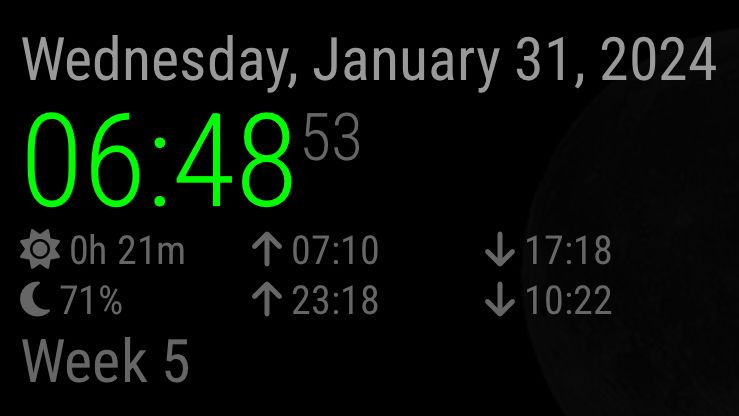
Is this an error?
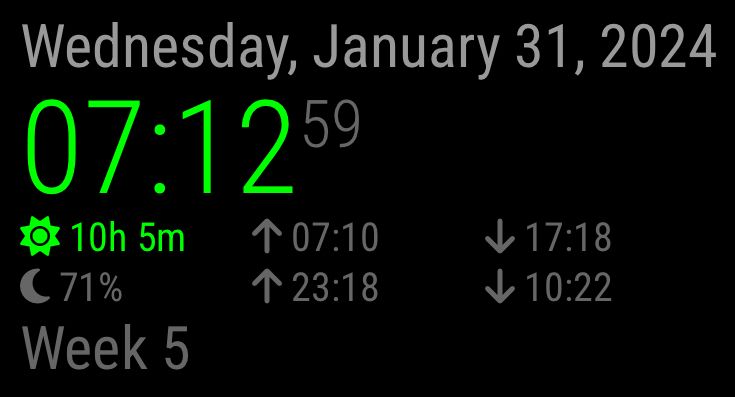
Should this be 10h 8m
my config:
module: "clock",
            position: "top_left",
            config: {
                showWeek: true,
                showSunTimes: true,
                showMoonTimes: "percent",
                lat: 39.693120,
                lon: -119.955200
            },
mirror version is 2.26.0
@korey_sed Fonts were adjusted via CSS and/or (un)zoom.
The following was copied from Google Store
Length: 6.4 in (162 mm)
Width: 2.4 in (61 mm)
Height: 0.5 in (12.5 mm)
Weight: 1.9 oz (55 g)
Colors: Snow, Sunrise, Sky
Connectivity: Wi-Fi 802.11ac (2.4 GHz / 5 GHz); Bluetooth®
Operating System: Android TV OS
Resolution: Up to 4K HDR, 60 FPS
Supports resolutions up to 4K and high dynamic range (HDR)
Video Formats
Dolby Vision, HDR10, HDR10+ for stunning picture quality.
1Ports
HDMI to plug directly into the TV
USB Type-C power
@kayakbabe I am not casting to my TV.
My MM does not screencast. I have MM setup to accept connections from the local WiFi network. The TV Bro app is just a browser installed on a dongle, that is connected to my TV.
@sdetweil Right. There are different hardware devices: Wikipedia Chromecast
The built-in browser on my older LG smart TV doesn’t display MM, but I loaded the TV Bro app on my Google’s chromecast with Google TV and it looks pretty good.
P.S. ‘Chromecast with Google TV’ is a Google branded user interface on Android TV in a chromecast capable dongle.
May I ask how you are using
classes: "daytime_scheduler"
Are there two instances of
daytime_scheduler
I use
classes: “currentweather”

type: “current”
and
classes: “weatherforcast”

type: “forecast”
to replace the deprecated modules.
The only thing I noticed was you’re trying to use http and the default is https for the apiBase.
Hi @sdetweil , Thanks for replying.
I am trying to migrate from the currentweather and weatherforcast modules to the new weather module.
I am using the MMM-Carousel module. It seemed strange (to me) to use the same module name. I was attempting to show the weather module with type=current on one slide and the weather module with type=forecast on another slide but with the same position. There didn’t seem to be any way to do this. I’ve since modified the config to use different positions so that a slide shows both current and forecast using the different positions.
It kinda works as I am getting the correct header but it just shows “Loading…” ,
Here is my config of MMM-Carousel:
{
 module: "MMM-Carousel",
 config: {
          transitionInterval: 10000,
          ignoreModules: ['alert', 'updatenotification', 'MMM-NewsFeedTicker'],
          mode: 'slides',
          slides: [
                   ['clock', 'calendar'],
                   ['clock', 'calendar', 'MMM-NetworkScanner'],
                   ['currentweather', 'weatherforecast', 'MMM-NetworkScanner'],
                   ['currentweather', 'weatherforecast', 'compliments'],
                   ['clock', 'calendar', 'compliments'],
                   ['clock', 'calendar', 'MMM-MoonPhase'],
                   ['currentweather', 'weatherforecast', 'MMM-MoonPhase'],
                   ['currentweather', 'weatherforecast']
         ]
 }
},
Can someone think of a way to use the new weather module in situation?
I saw the following error msgs:
[21.04.2021 15:12.39.799] [LOG]   Connecting socket for: currentweather
[21.04.2021 15:12.39.800] [WARN]  The module 'currentweather' is deprecated in favor of the 'weather'-module, please refer to the documentation for a migration path
[21.04.2021 15:12.39.802] [LOG]   Connecting socket for: weatherforecast
[21.04.2021 15:12.39.803] [WARN]  The module 'weatherforecast' is deprecated in favor of the 'weather'-module, please refer to the documentation for a migration path
So I started looking at the documentation.
I couldn’t find how to specify the forecast weather type for one slide, and the current weather type for another slide in the MMM-Carousel which my MM currently uses.
Can somebody tell me?
Is it bad to have this?
pi@raspberrypi ~ % sudo -l|grep NOPASS
    (ALL) NOPASSWD: ALL
pi@raspberrypi ~ %
Edit: To expand further, I have MMM-NetworkScanner running. I do not need to supply a password when I run sudo and I don’t have a password stored in a config file.
@bkrand95 said in Black screen on start up of Magic Mirror:
module: ‘MMM-Remote-Control’,
uncomment the following line to show the URL of the remote control on the mirror
position: ‘bottom_left’
The line after MMM-Remote-Control should be a comment,
and there should be a comma after the ‘bottom_left’.
@NathTheDude If you start a terminal on one desktop and run:
echo $DISPLAY
Then start a terminal on the other desktop and run:
echo $DISPLAY
do you get the same results?
@NathTheDude The 2nd monitor should be display 0, screen 1. Use this:
DISPLAY=:0.1
Isn’t the default localhost?
General property option
On my rpi I get the ::1 IPv6 address
pi@raspberrypi ~ % getent hosts localhost
::1             localhost ip6-localhost ip6-loopback
pi@raspberrypi ~ %
Both IPv4 and IPv6 addresses are in my local /etc/hosts file:
pi@raspberrypi ~ % grep localhost /etc/hosts
127.0.0.1       localhost
::1             localhost ip6-localhost ip6-loopback
pi@raspberrypi ~ %
@Mr-Gysy
config.js has a typo
adresss: “0.0.0.0”,
should be.
address: “0.0.0.0”,
A previous post showed how to change the color of the icons for the currentweather/weatherforcast modules here: colors-changed
As Far As I Know, setting colored: true changes the color of the min/max temperature listing.