MagicMirror Forum
    • Recent
    • Tags
    • Unsolved
    • Solved
    • MagicMirror² Repository
    • Documentation
    • 3rd-Party-Modules
    • Donate
    • Discord
    • Register
    • Login
    1. Home
    2. PGP_Protector
    3. Posts
    A New Chapter for MagicMirror: The Community Takes the Lead
    Read the statement by Michael Teeuw here.
    P
    Offline
    • Profile
    • Following 0
    • Followers 0
    • Topics 2
    • Posts 4
    • Groups 0

    Posts

    Recent Best Controversial
    • Clean Install

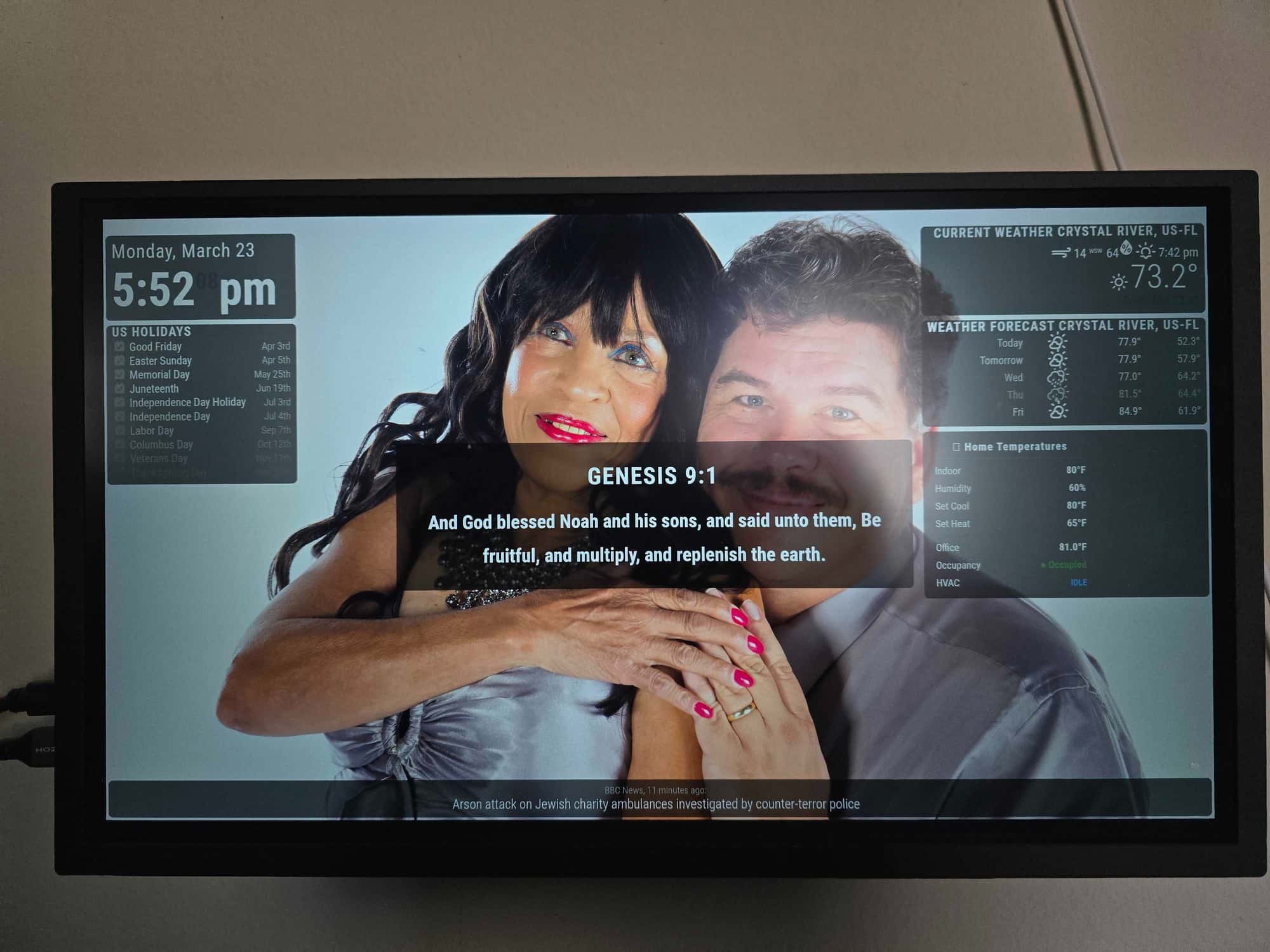
      Had an install but forgot my user / pw to the pi so decided to do a clean install.

      But with a bit more fun?
      So I decided to have Claude help me redo it all.

      Started with the clean install, then had it help me install an SQL Server (For the Bible Quotes in the center)

      Had it help me write the module to directly access the DB for the books / chapter / verse / text configurable with update speed / bible language (got 2 tables I can switch between ASV or KJV)

      Then had it help me configure my Ecobee connection (newer module ecobee so had a hard time getting access to it’s api points) but I did have home assistant running on a nother pi box. And claude helped me connect to that instead to get the Home Tempratures section.

      Finaly had it add a custom background rotating module that pulls images from a local folder and add overlays to the different modules.

      So far I’m liking the results.

      af85207e-7aac-4469-bd20-4cc23aa1dfa6-image.jpeg

      posted in Show your Mirror
      P
      PGP_Protector
    • RE: Failed to Fetch

      FYI update showing the display that I got working.

      be6a50b9-639b-453e-bc44-d1cd931b92ab-image.png

      posted in Troubleshooting
      P
      PGP_Protector
    • RE: Failed to Fetch

      Resolved.

      Figured it out, CORS was giving me a problem.

      Updated my php code with the following and now it’s accepting the data I’m sending.

      header('Access-Control-Allow-Origin: *');
      header('Access-Control-Allow-Methods: GET, POST');
      header("Access-Control-Allow-Headers: X-Requested-With");
      
      posted in Troubleshooting
      P
      PGP_Protector
    • Failed to Fetch

      Trying to write a small verse viewer based off of the complements code.

      If I run my call from the command line, both Machine IP, locahost & 127.0.0.1 return my json string.

      curl http://127.0.0.1/bible.php?verseid=1
      {"id":"1","book":"1","chapter":"1","verse":"1","text":"In the beginning God created the heavens and the earth.","bookID":"1","English":"Genesis"}r
      

      So the Web part is working. can access curl & from other machines.

      My module.js is

      /* global Cron */
      var DisplayedBibleRefrence = "John 3:16";
      var DisplayedBibleQuote = "For God So Loved The World";
      var CurrentBibleVerse = -1;
      var WebReturn = {"id":"57","book":"1","chapter":"3","verse":"1","text":"Now the serpent was more subtle than any beast of the field which Jehovah God had made. And he said unto the woman, Yea, hath God said, Ye shall not eat of any tree of the garden?","bookID":"1","English":"Genesis"};
      Module.register("thebible", {
      
      	// Default module config.
      	defaults: {
      		CurrentID : 57,
      		updateInterval: 30000,
      		fadeSpeed: 4000
      			},
      		async start()
      		{
      			Log.info(`The Bible Module Starting`);
      			const response = await this.MakeBibleCall();
      			setInterval(async () => {
      				const response = await this.loadComplimentFile();
      				if (response) {
      					this.compliments_new = JSON.parse(response);
      				}
      				else {
      					Log.error(`${this.name} remoteFile refresh failed`);
      				}
      			},
      			this.config.updateInterval);
      
      			// Schedule update timer. sync to the minute start (if needed), so minute based events happen on the minute start
      			setTimeout(() => {
      				setInterval(() => {
      					this.updateDom(this.config.fadeSpeed);
      				}, this.config.updateInterval);
      			},
      			1);
      		},
      		getScripts () { return ["croner.js", "moment.js"];},
      		
      		// Override dom generator.
      		getDom () {
      			var wrapper = document.createElement("div");
      			var BookRef = document.createElement("div");
      			var VerseText = document.createElement("div");
      			var TimeStamp = document.createElement("div");
      			BookRef.innerText = DisplayedBibleRefrence;
      			VerseText.innerText = DisplayedBibleQuote;
      			TimeStamp.innerText = Date();
      			wrapper.appendChild(BookRef);
      			wrapper.appendChild(VerseText);
      			wrapper.appendChild(TimeStamp);
      			return wrapper;
      			// <div>{{ BibleRefrence | safe }}</div>
      			// <div>{{ BibleQuote | safe }}</div>
      			// <div>{{ CurrentID | safe }}</div>
      	},
      
      	async MakeBibleCall(){
      		try {
      			const response = await fetch('http://127.0.0.1/bible.php?verseid=1');
      			return response.text(); 
      			}
      		 catch (error) {
      			 DisplayedBibleQuote = `${this.name} fetch failed error=`+ error;
      		 }
      	}
      
      });
      

      But both on startup and on the “refresh” I’m getting a TypeError: Failed to Fetch for the DisplayedBibleQuote
      So the try catch is throwing the error and displaying the error.

      Where did I go wrong?

      Thank you.
      posted in Troubleshooting
      P
      PGP_Protector
    • 1 / 1