@sdetweil
Thank you Sam,
That fixed my issue, and let me use the default clock files…
Cool thing is with the old setting in the Custom.css file I can change the colon : color between the numbers a different color.
Fun Fun Fun.
 P
Offline
P
Offline
A New Chapter for MagicMirror: The Community Takes the Lead
Read the statement by Michael Teeuw here.
Read the statement by Michael Teeuw here.
Posts
-
RE: AfterUpdate to v2.3.2 Small Problem
-
RE: AfterUpdate to v2.3.2 Small Problem
@sdetweil
So just replace “var(–color-text-bright)” with my preferred colors? -
RE: AfterUpdate to v2.3.2 Small Problem
Sorry I already deleted that folder MM that I renamed MagicMirror to.
Found the issue, the NEW default clock_styles.css has these extra lines compared to the older default clock_styles.css file.
.module.clock .clock-hour-digital {
  color: var(--color-text-bright);
}

.module.clock .clock-minute-digital {
  color: var(--color-text-bright);
}

.module.clock .clock-second-digital {
  color: var(--color-text-dimmed);
}
If I remove those lines my time on screen looks right again…
Which will mess up the next update probably…
At least I know what to repair to do the update next round. -
RE: AfterUpdate to v2.3.2 Small Problem
@sdetweil
1st I used your backup script.
Then I tried using your upgrade script and it stopped at the updating of the node version. Just set there for like an hour. I went outside and did some yard work.
I then rebooted the pi and did pm2 stop all
Then tried your upgrade script again and it froze again on the node update.
Waited about 30 minutes to see if it was a internet problem.
Then I did ctrl+c
Then I tried your script with “force” then it ran all the way through.
BUT it came up a black screen.
I did not feel like trying to figure out why it was a blank screen.
So I just renamed the MagicMirror to MM and then used your install script.
That fully installed without any input from me, I went out and finished the yard work I was doing. NO user input.
I cam back in and it was working with the sample config.js
Then I just moved the config.js and custom.css over from the backup and the modules from the MM (previous did not work) and rebooted now all is woking.
Not sure why it had so much of a stumble going from node v 20 to v22.14
I will say I updated from MM v2.3.0 to MM v2.3.2 maybe that was the problem…
I should have took some screen shots for you, so you could see the issues…
Weird part is the update script worked perfect on the other to MM I have running 1 is on a LePotato 1 is a pi 4 2gb
I will say the time thing did the same thing on the other pi 4, I am using the same time date seperation in both pi. So i figure it is something that was updated in the default clock code and does not get updated with my old custom.css code. -
AfterUpdate to v2.3.2 Small Problem
The numbers used to be orange also.
Now as you can see it is not getting any color in the numbers.
I even moved the custom css from my @sdetweil backup. That I did just before the update. Thank you Sam….clock.clock-time-only .time { Margin-right: 15px; Margin-top: 0px; Color: orange; Font-size: 125px; Font-weight: 500; }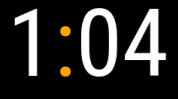
So far this is the only problem I have had… That I could not figure out real quickly. I will say I had to rename MagicMirror to MM and reinstall MagicMirror. Then move Config.js Custom.css and modules over to the new MagicMirror install all pretty quick. I had a blank screen. I figured it was the least amount of work for me… Again Thanks to @sdetweil backup. Saves the most important parts of MagicMirror…
-
RE: Missing custom.css breaks entire layout
@sdetweil
You are more than likely correct the sd card has started to fail.
That is why I went to the M.2 ssd’s they do not seem to fail as often as USB drives did for me. and I have gave up on sd cards on anything that I do not HAVE to use them in… I suppose if I would fork out the money for the better ones maybe they would last longer… Sorry to Hijack your post. @arh -
RE: Missing custom.css breaks entire layout
@arh
I would have put it on a USB drive 32gb, they last a LOT longer and are faster too.
I always set ssh and vnc to on in raspi config. Makes it a lot easier to make changes and fix problems that all the sudden show up. Did you make a change to custom.css and maybe make a mistake in the saving of it? typo’s are my biggest problem anymore. Oh and figuring out what to look for in ctrl+shift+i …
I am using M.2 drives in my raspberry Pi’s now. they are very reliable and last a LONG time. Just some things to think about so you do not have to dig into the door again. -
RE: Life 360 Module
@xadamxk
I did not have to pay or give credit card when i signed up and my wife and i can see where each other are all the time on our phones. Maybe I am grandfathered in, due to having it for so long. It does nag us sometimes to upgrade to paid subscription. I will have to look into if I can add anyone or not. -
RE: How to synchronize pictures from mobile to the MM?
@sdetweil
So Sam,
If I use your program to upload the photos and the module it defaults to, to show pictures anyone in my house could upload pictures to the folder that the photo module is showing from and the pictures will show then. or will it need MM to restart? Do the photos have to be resized? -
RE: Life 360 Module
@xadamxk
I don’t pay for life 360 and we use it all the time. -
RE: MMM-CountUP (COVID19 example)
@sdetweil
After messing with Confusius says for some time this morning. Using the window,
I figured out why I was having so much trouble finding the correct code to use.
my second half of the window you showed was not showing up, It was hidden.
Now that it shows and I found my glasses. This should become easier…
I don’t do it often enough to remember the details so we will see how I do down the line.
Thanks for the coaching. It is really appreciated. -
RE: Live phone location
@maria151
Where do you find the UNOFFICIAL modules for Life360? -
RE: MMM-CountUP (COVID19 example)
@sdetweil
Try Your pages module running 51 modules, one every 90 seconds.
DynamicWeather running in the background (cloudy today), was the one that made it impossible to see anything else. After I got it stopped my // it out and disabled: true, for it. I was able to see what you where talking about at least. I just missed the part where it showed the full name of the module as a clue as to how to format the code in the custom.css so that that MM could understand it… FYI you can not use the window with mplayer it covers the whole screen, had to kill it too.
Bingo the CountUp module header is now big enough to read and orange.
Thank you so very much Sam.
I know you have to get tired of those of us that do not have a clue and do not seem to catch on over the years. You are good soul.
Have a great evening.Just Jeff
-
RE: MMM-CountUP (COVID19 example)
@sdetweil
I really am burn’t out I saw that right below it that I needed to use the full module name for the header. MMM-CountDown was the same way… All I had to do was change the Down to UP and I would have had it… Oh well, at least I learned something today with the window thing… I just have too much going on, on my mirror for it to show things in the elements window…
I will install the ones I have trouble with one at a time on my spare mirror I just got running on a Le Potato. That thing is a trip to get up and running. I made an image of its base up and running, complete with MM running with no modules. that way it only takes 5 minutes or less to get it back to minimum setup.
Again thank you for your patients.
Jeff -
RE: MMM-CountUP (COVID19 example)
@sdetweil
Ok I found that and put it in my custom.css.CountUp .module_header{ font-size: 65px; }With no change.
What am I not seeing or doing wrong with my code. ???
Once I finally find the answer it did not work…
I am burnt out today. I will attack it again tomorrow.I have learned how to enlarge gif files. and If they put a css file I pretty much can find the correct thing to enlarge the fonts i want then. but this does not work well for me I click on the thing I want highlighted and it does for a split second then goes away never showing anything different in the html side… Maybe I should look at this from an html editor side of the file and I can see it then… Probably not able to do that though… I will keep trying to figure it out each time before I bug the forum for answers.
-
RE: MMM-CountUP (COVID19 example)
@sdetweil
It shows me nothing but dynamic weather in elements window. Then a bunch of .js
I am guessing I will have to stop all other modules except the one I want look at, to figure this out on my own.
Is that correct? -
RE: MMM-CountUP (COVID19 example)
@sdetweil
Yea I know, but I can not for the life of me see what you see.
It is so frustrating for me, to not be able to do the dev window elements.
It looks like Chinese to me…
I will have to see if a bigger screen helps.
I will plug my laptop into the 42 inch tv screen and see if that helps any…
Plus with pages running 40+ modules it takes so long to come back around, I sometimes just give up… and try what has worked in the past…
Thanks for you patience with me. -
RE: MMM-CountUP (COVID19 example)
@sdetweil
Sorry, brain fart.
Yes module header.
Did you find something?
I looked for an hour and then tried these.
But no go…
It is still really little and gray..countUP tr td.header { color: orange; font-size: 60px; } .countUP .header { color: orange; font-size: 60px; }