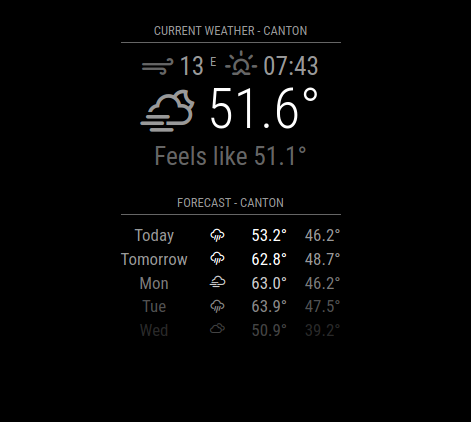
@sdetweil - you’re gonna laugh, but I found the issue. I was using an inactive API key. My backup was too old and was before the v2.29.0 API 3.0 requirement. Sorry to drag you through this!
Read the statement by Michael Teeuw here.
Posts
-
RE: "Invalid Date" appears in Weather module. MM v2.29.0
-
RE: "Invalid Date" appears in Weather module. MM v2.29.0
@reilley - oh, I think I know what’s wrong now.
-
RE: "Invalid Date" appears in Weather module. MM v2.29.0
@sdetweil - nope, same result
-
RE: "Invalid Date" appears in Weather module. MM v2.29.0
@sdetweil said in "Invalid Date" appears in Weather module. MM v2.29.0:
@reilley said in "Invalid Date" appears in Weather module. MM v2.29.0:
So my code worked for you and the only change was the API key?
correct
That’s nuts. Why would an API key work two days ago and not today? Seems like maybe there’s a configuration problem elsewhere but I not sure where it would be since I made no changes to weather.js or other .js files associated with the Weather module.
-
RE: "Invalid Date" appears in Weather module. MM v2.29.0
@sdetweil said in "Invalid Date" appears in Weather module. MM v2.29.0:
@reilley I copied your config and used my apikey
no other changes (well I wrapped your config in code block to keep the quotes correct for copy/paste)
So my code worked for you and the only change was the API key? This key worked two days ago, so not sure what’s happening here.
-
"Invalid Date" appears in Weather module. MM v2.29.0
Had to rebuild my mirror from scratch after my SSD croaked five months after purchase and my backup USB was corrupted, argh. Most everything works now except for my Weather modules, which are using OpenWeatherMap with API 3.0.
When current weather loads, I see "Invalid Date where the time should be above the temperature. To add insult to injury, the temp displays as “NaN”. What the heck? Here’s my config:
{ module: 'weather', position: 'top_center', header: 'Current Weather - Canton', config: { weatherProvider: 'openweathermap', appendLocationNameToHeader: false, type: 'current', weatherEndpoint: '/onecall', lat: '34.17188', lon: '-84.57056', apiVersion: '3.0', apiKey: "XXXX" } }, { module: 'weather', position: 'top_center', header: 'Forecast - Canton', config: { weatherProvider: 'openweathermap', appendLocationNameToHeader: false, type: 'forecast', weatherEndpoint: '/onecall', lat: '34.17188', lon: '-84.57056', apiVersion: '3.0', apiKey: "XXXX" } },Units are set to imperial in the config.js file and my Raspberry PI time seems correct.
Thoughts?

-
RE: Magic Mirror and NodeJS
@sdetweil - I feel ya! Back from dinner with the wife and your script ran perfectly - thanks! Now, I’m tracking down a pesky weather module issue, grrrrr. I’ll definitely be taking advantage of your backup scripts as soon as I get this all working again. I don’t ever want to reinstall from scratch again, ugh.
-
RE: Magic Mirror and NodeJS
@sdetweil - I’ve been running on Bullseye up until until the SSD croaked. I just installed Bookworm 64 bit before I saw your reply and once it’s done updating, I’ll give your script a whirl. Weird that this was happening since I installed NodeJS with no problems a few months ago. Argh!!!
Thanks for the help as always!!!
-
RE: Magic Mirror and NodeJS
@sdetweil - Sam, will your scripts install Nodejs and NPM? My SSD died and I’m having a hell of a time getting Nodejs installed on it. I keep getting errors about glibcc_3.4.29 and 3.4.30 not being found.
-
RE: 2.29.0 Weather Module w/api v3.0 works, sort of…
@HeikoGr - lol, adjusted my headers and saw that the timezone was concatenated to the header. Snapped a photo to post and saw your comment. That fixed it!!! Thank you and Sam both!!!
-
RE: 2.29.0 Weather Module w/api v3.0 works, sort of…
@HeikoGr - sorry, I didn’t copy/paste from the actual editor. I typed all that in and made a few errors! Sorry for the goose chase!
-
RE: 2.29.0 Weather Module w/api v3.0 works, sort of…
@sdetweil - sure, I’d be happy to force my header if that’s possible. So for example, with forecast I would want it to say:
Forecast - Canton, GA
Or similar, of course. I could test it if you could let me know where to insert that line of code.
-
RE: 2.29.0 Weather Module w/api v3.0 works, sort of…
@HeikoGr - so as it was said before, we’re not going to see our city the way we did under v2.5 of the API. That’s going to likely need a response from the MM2 dev team because if /open call is used, it’s timezone/city only. It seems api 3.0 broke the location/locationID functionality when using “current” or “forecast”. Or did someone else get it to work?
-
RE: 2.29.0 Weather Module w/api v3.0 works, sort of…
@Peter - Unfortunately, not yet. I’m wondering if anyone has been able to using the 3.0 API!
-
RE: 2.29.0 Weather Module w/api v3.0 works, sort of…
OK, it would appear when /onecall is used, the OpenWeatherMap.js script controls the header and you’re either going to get:
${data.timezone}
or
${data.city.name},${data.city.country}
I’m see the first option, timezone. It’s correct, but I don’t want timezone. I want city/country. Booooo!!!
-
RE: v2.29.0 weather module issue
@HeikoGr - What are you seeing for the header? Does it say [country]/[city] and if so, is it correct? Mine is saying “America/New York”, when I’m in Canton, Georgia.
-
RE: 2.29.0 Weather Module w/api v3.0 works, sort of…
@sdetweil - Oh okay - I was wondering why you mentioned case. That was just a typo here on my part. When I was using it, it was “locationID”.
-
RE: 2.29.0 Weather Module w/api v3.0 works, sort of…
@sdetweil - Hi Sam! I’m not even calling locationID in my script.
Here’s what I have:
module: “weather”,
position: “top_center”,
config: {
weatherProvider: “openweathermap”,
type: “current:,
weatherEndpoint: ‘/onecall’,
lat: ‘34.17188’.
lon: ‘-84.57056’,
apiVersion: ‘3.0’,
apiKey: 'nunya” -
RE: v2.29.0 weather module issue
@dawookie1979 - just add it somewhere in the config for your weather module. I added "apiVersion: “3.0"” just above the apiKey.
I’d help you write yours, but I’m struggling with mine as well so you might get better assistance from the gurus here!
-
2.29.0 Weather Module w/api v3.0 works, sort of…
Updated MM2 today to v2.29.0. Learned quickly that the api change forces you subscribe to the One Call v3.0 and provide a payment method but no big deal as long as you stay under 1000 calls per day.
It took some configuration editing to get the current and forecast sections working, specifically adding the apiVersion parameter and of course the new api key. It still didn’t work, so I added weatherEndpoint ‘/onecall’ and this resolved the problem, but now the location header reads “America/New York”. If you use One Call , the location and locationId parameters are ignored. Just not sure why the first shows incorrectly.
Anyone else having this issue?