MagicMirror Forum
    • Recent
    • Tags
    • Unsolved
    • Solved
    • MagicMirror² Repository
    • Documentation
    • 3rd-Party-Modules
    • Donate
    • Discord
    • Register
    • Login
    1. Home
    2. rkorell
    3. Posts
    A New Chapter for MagicMirror: The Community Takes the Lead
    Read the statement by Michael Teeuw here.
    R
    Offline
    • Profile
    • Following 0
    • Followers 0
    • Topics 23
    • Posts 379
    • Groups 0

    Posts

    Recent Best Controversial
    • New Mirror

      Hello to all,
      I’ve started end of last week and today I’m nearly happy with my modules and arrangement.

      Had struggled somtimes with several modules, not all of interest are currently maintained so sometimes I cannot get run it properly.
      Just now I’m “ready” with config - future steps are purchasing the mirror (sample pack is shipping) and build up the frame.
      Tomorrow the PIR sensor will arrive so in addition I have to figure out if and how this works and intergrate this sensor into the build.

      Future step is the integration of a background LED stripe - not sure about this because I’m currently not sure if I’m able to switch this LED on/off in conjunction with monitor (out of MMM-Pir).

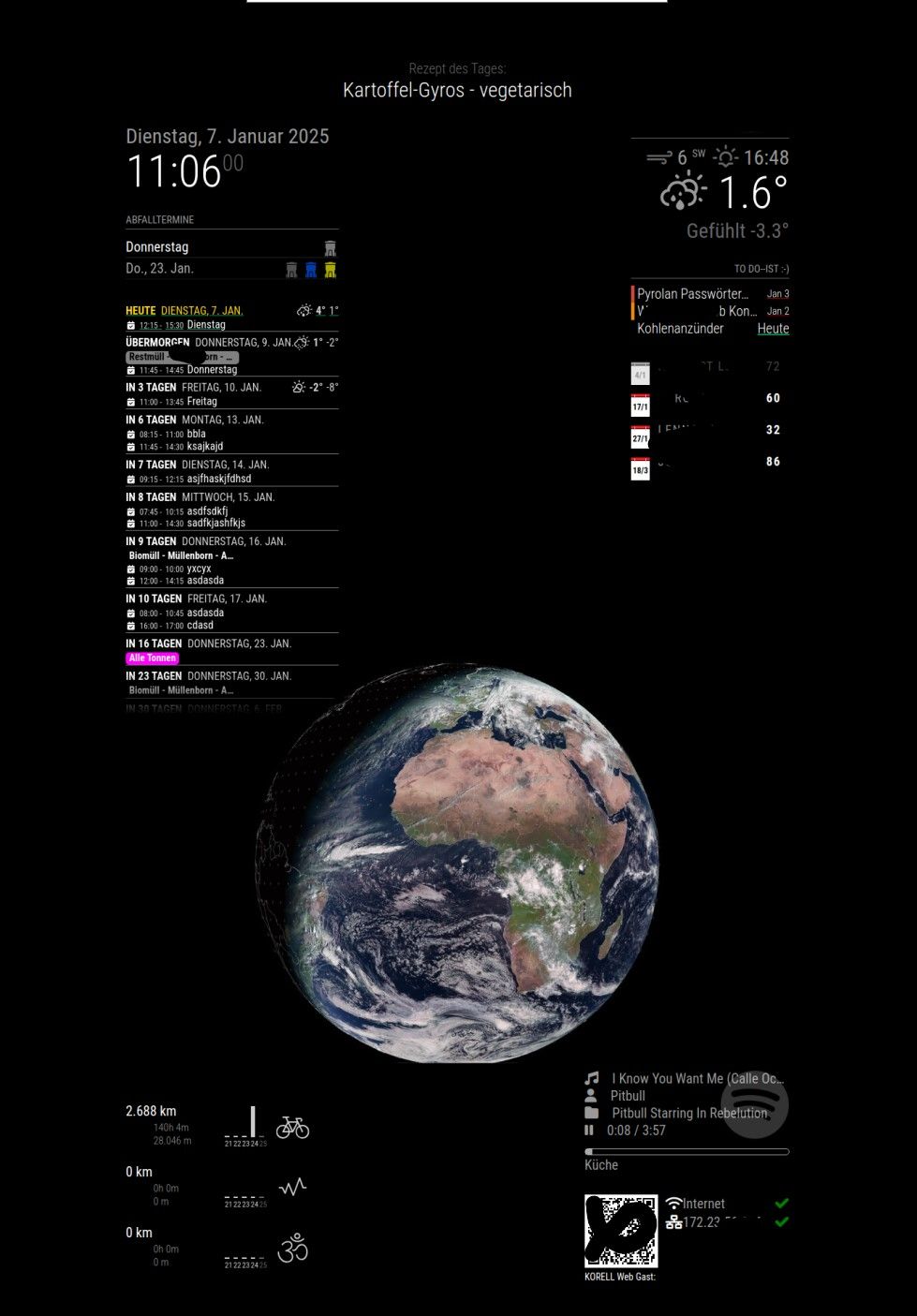
      Here a current screenshot:
      MagicMirrorProto.jpg

      I’ve used standards (weather, clock, newsfeed) and:

      MMM-Globe
      MMM-MyGarbage
      MMM-CalendarExt3Agenda
      MMM-Strava
      MMM-NowPlayingOnSpotify
      MMM-ToDoist
      birthdaylist
      MMM-SystemStats
      MMM-SystemInfo
      (MMM-Pir - “installed” but lacking sensor, so disabled and not tested)

      Target Monitor is a 27’’ Samsung device and I will mount this behind a 120cm*60cm mirror.
      (Will post an image, if ready…)

      I’m thinking about enriching the szenario with an 8’’ android tablet for streaming, but not sure…

      Nice rest of the day to all of you, thanks for your really GREAT work and highly motivated assistance in this forum.

      Warmest regards,
      Ralf

      posted in Show your Mirror
      R
      rkorell
    • RE: MMM-CalendarExt3Agenda - how to hide days with no events and hide/filter out events with a keywords

      @MMRIZE , thanks - I was aware of this.

      Regards,
      Ralf

      posted in Troubleshooting
      R
      rkorell
    • RE: MMM-CalendarExt3Agenda - how to hide days with no events and hide/filter out events with a keywords

      Dear Sam (@sdetweil ),
      short feedbacj from this end :-)
      I was able to found a compromize.
      I’ve found a months old thread with the guy whose mirror I saw and @MMRIZE regardins an equivalent “problem”.
      The mentioned CSS solution doesn’t work for me - for whatever reason

      /* In your custom.css */
      .CX3 .event.singleday .headline .title,
      .CX3 .event.singleday .headline .time {
        color: var(--calendarColor);
      }
      

      Doesn’t colour the textline.
      But in the same discoussion I identified the “idea” to use the fact that whole day events DO use the given color as I define in my config.
      So now the apperance isO.K.

      For reference to others who might have same issues the whole block here:

      {
      		  module: "MMM-CalendarExt3Agenda",
      		  position: "top_left", 
      		  //header: "Wichtige Termine",
      		  config: {
      			  
      			        eventTransformer: (ev) => {
      			            const customEvents = [
      			              { keyword: "Restmüll", symbol: ["fa-regular fa-trash-can"], color: "grey" },
      			              { keyword: "Papier", symbol: ["fa-solid fa-dumbbell"], color: "blue" },
      			              { keyword: "Gelber Sack", symbol: ["fa-solid fa-arrows-spin"], color: "yellow" },
      			              { keyword: "Biomüll", symbol: ["fa-regular fa-trash-can"], color: "brown" },
      			              { keyword: "Restmüll & Papier & Gelber Sack", symbol: ["fa-regular fa-trash-can"], color: "fuchsia" },
      			              { keyword: "Urlaub", symbol: ["fa-solid fa-dumbbell"], color: "cyan" },
      			              
      			            ]
      			            const found = customEvents.find((condition) => {
      			              return ev.title.search(condition.keyword) !== -1   
      			            })
      			            if (found) {
      			                ev.icon = [ found.symbol ]
      			                ev.color = found.color 
      			            }
      			            if (ev.title.search("Restmüll") !== -1) {
      			              ev.symbol = [ "fa-regular fa-trash-can" ],
      			              ev.isFullday = [true], 
      			              ev.color = "grey"  
      			            }
      			            if (ev.title.search("Papier") !== -1) {
      			              ev.symbol = [ "fa-regular fa-trash-can" ],
      			              ev.isFullday = [true],
      			              ev.color = "blue"  
      			            }
      			            if (ev.title.search("Gelber Sack") !== -1) {
      			              ev.symbol = [ "fa-solid fa-arrows-spin" ],
      			              ev.isFullday = [true],
      			              ev.color = "yellow"  
      			            }
      			            if (ev.title.search("Biomüll") !== -1) {
      			              ev.symbol = [ "fa-regular fa-trash-can" ],
      			              ev.isFullday = [true],
      			              ev.color = "brown"  
      			            }
      						if (ev.title.search("Restmüll & Papier & Gelber Sack") !== -1) {
      			              ev.symbol = [ "fa-regular fa-trash-can" ],
      			              ev.isFullday = [true],
      			              ev.title = "Alle Tonnen",
      			              ev.color = "fuchsia"
      			            }			            
      						if (ev.title.search("Urlaub") !== -1) {
      			              ev.symbol = [ "fa-regular fa-trash-can" ],
      			              ev.isFullday = [true],
      			              ev.color = "green"
      			            }
      
      			            return ev
      			        },


      Thanks for your support!
      Warmest regards,
      Ralf

      posted in Troubleshooting
      R
      rkorell
    • RE: MMM-CalendarExt3Agenda - how to hide days with no events and hide/filter out events with a keywords

      @sdetweil , yes, I’m fully aware of volunteer.
      So thanks a LOT!

      Ralf

      posted in Troubleshooting
      R
      rkorell
    • RE: MMM-CalendarExt3Agenda - how to hide days with no events and hide/filter out events with a keywords

      @sdetweil , thanks anyway!

      should I place a separate posting?
      Regards,
      Ralf

      posted in Troubleshooting
      R
      rkorell
    • RE: MMM-CalendarExt3Agenda - how to hide days with no events and hide/filter out events with a keywords

      @sdetweil , yes indeed.
      After making a little bit of progress now I’m not able to understand why the module doosn’t do what I expect…
      I try to change the icons as well as the color of the calendar events.
      Icon works fine, color for icon as well but the “event” itself doesn’t change color.

      I’ve figured out that the searchword is found - because it triggers the icon color as well as the icon color (regardless that the current searchword contains an German “Umlaut” (‘ü’).

      I found a code snippet here and modified it to my requirements.

      ev.color is the attribute I’ve used - this seems the right one.
      But It only changes the icon color…

      
      		{
      		  module: "MMM-CalendarExt3Agenda",
      		  position: "top_left", 
      		  //header: "Wichtige Termine",
      		  config: {
      			  
      			        eventTransformer: (ev) => {
      			            const customEvents = [
      			              { keyword: "Gelber Sack", symbol: ["fa-solid fa-arrows-spin"], color: "yellow" },
      			              { keyword: "Restmüll", symbol: ["fa-regular fa-trash-can"], color: "green" },
      			              { keyword: "Biomüll", symbol: ["fa-regular fa-trash-can"], color: "brown" },
      			              { keyword: "Papier", symbol: ["fa-solid fa-dumbbell"], color: "blue" },
      			              { keyword: "Urlaub", symbol: ["fa-solid fa-dumbbell"], color: "cyan" },
      			            ]
      			            const found = customEvents.find((condition) => {
      			              return ev.title.search(condition.keyword) !== -1
      			            })
      			            if (found) {
      			                ev.icon = [ found.symbol ]
      			                ev.color = found.color
      			            }
      			            if (ev.title.search('Restmüll') !== -1) {
      			              ev.symbol = [ "fa-solid fa-cake-candles" ]
      			            }
      			            if (ev.title.search('Papier') !== -1) {
      			              ev.symbol = [ "fa-regular fa-trash-can" ]
      			            }
      			            if (ev.title.search('Gelber Sack') !== -1) {
      			              ev.symbol = [ "fa-solid fa-arrows-spin" ]
      			            }
      			            if (ev.title.search('Biomüll') !== -1) {
      			              ev.symbol = [ "fa-regular fa-trash-can" ]
      			            }
      			            if (ev.title.search('Geb.') !== -1) {
      			              ev.title = ev.title.replace('Geb.', '')
      			              ev.symbol = [ "fa-solid fa-cake-candles" ]
      			            }
      			            return ev
      			        },


      					// useWeather: false ,
      					showMiniMonthCalendar: false,
      					//onlyEventDays: 10  -- Nur Tage mit terminen anzeigen ist in der custom.css eingetragen, DAS funktioniert...
      		  
      		  } 
      
      		},


      Where is my error now?

      :-)

      TIA for any hint.
      Regards,
      Ralf

      posted in Troubleshooting
      R
      rkorell
    • RE: MMM-CalendarExt3Agenda - how to hide days with no events and hide/filter out events with a keywords

      .Dear Sam, @sdetweil ,

      shame on me!
      This is dumb.
      thanks a lot for this hint.

      If you are doing it right - it works …

      I’m terribly embarrassed.
      Regards,
      Ralf

      posted in Troubleshooting
      R
      rkorell
    • RE: MMM-CalendarExt3Agenda - how to hide days with no events and hide/filter out events with a keywords

      Dear @sdetweil ,
      yes for sure, sorry…
      It’s VERY basic, because my trials were ignored I doesn’t spent too much time on it yet…
      As you can see I’ve disabled the not working parts (currently except the asked one - “onlyEventDays”.

      
      // Kalenderübersicht (Agendaview)
      
      		{
      		  module: "MMM-CalendarExt3Agenda",
      		  position: "top_left", 
      		  header: "Wichtige Termine",
      		  // useWeather: false ,
      		  // showMiniMonthCalendar: false,
      		  onlyEventDays: 1
      
      		},


      Thanks for your prompt reply - I was tired yesterday night, so seen your query rigth now.
      Warmest regards,
      Ralf

      posted in Troubleshooting
      R
      rkorell
    • RE: MMM-CalendarExt3Agenda - how to hide days with no events and hide/filter out events with a keywords

      Dear gurus,
      I’m pretty new here and i do have the exact same problem as the original thread owner.
      I’ve identified and tried the conig.cs approach with “onlyEventDays: 5,” but this doesn’t work for me unfortunately.
      In addition other documented switches of this module
      // useWeather: false ,
      // showMiniMonthCalendar: false,
      don’t work either for me.
      Any idea?
      Because of the other two switches I don’t want to play with CSS right now…
      Thanks for any hint/advise!

      Warmest regards,
      Ralf

      posted in Troubleshooting
      R
      rkorell
    • 1
    • 2
    • 34
    • 35
    • 36
    • 37
    • 38
    • 38 / 38