@rvnbrg i’m on a Rpi 3a, raspbian 12
R
Offline
A New Chapter for MagicMirror: The Community Takes the Lead
Read the statement by Michael Teeuw here.
Read the statement by Michael Teeuw here.
Posts
-
RE: MMM-PIR doesn't always make the modules visible after PIR motion
-
MMM-PIR doesn't always make the modules visible after PIR motion
Re: MMM-Pir bugsounet doesn't switch the screen off!
Hello,
My screen sometimes stays black after the PIR detected motion. The backlight of the screen is on but no content is shown. I have to restart the mirror to get it back to working. How can I solve this?
-
RE: Highlight current day in calendar
@sdetweil Sir, you did it once again. I tried editing the alpha channel from “0.2” to “0,5” and all worked out.
Thank you very much for all the support and your patience since the beginning of my MM journey! :)
-
RE: Highlight current day in calendar
@sdetweil i now reinstalled the whole mirror and still cannot get it to work on the mirror. The Dev tools on the mirror are exactly the same as on the windows laptop.
-
RE: Highlight current day in calendar
@sdetweil I am currently out of ideas.
My time zone settings are correct, the displayed time is correct.
With the help of ChatGPT I tried al kind of things like adding classes to the module js file. but to no avail. I am currently on a fresh installed module and where your first tip got it working it is now not working at all. (Only works on my laptop on localhost:8080) -
RE: Highlight current day in calendar
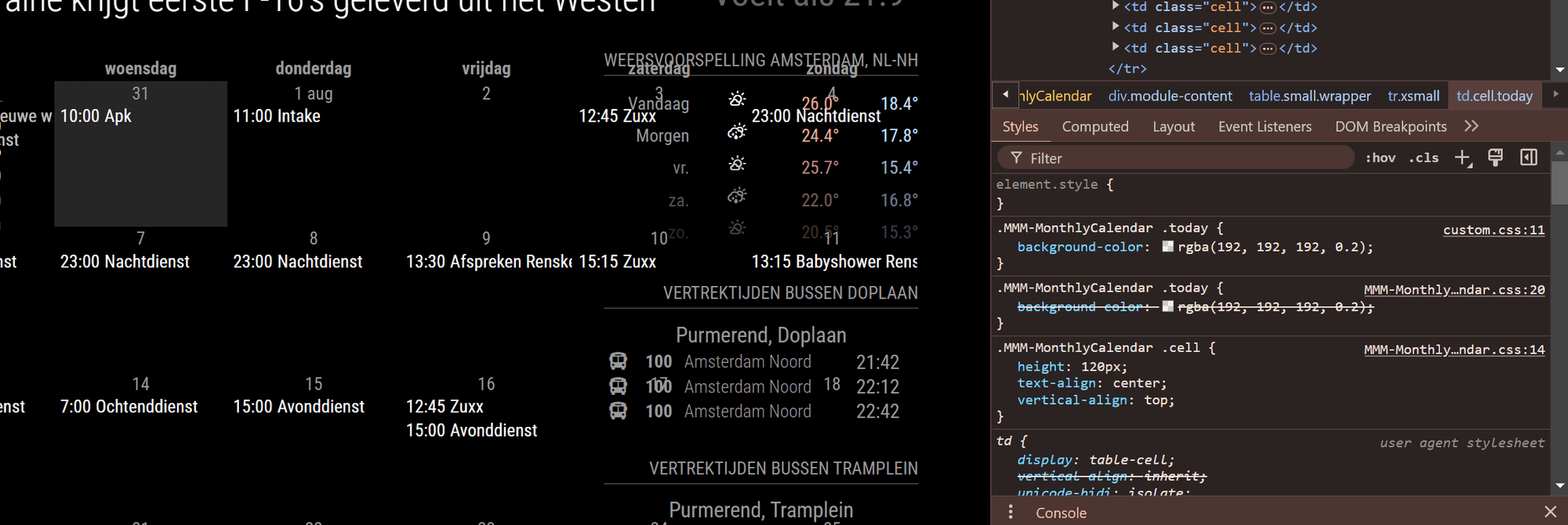
This is what I see when I check at my desktop browser.
Would it be any different on the raspberry? -
RE: Highlight current day in calendar
@sdetweil my raspberry 3 a+ is a bit too slow to navigate through the dev screen. That’s why I checked via my laptop’s chrome browser. But there is the background of today highlighted as expected.
Side question: If I replace my rb 3a+ with a rb 4. Can I get everything working as it is now by just changing the sd card?
-
RE: Highlight current day in calendar
@sdetweil i tried that multiple times
-
RE: Highlight current day in calendar
@sdetweil today I noticed that I do see the highlighted background when I open Magic Mirror on my phone’s web browser, but not on the mirror itself. A bit strange isn’t it?
-
RE: No Web UI with MMM-FastNotes
@mumblebaj YES! Got it working! Thank you very very much
-
RE: Highlight current day in calendar
@sdetweil I did so and it worked the first day(s) but today and Yesterday the background was gone. I checked the custom css and all lines are still present. Did I do something wrong? Or does it have to do something with the weekend days?
-
RE: No Web UI with MMM-FastNotes
@sdetweil Thank you for your help so far
-
RE: No Web UI with MMM-FastNotes
@sdetweil That gives me this:
xavier@raspberrypi:~/MagicMirror/modules/MMM-FastNotes $ python3 FastNotes.py --host 192.168.178.30 --port 5000 --debug
Traceback (most recent call last):
File “/home/xavier/MagicMirror/modules/MMM-FastNotes/FastNotes.py”, line 2, in
from backend.fast_notes import start
File “/home/xavier/MagicMirror/modules/MMM-FastNotes/backend/fast_notes.py”, line 1, in
import flask
File “/usr/local/lib/python3.11/dist-packages/flask/init.py”, line 14, in
from jinja2 import escape
ImportError: cannot import name ‘escape’ from ‘jinja2’ (/usr/lib/python3/dist-packages/jinja2/init.py) -
RE: No Web UI with MMM-FastNotes
@sdetweil Yes that works to see the MM on my desktop web browser.
Only the FastNotes WebUI does not load -
RE: No Web UI with MMM-FastNotes
@sdetweil This is what I get
xavier@raspberrypi:~ $ ip addr
1: lo: <LOOPBACK,UP,LOWER_UP> mtu 65536 qdisc noqueue state UNKNOWN group default qlen 1000
link/loopback 00:00:00:00:00:00 brd 00:00:00:00:00:00
inet 127.0.0.1/8 scope host lo
valid_lft forever preferred_lft forever
inet6 ::1/128 scope host noprefixroute
valid_lft forever preferred_lft forever
2: wlan0: <BROADCAST,MULTICAST,UP,LOWER_UP> mtu 1500 qdisc pfifo_fast state UP group default qlen 1000
link/ether b8:27:eb:69:7b:37 brd ff:ff:ff:ff:ff:ff
inet 192.168.178.30/24 brd 192.168.178.255 scope global noprefixroute wlan0
valid_lft forever preferred_lft forever
inet6 fd48:42be:e531:6cb0:2d2a:6ab4:13e2:1d5a/64 scope global dynamic noprefixroute
valid_lft 1624sec preferred_lft 1624sec
inet6 fe80::56dd:2b5f:e33f:829e/64 scope link noprefixroute
valid_lft forever preferred_lft forever -
RE: No Web UI with MMM-FastNotes
So I try to access the Web UI with: 192.168.178.30:5000
-
RE: No Web UI with MMM-FastNotes
@sdetweil I have
host: “192.168.78.30”, // address of raspberry pi in local network, need for access to WEB UI
port: 5000, // port on host where UI will be accessible via web browserWhere “192.168.178.30” is the ip adress of my raspberry
-
RE: No Web UI with MMM-FastNotes
@sdetweil Yes, current setup in config is
"address": "0.0.0.0",
"ipWhitelist": [],
"locale": "en-US",
"logLevel": [
	"INFO",
	"LOG",
	"WARN",
	"ERROR"
],