MagicMirror Forum
    • Recent
    • Tags
    • Unsolved
    • Solved
    • MagicMirror² Repository
    • Documentation
    • 3rd-Party-Modules
    • Donate
    • Discord
    • Register
    • Login
    1. Home
    2. Sceetch
    3. Posts
    A New Chapter for MagicMirror: The Community Takes the Lead
    Read the statement by Michael Teeuw here.
    S
    Offline
    • Profile
    • Following 0
    • Followers 0
    • Topics 13
    • Posts 39
    • Groups 0

    Posts

    Recent Best Controversial
    • RE: PIR wake up automatically!

      @sdetweil

      if i do your code, i get these datas:

      PM2 | 2024-10-15T20:29:52: PM2 log: Node.js version : 20.8.0
      PM2 | 2024-10-15T20:29:52: PM2 log: Current arch : arm
      PM2 | 2024-10-15T20:29:52: PM2 log: PM2 home : /home/pi/.pm2
      PM2 | 2024-10-15T20:29:52: PM2 log: PM2 PID file : /home/pi/.pm2/pm2.pid
      PM2 | 2024-10-15T20:29:52: PM2 log: RPC socket file : /home/pi/.pm2/rpc.sock
      PM2 | 2024-10-15T20:29:52: PM2 log: BUS socket file : /home/pi/.pm2/pub.sock
      PM2 | 2024-10-15T20:29:52: PM2 log: Application log path : /home/pi/.pm2/logs
      PM2 | 2024-10-15T20:29:52: PM2 log: Worker Interval : 30000
      PM2 | 2024-10-15T20:29:52: PM2 log: Process dump file : /home/pi/.pm2/dump.pm2
      PM2 | 2024-10-15T20:29:52: PM2 log: Concurrent actions : 2
      PM2 | 2024-10-15T20:29:52: PM2 log: SIGTERM timeout : 1600
      PM2 | 2024-10-15T20:29:52: PM2 log: ===============================================================================
      PM2 | 2024-10-15T20:29:52: PM2 log: [Watch] Start watching MagicMirror
      PM2 | 2024-10-15T20:29:52: PM2 log: App [MagicMirror:0] starting in -fork mode-
      PM2 | 2024-10-15T20:29:52: PM2 log: App [MagicMirror:0] online

      /home/pi/.pm2/logs/MagicMirror-out.log last 15 lines:
      0|MagicMir | [2024-10-15 20:30:10.964] [LOG] Create new calendarfetcher for url:. Edited: moderator - Interval: 604800000
      0|MagicMir | [2024-10-15 20:30:11.292] [LOG] requesting:https://opendata.dwd.de/climate_environment/health/alerts/s31fg.json
      0|MagicMir | [2024-10-15 20:30:11.331] [LOG] [MMM-Pir] Version: 1.5.3 rev: 240701
      0|MagicMir | [2024-10-15 20:30:11.333] [LOG] [MMM-Pir] [LIB] [PIR] Mode 0 Selected (onoff library)
      0|MagicMir | [2024-10-15 20:30:11.446] [LOG] [MMM-Pir] [LIB] [PIR] Started!
      0|MagicMir | [2024-10-15 20:30:11.449] [LOG] [MMM-Pir] [LIB] [SCREEN] Mode 9: xrandr (primary display) – Rotation: left
      0|MagicMir | [2024-10-15 20:30:11.473] [LOG] [MMM-Pir] Started!
      0|MagicMir | [2024-10-15 20:30:11.900] [LOG] MMM-DWD-Pollen: Success loading
      0|MagicMir | [2024-10-15 20:30:11.931] [LOG] [MMM-OpenWeatherForecast] 15-Oct-24 20:30 ** ERROR ** Error: Request failed with status code 401
      0|MagicMir | [2024-10-15 20:30:12.086] [INFO] System information:
      0|MagicMir | ### SYSTEM: manufacturer: Raspberry Pi Foundation; model: Raspberry Pi 4 Model B Rev 1.2; raspberry: [object Object]; virtual: false
      0|MagicMir | ### OS: platform: linux; distro: Raspbian GNU/Linux; release: 11; arch: arm; kernel: 6.1.21-v8+
      0|MagicMir | ### VERSIONS: electron: 29.4.2; used node: 20.9.0; installed node: 20.8.0; npm: 10.1.0; pm2: 5.4.1
      0|MagicMir | ### OTHER: timeZone: Europe/Berlin; ELECTRON_ENABLE_GPU: undefined
      0|MagicMir | [2024-10-18 19:33:19.104] [INFO] Calendar-Fetcher: Broadcasting 209 events from. Edited: moderator
      /home/pi/.pm2/logs/MagicMirror-error.log last 15 lines:
      0|MagicMir | [1441:1015/203007.468295:ERROR:gbm_wrapper.cc(76)] Failed to get fd for plane.: Datei oder Verzeichnis nicht gefunden (2)
      0|MagicMir | [1441:1015/203007.469114:ERROR:gbm_wrapper.cc(259)] Failed to export buffer to dma_buf: Datei oder Verzeichnis nicht gefunden (2)
      0|MagicMir | [1441:1015/203007.469703:ERROR:gbm_wrapper.cc(76)] Failed to get fd for plane.: Datei oder Verzeichnis nicht gefunden (2)
      0|MagicMir | [1441:1015/203007.470376:ERROR:gbm_wrapper.cc(259)] Failed to export buffer to dma_buf: Datei oder Verzeichnis nicht gefunden (2)
      0|MagicMir | [1441:1015/203007.470857:ERROR:gbm_wrapper.cc(76)] Failed to get fd for plane.: Datei oder Verzeichnis nicht gefunden (2)
      0|MagicMir | [1441:1015/203007.471246:ERROR:gbm_wrapper.cc(259)] Failed to export buffer to dma_buf: Datei oder Verzeichnis nicht gefunden (2)
      0|MagicMir | [1441:1015/203007.471864:ERROR:gbm_wrapper.cc(76)] Failed to get fd for plane.: Datei oder Verzeichnis nicht gefunden (2)
      0|MagicMir | [1441:1015/203007.472289:ERROR:gbm_wrapper.cc(259)] Failed to export buffer to dma_buf: Datei oder Verzeichnis nicht gefunden (2)
      0|MagicMir | [1441:1015/203007.473545:ERROR:gbm_wrapper.cc(76)] Failed to get fd for plane.: Datei oder Verzeichnis nicht gefunden (2)
      0|MagicMir | [1441:1015/203007.473975:ERROR:gbm_wrapper.cc(259)] Failed to export buffer to dma_buf: Datei oder Verzeichnis nicht gefunden (2)
      0|MagicMir | [1441:1015/203007.474361:ERROR:gbm_wrapper.cc(76)] Failed to get fd for plane.: Datei oder Verzeichnis nicht gefunden (2)
      0|MagicMir | [1441:1015/203007.474628:ERROR:gbm_wrapper.cc(259)] Failed to export buffer to dma_buf: Datei oder Verzeichnis nicht gefunden (2)
      0|MagicMir | [1039:1018/193452.138762:ERROR:browser_main_loop.cc(278)] Gdk: gdk_monitor_get_scale_factor: assertion ‘GDK_IS_MONITOR (monitor)’ failed
      0|MagicMir | [1039:1018/193452.146069:ERROR:browser_main_loop.cc(278)] Gdk: gdk_monitor_get_scale_factor: assertion ‘GDK_IS_MONITOR (monitor)’ failed
      0|MagicMir | [1039:1018/193452.150739:ERROR:browser_main_loop.cc(278)] Gdk: gdk_monitor_get_scale_factor: assertion ‘GDK_IS_MONITOR (monitor)’ failed

      0|MagicMirror | [1039:1018/193549.175898:ERROR:browser_main_loop.cc(278)] Gdk: gdk_monitor_get_scale_factor: assertion ‘GDK_IS_MONITOR (monitor)’ failed
      0|MagicMirror | [1039:1018/193549.241698:ERROR:browser_main_loop.cc(278)] Gdk: gdk_monitor_get_scale_factor: assertion ‘GDK_IS_MONITOR (monitor)’ failed
      0|MagicMirror | [1039:1018/193549.246287:ERROR:browser_main_loop.cc(278)] Gdk: gdk_monitor_get_scale_factor: assertion ‘GDK_IS_MONITOR (monitor)’ failed
      0|MagicMirror | [1039:1018/193634.176330:ERROR:browser_main_loop.cc(278)] Gdk: gdk_monitor_get_scale_factor: assertion ‘GDK_IS_MONITOR (monitor)’ failed
      0|MagicMirror | [1039:1018/193634.183421:ERROR:browser_main_loop.cc(278)] Gdk: gdk_monitor_get_scale_factor: assertion ‘GDK_IS_MONITOR (monitor)’ failed
      0|MagicMirror | [1039:1018/193634.186706:ERROR:browser_main_loop.cc(278)] Gdk: gdk_monitor_get_scale_factor: assertion ‘GDK_IS_MONITOR (monitor)’ failed

      posted in Troubleshooting
      S
      Sceetch
    • RE: PIR wake up automatically!

      @sdetweil
      thx for help.
      for me its not clear where i can find the information?

      Is it on the booting sequence for raspberry?

      posted in Troubleshooting
      S
      Sceetch
    • RE: PIR wake up automatically!

      @sdetweil
      Hi,

      Sorry for answering so late.
      The problem already exists.☹️

      To modify the Text file doesen’t solve the problem.
      I have actually no solution.

      Do u have another hint?

      posted in Troubleshooting
      S
      Sceetch
    • RE: PIR wake up automatically!

      @wishmaster270

      Hi,
      I saw this file, but there is no vc4.force_hotplug Parameter listet.
      Should I easily add it?

      posted in Troubleshooting
      S
      Sceetch
    • RE: PIR wake up automatically!

      @wishmaster270

      Hi,
      Thx for your answer.
      I saw your Information on the end.
      But I can’t find the related .txt file under path
      /boot/firmware/cmdline.txt

      There is not a folder firmware inside.
      Do you have perhaps another solution??

      Thanks in advance

      posted in Troubleshooting
      S
      Sceetch
    • PIR wake up automatically!

      Hi,
      im using the MMM-Pir module.
      I set the timer on 30 second. If i move in front of the sensor the time resets itself and starts the countdown for new.
      so far so good!

      if the sensor does not detect any movement the screen disappears and the monitor switch off into standby mode.

      so far so good!

      but after another 30 seconds in Standby mode the Screen turns on automatically without any movement.

      I have already taped over the sensor that im sure there is no movement possible. Same problem again.
      it seems to be on a endless loop.

      Does anybody know this problem??

      posted in Troubleshooting
      S
      Sceetch
    • RE: OpenWeatherForecast (API-Key)

      @MarcLandis
      Thank u very much!

      Kind regards

      posted in Troubleshooting
      S
      Sceetch
    • RE: OpenWeatherForecast (API-Key)

      Thanks.
      I switched te Module to hirschberger.
      It looks like working.
      Do you know there is a chance to Look how many times currently I call or use the API?
      I can’t find anything in my open weather account?

      posted in Troubleshooting
      S
      Sceetch
    • OpenWeatherForecast (API-Key)

      Hi guys,
      im using the MMM-openWeatherForeast (guess its jclarke0000 version),
      the module is running on two devices with the same API-key.

      The application has not been working for 3 days.
      The screen shows only the loading message all the time on both devices .

      I think the problem is with the API key.

      What module do you guys using now, which is working??
      I have already registered for an api 3.0 key. But i cant find any changes in my account on open weather. Do you know if create a new api key takes a while? in which subpoint can i find it?

      posted in Troubleshooting
      S
      Sceetch
    • MMM-Pir bugsounet doesn't switch the screen off!

      Hi guys,
      i installed the MMM-Pir module yesterday.
      I see the count-down. If the time is over the monitor turns black.
      If the sensor registered movements the the picture appears again.

      i guess the the sensor is working correctly.
      so far so good…
      Im just wondering that the screen shows only a dark picture and its in on mode.
      There is no chance to fell into energy saving mode.

      It should be no signal on the screen interface. If this happend the screen has also no signal an turn into energy saving mode.

      Does anybody has an idea how to say into the PIR module if the count-down is over send no signal or deaktivate the hdmi or micro hdmi output??

      Thanks in advance

      posted in Troubleshooting
      S
      Sceetch
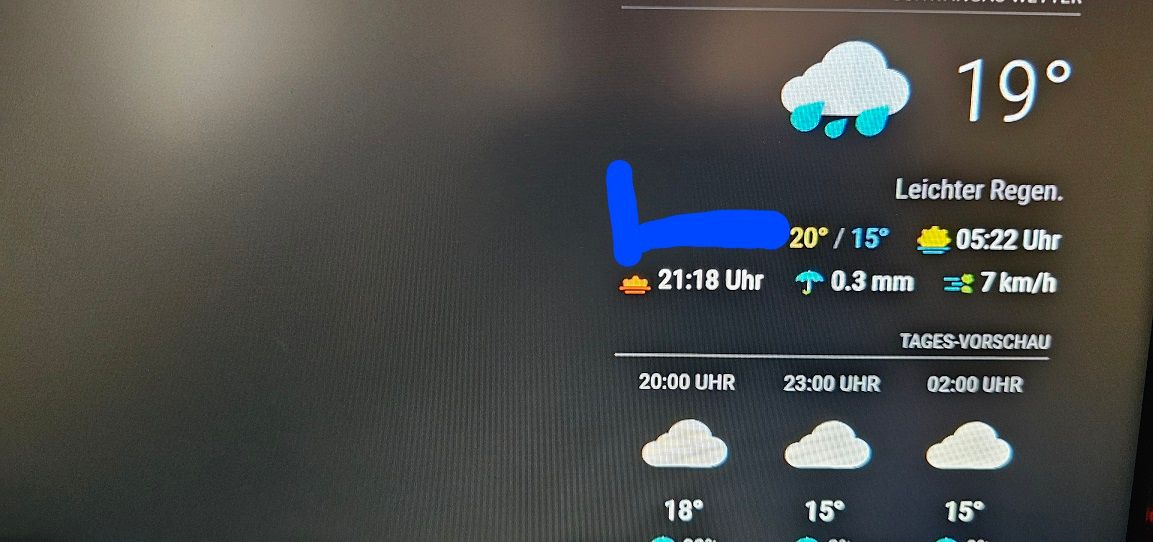
    • openweatherforcast (Tom Hirschberger)

      hello, good evening,

      does anybody know how to put the first line left aligned
      without the blue marked gab??

      20240630_175545.jpg

      posted in Troubleshooting
      S
      Sceetch
    • RE: loading MMM-OpenWeatherForecast

      @sdetweil

      okay. im a little bit confuesd.
      i created in 2021 three api’s and also one week ago another 2.

      only one api from 2021 works in this app.
      All 5 of them are free api’s without any creditcards details.

      posted in Troubleshooting
      S
      Sceetch
    • RE: loading MMM-OpenWeatherForecast

      Thanks.
      Hirschbergers module works.
      But there was also a problem with the api key.
      I have 5 api’s but only one of them works.
      i don’t know why.

      posted in Troubleshooting
      S
      Sceetch
    • RE: Calendarext3

      thx for solving the problem :).
      Remove positon works .

      thank u

      posted in Troubleshooting
      S
      Sceetch
    • Calendarext3

      Hi guys,
      Im using the calendarext3 Module.
      Is ist possible to Show only the weekly or monthly schedule?
      I want to hide the basic one on left upper side (red circled).

      posted in Troubleshooting
      S
      Sceetch
    • RE: loading MMM-OpenWeatherForecast

      @sdetweil

      Hi Sam,
      thanks for your answer.
      i already use the weather forcast module from jclarke. Here i have this issue.

      posted in Troubleshooting
      S
      Sceetch
    • loading MMM-OpenWeatherForecast

      Hi,
      i build a new Magic mirror. In the past i used alltime jclarke0000/OpenWeatherForecast. I was very satisfied with it.

      Now i installed it again. I got some installation warnings
      npm Warn old lockfile.

      If the Mirror starts the weather forecast shows “loading” all the time.
      Doas anybody has an idea how to fix this.

      i also created a new api-key. But without any results.

      Is there mybe a version incompability between module and operating system?

      thanks in advance
      Sceetch

      posted in Troubleshooting
      S
      Sceetch
    • PV app for E3DC

      Hi guys,
      Does anybody know, if there is a mmm available for showing live values of E3DC photovoltaik on magic mirror?
      Has anybody expirience about that topic?

      Kind regards
      Sceetch

      posted in General Discussion
      S
      Sceetch
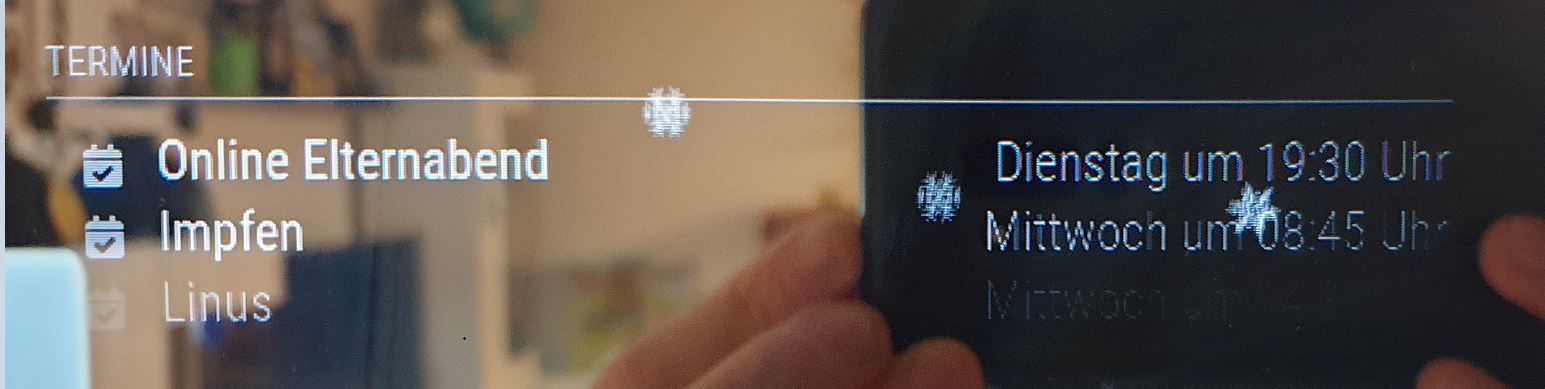
    • calendar shading

      Hi guys,

      could you please help me out with the settings of calendar module:

      The color of event name is in strong white. Otherside the color of the event time (date) is shaded.
      I want both in strong white.
      How is the command to unify both with same visualization?

      Hope you know what i mean. Take a look on this pic.

      calendar.JPG

      posted in Troubleshooting
      S
      Sceetch
    • RE: Where to buy mirror glass?

      i can recommend chrome spy glas on glas star.

      https://www.glas-star.de/collections/mirropane-chrome-spy

      i get a good result to glue the mirror with Pattex

      https://www.amazon.de/gp/product/B00I3IQTFG/ref=ppx_yo_dt_b_asin_title_o04_s00?ie=UTF8&psc=1

      posted in Hardware
      S
      Sceetch
    • 1 / 1