If you want to go bigger and really crazy: http://www.lg.com/us/tvs/lg-OLED77W7P-oled-4k-tv
S
Offline
A New Chapter for MagicMirror: The Community Takes the Lead
Read the statement by Michael Teeuw here.
Read the statement by Michael Teeuw here.
Posts
-
RE: What the best slim LCD for 24"+ magic mirror? I've been only been able to get components down to 1.5".
-
RE: [MMM-SpotifyConnectUI] Error: connect ECONNREFUSED 127.0.0.1:4000
newer spotify connect app - raspotify works out of the box:
https://github.com/dtcooper/raspotify
https://discourse.osmc.tv/t/howto-spotify-connect-support-via-raspotify-librespot/38348 -
RE: MMM-SpotifyConnectUI
newer spotify connect app - raspotify works out of the box:
https://github.com/dtcooper/raspotify
https://discourse.osmc.tv/t/howto-spotify-connect-support-via-raspotify-librespot/38348but there is no frontend yet
-
RE: On-Demand Music
A pretty easy an fast way is by installing this: https://discourse.osmc.tv/t/howto-spotify-connect-support-via-raspotify-librespot/38348?source_topic_id=15818&source_topic_id=15818
the best things are: works instantly , works instantly with justboom amp hat etc; stream from different profiles
but there is no frontend yet,…
-
RE: Changing ipwhitelist prevents Mirror from loading correctly
var config = {
port: 8080,
ipWhitelist: [“127.0.0.1”, “::ffff:127.0.0.1”, “::1”, “::ffff:192.168.1.0/28”, “::ffff:192.168.2.0/28”, “::ffff:192.168.3.0/28”, “10.0.0.16”],language: "de", modules: [ {..... -
RE: Changing ipwhitelist prevents Mirror from loading correctly
@rcollie yep this works for me too, wierd!
-
RE: Changing ipwhitelist prevents Mirror from loading correctly
@Snille When I try this, the log stopped at this point:
0|mm | Connecting socket for: MMM-Fuel
0|mm | Starting module helper: MMM-Fuel
0|mm | Sockets connected & modules started …
0|mm | Launching application.
0|mm | Access denied to IP address: 0.0.0.0/0 -
RE: digital photo frame
@soqueen to change the modules per time, you can use this: https://github.com/ianperrin/MMM-ModuleScheduler
-
RE: Looking for Austrian Testers
@strawberry-3-141 OMG! Thank you so much :smile:
-
RE: The Mystic Mirror: An Alexa-powered Magic Mirror
pretty nice! how did you set up the RSS-Feed module to show pictures and the text? :)
-
RE: [Remote-Control] Shutdown, Configure and Update your MagicMirror
@AAPS i did use npm install the module and everything else is working. only pm2 restart mm crashes electron
-
RE: [Remote-Control] Shutdown, Configure and Update your MagicMirror
Heyo, after updating to 1.1.2, if i restart MM using pm2 i get a white screen and had to reboot the pi. Any idea?
-
RE: layer definition: here MMM-Globe overlaps left panel
@strawberry-3.141 thats my custom.css:
/*****************************************************
 * Magic Mirror                                      *
 * Custom CSS                                        *
 *                                                   *
 * By Michael Teeuw http://michaelteeuw.nl           *
 * MIT Licensed.                                     *
 *                                                   *
 * Add any custom CSS below.                         *
 * Changes to this files will be ignored by GIT. *
 *****************************************************/

body {
  margin: 20px;
  position: absolute;
  height: calc(100% - 40px);
  width: calc(100% - 40px);
  background: #000;
  color: #aaa;
  font-family: "Roboto Condensed", sans-serif;
  font-weight: 400;
  font-size: 2em;
  line-height: 1.5em;
  -webkit-font-smoothing: antialiased;
}

.brightb {
color: #55acee;
}
.currentweather .wi-sunrise {
color: #ffd700;
}
.currentweather .wi-sunset {
color: #ffa500;
}
.currentweather .wi-day-sunny {
color: #ffff00;
}
.currentweather .wi-night-showers {
color: #55acee;
}
.currentweather .wi-degrees {
color: #415;
}
.currentweather .wi-rain {
color: #55acee;
}
.currentweather .wi-showers {
color: #55acee;
}
.currentweather .wi-night-showers {
color: #55acee;
}
.currentweather .wi-night-alt-cloudy-windy {
color: #aaa;
}
.currentweather .wi-night-cloudy {
color: #aaa;
}
.currentweather .wi-cloudy {
color: #aaa;
}
.currentweather .wi-day-cloudy {
color: #aaa;
}
.currentweather .wi-cloudy {
color: #aaa;
}
.currentweather .wi-cloudy-windy {
color: #aaa;
}
.currentweather .wi-showers {
color: #55acee;
}
.currentweather .wi-thunderstorm {
color: #ff00ff;
}
.currentweather .wi-snow {
color: #fff;
}
.currentweather .wi-fog {
color: #999;
}
.currentweather .wi-night-clear {
color: #fff;
}
.currentweather .wi-night-rain {
color: #55acee;
}
.currentweather .wi-night-thunderstorm {
color: #ff00ff;
}
.currentweather .wi-night-snow {
color: #fff;
}

.weatherforecast .wi-sunrise {
color: #ffd700;
}
.weatherforecast .wi-sunset {
color: #ffa500;
}
.weatherforecast .wi-day-sunny {
color: #ffff00;
}
.weatherforecast .wi-night-showers {
color: #55acee;
}
.weatherforecast .wi-degrees {
color: #415;
}
.weatherforecast .wi-rain {
color: #55acee;
}
.weatherforecast .wi-showers {
color: #55acee;
}
.weatherforecast .wi-night-showers {
color: #55acee;
}
.weatherforecast .wi-night-alt-cloudy-windy {
color: #aaa;
}
.weatherforecast .wi-night-cloudy {
color: #aaa;
}
.weatherforecast .wi-cloudy {
color: #aaa;
}
.weatherforecast .wi-day-cloudy {
color: #aaa;
}
.weatherforecast .wi-cloudy {
color: #aaa;
}
.weatherforecast .wi-cloudy-windy {
color: #aaa;
}
.weatherforecast .wi-showers {
color: #55acee;
}
.weatherforecast .wi-thunderstorm {
color: #ff00ff;
}
.weatherforecast .wi-snow {
color: #fff;
}
.weatherforecast .wi-fog {
color: #999;
}
.weatherforecast .wi-night-clear {
color: #fff;
}
.weatherforecast .wi-night-rain {
color: #55acee;
}
.weatherforecast .wi-night-thunderstorm {
color: #ff00ff;
}
.currentweather .wi-night-snow {
color: #fff;
}

.region.fullscreen {
  position: absolute;
  top: -20px;
  left: -20px;
  right: -20px;
  bottom: -20px;
}
where should i put ?
 .MMM-Globe {
z-index: 2;
position: relative;
}
everywhere I tried it, it´s not working :see_no_evil:
-
RE: layer definition: here MMM-Globe overlaps left panel
not working for me too
-
MMM-Saint-Patrick
Discription:
A little different Snow Module inspired by MM-Snow by MichMich and MM-Valentine by morozgrafix with Saint Patricks Day related Icons.Screenshot:
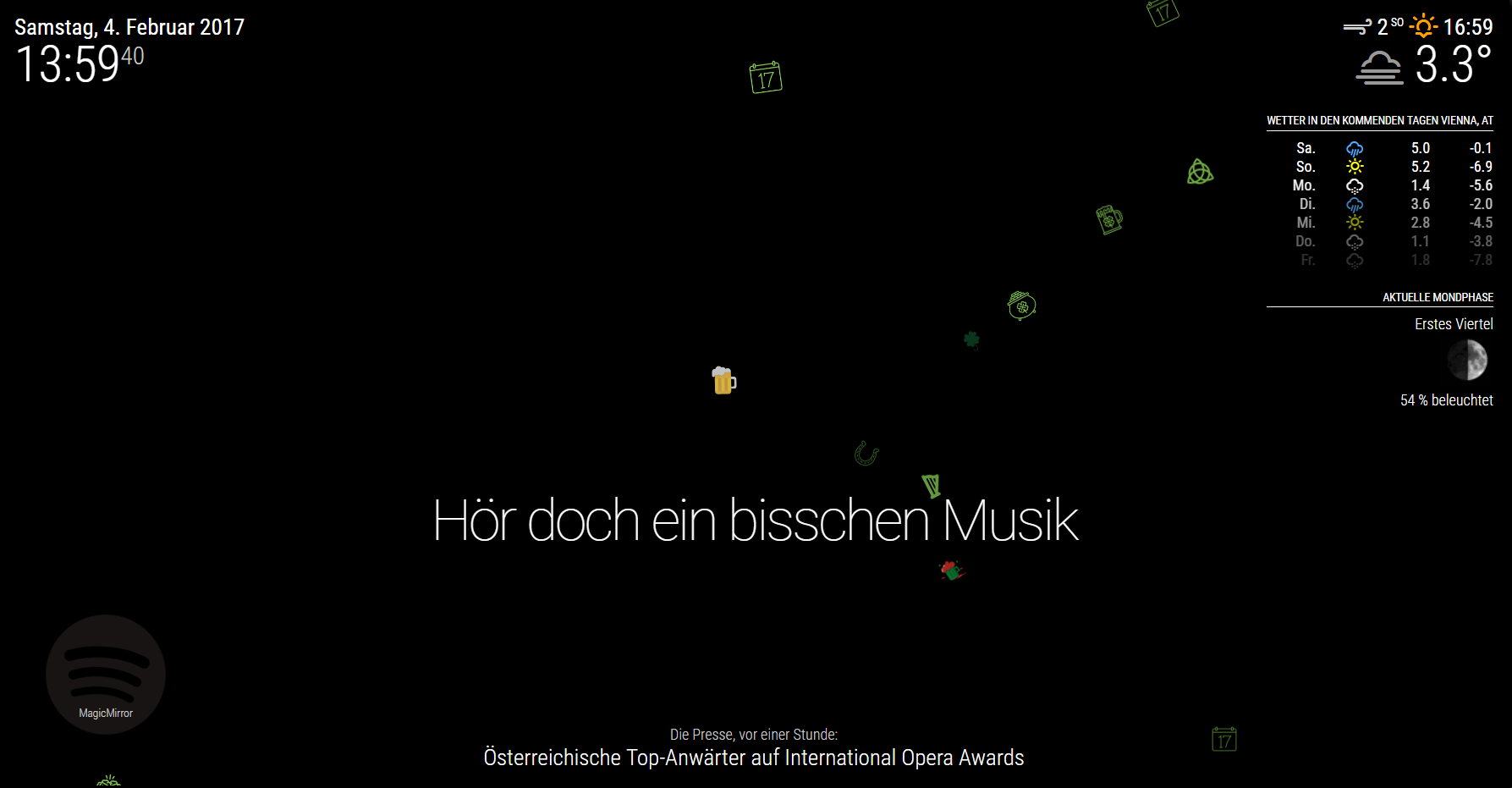
Download:
[card:schlachtkreuzer6/MMM-Saint-Patrick]
-
RE: Replacing snow flakes with hearts in the MMM-SNOW module
Yeah I did it :P
[card:schlachtkreuzer6/MMM-Saint-Patrick]