@Labzz I´m interested and i pulled a similar request days ago :P
S
Offline
A New Chapter for MagicMirror: The Community Takes the Lead
Read the statement by Michael Teeuw here.
Read the statement by Michael Teeuw here.
Posts
-
RE: digital photo frame
-
RE: [Remote-Control] Shutdown, Configure and Update your MagicMirror
@in_a_days Funny I also got that bug on the previous remote version, after updating to MM v2.1 . If I´m rebooting the MM or Power Off and starting it later, all changes of visible Modules are gone. So basically i tested some modules and later hide them cause i don´t want to delete them from the config, or just show them when i need some of them. It´s not a big deal, just saying.
-
RE: mmm-wu-moon-phases - Moonphases from Weather Underground
@kurt yeah, you are right! all module specific changes and settings are in the main config
~/MagicMirror/config/ -
RE: mmm-wu-moon-phases - Moonphases from Weather Underground
@kurt and in the config:
{ module: 'mmm-wu-moonphase', header: 'Aktuelle Mondphase', // optionally you can add a header to this block position: 'top_right', // this can be any of the regions. config: { // See 'Configuration options' for more information. apikey: 'your api', country: 'Austria', city: 'Vienna', apiLang: 'DL', } }, -
RE: mmm-wu-moon-phases - Moonphases from Weather Underground
@kurt Hey Kurt :) or servus! yeah sure i will help you!
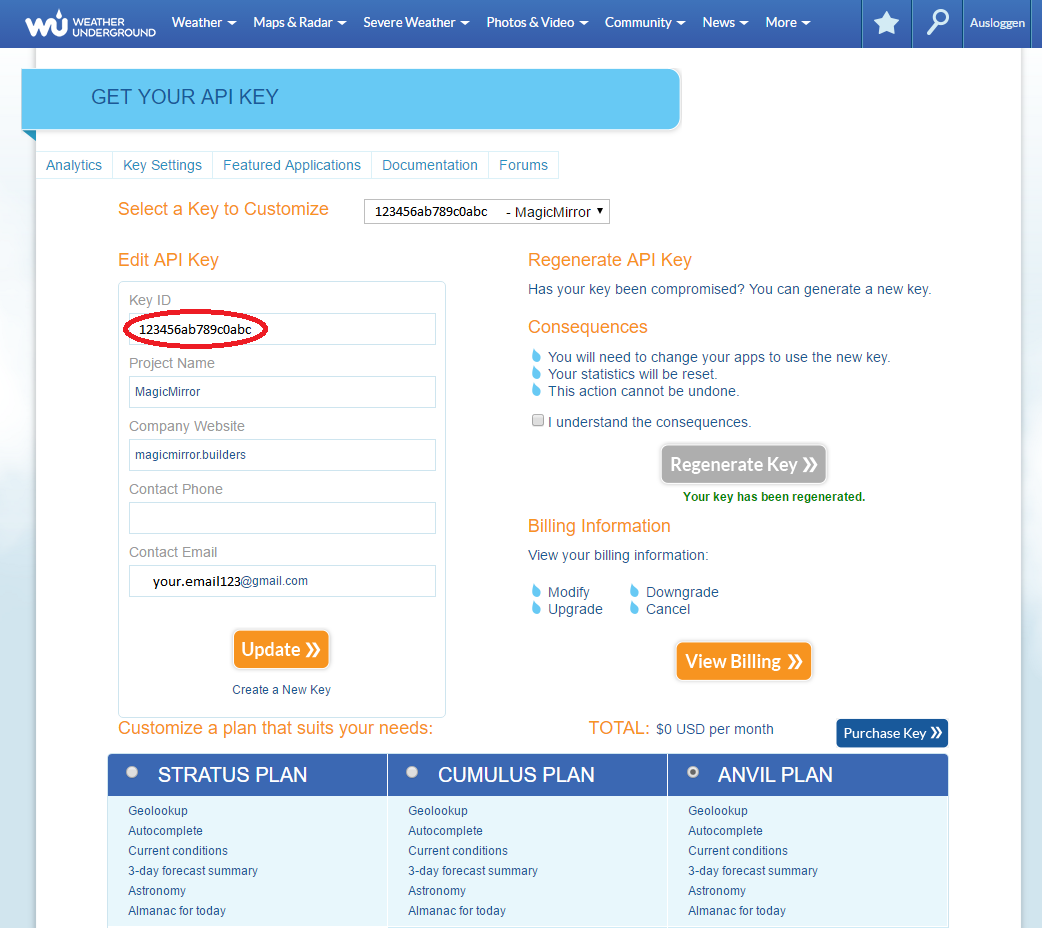
- go to this site: https://www.wunderground.com/weather/api/
- klick on the explore my options button
- it doesn´t matter what package you´re choosing all 3 are free, only if you need more data requests as 500 a day (10 per minute)
- register to the site with your email etc.
-
RE: Camera intigration in your Mirror
@lolobyte ah okay thats V1 so :) Thank you :)
-
RE: Camera intigration in your Mirror
@lolobyte WOW! that is great thank you very much! That helps me immensely :D
which camera version are you using? the Pi Noir v2? and which transmision has the mirror?
-
RE: Paul's frameless MM- finally done :)
@lolobyte Awehh Damn! May bad, how is it happend?
-
RE: Paul's frameless MM- finally done :)
@PaulB WoW nice work! :) i like the frameless thing! somehow it looks broken in the left bottom corner!? or is it just an illusion?
-
RE: Camera intigration in your Mirror
@lolobyte I´m also interested to see the difference between the camera mounted in the frame or mounted behind the glass :) Is it possilbe to share some pics of the camera feed? :)
-
RE: ESP8266 + DHT22 + Thingspeak in magic mirror
@tosti007 Why Thingspeak and not FHEM?
-
RE: The screen doesn't have the right size
go to:
~/MagicMirror/css/main.cssand change the content of main.css to this:/***************************************************** * Magic Mirror * * Custom CSS * * * * By Michael Teeuw http://michaelteeuw.nl * * MIT Licensed. * * * * Add any custom CSS below. * * Changes to this files will be ignored by GIT. * *****************************************************/ body { margin: 20px; position: absolute; height: calc(100% - 40px); width: calc(100% - 40px); background: #000; color: #aaa; font-family: "Roboto Condensed", sans-serif; font-weight: 400; font-size: 2em; line-height: 1.5em; -webkit-font-smoothing: antialiased; } .region.fullscreen { position: absolute; top: -20px; left: -20px; right: -20px; bottom: -20px; }just change margin px, hight and width px and be careful to set the same margin px at fullscreen ;)
-
RE: MagicMirrorApp
@aschulz90 So it´s like the MMM-Remote control module but in an android app :) sounds nice! great work :D
-
RE: My 1st MagicMirror2
@broberg said in My 1st MagicMirror2:
You could remove the margins of the MM body, that way you would utilize more of the screen itself, since you have more mirror on the sides of the monitor :)
It´s easy just add this to your custom css:
/*****************************************************
 * Magic Mirror                                      *
 * Custom CSS                                        *
 *                                                   *
 * By Michael Teeuw http://michaelteeuw.nl           *
 * MIT Licensed.                                     *
 *                                                   *
 * Add any custom CSS below.                         *
 * Changes to this files will be ignored by GIT. *
 *****************************************************/

body {
  margin: 20px;
  position: absolute;
  height: calc(100% - 40px);
  width: calc(100% - 40px);
  background: #000;
  color: #aaa;
  font-family: "Roboto Condensed", sans-serif;
  font-weight: 400;
  font-size: 2em;
  line-height: 1.5em;
  -webkit-font-smoothing: antialiased;
}

.region.fullscreen {
  position: absolute;
  top: -20px;
  left: -20px;
  right: -20px;
  bottom: -20px;
}
just play with the px and don´t forget about the fullscreen mode for modules :)
-
RE: Video messages
@broberg the mirror should record the video :) but sending massages to the MM would also be a great feature!