did you update the dependencies?
S
Offline
A New Chapter for MagicMirror: The Community Takes the Lead
Read the statement by Michael Teeuw here.
Read the statement by Michael Teeuw here.
Posts
-
RE: MMM-Remote-Control after upd MM to 2.1.0
-
RE: Colors changed
@PindaPower it´s in his first post! :)
https://forum.magicmirror.builders/topic/1166/my-first-mirror -
RE: MMM-Globe
@binderth the globe is cut at south pole area, i think the white slice down there is the background color
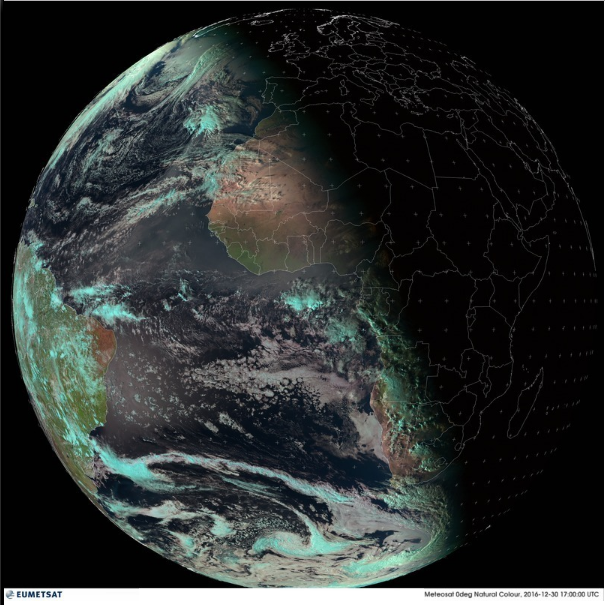
so i think the module cut a circle out of the webpage and down there is some part of the earth missing, or out of view. Also i got another issue: If I´m using the random Photo Module as background, i see a small black border around the full globe. So to fix that, there must be an adjustment for the size of the cutting circle. But anyway the main problem with that white slice is, the image source.
-
RE: Netflix Module
@binderth the color problem,… yeah therefore i´m looking forward to integrate this little guy here: http://spyder.datacolor.com/display-calibration/ I allready own an old version of the spyder :) but anyway i don´t want to watch netflix for hours in the bathroom, just finish an episode or a film :D and for the sound, i will integrate some small stereo speaker :) so there is no excuse for not inventing a netflix module gg
and btw. a tablet is way to simple!
-
Netflix Module
I was wondering that there is no netflix module :) here you can find api, info etc. :)
https://www.programmableweb.com/api/netflix -
RE: My first Mirror
@edlug Hey, how do you mange to change the colors of the weather icons? :)
-
RE: Music with smartphone to Pi
@vicdilou You´re welcome. There is also the option of chromecast. https://github.com/lanceseidman/picast
-
RE: Music with smartphone to Pi
@vicdilou http://raspberrypi.stackexchange.com/questions/47708/setup-raspberry-pi-3-as-bluetooth-speaker
or better
http://blog.scphillips.com/posts/2014/05/playing-music-on-a-raspberry-pi-using-upnp-and-dlna-v3/i´ll give it a try in some days (currently waiting for components) :D
-
RE: Memory effect with MM2
@strawberry-3.141 yeah but i´m a css noob. maybe you can explain that a little? many thanks!
-
RE: How do you switch on / off, wake up yours?
@lolobyte a question :) is the cam on all the time? i´m interested to use the pi cam as a surveillance cam (something like an ip cam) und using a mm module for motion detection (wake up the screen etc.)
-
RE: Memory effect with MM2
It depends on the displaytechnology you are using. Generally you are right about that. But it is not that bad. https://en.wikipedia.org/wiki/Screen_burn-in
Anyway my idea (the basic idea is very old, currently google is using something in android wear) is a module, with a Screen-burn-in protection that periodically shift the contents of the screen by a few pixels :)
MMM-Anti-screen-burn-in ? :P
-
Amazon cloud drive photo album
An idea: A full-screen or tiny frame with your photos from Amazon drive, like on the fire TV? Simply upload the photos and the mirror is showing them :)
-
RE: MMM-SpotifyConnectUI
Okay, I followed your installation guide.
I git clone the spotify module and copy and paste the example code to my config.js but nothing is there. So no grey logo with the magic mirror letters.
For now I fixed it with deleting the module and git clone it again :O what ever happened before!?!
-
RE: MMM-SpotifyConnectUI
Yeah, thats why I´m so confused ^^ do i need to install any node helper? npm install stuff like in other modules?
-
RE: mmm-wu-moon-phases - Moonphases from Weather Underground
You need to change the name of the module in the example code, from ‘mmm-wu-moon-phases’ to ‘mmm-wu-moonphase’:
wrong:
modules: [
{
module: ‘mmm-wu-moon-phases’,
header: ‘Current Moon Phase’, // optionally you can add a header to this block
position: ‘top_right’, // this can be any of the regions.
config: {
// See ‘Configuration options’ for more information.
apikey: ‘abcde12345abcde12345abcde12345ab’,
country: ‘Switzerland’,
city: ‘Bern’,
apiLang: ‘EN’,} },]
right:
modules: [
{
module: ‘mmm-wu-moonphase’,
header: ‘Current Moon Phase’, // optionally you can add a header to this block
position: ‘top_right’, // this can be any of the regions.
config: {
// See ‘Configuration options’ for more information.
apikey: ‘abcde12345abcde12345abcde12345ab’,
country: ‘Switzerland’,
city: ‘Bern’,
apiLang: ‘EN’,} },]