MagicMirror Forum
    • Recent
    • Tags
    • Unsolved
    • Solved
    • MagicMirror² Repository
    • Documentation
    • 3rd-Party-Modules
    • Donate
    • Discord
    • Register
    • Login
    1. Home
    2. sollekram
    3. Posts
    A New Chapter for MagicMirror: The Community Takes the Lead
    Read the statement by Michael Teeuw here.
    S
    Offline
    • Profile
    • Following 0
    • Followers 0
    • Topics 7
    • Posts 19
    • Groups 0

    Posts

    Recent Best Controversial
    • RE: Mi band Magic Mirror..

      @joern it seems that there is a way to get it unpaired from the app.
      and then fetch the data to the mirror.
      now for the sleep status , maybe you could get the heart and do a program calculation of the pulses(update actually the movement is calculated from 12 until 6am, so you have to program gyroscope or something like that) when you were most rested and get the sleep status… deep sleep, weak sleep, etc.
      And even get a message like, you slept well, or you slept bad.

      what do you think?

      posted in Requests
      S
      sollekram
    • RE: Mi band Magic Mirror..

      i will try it yes ;)
      i kinda know the basics, i am not an expert, but i know the basics of programing.
      like basics basics.

      posted in Requests
      S
      sollekram
    • Mi band Magic Mirror..

      I would had to do it by my self but, for my knowledge it will take ages.
      so i was thinking if someone can make a module, were data from mi band 2 and 3 passed to the mirror(raspberry pi but i think it would work with other linux based systems ).

      now i found something but i dont know if it is helpfull.

      this https://github.com/vshymanskyy/miband-js
      and this https://github.com/creotiv/MiBand2
      the first one is js, so maybe it is easier to fetch the data into the mirror with a module.

      what do you think guys is it possible ?

      posted in Requests
      S
      sollekram
    • How to reload a module..

      How to reload/restart a module without restarting the magic mirror.
      E.g I want to load a new video from embedyoutube module but without restarting all the mirror.
      Is it possible?

      posted in Troubleshooting
      S
      sollekram
    • RE: Blank screen after restarting magic mirror?

      @idoodler year I saved the currently instances and now the problem solved ;)

      posted in Troubleshooting
      S
      sollekram
    • RE: Blank screen after restarting magic mirror?

      To install the mm I had runned the installer automatically from github.com with curl, and then I have followed the guide for making it auto start at every boot. And then saved the instance

      posted in Troubleshooting
      S
      sollekram
    • RE: Blank screen after restarting magic mirror?

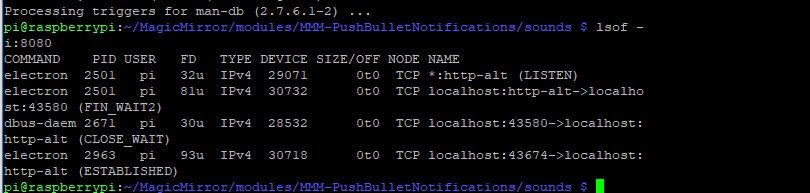
      Yeah it seems that 2 electro instances are open, how can I avoid that, what should I do to get away with the conflict?
      So every time that I restart it will be 👌?

      posted in Troubleshooting
      S
      sollekram
    • RE: Blank screen after restarting magic mirror?

      it seems there is a conflict, i just kill some pid and now it is fine, but if i dont want to have them again starting?

      posted in Troubleshooting
      S
      sollekram
    • RE: Blank screen after restarting magic mirror?

      hmm
      0_1545732078005_2018-12-25 (8).png

      posted in Troubleshooting
      S
      sollekram
    • RE: Blank screen after restarting magic mirror?

      0_1545731671345_2018-12-25 (6).png

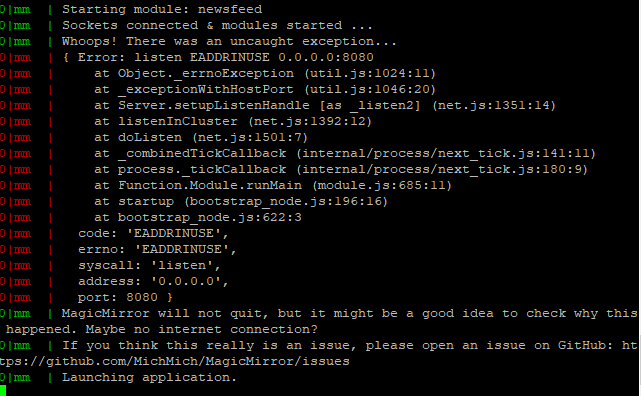
      it seems it is something that produces an error but not fatal one, thats why i see a black screen.
      is the adress to listen wrong?

      posted in Troubleshooting
      S
      sollekram
    • RE: Blank screen after restarting magic mirror?

      hmmmm seems i got something thank you!!
      one moment to attach the image

      posted in Troubleshooting
      S
      sollekram
    • RE: Blank screen after restarting magic mirror?

      this bug seems to appear after i restart the magic mirror many times

      posted in Troubleshooting
      S
      sollekram
    • Blank screen after restarting magic mirror?

      first of all, Merry Christmass to everyone !!
      After restarting the magic mirror i see blank screen, is this a common problem?
      i am restarting it with the remote module, telegram, pushbullet, but i get the same problem.

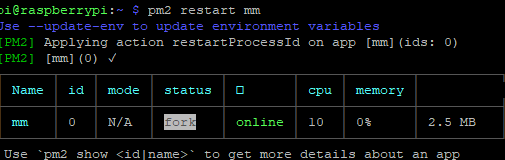
      this is the command that i executing and i get the black screen
      0_1545728948436_2018-12-25 (2).png

      posted in Troubleshooting
      S
      sollekram
    • No sound when notification is arriving pushBulletNotification..

      i am trying to set it up but unfortunately i cant output the sound.
      https://github.com/basknol/MMM-PushBulletNotifications
      am i doing something wrong ? here is my config, i also already install the sound-play with npm install sound-play.
      also i want to know if this git is clean, cause with my access token someone can pull everything from me…

      {
      		module: 'MMM-PushBulletNotifications',
      		header: 'Notifications',
      		position: 'bottom_right',	// This can be any of the regions.		
      		config: {
      			// See 'Configuration options' for more information.
      			accessToken: "myCode---", //PushBullet API Access Token
      			numberOfNotifications: 3,
      			filterTargetDeviceName: "",
      			showPushesSentToAllDevices: true,
      			onlyAllowCommandsFromSourceDevices: [],
      			fetchLimitPushBullet: 50,
      			showPushes: true,
      			showPushesOnLoad: true,
      			showDismissedPushes: true,
      			showMirroredNotifications: true, 
      			onlyShowLastNotificationFromApplication: false,
      			showIndividualNotifications: false,
      			showSMS: true,
      			showMessage: true,
      			showIcons: true,
      			showDateTime: true,
      			localesDateTime: 'nl-NL',
      			playSoundOnNotificationReceived: true,
      			soundFile: 'modules/MMM-PushBulletNotifications/sounds/new-message.mp3',			
      			maxMsgCharacters: 50,
      			maxHeaderCharacters: 32,
      			showModuleIfNoNotifications: true,
      			noNotificationsMessage: "No new notifications",
      			debugMode: false,
      		}
      	},
      
      posted in Troubleshooting
      S
      sollekram
    • Modifying Google newsfeed url..

      Hello!
      So i have this link bellow so i can get the latest news appeard in the magic mirror.
      But i dont know how to modify it so i can get the latest news on this subject/section.
      Note: this is a news link from google news(with the section i like).
      But they appeard in wrong days.
      Should i change something in the url or in the newsfeed module?
      https://news.google.com/news/rss/search/section/q/Επιστήμη+και+τεχνολογία?ned=el_gr&gl=GR&hl=el

      posted in Troubleshooting
      S
      sollekram
    • RE: Syntax Errorn in Config.js

      I finally fixed it!!
      Thank you guys !!!

      posted in Troubleshooting
      S
      sollekram
    • RE: Syntax Errorn in Config.js

      @strawberry-3-141 pfff that commas…how I always stuck in such of errors…

      Anyway thank you guys for the answers , I will check the commas and the location tommorow , and I will update.

      posted in Troubleshooting
      S
      sollekram
    • Syntax Errorn in Config.js

      syntax error while strarting mm, am i forgeting something?

      /* Magic Mirror Config Sample
       *
       * By Michael Teeuw http://michaelteeuw.nl
       * MIT Licensed.
       *
       * For more information how you can configurate this file
       * See https://github.com/MichMich/MagicMirror#configuration
       *
       */
      
      var config = {
      	address: "localhost", // Address to listen on, can be:
      	                      // - "localhost", "127.0.0.1", "::1" to listen on loopback interface
      	                      // - another specific IPv4/6 to listen on a specific interface
      	                      // - "", "0.0.0.0", "::" to listen on any interface
      	                      // Default, when address config is left out, is "localhost"
      	port: 8080,
      	ipWhitelist: ["127.0.0.1", "::ffff:127.0.0.1", "::1"], // Set [] to allow all IP addresses
      	                                                       // or add a specific IPv4 of 192.168.1.5 :
      	                                                       // ["127.0.0.1", "::ffff:127.0.0.1", "::1", "::ffff:192.168.1.5"],
      	                                                       // or IPv4 range of 192.168.3.0 --> 192.168.3.15 use CIDR format :
      	                                                       // ["127.0.0.1", "::ffff:127.0.0.1", "::1", "::ffff:192.168.3.0/28"],
      
      	language: "en",
      	timeFormat: 24,
      	units: "metric",
      
      	modules: [
      		{
      			module: "alert",
      		},
      		{
      			module: "updatenotification",
      			position: "top_bar"
      		},
      		{
      			module: "clock",
      			position: "top_left"
      		},
      		{
      			module: "calendar",
      			header: "US Holidays",
      			position: "top_left",
      			config: {
      				calendars: [
      					{
      						symbol: "calendar-check-o ",
      						url: "webcal://www.calendarlabs.com/templates/ical/US-Holidays.ics"
      					}
      				]
      			}
      		},
      		{
      			module: "compliments",
      			position: "lower_third"
      		},
      		{
      			module: "currentweather",
      			position: "top_right",
      			config: {
      				location: "New York",
      				locationID: "",  //ID from http://www.openweathermap.org/help/city_list.txt
      				appid: "YOUR_OPENWEATHER_API_KEY"
      			}
      		},
      		{
      			module: "weatherforecast",
      			position: "top_right",
      			header: "Weather Forecast",
      			config: {
      				location: "New York",
      				locationID: "5128581",  //ID from http://www.openweathermap.org/help/city_list.txt
      				appid: "YOUR_OPENWEATHER_API_KEY"
      			}
      		},
      		{
      			module: "newsfeed",
      			position: "bottom_bar",
      			config: {
      				feeds: [
      					{
      						title: "Hot News",
      						url: "http://www.ert.gr/feed/"
      					}
      				],
      				showSourceTitle: true,
      				showPublishDate: true
      			}
      		},
      	
      		{
      		    module: 'MMM-Assistant',
      		    position: 'bottom_left',
      		    config: {
      		        assistant: {
      		            auth: {
      		                keyFilePath:     "assets/google-client-secret.json", // REQUIRED (Google Assistant API) -- OAuth2 x509 cert
      		                savedTokensPath: "assets/google-access-tokens.json"  // REQUIRED (Google Assitant API) -- accesss_token & refresh_token
      		            },
      		            conversation: {
      		                lang: 'en-US',
      		                audio: {
      		                    encodingIn: "LINEAR16",  // Default. No need to change.
      		                    sampleRateOut: 16000     // Default. No need to change.
      		                }
      		            },
      		        },
      		        snowboy: {
      		            models: [
      		                {
      		                    hotwords : "MIRROR"                           // Default model: "MIRROR". (This is not the wake word!)
      		                    file: "resources/smart_mirror.umdl", // This file define your MM wake word. (See doc notes.)
      		                    sensitivity: 0.5,                             // 0.5
      		                },
      		                {
      		                    hotwords : "ASSISTANT"                        // Default model: "ASSISTANT". (This is not the wake word!)
      		                    file: "resources/snowboy.umdl",      // This file define your GA wake word. (See doc notes.)
      		                    sensitivity: 0.5,                             // 0.5
      		                }
      		            ]
      		        },
      		        record: {
      		            threshold: 0,                 // Default. No need to change.
      		            verbose: false,               // Default: true  -- for checking recording status.
      		            recordProgram: 'rec',         // You can also use 'arecord' or 'sox', but we recommend 'rec'
      		            silence: 2.0                  // Default. No need to change.
      		        },
      		        
      		}, // END
      	]
      
      };
      
      /*************** DO NOT EDIT THE LINE BELOW ***************/
      if (typeof module !== "undefined") {module.exports = config;}
      

      UPDATE:Solved
      posted in Troubleshooting
      S
      sollekram
    • No voice go passing throught my microphone

      I tried this module https://github.com/eouia/MMM-Assistant (i install only google assistant note i didnt use the speech cloud cause i dont want, unless its important)
      i start the magic mirror and everything is fine, the icon of microphone appears, but when im talking and say magic-mirror or snowboy or ok google, it appears that nothing particularly happens.

      what may i’ve done wrong ?
      i mean it starts with no errors, i got it step by step, but no voice going through, also arecord works when i doing it on terminal, it record perfectly my voice.

      fyi: I use a ps3 camera, should i register it somewhere on magicmirror or everything fine as it is?

      posted in Troubleshooting
      S
      sollekram
    • 1 / 1