MagicMirror Forum
    • Recent
    • Tags
    • Unsolved
    • Solved
    • MagicMirror² Repository
    • Documentation
    • 3rd-Party-Modules
    • Donate
    • Discord
    • Register
    • Login
    1. Home
    2. SvenSommer
    3. Best
    A New Chapter for MagicMirror: The Community Takes the Lead
    Read the statement by Michael Teeuw here.
    Offline
    • Profile
    • Following 0
    • Followers 1
    • Topics 7
    • Posts 73
    • Groups 1

    Posts

    Recent Best Controversial
    • A thin MM with metal frame, hidden IR camera and 32" Inch HDTV

      Description

      When I first run into the Magic Mirror project I was convinced this was something I wanted to build on my own. Without the amazing work and the easy to use framework by Michael Teeuw and this forum, this wouldn’t any possible to archive. And yes, this was real fun!

      Screenshots

      alt text
      alt text

      Further Details

      Checkout my blog on http://www.robstechlog.com/building/ for more details.

      posted in Show your Mirror
      SvenSommerS
      SvenSommer
    • stronger Raspberry Pi 3 Alternatives

      Several modules like the ones for face recognition, speech recognition or even streaming from webcams bring the Raspberry Pi 3 to it’s performance limits by max out it’s memory and cpu. I found some older topics where several alternatives where named. Unfortunately those post were abandoned like half a year ago and really hard to read, due to the overlapping conversations.

      I really want to find a powerful alternative to the Pi3. Perhaps the experienced builders can briefly share what they have done for experience with your alternatives. I think the following criteria are interesting.

      Everybody else please don’t forget to up vote the contributions of those who share.

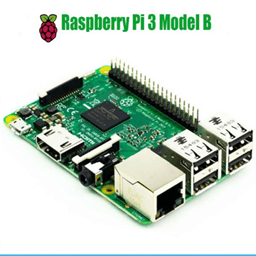
      Model: Raspberry Pi 3 Model B

      0_1500588784360_Desi2003_a.png

      Price

      • Board - 35 $
      • Power Supply (mini USB) - 5 $

      in Total: about 40 $

      Dimensions

      85.60mm x 56mm x 21mm

      0_1500589688029_rasp3_dimensions.png

      Hardware Specifications

      • CPU: Quad Core 1.2GHz Broadcom BCM2837 64bit CPU
      • Memory: 1GB RAM
      • WLAN: BCM43438 wireless LAN and Bluetooth Low Energy (BLE) on board
      • GPIO Pins:: 40-pin extended
      • USB: 4x USB 2.0 ports
      • Video & Stereo output: 4 Pole stereo output and composite video port
      • Full size HDMI
      • CSI camera port for connecting a Raspberry Pi camera
      • DSI display port for connecting a Raspberry Pi touchscreen display
      • Micro SD port for loading your operating system and storing data
      • Upgraded switched Micro USB power source up to 2.5A

      Software:

      OS: Raspian
      Is able to run:

      • NodeJS - yes

      Installation of MM:

      • Is the standard installation script executable? - yes
      bash -c "$(curl -sL https://raw.githubusercontent.com/MichMich/MagicMirror/master/installers/raspberry.sh)
      

      Remarks:

      • Strong spread, big supportive community.

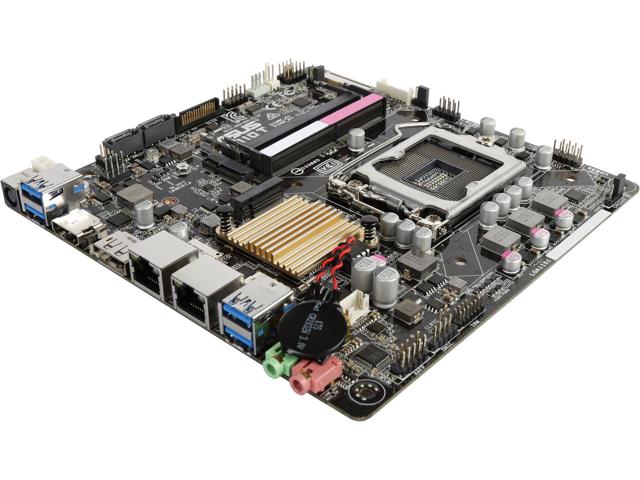
      Model: Intel Thin Mini-ITX Motherboard

      like ASUS H110T/CSM LGA 1151 Intel H110 HDMI SATA 6Gb/s USB 3.0 Thin Mini-ITX Motherboards
      0_1500631618216_13-132-833-01.jpg

      Price

      • Board: 80 $
      • Ram: 8 GB - 70 $
      • Wifi Card: 27 $
      • CPU: 56 $
      • Cooler: 20$
      • SSD: 128GB - 30 $
      • accepts 12 to 19 Volts Power Supply as for notebooks - 15 $

      in Total: about 300 $ (depending on components)

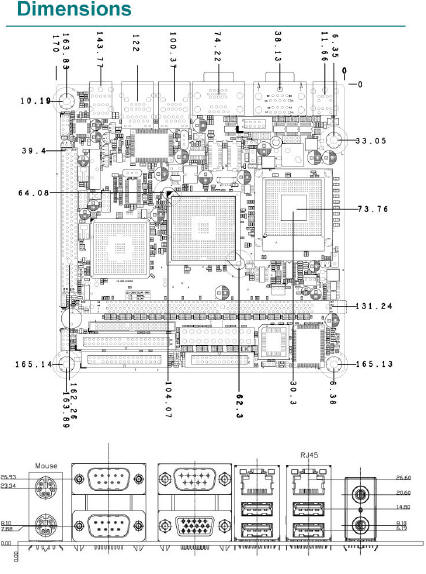
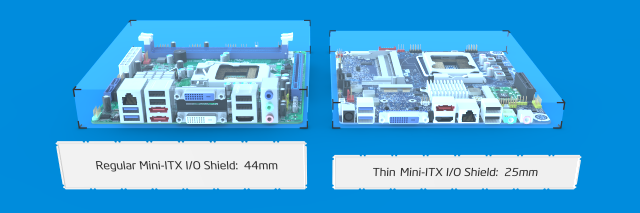
      Dimensions

      1702mm x 1702 x 25mm

      0_1500631924158_Intel-2.jpg
      0_1500632100859_Mmclj.png

      Hardware Specifications

      • Supported CPU (CPU not included)
        • Socket Type: LGA 1151
        • CPU Type: **Core i7 / i5 / i3 / Pentium / Celeron (LGA1151)
        • Supported CPU Technologies: * Turbo Boost Technology 2.0
      • Memory (not included)
        • Number of Memory Slots: 2×260pin
        • Memory Standard: DDR4 2133
        • Maximum Memory Supported: 32GB
        • Channel Supported: Dual Channel
      • Onboard Video:
        • Integrated Graphics Processor
        • Multi-VGA output support: DP/HDMI/LVDS ports
        • Supports HDMI with max. resolution of 4096 x 2160 @ 24Hz / 2560 x 1600 @ 60Hz
        • Supports LVDS with max. resolution of 1920 x 1200 @ 60Hz
        • Supports DisplayPort with max. resolution of 4096 x 2304 @ 60 Hz
        • Maximum shared memory of 1024MB
      • WLAN: only by using expansion Slot for 1 x M.2 Socket 1 with E key, type 2230 for WIFI device
      • LAN: Dual 10/100/1000Mbps with Realtek 8111H
      • GPIO Pins: no
      • Rear Panel Ports
        • 1 x HDMI
        • 2 x RJ45
        • 1 x DisplayPort
        • 4 x USB 3.0
        • 2 Audio Ports
      • Onboard USB:
        • 2 x USB 2.0 2-port connectors support additional 4 USB 2.0 ports
        • 1 x USB 2.0 1-port connectors support additional 1 USB 2.0 port
      • Video & Stereo output: 4 Pole stereo output and composite video port
      • Full size HDMI

      Software:

      Operating System Support:

      • Unbuntu
      • Windows 10*
      • Windows 8.1*
      • Windows 7
      • 64-bit supported only

      Is able to run:

      • NodeJS - yes

      Installation of MM:

      • Is the standard installation script executable? - yes
      bash -c "$(curl -sL https://raw.githubusercontent.com/MichMich/MagicMirror/master/installers/raspberry.sh)
      

      Remarks:

      • Powerfull Board with several upgrading capabilities which comes with a bigger pice tag
      • Quotes:
        • “So things like @strawberry-3-141 voice module is REALLY fast and responsive. I’m also using an IR touch frame that responds quite well with no additional drivers needed.”
      posted in Hardware
      SvenSommerS
      SvenSommer
    • MMM-GrafanaCharts and MMM-GrafanaGauges: Display you data with Charts and Gauges. Beautifully.

      Description:

      Two little modules for the Magic Mirror to include beautiful graphics generated with grafana.

      MMM-GrafanaCharts

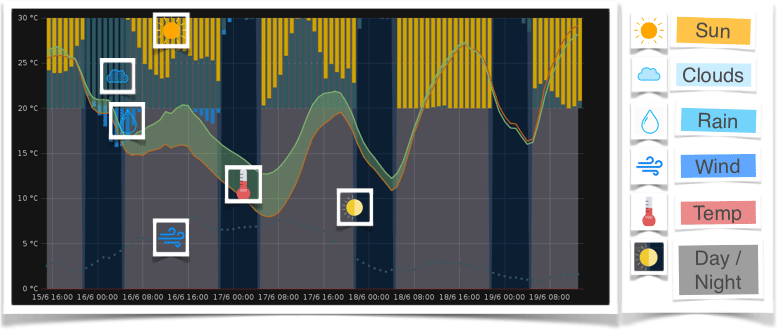
      It’s for your graphs! The data that’s currently displayed on my mirror using the MMM-GrafanaCharts is a weather forecast for the next two days.
      If you’re interested in building you own weather chart, check out my blog post Programming your personal weather chart.

      MMM-GrafanaGauges

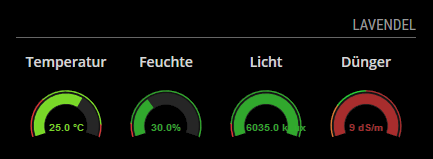
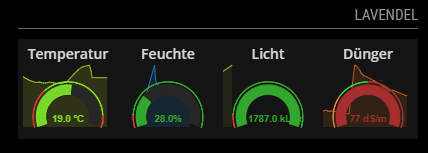
      Gauges are extremely helpful to monitor individual values ​​and their deviations from the nominal value. With the MMM-GrafanaGauges vital values of my plants are displayed on the mirror.

      Screenshots:

      0_1499632484128_weather_explained.gif

      0_1499632641560_MMM-GrafanaGauges.png

      with graph behind

      alt text

      Download

      [card:SvenSommer/MMM-GrafanaChart]
      [card:SvenSommer/MMM-GrafanaGauges]


      MMM-GrafanaChart- Version 1

      • Initial release
      • Showing charts provided by grafana

      MMM-GrafanaGauges- Version 1

      • Initial release
      • Showing gauges in a row provided by grafana
      posted in Utilities
      SvenSommerS
      SvenSommer
    • RE: A thin MM with metal frame, hidden IR camera and 32" Inch HDTV

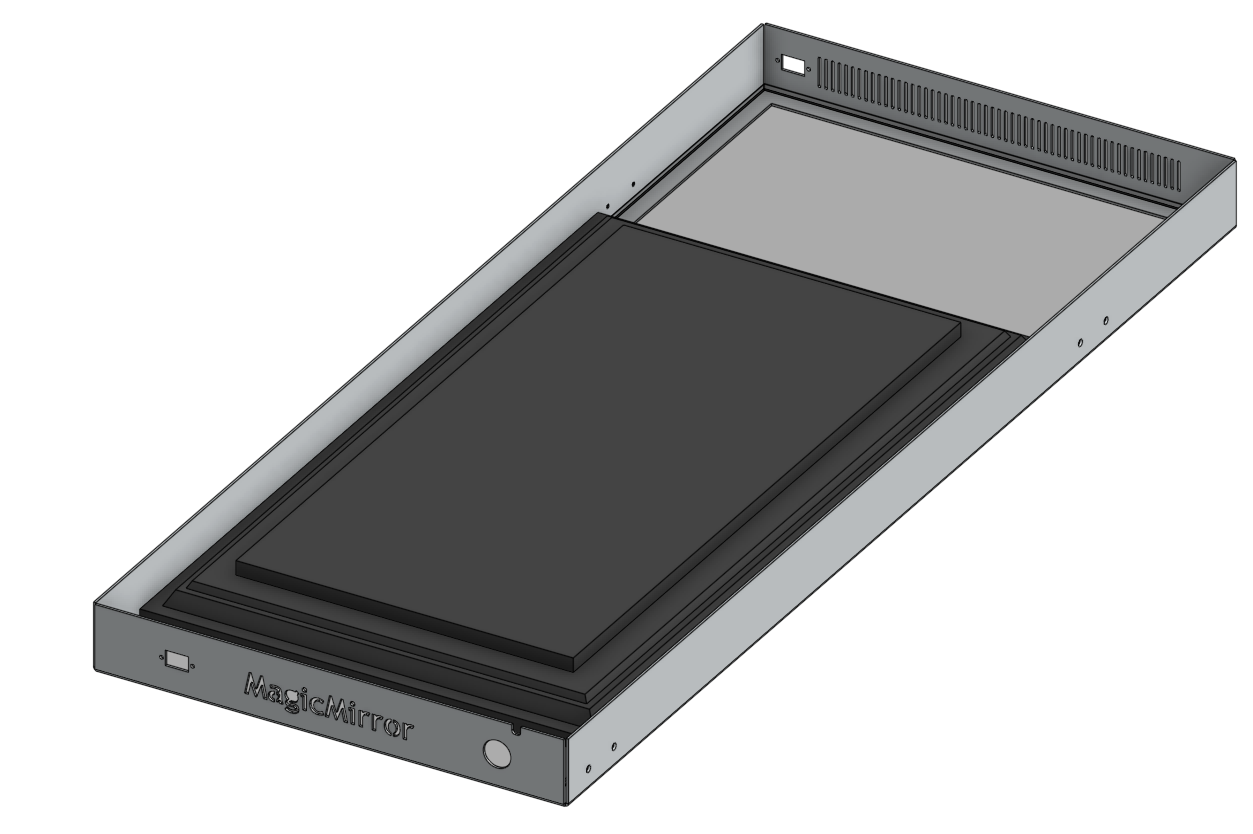
      I found I nice website to share constructions online, its’called Onshape.
      0_1500054725849_MagicMirror_Metal_frame_model.png
      If someone is interested in the metal frame model. It’s available here.

      posted in Show your Mirror
      SvenSommerS
      SvenSommer
    • RE: stronger Raspberry Pi 3 Alternatives

      @cowboysdude
      I just updated the summary post, could you please check, if there is everything correct?!

      posted in Hardware
      SvenSommerS
      SvenSommer
    • RE: MMM-Globe

      I just found this source here and thought about this module.
      http://earth.nullschool.net/

      posted in Utilities
      SvenSommerS
      SvenSommer
    • RE: MMM-OralB / Bluetooth equipped toothbrush integration

      @dfuerst
      By now brushtimer.js has already the whole logic the of the final modul implemented. It’s working like this.

      1. If a brush is connected it’s starts the timer. This happens when the “start/stop” button is pushed for the first time. After 3 seconds (mine and your) toothbrush turns off bluetooth connection. This is registred, but nothing happens (timer is still running) until:
      2. Brush is connected again. This means the “start/stop” button was hit again and this time is means to stop the timer, because the brush was already running and is now stopped. (If I understood your test output right, this point never happens when you tested it; your toothbrush isn’t connecting again, when you stopped it)
      3. Because (my) toothbrush doesn’t shut down the connection for 32 seconds after the stop, I have to wait until I can detect a new connection event.

      What you need to set up in your attempt is a timer. When you detect your mac-address you start your timer. And when its gone, stop it.

      Here is a clock object you can integrate and use. You can use Clock.resume() to start/resume the timer or Clock.pause() to wait. If you want to reset use Clock.Stop()
      Everytime the clock-timer is changed you fire a sendSocketNotification('TIMER_UPDATE', totalSeconds) like int the MMM-NetworkScanner-project with sendSocketNotification('MAC_ADDRESSES', macAddresses) to inform the main module an show it to the mirror-screen.

      var Clock = {
        totalSeconds: 0,
      
        start: function () {
          var self = this;
      
          this.interval = setInterval(function () {
            self.totalSeconds += 1;
      
            console.log(Math.floor(self.totalSeconds / 60 % 60) + ':' + parseInt(self.totalSeconds % 60));
          }, 1000);
        },
      
          pause: function () {
            clearInterval(this.interval);
            delete this.interval;
          },
      
          resume: function () {
            if (!this.interval) this.start();
          },
      
          stop: function(){
              this.totalSeconds = 0;
              clearInterval(this.interval);
              delete this.interval;
          }
      };
      
      
      posted in Development
      SvenSommerS
      SvenSommer
    • RE: A thin MM with metal frame, hidden IR camera and 32" Inch HDTV

      @cowboysdude The Frame was made in small factory in Berlin. The main challenge was to find somebody with free capacities in the next three month!!
      Seems like it’s a good place for metal processing companies around Berlin!

      posted in Show your Mirror
      SvenSommerS
      SvenSommer
    • RE: stronger Raspberry Pi 3 Alternatives

      @cowboysdude
      Thanks for your answer.
      Could you please share a link which mini itx board board you’re exactly using?

      posted in Hardware
      SvenSommerS
      SvenSommer
    • RE: MMM-Globe

      @schlachtkreuzer6
      Hey guys,
      I was able to cut the white bar by cutting the last pixels (depending on the image size) from this image with adding the following to MMM-Globe.js

      getDom: function () {
          var wrapper = document.createElement("div");
          if (this.config.style == "europeDiscNat") {
      	wrapper.style.height = 0.98 * this.config.imageSize - 1 + "px";
      	wrapper.style.overflow = "hidden";
          }
      
          var image = document.createElement("img");
      
      posted in Utilities
      SvenSommerS
      SvenSommer
    • RE: MMM-OralB / Bluetooth equipped toothbrush integration

      Hey @Fistandantilus,
      Thanks for checking out the module. Sorry for disappointing you, but the MMM-OralB-module is not finished yet. The module is not capable of displaying any other message than ‘Searching…’ right now.

      I stopped the development a few month ago, caused by the different matching results, we experienced in the testing phase at the individual toothbrushes.
      But I’m definitely interested in making this module.

      If you want to help me , you could send me your detailed test output of the scenario I pointed out before.

      Here are some details:

      • If the toothbrush is started bluetooth is activated for 3 Seconds.
      • If the brush is paused/stopped bluetooth is activated again for 32 Seconds.

      This leads to the following limited possiblities in tracking a brush session.

      • A start of a session is only trackable, if the programm/script has started with a (for 32 seconds) silent brush.
      • A stop is only trackable 3 seconds after start.
      • A stop/pause leads to a 32 Seconds “cooldown phase”, were no tracking is possible. This will reset the timer to 0:00.

      This is only helpfull if you do not interrupt you brushing session. :smile:

      If you wanna try the current setup you can run the script by:

      1. Enter your module-directory: cd ~/MagicMirror/modules
      2. Clone repository : git clone https://github.com/SvenSommer/MMM-OralB
      3. Enter new directory: cd ~/MagicMirror/modules/MMM-OralB
      4. Install dependencies: sudo apt-get install bluetooth bluez libbluetooth-dev libudev-dev
      5. Install noble module: npm install noble
      6. Exceute helper programm to find your brushID (this is not the mac-address): sudo node findBrushId.js
        This should lead to a output like
      Searching for OralB Toothbrushes with manufacturerData: "dc00010205030000000101"...
      changed state to:poweredOn
      Found OralB Tootbrush with ID: 544a1621209f
      
      
      1. Copy and paste your ID into the brushTimer.js file: sudo nano brushTimer.js
        (Save and exit with STRG + O and STRG + X )
      "use strict";
      
      var NodeHelper = require("node_helper");
      var noble = require('noble');
      
      //Copy Paste your ID here 
      var toothbrush_uuid = '544a1621209f';
      
      1. Run script with sudo node brushTimer.js
        This should lead to an output like:
      scanning started...
      Toothbrush is running
      0:1
      0:2
      0:3
      0:4
      0:5
      0:6
      0:7
      0:8
      0:9
      0:10
      0:11
      0:12
      0:13
      0:14
      0:15
      0:16
      0:17
      0:18
      Toothbrush stopped. "Cool down" for 32 seconds needed!

      
      
      posted in Development
      SvenSommerS
      SvenSommer
    • RE: 27" barn wood frame mirror (Alexa controlled)

      Very nicely done!
      What are the rotary switches in the last pictures for?

      posted in Show your Mirror
      SvenSommerS
      SvenSommer
    • RE: MMM-Globe

      @schlachtkreuzer6
      done, I also included the sources from binderth and made a pull request.

      posted in Utilities
      SvenSommerS
      SvenSommer
    • RE: Send Notification from one module to another module

      It seemed the sender is now a object not only a string with several properties. Therefore this code snippet has changed a little by sender to sender.name:

      notificationReceived: function(notification, payload, sender){
        if(notification === "NEW_STUFF" && sender.name === "modula"){
          //handle the payload: {foo: "bar"}
        }
      }
      
      posted in Development
      SvenSommerS
      SvenSommer
    • RE: A thin MM with metal frame, hidden IR camera and 32" Inch HDTV

      @Arthur
      Sure, I already thought about this. Unfortunately I’m very busy this week. Hope to get it done on the weekend.

      posted in Show your Mirror
      SvenSommerS
      SvenSommer
    • RE: MMM-Globe

      @lolobyte
      Thank you for the links.
      For central america I found the following source the most usefull. Unfortunately it’s only available in high resulution.
      http://goes.gsfc.nasa.gov/goescolor/goeseast/overview2/color_lrg/latestfull.jpg
      alt text

      Has anybody found more usefull sources by now?

      posted in Utilities
      SvenSommerS
      SvenSommer
    • RE: Calendar times in 24 hour format?

      @MrEdOne
      timeFormat uses the formatting of your operating system.
      When “24” is configured the format “hh:mm” is returned. Which is exactly, what you are looking for.
      Here is the code snippet from calender.js:

      		switch (config.timeFormat) {
      		case 12: {
      			moment.updateLocale(config.language, {
      				longDateFormat: {
      					LT: "h:mm A"
      				}
      			});
      			break;
      		}
      		case 24: {
      			moment.updateLocale(config.language, {
      				longDateFormat: {
      					LT: "hh:mm"
      				}
      			});
      			break;
      		}
      

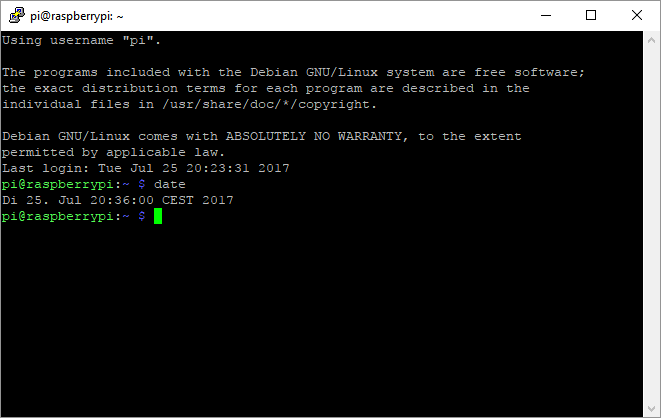
      What do you get, when typing date in your console?

      0_1501007853673_492bdac5-1124-4fcf-b5bf-c69605f21853-image.png
      If it’s not in displayed in a format of 24h, change the setting of your OS.

      Maybe this helps?

      posted in Feature Requests
      SvenSommerS
      SvenSommer
    • RE: A thin MM with metal frame, hidden IR camera and 32" Inch HDTV

      @Arthur: The costs, used parts and main challenges I experienced when building my smart mirror are now updated on my blog on
      http://robstechlog.com/2017/06/25/building-a-big-magicmirror-with-metal-frame-the-summary-parts-prices/

      posted in Show your Mirror
      SvenSommerS
      SvenSommer
    • RE: MMM-Globe

      @LukeCodewalker, @Burner911
      I just integrated the ‘centralAmericaDiscNat’ option and made a pull request.

      posted in Utilities
      SvenSommerS
      SvenSommer
    • RE: Calendar times in 24 hour format?

      Then I have no idea. Sorry…

      posted in Feature Requests
      SvenSommerS
      SvenSommer
    • 1 / 1