MagicMirror Forum
    • Recent
    • Tags
    • Unsolved
    • Solved
    • MagicMirror² Repository
    • Documentation
    • 3rd-Party-Modules
    • Donate
    • Discord
    • Register
    • Login
    1. Home
    2. tidus5
    3. Posts
    A New Chapter for MagicMirror: The Community Takes the Lead
    Read the statement by Michael Teeuw here.
    Offline
    • Profile
    • Following 0
    • Followers 0
    • Topics 6
    • Posts 59
    • Groups 0

    Posts

    Recent Best Controversial
    • MMM-Todoist - adding reminder priority owner

      Hello,

      i’m working on the MMM-Todoist from @cbrooker
      https://forum.magicmirror.builders/topic/566/mmm-todoist-your-todoist-tasks-on-your-mirror

      A good way to learn - Im trying to add the priority (want an icon and sort by) the due date and some little informations.

      i found in the fetcher how to add the informations (in an array?) - but i dont really understand how the data are used after

      	 for (var i = 0; i < JSON.parse(body).items.length; i++) {
      		 if (JSON.parse(body).items[i].project_id == listID) {
      			 items.push(JSON.parse(body).items[i].due_date_utc);
      			 items.push(JSON.parse(body).items[i].priority);
      			 items.push(JSON.parse(body).items[i].assigned_by_uid);
      			 items.push(JSON.parse(body).items[i].content);
      			 items.push(JSON.parse(body).items[i].checked);
      

      and after i understand in the MMM-Todoist.js here

      for (var i = 0; i < todos.length; i++) {
      var titleWrapper = document.createElement(“tr”);
      titleWrapper.innerHTML = todos[i];
      titleWrapper.className = “title bright”;
      wrapper.appendChild(titleWrapper);

       // Create fade effect by MichMich (MIT)
       if (this.config.fade && this.config.fadePoint < 1) {
      	if (this.config.fadePoint < 0) {
      	 this.config.fadePoint = 0;
      	}
      	var startingPoint = todos.length * this.config.fadePoint;
      	var steps = todos.length - startingPoint;
      	if (i >= startingPoint) {
      	 var currentStep = i - startingPoint;
      	 titleWrapper.style.opacity = 1 - (1 / steps * currentStep);
      

      we make the view

      for now i have that - if someone can help me to understand - thankssssss
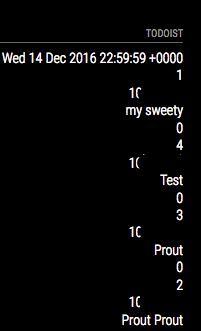
      0_1481658850398_Screen Shot 2016-12-13 at 20.50.54.png

      posted in Development
      tidus5T
      tidus5
    • RE: MMM-Todoist - Your todoist tasks on your mirror

      Yop,

      I’m looking to add the reminder and priority level (with an icon) Has anyone did something like that with this module ?

      in the fetcher i found where to add the var

      	 for (var i = 0; i < JSON.parse(body).items.length; i++) {
      		 if (JSON.parse(body).items[i].project_id == listID) {
      			 items.push(JSON.parse(body).items[i].content);
      			 items.push(JSON.parse(body).items[i].priority);	
      			 items.push(JSON.parse(body).items[i].due_date_utc);	
      

      but i dont know how to use the answer

      posted in Productivity
      tidus5T
      tidus5
    • RE: MMM-Nest

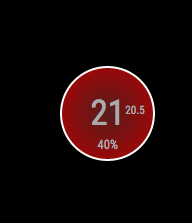
      0_1481642822085_Screen Shot 2016-12-13 at 16.25.04.png

      changed the CSS

      for who want

      .heating {
      width: 130px;
      height: 130px;
      background: red;
      background: radial-gradient(#571d1d, #b30000);
      -moz-border-radius: 50px;
      -webkit-border-radius: 50px;
      border-radius: 70px;
      line-height: 130px;
      font-size: 50px;
      text-align: center;
      position: relative;
      border: 4px solid #FFF;
      }
      
      .cooling {
      width: 130px;
      height: 130px;
      background: blue;
      background: radial-gradient(#0a237a, #436cc0);
      -moz-border-radius: 50px;
      -webkit-border-radius: 50px;
      border-radius: 70px;
      line-height: 130px;
      font-size: 50px;
      text-align: center;
      position: relative;
      border: 4px solid #FFF;
      }
      
      .heatingHC {
      width: 130px;
      height: 130px;
      background: red;
      background: radial-gradient(#571d1d, #b30000);
      -moz-border-radius: 50px;
      -webkit-border-radius: 50px;
      border-radius: 70px;
      line-height: 130px;
      font-size: 40px;
      text-align: center;
      position: relative;
      border: 4px solid #FFF;
      }
      
      .coolingHC {
      width: 130px;
      height: 130px;
      background: blue;
      background: radial-gradient(#0a237a, #436cc0);
      -moz-border-radius: 50px;
      -webkit-border-radius: 50px;
      border-radius: 70px;
      line-height: 130px;
      font-size: 40px;
      text-align: center;
      position: relative;
      border: 4px solid #FFF;
      }
      
      .off {
      width: 130px;
      height: 130px;
      border: 4px solid white;
      background: black;
      -moz-border-radius: 50px;
      -webkit-border-radius: 50px;
      border-radius: 70px;
      line-height: 130px;
      font-size: 50px;
      text-align: center;
      position: relative;
      }
      
      .heatingText {
        font-size:medium;
        position: absolute;
      top: -5px;
      right: 40px;
        width: 0;
      }
      
      .coolingText {
        font-size:medium;
        position: absolute;
      top: -5px;
      right: 40px;
        width: 0;
      }
      
      .humidityText {
        position:absolute;
        font-size:large;
        top: 35%;
        width: 100%;
      }
      
      .nameText {
       font-size:medium;
       text-align:center;
       width:33%;
      }
      
      .center {
       text-align:center;
      }
      
      .heatingCell {
       background:red;
       background:linear-gradient(to right, #990000 , red, #990000);
      }
      
      .coolingCell {
       background-color:blue;
       background:linear-gradient(to right, #000099 , blue, #000099);
      }
      
      .fanIcon {
       height:15px;
       width:15px;
       position:absolute;
       top: 72%;
       right: 42%;
      }
      
      posted in Utilities
      tidus5T
      tidus5
    • RE: Facial Recognition - customize your mirror for every user!

      @Aly if you use the option “DISPLAY=:0 npm start dev”

      do you see the error ?

      posted in Troubleshooting
      tidus5T
      tidus5
    • RE: Facial Recognition - customize your mirror for every user!

      @Aly
      could you try to found the module who make the bug by active one by one ?

      i found like that

      posted in Troubleshooting
      tidus5T
      tidus5
    • RE: MM-Navbar - Navigation Bar for Touchscreens to hide/show modules

      @chrisyy Hello

      amazing!!! thank you

      just small error added exceptWithClass(‘MM-navbar’) (exceptmodule(this)) didnt work (the nav itself was hidden)
      thank you so much

      	$(hideallmodulesbutton).on("click", function(){
      		if(hideallmodules){
      			MM.getModules().exceptWithClass('MM-navbar').exceptWithClass('clock').enumerate(function(module){
      			module.show(1000, function(){
      					});
      				});
      			hideallmodules = false;
      		}else{
      			MM.getModules().exceptWithClass('MM-navbar').exceptWithClass('clock').enumerate(function(module){
      			module.hide(1000, function(){
      					});
      				});
      			hideallmodules = true;
      			}
      		});
      
      posted in System
      tidus5T
      tidus5
    • RE: MM-Navbar - Navigation Bar for Touchscreens to hide/show modules

      @chrisyy

      pretty cool

      im using your code

      MM.getModules().exceptModule(this).exceptWithClass(‘clock’).enumerate(function(module){
      module.hide(1000, function(){
      });

      to create an icon to hide or show all
      for now i can only show all - cant hide all after.

      did you plan to work on that ?

      posted in System
      tidus5T
      tidus5
    • Samsung multiroom module

      Hey :-)

      im looking for someone who have clue about samsung multiroom (like sonos)

      do you know a module or something to controle the system ? im using spotify with the multiroom

      thanks

      posted in Requests
      tidus5T
      tidus5
    • RE: MM-Navbar - Navigation Bar for Touchscreens to hide/show modules

      @chrisyy yes of course :-)

      posted in System
      tidus5T
      tidus5
    • RE: MM-Navbar - Navigation Bar for Touchscreens to hide/show modules

      @chrisyy i think you can list all the modules yes but how to attribut the good icon?
      i will check for hide the module on startup tonight - i let you know if i find something

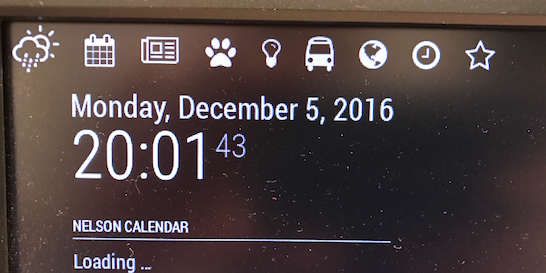
      @cowboysdude 0_1481034446135_Screen Shot 2016-12-06 at 15.26.36.png

      posted in System
      tidus5T
      tidus5
    • RE: MM-Navbar - Navigation Bar for Touchscreens to hide/show modules

      @chrisyy

      yop :-)

      i added my own module to your script

       Module.register("MM-navbar",{
      	getScripts: function(){
      		return ["modules/MM-navbar/jquery-3.1.1.js"];
      	},
      	getStyles: function(){
      		return ["weather-icons.css", "navbar.css", "font-awesome.css"];
      	},
      	getDom: function(){
      
      		var wrapper = document.createElement("div");
      
      		var weatherbutton = document.createElement("span");
      		var calendarbutton = document.createElement("span");
      		var newsbutton = document.createElement("span");
      		var nestbutton = document.createElement("span");	//NEST module
      		var huebutton = document.createElement("span");		//HUE module
      		var localtransportbutton = document.createElement("span");	//localtransport module
      		var globebutton = document.createElement("span");	//globe module
      		var clockbutton = document.createElement("span");	//clock module
      		var complimentbutton = document.createElement("span");	//compliment module
      
      		var weatherhidden = false;
      		var calendarhidden = false;
      		var newshidden = false;
      		var nesthidden = false;
      		var huehidden = false;
      		var localtransporthidden = false;
      		var globehidden = false;
      		var clockhidden = false;
      		var complimenthidden = false;
      		
      		weatherbutton.className = "wi wi-day-rain-mix navbar";
      		calendarbutton.className = "fa fa-calendar navbar";	
      		newsbutton.className = "fa fa-newspaper-o navbar";
      		nestbutton.className = "fa fa-paw navbar";
      		huebutton.className = "fa fa-lightbulb-o navbar";
      		localtransportbutton.className = "fa fa-bus navbar";	
      		globebutton.className = "fa fa-globe navbar";
      		clockbutton.className = "fa fa-clock-o navbar";
      		complimentbutton.className = "fa fa-star-o navbar";
      
      
      		var forecast = MM.getModules().withClass('weatherforecast');
      		var weather = MM.getModules().withClass('currentweather');
      		var calendar = MM.getModules().withClass('calendar');
      		var news = MM.getModules().withClass('newsfeed');
      		var nest = MM.getModules().withClass('MMM-Nest');
      		var hue = MM.getModules().withClass('MMM-Hue');
      		var transport = MM.getModules().withClass('localtransport');
      		var globe = MM.getModules().withClass('MMM-Globe');
      		var clock = MM.getModules().withClass('clock');
      		var compliment = MM.getModules().withClass('compliments');
      	
      		wrapper.appendChild(weatherbutton);		
      		wrapper.appendChild(calendarbutton);
      		wrapper.appendChild(newsbutton);
      		wrapper.appendChild(nestbutton);
      		wrapper.appendChild(huebutton);
      		wrapper.appendChild(localtransportbutton);
      		wrapper.appendChild(globebutton);
      		wrapper.appendChild(clockbutton);
      		wrapper.appendChild(complimentbutton);
      	
      		$(weatherbutton).on("click", function(){
      			if(weatherhidden){
      				forecast[0].show();
      				weather[0].show();
      				weatherhidden = false;
      			}else{
      				forecast[0].hide();
      				weather[0].hide();
      				weatherhidden = true;
      			}
      		});
      
      		$(calendarbutton).on("click", function(){
      			if(calendarhidden){
      				calendar[0].show();
      				calendarhidden = false;
      			}else{
      				calendar[0].hide();
      				calendarhidden = true;
      			}
      		});
      
      		$(newsbutton).on("click", function(){
      			if(newshidden){
      				news[0].show();
      				newshidden = false;
      			}else{
      				news[0].hide();
      				newshidden = true;
      			}
      		});
      
      		$(nestbutton).on("click", function(){
      			if(nesthidden){
      				nest[0].show();
      				nesthidden = false;
      			}else{
      				nest[0].hide();
      				nesthidden = true;
      			}
      		});
      
      		$(huebutton).on("click", function(){
      			if(huehidden){
      				hue[0].show();
      				huehidden = false;
      			}else{
      				hue[0].hide();
      				huehidden = true;
      			}
      		});
      
      		$(localtransportbutton).on("click", function(){
      			if(localtransporthidden){
      				transport[0].show();
      				localtransporthidden = false;
      			}else{
      				transport[0].hide();
      				localtransporthidden = true;
      			}
      		});
      
      		$(globebutton).on("click", function(){
      			if(globehidden){
      				globe[0].show();
      				globehidden = false;
      			}else{
      				globe[0].hide();
      				globehidden = true;
      			}
      		});
      
      		$(clockbutton).on("click", function(){
      			if(clockhidden){
      				clock[0].show();
      				clockhidden = false;
      			}else{
      				clock[0].hide();
      				clockhidden = true;
      			}
      		});
      
      		$(complimentbutton).on("click", function(){
      			if(complimenthidden){
      				compliment[0].show();
      				complimenthidden = false;
      			}else{
      				compliment[0].hide();
      				complimenthidden = true;
      			}
      		});
      
      		return wrapper;				
      
      	}
      });
      

      Note from admin: Please use Markdown on code snippets for easier reading!

      posted in System
      tidus5T
      tidus5
    • RE: Facial Recognition - customize your mirror for every user!

      @Aly @Escenda
      i found the problem - the localtransport module :-)

      do you use this module too ? if you remove the module on the config.js its work :D

      posted in Troubleshooting
      tidus5T
      tidus5
    • RE: Facial Recognition - customize your mirror for every user!

      @Aly
      try with classes : ‘default’

      You have the same problem as me and @Escenda

      custom’s classes doesnt work and everyone’s classes neither
      im on it since 6 days and… it cant found the solution

      posted in Troubleshooting
      tidus5T
      tidus5
    • RE: Facial Recognition - customize your mirror for every user!

      Hey :D

      little UP - im becoming crazy.
      i read and read an read again - add… inside config.js (mirror module) or config.py (model tester)
      so users : [‘kevin’]… and the config.py is needed if i want to test with the recognition-tools

      right ?
      i see if the MMM-Facial use “everyone” or “kevin” that doesnt work

      posted in Troubleshooting
      tidus5T
      tidus5
    • RE: Facial Recognition - customize your mirror for every user!

      Hi everyone,

      my module is working fine and i can loggin with my user
      Module with class everyone and default are loading fine.

      But for module with my class 'Kevin" it doesnt work.

      i have this error "ught TypeError: Cannot read property ‘toLowerCase’ of undefined

      my ame class is the same as my user (copy paste)
      did i miss something ?

      thanksssss

      posted in Troubleshooting
      tidus5T
      tidus5
    • RE: Device detection - personalised message

      :-p thanks :-)

      posted in Development
      tidus5T
      tidus5
    • RE: Device detection - personalised message

      Hey guy, are you still on it ?

      posted in Development
      tidus5T
      tidus5
    • RE: Calendar module - var location

      @strawberry-3.141 thanks :-) yes was a bit lost in the code to found the broadcast

      posted in Development
      tidus5T
      tidus5
    • Calendar module - var location

      Hello

      is it possible to found a VAR with the location in the default calendar module of magic mirror?

      I want to use it with the module of localtransport to generate a dynamical search

      thanks :-)

      posted in Development
      tidus5T
      tidus5
    • 1
    • 2
    • 3
    • 3 / 3