MagicMirror Forum
    • Recent
    • Tags
    • Unsolved
    • Solved
    • MagicMirror² Repository
    • Documentation
    • 3rd-Party-Modules
    • Donate
    • Discord
    • Register
    • Login
    A New Chapter for MagicMirror: The Community Takes the Lead
    Read the statement by Michael Teeuw here.

    MM-Navbar - Navigation Bar for Touchscreens to hide/show modules

    Scheduled Pinned Locked Moved System
    47 Posts 11 Posters 47.3k Views 15 Watching
    Loading More Posts
    • Oldest to Newest
    • Newest to Oldest
    • Most Votes
    Reply
    • Reply as topic
    Log in to reply
    This topic has been deleted. Only users with topic management privileges can see it.
    • tidus5T Offline
      tidus5 @chrisyy
      last edited by

      @chrisyy yes of course :-)

      1 Reply Last reply Reply Quote 0
      • cowboysdudeC Offline
        cowboysdude Module Developer @tidus5
        last edited by

        @tidus5 VERY excellent!! Thank you… I can use that :)

        1 Reply Last reply Reply Quote 0
        • C Offline
          chrisyy
          last edited by

          i added the code to hide all modules on startup :)

          tidus5T 1 Reply Last reply Reply Quote 0
          • tidus5T Offline
            tidus5 @chrisyy
            last edited by

            @chrisyy

            pretty cool

            im using your code

            MM.getModules().exceptModule(this).exceptWithClass(‘clock’).enumerate(function(module){
            module.hide(1000, function(){
            });

            to create an icon to hide or show all
            for now i can only show all - cant hide all after.

            did you plan to work on that ?

            1 Reply Last reply Reply Quote 0
            • C Offline
              chrisyy
              last edited by

              Its a possibility.
              Think u are missing a toggle there, i can build u one later and update it.

              1 Reply Last reply Reply Quote 0
              • C Offline
                chrisyy
                last edited by

                @tidus5
                Can u try this?

                var hideallmodules = true;
                var hideallmodulesbutton = document.createElement(“span”);
                hideallmodulesbutton.className = “wi wi-day-rain-mix navbar”; // change icon here
                wrapper.appendChild(hideallmodulesbutton);

                $(hideallmodulesbutton).on(“click”, function(){
                if(hideallmodules){
                MM.getModules().exceptModule(this).exceptWithClass(‘clock’).enumerate(function(module){
                module.show(1000, function(){
                });
                });
                hideallmodules = false;
                }else{
                MM.getModules().exceptModule(this).exceptWithClass(‘clock’).enumerate(function(module){
                module.hide(1000, function(){
                });
                });
                hideallmodules = true;
                }
                });

                this is a bit messy, but should work as the rest of the buttons. will publish it to git, when i got time.

                tidus5T 1 Reply Last reply Reply Quote 0
                • tidus5T Offline
                  tidus5 @chrisyy
                  last edited by

                  @chrisyy Hello

                  amazing!!! thank you

                  just small error added exceptWithClass(‘MM-navbar’) (exceptmodule(this)) didnt work (the nav itself was hidden)
                  thank you so much

                  	$(hideallmodulesbutton).on("click", function(){
                  		if(hideallmodules){
                  			MM.getModules().exceptWithClass('MM-navbar').exceptWithClass('clock').enumerate(function(module){
                  			module.show(1000, function(){
                  					});
                  				});
                  			hideallmodules = false;
                  		}else{
                  			MM.getModules().exceptWithClass('MM-navbar').exceptWithClass('clock').enumerate(function(module){
                  			module.hide(1000, function(){
                  					});
                  				});
                  			hideallmodules = true;
                  			}
                  		});
                  
                  1 Reply Last reply Reply Quote 0
                  • tidus5T Offline
                    tidus5
                    last edited by

                    @chrisyy yop everything is working perfectly

                    i added a timing of 1000 on every hide/show
                    without i had a little ugly mouvement sometimes :-)
                    again thanks you !!!

                    1 Reply Last reply Reply Quote 0
                    • TheHyp3T Offline
                      TheHyp3
                      last edited by

                      What a great module! Is there a way to get the icons centerd? I´m using a 7" touchscreen display and it looks like the picture below:
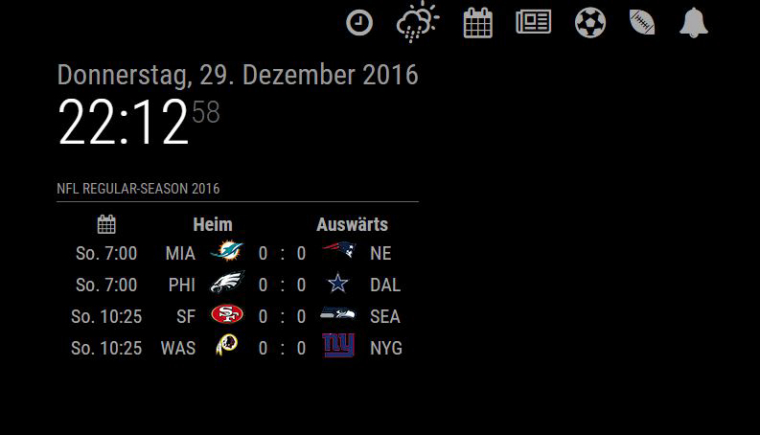
                      0_1483046096077_navbar.JPG

                      If I would add more icons they go in a line below.

                      tidus5T 1 Reply Last reply Reply Quote 0
                      • tidus5T Offline
                        tidus5 @TheHyp3
                        last edited by tidus5

                        @TheHyp3

                        Hello
                        in navbar.css you can play with

                        .center{
                        position: fixed;
                        left: 45%;
                        }

                        • personnaly i removed this class
                        strawberry 3.141S 1 Reply Last reply Reply Quote 0
                        • strawberry 3.141S Offline
                          strawberry 3.141 Project Sponsor Module Developer @tidus5
                          last edited by

                          @tidus5 its never a good idea to manipulate modules code, but after reviewing this module there is no chance to avoid it to have custom buttons. The module owner should change this to config options.

                          I came up with this solution to center them

                          custom.css

                          .MM-navbar .center {
                            left: 50%;
                            -webkit-transform: translate(-50%);
                          }
                          

                          Please create a github issue if you need help, so I can keep track

                          1 Reply Last reply Reply Quote 0
                          • C Offline
                            chrisyy
                            last edited by

                            I have already tested some things and still didnt update and pushed to git.

                            The problem with the creation of buttons out of the config is a for/while that still doesn’t work. Also i would need a library for icons.

                            Ur proplem was indeed an issue, will fix this within git.

                            1 Reply Last reply Reply Quote 0
                            • TheHyp3T Offline
                              TheHyp3
                              last edited by

                              @strawberry-3.141 did a little change on my custome.css in MagicMirror/css. Now its working very well.

                              Heres the code:

                              .MM-navbar .center {
                              width: 100%;
                              text-align: center;
                              left: 0px;
                              }
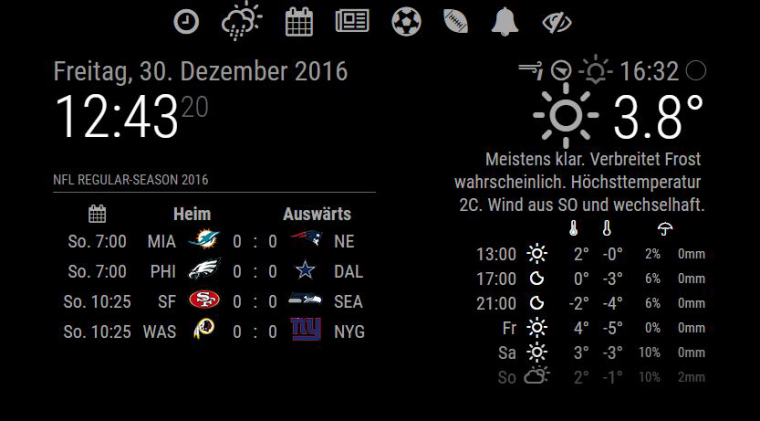
                              0_1483098225679_navbar.JPG

                              1 Reply Last reply Reply Quote 0
                              • S Offline
                                shashank @chrisyy
                                last edited by

                                @chrisyy hi, i installed this module works great, how can i toggle between 2 same modules, example MMM-mails i need to toggle emails between gmail and hotmail , gmail to show hotmail to hide and vice versa

                                C 1 Reply Last reply Reply Quote 0
                                • tidus5T Offline
                                  tidus5
                                  last edited by

                                  Hey @chrisyy - hope you are well.
                                  Since the update i have a problem with the hide/show all butt - function not recognized in this line

                                  			MM.getModules().exceptWithClass('MM-navbar').exceptWithClass('MMM-ShipmentTracking').exceptWithClass('clock').enumerate(function(module){
                                  

                                  and now the weather and the current weather are not hide at startup - do you have the same problem ?

                                  1 Reply Last reply Reply Quote 0
                                  • C Offline
                                    chrisyy @shashank
                                    last edited by

                                    @shashank u would need to have 2 of them installed, lets say one is Mail-Gmail, the second is Mail-Hotmail

                                    @tidus5 until now i haven’t tested it and im moving to a new place, so i my mirror aswell as my server is laying in a box right now. I saw that in the new version, there are visibility-locking options. Maybe this will have to do something with it. As soon as it is possible for me to do something, i will take a look and hopefully can fix this.
                                    second thing: u should not make 3x exceptwithclass, do one and separate the modules with commata.

                                    AlessandroRaA 1 Reply Last reply Reply Quote 0
                                    • in_a_daysI Offline
                                      in_a_days
                                      last edited by

                                      I think this module is very cool! My present build is non-touch so I made some small additions (informed by @GinSeng in another thread) and I’m currently using voice to trigger the Navbar. Love it! I’ll be happy to provide code or details if anybody is interested.

                                      What ship would bear me ever back across so wide a Sea?

                                      S 1 Reply Last reply Reply Quote 0
                                      • S Offline
                                        shashank @in_a_days
                                        last edited by

                                        @in_a_days hi, can you please share the code

                                        in_a_daysI 1 Reply Last reply Reply Quote 0
                                        • AlessandroRaA Offline
                                          AlessandroRa @chrisyy
                                          last edited by

                                          Hi @chrisyy thank you for this awesome module!
                                          Only problem is that with this module on, the Hide/show all module disappeared. How can I fix it?
                                          Thanks!

                                          1 Reply Last reply Reply Quote 0
                                          • in_a_daysI Offline
                                            in_a_days @shashank
                                            last edited by in_a_days

                                            @shashank

                                            For sure. Forgive me if there are several steps.

                                            First thing is to install this module

                                            https://github.com/alexyak/voicecontrol

                                            Go to your MagicMirror/modules folder and type

                                            git clone https://github.com/alexyak/voicecontrol.git

                                            Then install dependencies with

                                            sudo apt-get install python-pyaudio python3-pyaudio sox

                                            Next, install the navbar. Again, make sure you are in the MagicMirror/modules folder and type

                                            git clone https://github.com/chr1syy/MM-navbar.git

                                            Then you will need to go to this website and define your voice commands.

                                            https://snowboy.kitt.ai/

                                            Keep track of the keywords you define and the filenames you produce. Each keyword/command will require you to download a .pmdl file that needs to be copied into the MagicMirror folder on your Pi. I’m only using 3 commands so far - calendar, newsfeed, and weather.

                                            Still with me? Sweet! Lets configure config.js. Go to the MagicMirror/config folder and

                                            nano config.js

                                            Assuming you know where to place a new module in this file, add the navbar module with

                                                        {
                                                                module: 'MM-navbar',
                                                                position: 'fullscreen_above'
                                                        },
                                            

                                            Next we will add the voice control call to the same config.js file. There are a couple variables here that will depend on the keywords and filenames you used on the snowboy site. Here is the code I use

                                                      {
                                                                module: 'voicecontrol',
                                                                position: 'bottom_right',
                                                                config: {
                                                                        models: [
                                                                                        {
                                                                                                keyword: "Calendar",
                                                                                                description: "Say 'Calendar' to toggle display",
                                                                                                file: "calendar.pmdl",
                                                                                                message: "CALENDAR"
                                                                                        },
                                                                                        {
                                                                                                keyword: "Newsfeed",
                                                                                                description: "Say 'Newsfeed' to toggle display",
                                                                                                file: "newsfeed.pmdl",
                                                                                                message: "NEWSFEED"
                                                                                        },
                                                                                        {
                                                                                                keyword: "Weather",
                                                                                                description: "Say 'Weather' to toggle display",
                                                                                                file: "weather.pmdl",
                                                                                                message: "WEATHER"
                                                                                        }
                                                                                ]
                                            
                                                                        }
                                                        },
                                            

                                            Note that the keyword and file need to match the keyword and filenames you used on your Snowboy files. Save and quit out of config.js and we’ll hit the last step. We need to make a couple changes to the navbar code. Navigate to MagicMirror/modules/MM-navbar then

                                            nano MM-navbar.js

                                            First change is at line 13. Right now lines 12-19 look like this

                                            notificationReceived: function(notification, payload, sender){
                                            	if (notification === 'DOM_OBJECTS_CREATED'){
                                            		MM.getModules().exceptModule(this).exceptWithClass('clock').enumerate(function(module){
                                            			module.hide(1000, function(){
                                            			});
                                            		});
                                            	}
                                            },
                                            

                                            You will need to modify it to look like this

                                                notificationReceived: function(notification, payload, sender){
                                                        if (notification === "CALENDAR"){
                                                                var calendarbutton = document.getElementById('calendar-button');
                                                                calendarbutton.click();
                                                        }
                                                        if (notification === "NEWSFEED"){
                                                                var newsbutton = document.getElementById('news-button');
                                                                newsbutton.click();
                                                        }
                                                        if (notification === "WEATHER"){
                                                                var weatherbutton = document.getElementById('weather-button');
                                                                weatherbutton.click();
                                                        }
                                                },
                                            

                                            Now we’re going down to the section that originally starts on line 32

                                            	wrapper.className = "center";
                                            	weatherbutton.className = "wi wi-day-rain-mix navbar";
                                            	calendarbutton.className = "fa fa-calendar navbar";	
                                            	newsbutton.className = "fa fa-newspaper-o navbar";		
                                            

                                            And change it to

                                                        wrapper.className = "center";
                                                        weatherbutton.className = "wi wi-day-rain-mix navbar";
                                                        weatherbutton.id = 'weather-button';
                                                        calendarbutton.className = "fa fa-calendar navbar";
                                                        calendarbutton.id = 'calendar-button';
                                                        newsbutton.className = "fa fa-newspaper-o navbar";
                                                        newsbutton.id = 'news-button';
                                            

                                            Save, close and restart your MM and you should have a working, voice responsive nav bar. I know there are kind of a lot of steps here and typos and omissions are entirely possible. If you have any problems let me know and I’ll try to help. Cheers!


                                            What ship would bear me ever back across so wide a Sea?

                                            C S 2 Replies Last reply Reply Quote 0

                                            Hello! It looks like you're interested in this conversation, but you don't have an account yet.

                                            Getting fed up of having to scroll through the same posts each visit? When you register for an account, you'll always come back to exactly where you were before, and choose to be notified of new replies (either via email, or push notification). You'll also be able to save bookmarks and upvote posts to show your appreciation to other community members.

                                            With your input, this post could be even better 💗

                                            Register Login

                                            • 1
                                            • 2
                                            • 3
                                            • 1 / 3
                                            • First post
                                              Last post
                                            Enjoying MagicMirror? Please consider a donation!
                                            MagicMirror created by Michael Teeuw.
                                            Forum managed by Sam, technical setup by Karsten.
                                            This forum is using NodeBB as its core | Contributors
                                            Contact | Privacy Policy