Read the statement by Michael Teeuw here.
MM-Navbar - Navigation Bar for Touchscreens to hide/show modules
-
Description
Hey there,
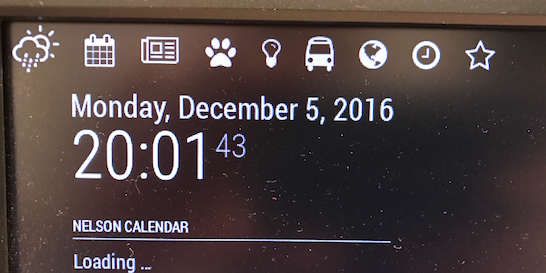
after a few tries i got my navigation bar to work for my touchscreen.
It needs a few more tweaks and maybe someone who knows more about js-programming than me, but until now it works fine for me.Modules integrated until now are: currentweather, weatherforecast, calendar and newsfeed.
Maybe there is a way to automatically read all modules and create a navigation bar according to ur activated modules.
And i need Icons… Dont know where i can get them, cause they want to get credited or sth. And i cant make them myself.
Just give it a look, maybe some of u can help tweaking it. Needs a few more things to explain and so on.
Screenshot
Download
[card:chr1syy/MM-navbar]
-
yop :-)
i added my own module to your script
 Module.register("MM-navbar",{
	getScripts: function(){
		return ["modules/MM-navbar/jquery-3.1.1.js"];
	},
	getStyles: function(){
		return ["weather-icons.css", "navbar.css", "font-awesome.css"];
	},
	getDom: function(){

		var wrapper = document.createElement("div");

		var weatherbutton = document.createElement("span");
		var calendarbutton = document.createElement("span");
		var newsbutton = document.createElement("span");
		var nestbutton = document.createElement("span");	//NEST module
		var huebutton = document.createElement("span");		//HUE module
		var localtransportbutton = document.createElement("span");	//localtransport module
		var globebutton = document.createElement("span");	//globe module
		var clockbutton = document.createElement("span");	//clock module
		var complimentbutton = document.createElement("span");	//compliment module

		var weatherhidden = false;
		var calendarhidden = false;
		var newshidden = false;
		var nesthidden = false;
		var huehidden = false;
		var localtransporthidden = false;
		var globehidden = false;
		var clockhidden = false;
		var complimenthidden = false;

		weatherbutton.className = "wi wi-day-rain-mix navbar";
		calendarbutton.className = "fa fa-calendar navbar";
		newsbutton.className = "fa fa-newspaper-o navbar";
		nestbutton.className = "fa fa-paw navbar";
		huebutton.className = "fa fa-lightbulb-o navbar";
		localtransportbutton.className = "fa fa-bus navbar";
		globebutton.className = "fa fa-globe navbar";
		clockbutton.className = "fa fa-clock-o navbar";
		complimentbutton.className = "fa fa-star-o navbar";


		var forecast = MM.getModules().withClass('weatherforecast');
		var weather = MM.getModules().withClass('currentweather');
		var calendar = MM.getModules().withClass('calendar');
		var news = MM.getModules().withClass('newsfeed');
		var nest = MM.getModules().withClass('MMM-Nest');
		var hue = MM.getModules().withClass('MMM-Hue');
		var transport = MM.getModules().withClass('localtransport');
		var globe = MM.getModules().withClass('MMM-Globe');
		var clock = MM.getModules().withClass('clock');
		var compliment = MM.getModules().withClass('compliments');

		wrapper.appendChild(weatherbutton);
		wrapper.appendChild(calendarbutton);
		wrapper.appendChild(newsbutton);
		wrapper.appendChild(nestbutton);
		wrapper.appendChild(huebutton);
		wrapper.appendChild(localtransportbutton);
		wrapper.appendChild(globebutton);
		wrapper.appendChild(clockbutton);
		wrapper.appendChild(complimentbutton);

		$(weatherbutton).on("click", function(){
			if(weatherhidden){
				forecast[0].show();
				weather[0].show();
				weatherhidden = false;
			}else{
				forecast[0].hide();
				weather[0].hide();
				weatherhidden = true;
			}
		});

		$(calendarbutton).on("click", function(){
			if(calendarhidden){
				calendar[0].show();
				calendarhidden = false;
			}else{
				calendar[0].hide();
				calendarhidden = true;
			}
		});

		$(newsbutton).on("click", function(){
			if(newshidden){
				news[0].show();
				newshidden = false;
			}else{
				news[0].hide();
				newshidden = true;
			}
		});

		$(nestbutton).on("click", function(){
			if(nesthidden){
				nest[0].show();
				nesthidden = false;
			}else{
				nest[0].hide();
				nesthidden = true;
			}
		});

		$(huebutton).on("click", function(){
			if(huehidden){
				hue[0].show();
				huehidden = false;
			}else{
				hue[0].hide();
				huehidden = true;
			}
		});

		$(localtransportbutton).on("click", function(){
			if(localtransporthidden){
				transport[0].show();
				localtransporthidden = false;
			}else{
				transport[0].hide();
				localtransporthidden = true;
			}
		});

		$(globebutton).on("click", function(){
			if(globehidden){
				globe[0].show();
				globehidden = false;
			}else{
				globe[0].hide();
				globehidden = true;
			}
		});

		$(clockbutton).on("click", function(){
			if(clockhidden){
				clock[0].show();
				clockhidden = false;
			}else{
				clock[0].hide();
				clockhidden = true;
			}
		});

		$(complimentbutton).on("click", function(){
			if(complimenthidden){
				compliment[0].show();
				complimenthidden = false;
			}else{
				compliment[0].hide();
				complimenthidden = true;
			}
		});

		return wrapper;

	}
});
Note from admin: Please use Markdown on code snippets for easier reading!
-
Hope it works well :-)
I will add some more moduls for me too.
Would be awesome if there is a way to automatically read modules and create buttons for them.
And im trying to hide all modules on startup. If i get it to work i will update it. -
Pictures? :)
-
@chrisyy i think you can list all the modules yes but how to attribut the good icon?
i will check for hide the module on startup tonight - i let you know if i find something -
Thanks for ur Picture. Mine is looking similar.
Thats the next thing i thought about. U got all modules, but still u need a text file or sth with a module -> Icon categorization.
My tries to hide all modules on startup were leading to a totally black screen.@tidus5 can I use the picture for github?
-
@chrisyy yes of course :-)
-
@tidus5 VERY excellent!! Thank you… I can use that :)
-
i added the code to hide all modules on startup :)
-
pretty cool
im using your code
MM.getModules().exceptModule(this).exceptWithClass(‘clock’).enumerate(function(module){
module.hide(1000, function(){
});to create an icon to hide or show all
for now i can only show all - cant hide all after.did you plan to work on that ?
-
Its a possibility.
Think u are missing a toggle there, i can build u one later and update it. -
@tidus5
Can u try this?var hideallmodules = true;
var hideallmodulesbutton = document.createElement(“span”);
hideallmodulesbutton.className = “wi wi-day-rain-mix navbar”; // change icon here
wrapper.appendChild(hideallmodulesbutton);$(hideallmodulesbutton).on(“click”, function(){
if(hideallmodules){
MM.getModules().exceptModule(this).exceptWithClass(‘clock’).enumerate(function(module){
module.show(1000, function(){
});
});
hideallmodules = false;
}else{
MM.getModules().exceptModule(this).exceptWithClass(‘clock’).enumerate(function(module){
module.hide(1000, function(){
});
});
hideallmodules = true;
}
});this is a bit messy, but should work as the rest of the buttons. will publish it to git, when i got time.
-
@chrisyy Hello
amazing!!! thank you
just small error added exceptWithClass(‘MM-navbar’) (exceptmodule(this)) didnt work (the nav itself was hidden)
thank you so much$(hideallmodulesbutton).on("click", function(){ if(hideallmodules){ MM.getModules().exceptWithClass('MM-navbar').exceptWithClass('clock').enumerate(function(module){ module.show(1000, function(){ }); }); hideallmodules = false; }else{ MM.getModules().exceptWithClass('MM-navbar').exceptWithClass('clock').enumerate(function(module){ module.hide(1000, function(){ }); }); hideallmodules = true; } }); -
@chrisyy yop everything is working perfectly
i added a timing of 1000 on every hide/show
without i had a little ugly mouvement sometimes :-)
again thanks you !!! -
What a great module! Is there a way to get the icons centerd? I´m using a 7" touchscreen display and it looks like the picture below:
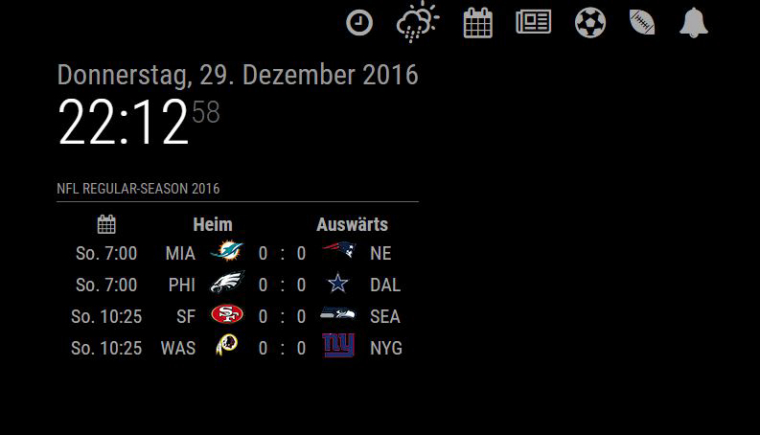
If I would add more icons they go in a line below.
-
Hello
in navbar.css you can play with.center{
position: fixed;
left: 45%;
}- personnaly i removed this class
-
@tidus5 its never a good idea to manipulate modules code, but after reviewing this module there is no chance to avoid it to have custom buttons. The module owner should change this to config options.
I came up with this solution to center them
custom.css
.MM-navbar .center { left: 50%; -webkit-transform: translate(-50%); } -
I have already tested some things and still didnt update and pushed to git.
The problem with the creation of buttons out of the config is a for/while that still doesn’t work. Also i would need a library for icons.
Ur proplem was indeed an issue, will fix this within git.
-
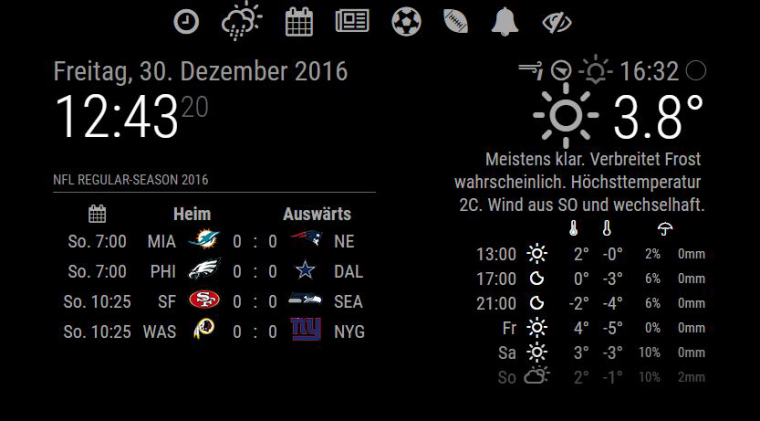
@strawberry-3.141 did a little change on my custome.css in MagicMirror/css. Now its working very well.
Heres the code:
.MM-navbar .center {
width: 100%;
text-align: center;
left: 0px;
}
-
@chrisyy hi, i installed this module works great, how can i toggle between 2 same modules, example MMM-mails i need to toggle emails between gmail and hotmail , gmail to show hotmail to hide and vice versa




Hello! It looks like you're interested in this conversation, but you don't have an account yet.
Getting fed up of having to scroll through the same posts each visit? When you register for an account, you'll always come back to exactly where you were before, and choose to be notified of new replies (either via email, or push notification). You'll also be able to save bookmarks and upvote posts to show your appreciation to other community members.
With your input, this post could be even better 💗
Register Login