@sdetweil Okay, I think that makes sense. Thanks!
A New Chapter for MagicMirror: The Community Takes the Lead
Read the statement by Michael Teeuw here.
Read the statement by Michael Teeuw here.
 Offline
Posts
-
RE: Stock calendar module does not honor options
-
MMM-Moon shows only "No Image!"
I installed the MMM-Moon module and put in the default config from the git page and all I see is “No Image!”. Has anyone else gotten this to work?
Here’s my config:
{ module: "MMM-Moon", position: "top_left", config: { // Coordinates for my place: lat: 37.nnnnn, lon: -122.nnnnn, timezone: "America/Los_Angeles" } }, -
RE: Want to show full-screen images and switch to MM on keypress
@sdetweil Thanks again! That gives me what I need to move further.
It looks like I need a module to display the images (I know I’ve seen some modules that do that) and one to handle the keypress that can send a notification to the image module (and the image module needs to be able to process the notification.)
Or, I’ve seen modules that (I think) can change the layout dynamically, perhaps that could work too.
Thanks!
-
RE: Stock calendar module does not honor options
@sdetweil Thank you so much! That did the trick!
I guess everything goes inside the config block other than the module name and position? I’ll re-read the docs to get more info on that.
Thanks again!
-
Stock calendar module does not honor options
I’m new to this so I suspect I’ve done something wrong. I also don’t know what info is needed for folks to help me.
I started with a fresh OS install and then used sdeitwell’s install script. I’ve added a few modules, including MMM-MonthlyCalendar to display 4 weeks of a calendar. Because that module uses the calendars specified in the stock calendar’s config, I have all my calendars listed in the stock calendar with hiddenOnStartup set to true.
Then I also have another instance of the stock calendar with just one calendar. That one, my Dinner Menu, has a single all-day event each day and what I want is to list the next week or so’s dinners (so I don’t have to keep answering my son’s question of “what’s for dinner?”).
That works except that I don’t want the symbol shown next to it and I think I’d like to turn off the fade. Neither works, however. Whatever I try, the symbol shows next to the entries and the fade is there. Here’s what I’ve got in my config file (I also tried MMM-CalendarExt3Agenda which works but I actually prefer the stock calendar’s layout for this.):
//----------------------------------------------------------------------------------------------
                {
                        module: "calendar",
                        // disabled: true,
                        hiddenOnStartup: true,
                        header: "Dinner Menu",
                        position: "top_left",
                        coloredText: true,
                        coloredBackground: true,
                        fade: false,
                        displaySymbol: false,
                        config: {
                                calendars: [
                                        {  // Roger's Calendar
                                                name: "Roger",
                                                url: "https://calendar.google.com/calendar/ical/
                                                broadcastPastEvents:    "true",
                                                color: "#ffcc00"
                                        },
                                        {  // Rachel's Calendar
                                                name: "Rachel",
                                                url: "https://calendar.google.com/calendar/ical/
                                                broadcastPastEvents: true,
                                                color: "#07790e",  // "#21ff00",
                                        },

                                        {  // Jared's Calendar
                                                name: "Jared",
                                                url: "https://calendar.google.com/calendar/ical/
                                                broadcastPastEvents: true,
                                                color: "#fd0018", // "#e3240a"
                                        },
                                        {  // Sara's Calendar
                                                name: "Sara",
                                                url: "https://calendar.google.com/calendar/ical/
                                                broadcastPastEvents: true,
                                                color: "#2c48cf",  // "#ba10fc",  // "#2c48cf",
                                                bgColor: "#dd3367"
                                        },
                                        {  // Ezra's Calendar
                                                name: "Ezra",
                                                url: "https://calendar.google.com/calendar/ical/
                                                broadcastPastEvents: true,
                                                color: "$1313fc",  // "#ffad46"
                                        },
                                        {  // Cal Poly SLO Calendar
                                                name: "CalPoly",
                                                url: "https://calendar.google.com/calendar/ical/
                                                broadcastPastEvents: true,
                                                color: "#ca7319"
                                        },
                                        {  // SUNY Cortland Calendar
                                                name: "SUNYCortland",
                                                url: "https://calendar.google.com/calendar/ical/
                                                broadcastPastEvents: true,
                                                color: "#2c48cf"
                                        },
                                        {  // SFUSD Academic Calendar
                                                name: "SFUSD",
                                                url: "https://calendar.google.com/calendar/ical/
                                                broadcastPastEvents: true,
                                                color: "#ffad46"
                                        }

                                ]
                        }
                },
//-------------------------------------------------------------------------
                {
                        module: "calendar",
                        header: "Dinner Menu",
                        position: "top_left",
                        coloredText: true,
                        coloredBackground: true,
//                      maximumNumberOfDays: 7,
//                      maximumEntries: 4,
//                      displaySymbol: false,
//                      limitDays: 7,
                        fade: false,
                        config: {
                                calendars: [
                                        {  // Dinner Menu
                                                name: "Dinner Menu",
                                                url: "https://calendar.google.com/calendar/ical/
                                                broadcastPastEvents: "true",
                                                color: "#3333ff",
                                                displaySymbol: false,
//                                              maximumNumberOfDays: 7,
                                                maximumEntries: 8,
//                                              limitDays: 7,
                                         },
                                ]
                        }
                },


                {
                  module: "MMM-CalendarExt3Agenda",
                  position: "top_left",
                  title: "My Agenda",
                  config: {
                    instanceId: "basicCalendar",
//                  locale: 'de-DE',
                    firstDayOfWeek: 1,
                    startDayIndex: 0,
                    endDayIndex: 10,
                    calendarSet: ['Dinner Menu'],
                    useWeather: false,
                    onlyEventDays: 8,
                    showMiniMonthCalendar: false,
                  }
                },

//------------------------------------------------------------------------
Here’s the config for the MonthlyCalendar. Note that I don’t think the calendar set does anything there; I just haven’t taken it out yet:
                {
                        module: "MMM-MonthlyCalendar",
                        position: "bottom_right",
                        config: { // See "Configuration options" for more information.
                          mode: "fourWeeks",
                          firstDayOfWeek: "monday",
                          hideCalendars: [ "Dinner Menu" ],
                                calendars: [
                                        {  //  Dinner Menu
                                                url: "https://calendar.google.com/calendar/ical/
                                                broadcastPastEvents: "true",
                                                bgColor: "#3333ff"
                                        },
                                        {  //  Roger's Calendar
                                                url: "https://calendar.google.com/calendar/ical/
                                                braodcastPastEvents: "true",
                                                color: "#00ff00"
                                        }
                                ]
                        }
                },
Lastly, here’s what I’m seeing:
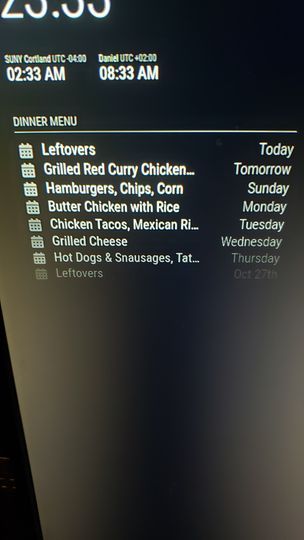
Any tips or suggestions would be most welcome. Thanks!
-
Want to show full-screen images and switch to MM on keypress
I am setting up a MagicMirror and so far I’m just mad that I haven’t done it sooner.
I’d like to get some advice on how to accomplish what I want to do. Mostly, I want the screen to show a slideshow of images but if someone presses a key on an attached keyboard, it would switch to the MagicMirror. I plan to use one of the cheap 3-button macro keyboards for this.
Is this even possible? I’m wondering if a screen saver would work but I suspect that MM disables screen savers (if they’re even available for the RPi).
I would love to hear any suggestions, even just pointers to what I should be looking for.
Thanks!