Can please somebody help me
How can i increase the size of the icons?
Thanks a lot
V
Offline
A New Chapter for MagicMirror: The Community Takes the Lead
Read the statement by Michael Teeuw here.
Read the statement by Michael Teeuw here.
Posts
-
RE: MMM-CalendarExtPlan
-
Show MirrorContent in other browsers
Hi friends,
on my pi i have mm and openhab running.
Accessing from any browser in the lan obenhab via ip:8080 works fine (i can see the dashboards)
Trying to access mm via ip:8081 (8081 is the port from my config) does not work.
Do i need to “switch on” this function with some config task?
Thanks
Regards -
Problems with MMM-CalendarExt2
Hi friends,
among other modules i have running “MMM-CalendarExt2” and “MMM-CalendarExtPlan”.The view from “MMM-CalendarExt2” looks like.
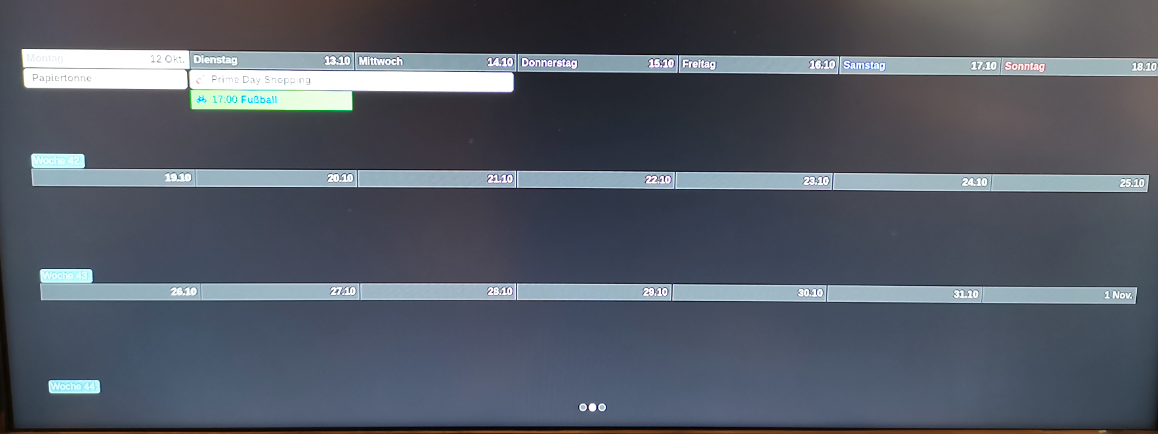
And the view from “MMM-CalendarExtPlan” looks like:
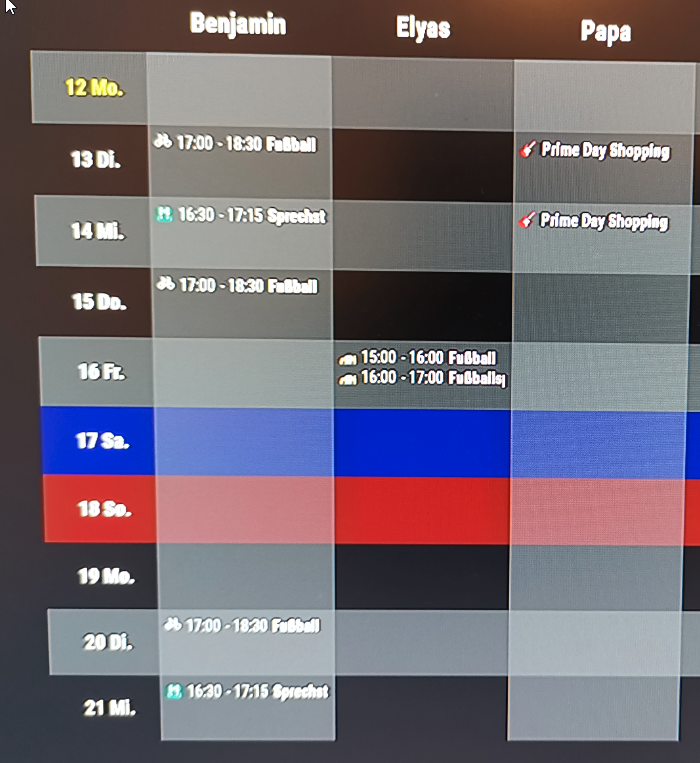
Sometimes CalExt2 shows all the infos from the connected calendars in the config (so same among like ExtPlan), but often it “only” shows a few entries.
Maybe somebody can help me?
Thanks a lot -
RE: MMM-CalendarExt2
Hello all,
one question
I was trying to filter from an ics datas and sign them to other icons, colors and so on…
But unfortunately nothing happend and i am really confused because i am sitting here for days and i really do not know the bug{//MMM-CalendarExt2 module: 'MMM-CalendarExt2', config: { locale: "de-DE", calendars : [ { name: "Ferien Bayern", url: "http://www.ecoline-media.de/ics/bayern_gf.ics", className: "Ferien", icon: "noto-v1:flag-for-germany", }, { name: "Müllabfuhr", url: "http://localhost:8080/modules/abfallkalender.ics", transform: (event)=>{ if (event.title.search("Biotonne") > -1) { // If the event might include "Birthday" in its title, event.icon = "mdi-bio" // Set icon of that event to "fxemoji-birthdaycake" event.className = "AbfallBio" } if (event.title.search("Restmuelltonne") > -1) { // If the event might include "Birthday" in its title, event.icon = "fa-solid:trash" // Set icon of that event to "fxemoji-birthdaycake" event.className = "AbfallRest" } if (event.title.search("Problemabfaelle") > -1) { // If the event might include "Birthday" in its title, event.icon = "emojione-monotone:biohazard" // Set icon of that event to "fxemoji-birthdaycake" event.className = "AbfallProb" } if (event.title.search("Papiertonne") > -1) { // If the event might include "Birthday" in its title, event.icon = "emojione-monotone:newspaper" // Set icon of that event to "fxemoji-birthdaycake" event.className = "AbfallPap" } if (event.title.search("Gelber Sack") > -1) { // If the event might include "Birthday" in its title, event.icon = "fa-solid:trash" // Set icon of that event to "fxemoji-birthdaycake" event.className = "AbfallGelb" } return event // Return that event. },//transform*/ },Can please somebody help me
Thanks a lot -
RE: MMM-CalendarExtPlan
@Sean
Thanks for this module.
Unfortunately i am not able to bring this module to workIn CalExt2 i have (among other calendars) these ones here:
{
					name: "Benjamin",
					url: "https://calendar.google.com/calendarxxxxxxxxxxxxxxxxxxxx0/basic.ics",
					className: "Benjamin",
					icon: "ps-bike",
				  },
Running the module i get the following error
[2020-10-11 21:40:58.074] [ERROR]  WARNING! Could not validate config file. Starting with default configuration. Please correct syntax errors at or above this line: /home/pi/MagicMirror/config/config.js:327
			criteria: [
			^^^^^^^^

SyntaxError: Unexpected identifier
    at wrapSafe (internal/modules/cjs/loader.js:1051:16)
    at Module._compile (internal/modules/cjs/loader.js:1101:27)
    at Object.Module._extensions..js (internal/modules/cjs/loader.js:1166:10)
    at Module.load (internal/modules/cjs/loader.js:981:32)
    at Module._load (internal/modules/cjs/loader.js:881:14)
    at Function.Module._load (electron/js2c/asar.js:769:28)
    at Module.require (internal/modules/cjs/loader.js:1023:19)
    at require (internal/modules/cjs/helpers.js:77:18)
    at loadConfig (/home/pi/MagicMirror/js/app.js:67:12)
    at App.start (/home/pi/MagicMirror/js/app.js:202:3)
At line 327 the “criteria” start from this module
{//MMM-CalendarExtPlan
		  module: "MMM-CalendarExtPlan",
		  position: "bottom_bar",
		  config: {
			maxItems: 100,
			refreshInterval: 60*60*1000, // millisec.
			dateFormat: "MMM D.",
			eventTimeFormat: "HH:mm",
			dayCount: 5,
			fromNow: 0,
			source: "CALEXT2"
			criteria: [
						{
							title: "Benjamin",
							calendars: ["Benjamin"],
						  }
						  /*{
							title: "Müllabfuhr",
							calendars: ["Müllabfuhr"],
						  },
						  {
							title: "Elyas",
							calendars: ["Elyas"],
						  }*/

			],
		  }
		},
I would be glad if you could help me
Thanks a lot
Regards -
RE: Microsoft Teams
Uhhhh
I do not have any deep knowledge from this api stuff.
Based on covid with all this homeschooling stuff, it would be great to see in the mirror, if some of the teachers has shared some new task, attached some new homework or commented something.
Thanks -
Microsoft Teams
Hi Friends,
it there a possibility to integrate MS Teams to the MM?
thanks -
RE: Max! cube system
@pinsdorf
i have a problem with getting connected to MaxCube[2020-09-16 20:55:56.345] [LOG] Triggering MAX upate [2020-09-16 20:55:56.351] [ERROR] Error: getaddrinfo ENOTFOUND 192.xxx.xxx.xxx:80 at GetAddrInfoReqWrap.onlookup [as oncomplete] (dns.js:64:26) { errno: 'ENOTFOUND', code: 'ENOTFOUND', syscall: 'getaddrinfo', hostname: '192.xxx.xxx.xxx:80' } [2020-09-16 20:55:56.360] [ERROR] Whoops! There was an uncaught exception... [2020-09-16 20:55:56.361] [ERROR] Error [ERR_UNHANDLED_ERROR]: Unhandled error. (undefined) at MaxCubeLowLevel.emit (events.js:299:17) at Socket.<anonymous> (/home/pi/MagicMirror/modules/MMM-max/maxcube/maxcube-lowlevel.js:51:10) at Socket.emit (events.js:310:20) at emitErrorNT (internal/streams/destroy.js:92:8) at emitErrorAndCloseNT (internal/streams/destroy.js:60:3) at processTicksAndRejections (internal/process/task_queues.js:84:21) { code: 'ERR_UNHANDLED_ERROR', context: undefined }Do you have an idea want went wrong?
here is my config
{//MMM-max
				module: 'MMM-max',
				position: 'bottom_left',
				header: 'Heizung / Temperatur',  // This is optional
				config: {
				maxIP: '192.xxx.xxx.xxx:80',// See 'Configuration options' for more information.
						}
				},
Thanks a lot
-
RE: MMM-WeatherChart
@lavolp3
ok
this is strange for me
using also modules like “iss live” or “rain map”
I put them in the Top_center and increase the “width and height” datas.
These modules then take there place on the screen (like adjusted to these datas width and heigt)
I will play a around…lets see
thanks -
RE: MMM-WeatherChart
@lavolp3
Works fine
Thanks a lotOne more question
Using the code :> .mmm-weatherchart img{ > width: 1035px; > height: 340px; > }in my custom css it only “zoomed in” the image itself.
But the area on the screen stay the same.
I want to make this img viewable over the hole screen.
Can please somebody help me?
Thanks a lot -
Newbie question OpenHab and MagicMirror
Hi friends,
i have installed Openhab on the same system from the magic mirror (raspi).
Now, trying to start the mm with “pm2 start 0” from the home directory or “npm start” from the MagicMirrror folder, the pi opens the Openhab WebCan please anybody help me?
Sry for the newbie question?
Thanks a lot -
RE: MMM-WeatherChart
Hi friends,
i have seen in the dev mode that the modules gets the png from color from
here:
www.yr.no/place/Germany/Bavaria/Pöcking/meteogram.pngCan i use it also in color in the mm?
Thanks a lot
Regards -
Problems with MMM-FHEM
Hi Friends,
unfortunately i have some problems with the above standing module.
It does not shows anything.
FHEM server ist located on the same device.
Usingnpm start devdoes not show any error
here is my comfig
{//MMM-FHEM
			module: 'MMM-FHEM',
			position: 'top_left',
			config: {
			  host: 'localhost',
			  port: '8083',
			  https: false,
			  devices: [
						  { deviceName: 'MAX_106dd0',
							deviceReadings: [
											  { name: 'temperature', icon: 'wi wi-thermometer', suffix: '°' },
											  /*{ name: 'humidity', icon: 'wi wi-humidity', suffix: '%' },*/
											],
						  },
						  { deviceName: 'MAX_106dd8',
							deviceReadings: [
											  { name: 'temperature', icon: 'wi wi-thermometer', suffix: '°' },
											  /*{ name: 'battery', icon: 'fa fa-battery-half', suffix: '' },*/
											],
						  },
						],
			},
		  },
I know the module is not longer maintanced.
But mayby somebody can help meThanks a lot
Regards -
RE: MM does not start anymore
@sdetweil
I have erased the sd card and i have written a buster image on it
So far everthing works fine
Start know to install the mm again -
RE: MM does not start anymore
@sdetweil
Does not workDoing the other thing…i get an error message
Operation not permitted…also with “sudo” in frontpi@PiMirrorNeu:~/MagicMirror $ rm -rf node_modules/ rm: das Entfernen von 'node_modules/rxjs/internal/operators/filter.d.ts' ist nicht möglich: Die Operation ist nicht erlaubt -
RE: MM does not start anymore
@bhepler
no
i am not aware of this
I only run on mm
Regards -
MM does not start anymore
Hello all,
unfortunately my mm does not start anymorepi@PiMirrorNeu:~ $ pm2 start mm.sh [PM2] Applying action restartProcessId on app [mm](ids: 0,1) [PM2] [mm](0) ✓ [PM2] [mm](1) ✓ [PM2] Process successfully started ┌─────┬─────┬─────────────┬─────────┬─────────┬──────────┬────────┬──────┬───────────┬──────────┬──────────┬──────────┬──────────┐ │ id │ na… │ namespace │ version │ mode │ pid │ uptime │ ↺ │ status │ cpu │ mem │ user │ watching │ ├─────┼─────┼─────────────┼─────────┼─────────┼──────────┼────────┼──────┼───────────┼──────────┼──────────┼──────────┼──────────┤ │ 0 │ mm │ default │ N/A │ fork │ 2109 │ 0s │ 1 │ online │ 0% │ 2.5mb │ pi │ disabled │ │ 1 │ mm │ default │ 2.11.0 │ fork │ 2118 │ 0 │ 32 │ stopped │ 0% │ 0b │ pi │ disabled │ └─────┴─────┴─────────────┴─────────┴─────────┴──────────┴────────┴──────┴───────────┴──────────┴──────────┴──────────┴──────────┘pi@PiMirrorNeu:~ $ pm2 log [TAILING] Tailing last 15 lines for [all] processes (change the value with --lines option) /home/pi/.pm2/pm2.log last 15 lines: PM2 | 2020-04-28T15:13:35: PM2 log: App [mm:1] online PM2 | 2020-04-28T15:13:35: PM2 log: App [mm:1] exited with code [0] via signal [SIGINT] PM2 | 2020-04-28T15:13:35: PM2 log: App [mm:1] starting in -fork mode- PM2 | 2020-04-28T15:13:35: PM2 log: App [mm:1] online PM2 | 2020-04-28T15:13:35: PM2 log: App [mm:1] exited with code [0] via signal [SIGINT] PM2 | 2020-04-28T15:13:35: PM2 log: App [mm:1] starting in -fork mode- PM2 | 2020-04-28T15:13:35: PM2 log: App [mm:1] online PM2 | 2020-04-28T15:13:35: PM2 log: App [mm:1] exited with code [0] via signal [SIGINT] PM2 | 2020-04-28T15:13:35: PM2 log: App [mm:1] starting in -fork mode- PM2 | 2020-04-28T15:13:35: PM2 log: App [mm:1] online PM2 | 2020-04-28T15:13:35: PM2 log: App [mm:1] exited with code [0] via signal [SIGINT] PM2 | 2020-04-28T15:13:35: PM2 log: App [mm:1] starting in -fork mode- PM2 | 2020-04-28T15:13:35: PM2 log: App [mm:1] online PM2 | 2020-04-28T15:13:35: PM2 log: App [mm:1] exited with code [0] via signal [SIGINT] PM2 | 2020-04-28T15:13:35: PM2 log: Script /home/pi/MagicMirror/mm.sh had too many unstable restarts (16). Stopped. "errored"Trying to install update, reports me the following error:
pi@PiMirrorNeu:~/MagicMirror $ git pull && npm install
Bereits aktuell.
npm ERR! code ENOTDIR
npm ERR! syscall scandir
npm ERR! path /home/pi/MagicMirror/node_modules/rxjs/internal/operators/filter.d.ts
npm ERR! errno -20
npm ERR! ENOTDIR: not a directory, scandir '/home/pi/MagicMirror/node_modules/rxjs/internal/operators/filter.d.ts'

npm ERR! A complete log of this run can be found in:
npm ERR!     /home/pi/.npm/_logs/2020-04-28T13_28_36_996Z-debug.log
Can please somebody help me
Thanks