@MMRIZE
Thx for your answer.
But unfortunately the symbols are still not viewable
It looks still like the above standing screenshot
Do you have another idea?
Thx a lot
@MMRIZE
Thx for your answer.
But unfortunately the symbols are still not viewable
It looks still like the above standing screenshot
Do you have another idea?
Thx a lot
Hi all,
i have problems with the symbols by the “MMM-CalendarExt3Agenda”.
A meeting which have some hours of duration => the symbols are shown correctly.
A meeting which takes to complete day => no symbols are shown (please refer to the screenshot)
Can please somebody help me how to solve this topic?
Thx a lot!
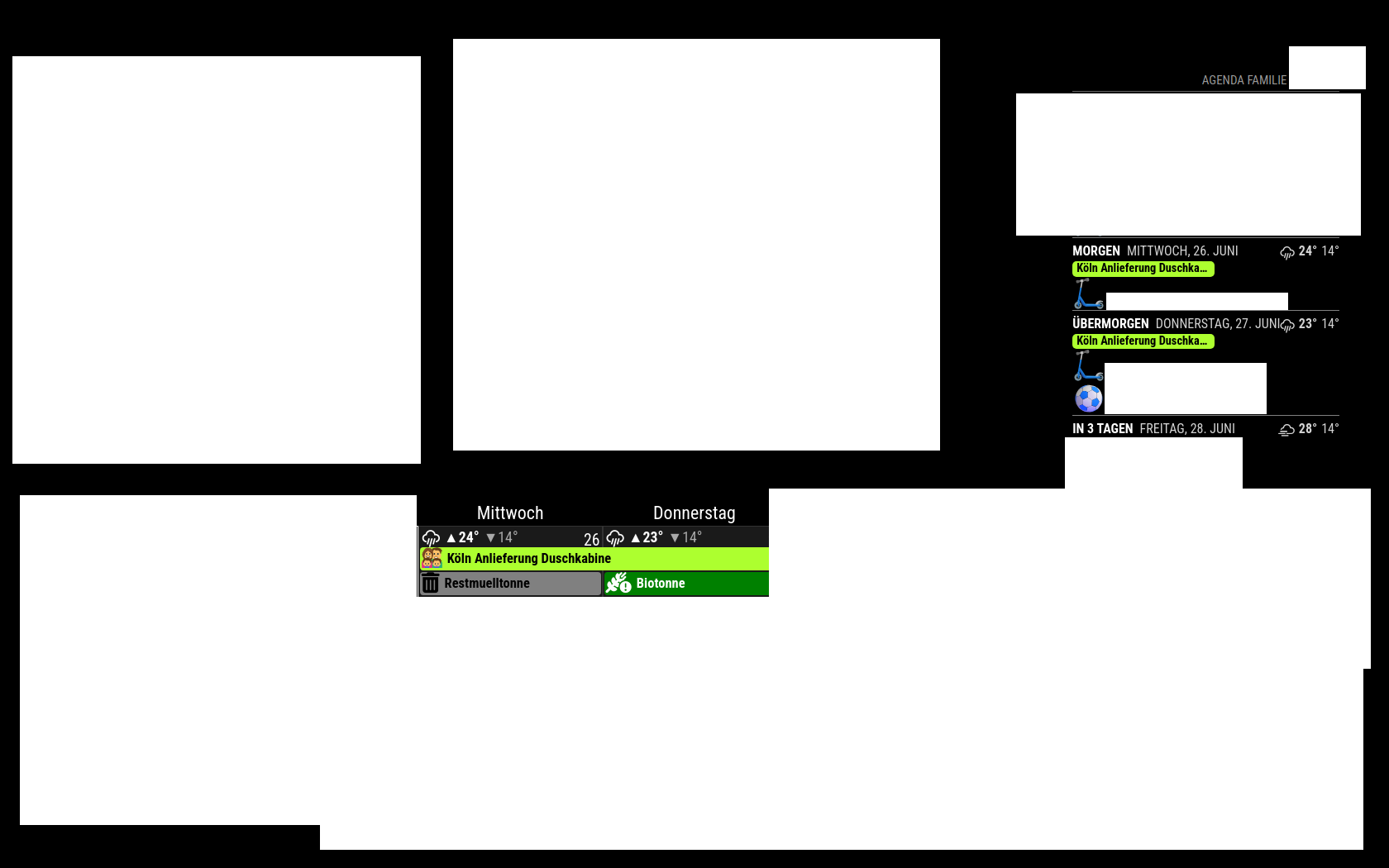 file:///home/warni/Bilder/MM.png
@MMRIZE
Thanks a lot
Works perfect
@MMRIZE
Doing this
Everthing runs fine
Thx
Hi all,
q1
How can i increase the size of the symbols for both modules?
I did not find any working solution in the forum.
q2
While increasing the symbol size, will automatically increase also the height of the rows?
Thx a lot
@kayakbabe
I do not check your answer
While having the default weather module running with “openweathermap” as the source for the datas, everthing runs fine.
And the default module uses according to their css file also the 2.5.
I was also switching the “MMM-OpenWeatherForecast” css to 3.0.
Nothing changed
Thank you
		module: "MMM-OpenWeatherForecast",
		//header: "Wetter Berlin", // Optional header
		position: "top_right",
		classes: "default everyone",
		disabled: false,
		config: {
			apikey: "key",
			latitude: "51.xxxxx",
			longitude: "-0.xxxxx",
			iconset: "2c",
			concise: true,
			showWind: false,
			displayKmhForWind: true,
			animatedIconStartDelay: 2000,
			label_timeFormat: "HH:mm",
			forecastLayout: "tiled",
			forecastHeaderText: "",
			label_sunriseTimeFormat: "HH:mm",
			maxHourliesToShow: 0,
			maxDailiesToShow: 4,
			label_days: ["So", "Mo", "Di", "Mi", "Do", "Fr", "Sa"],
			}
		},
Hi all,
i have problem to bring this module to work (it does not show any content).
CalendarEx3 runs smooth
Here is my code
{
				  module: "MMM-CalendarExt3Agenda",
				  position: "top_left",
				  header: "My Agenda",
				  config: {
					instanceId: "basicCalendar",
					locale: 'de-DE',
					firstDayOfWeek: 1,
					startDayIndex: 0,
					endDayIndex: 5,
					calendarSet: ['Elyas', 'Benjamin'],
				  }
				},
In the debug console i see the following error
MMM-CalendarExt3Agenda.js:186 [CX3A] Module is not prepared yet, wait a while.
getDom @ MMM-CalendarExt3Agenda.js:186
CX3_shared.mjs:1


       Failed to load resource: the server responded with a status of 404 (Not Found)
MMM-CalendarExt3Agenda.js:105 TypeError: Failed to fetch dynamically imported module: http://localhost:8080/modules/MMM-CalendarExt3Agenda/CX3_Shared/CX3_shared.mjs
(anonymous) @ MMM-CalendarExt3Agenda.js:105
MMM-CalendarExt3Agenda.js:116 Uncaught (in promise) TypeError: Cannot read properties of undefined (reading 'prepareMagic')
    at MMM-CalendarExt3Agenda.js:116:20
I do not know what to do
Can please somebody help me?
Thx
Here ue are
@raspberrypi:~/MagicMirror/modules/MMM-OpenWeatherForecast $ git remote -v
origin	https://github.com/Tom-Hirschberger/MMM-OpenWeatherForecast (fetch)
origin	https://github.com/Tom-Hirschberger/MMM-OpenWeatherForecast (push)
@KristjanESPERANTO
no change
Still error
Hi all,
i have problems with bringing iconify symbols to work.
Using the example symbol “flag:us4x3”, it works.
Even if i change the symbol to “flag:us1x1” it works.
But using some kind of other symbols (refer to the example below) it does not work.
They will be not shown
				    {
					//symbol: "gamepad",
					color: "blue",
					url: "https://url/basic.ics",
					name: "Elyas",
					className: "Elyas",
					symbol: "twenmoji-crossed-swords",
					//color: "blue", // <= RECOMMENDED to assign color*/crossed-swords flag:us-4x3noto-v1--crossed-swords
					},
What am i doing wrong here?
Thx for your help
BR
For this is also really spuky
Using the default weather module with my api key
Config “OpenweatherMap”
Everything runs fine
Using the “MMM-OpenWeatherMapForecast” i get the error meassage 401
Strange…
@KristjanESPERANTO
No…hmm i don’t know
Can you guide me?
Thx
...@raspberrypi:~ $ python --version
Python 3.11.2
Python is available
But the installation errors (npm install) remains the same
@sdetweil
Yes i did
But i did not find anything ni the docs with regards to python
I installed it again
warni@raspberrypi:~/MagicMirror/modules/MMM-MyBMW $ npm install

> MMM-MyBMW@1.0.0 preinstall
> echo 'Installing Python Dependencies...' && pip install -r requirements.txt --no-warn-script-location

Installing Python Dependencies...
error: externally-managed-environment

× This environment is externally managed
╰─> To install Python packages system-wide, try apt install
    python3-xyz, where xyz is the package you are trying to
    install.

    If you wish to install a non-Debian-packaged Python package,
    create a virtual environment using python3 -m venv path/to/venv.
    Then use path/to/venv/bin/python and path/to/venv/bin/pip. Make
    sure you have python3-full installed.

    For more information visit http://rptl.io/venv

note: If you believe this is a mistake, please contact your Python installation or OS distribution provider. You can override this, at the risk of breaking your Python installation or OS, by passing --break-system-packages.
hint: See PEP 668 for the detailed specification.
npm ERR! code 1
npm ERR! path /.../MagicMirror/modules/MMM-MyBMW
npm ERR! command failed
npm ERR! command sh -c echo 'Installing Python Dependencies...' && pip install -r requirements.txt --no-warn-script-location

npm ERR! A complete log of this run can be found in:
npm ERR!     /.../.npm/_logs/2024-06-14T14_33_26_887Z-debug-0.log
...

I think the installation did not work
Hi all,
i am trying to get “MMM-MYBMW” to work.
But i think, i forgot to install some additional modules
The error message looks like
[2024-06-14 15:46:46.534] [ERROR] bimmer_connected error: Traceback (most recent call last):
  File ".../MagicMirror/modules/MMM-MyBMW/getMyBMWData.py", line 6, in <module>
    from bimmer_connected.account import MyBMWAccount
ModuleNotFoundError: No module named 'bimmer_connected'
Can please somebody help me?
Thx a lot
Ok
Somehow strange
The API key in the default weather module works
Thx for your feedback
Hi all,
i am getting crazy to bring this module to work.
I always get the Error Message
“Request failed with status 401”
What have i done so far:
api.openweathermap.org/data/2.5/weather?q=peshawar&appid=API_key
Works perfect ( in meanwhile i have 3 api codes = > all of them works fine)
Is there sonthings else what i can do
Thanks for your help
BR