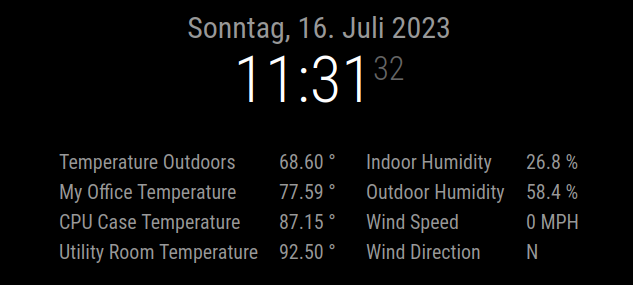
@BKeyport Hi and sorry, my fault.
I added the items in the wrong order to the group.
The main idea is that all items are in a row. Every time the space on the right side is not enough to display the next item a new line starts.
As the maximum width of the module is set to 700px only two items fit in a row. Thats why we get two columns here but the order of the items in the config matters.
In the config i additionally add the classes col1 and col2 to the items. This way i can set the width of the titles in the first column different to the ones of the second column.
I re-arranged the items to the structure of the initial post and increased the width of the titles a little bit:
{
	module: "MMM-ValuesByNotification", // https://github.com/Tom-Hirschberger/MMM-ValuesByNotification
	position: "top_center",
	config: {
		animationSpeed: 0,
		updateInterval: 3600,
		groupPositions: "e",
		itemPositions: "e",
		reuseCount: 99,
		transformerFunctions: {
			degToCompass: (num) => {
				val = ((num/22.5)+.5) | 0;
				arr = ["N","NNE","NE","ENE","E","ESE", "SE", "SSE","S","SSW","SW","WSW","W","WNW","NW","NNW"];
				res = arr[(val % 16)];
				return res;
			},
		},
		groups: [
			{
				items: [
					{
						notification: "WeatherLink",
						classes: "col1",
						values: [
							{
								valueTitle: "Temperature Outdoors",
								valueUnit: "°",
								jsonpath: "data.conditions[0].temp",
								valueFormat: "Number(${value}).toFixed(2)",
							},
						],
					},
					{
						notification: "WeatherLink",
						classes: "col2",
						values: [
							{
								valueTitle: "Indoor Humidity",
								valueUnit: "%",
								jsonpath: "data.conditions[1].hum_in",
							},
						]
					},
					{
						notification: "TempRoom",
						classes: "col1",
						values: [
							{
								valueTitle: "My Office Temperature",
								valueUnit: "°",
								jsonpath: "temperature_f",
								valueFormat: "Number(${value}).toFixed(2)",
							},
						],
					},
					{
						notification: "WeatherLink",
						classes: "col2",
						values: [
							{
								valueTitle: "Outdoor Humidity",
								valueUnit: "%",
								jsonpath: "data.conditions[0].hum",
							},
						]
					},
					{
						notification: "TempCase",
						classes: "col1",
						values: [
							{
								valueTitle: "CPU Case Temperature",
								valueUnit: "°",
								jsonpath: "temperature_f",
								valueFormat: "Number(${value}).toFixed(2)",
							},
						],
					},
					{
						notification: "WeatherLink",
						classes: "col2",
						values: [
							{
								valueTitle: "Wind Speed",
								valueUnit: "MPH",
								jsonpath: "data.conditions[0].wind_speed_last",
								unitSpace: true,
							}
						]
					},
					{
						notification: "WeatherLink",
						classes: "col1",
						values: [
							{
								valueTitle: "Utility Room Temperature",
								valueUnit: "°",
								jsonpath: "data.conditions[1].temp_in",
								valueFormat: "Number(${value}).toFixed(2)",
							},
						],
					},
					{
						notification: "WeatherLink",
						classes: "col2",
						values: [
							{
								valueTitle: "Wind Direction",
								jsonpath: "data.conditions[0].wind_dir_last",
								valueTransformers: ["degToCompass"],
							},
						]
					},
				],
			},
		],
	},
}
.MMM-ValuesByNotification{
  width: 700px;
}

.MMM-ValuesByNotification .vbn .groupWrapper {
  border-radius: 0px;
  border-style: none;
}

.MMM-ValuesByNotification .vbn .itemsWrapper {
  flex-direction: row;
  flex-wrap: wrap;
  column-gap: 30px;
  justify-content: space-around;
}

.MMM-ValuesByNotification .vbn .itemWrapper {
  flex-direction: row;
  justify-content: unset;
}

.MMM-ValuesByNotification .vbn .valueWrapper {
  flex-direction: row;
  column-gap: 10px;
  justify-content: unset;
}

.MMM-ValuesByNotification .vbn .col1 .valueWrapper {
  min-width: 310px;
}

.MMM-ValuesByNotification .vbn .col2 .valueWrapper {
  min-width: 285px;
}

.MMM-ValuesByNotification .vbn .wrap1 {
  justify-content: flex-start;
}

.MMM-ValuesByNotification .vbn .valueTitle {
  text-align: left;
}

.MMM-ValuesByNotification .vbn .col1 .valueTitle {
  min-width: 220px;
}

.MMM-ValuesByNotification .vbn .col2 .valueTitle {
  min-width: 210px;
}