Version 1.7.0
Features
- Add support for Mealie v2 (Households)
Bug Fixes
- Error log output
 Z
Offline
Z
Offline
Features
Bug Fixes
Bug Fixes
@WallysWellies Are you running MM and Mealie on the same computer? And do you have the MMM-Mealie URL set as localhost?
If so, try changing the MMM-Mealie URL to the IP address of the computer it’s running on.
@WallysWellies I opened MM on my desktop (MM runs on a Pi5) and I can see the meal images.
The default image only displays when the meal image cannot load. Maybe the URL of the images isn’t accessible on your laptop?
@WallysWellies I just updated the module to account for token expiration.
It took me a bit to test since I needed to let the token expire to make sure it worked.
Bug Fixes
Features
@WallysWellies Thanks!
I think the token does expire. I just checked the token on my instance and it expires 1 month from now.
I will work on fixing that soon.
I just realized this error occurs when the meal plan is fetched. I wonder if the auth token is expiring.
I normally use an API key but I just tried my username/password and it worked. I’m on Mealie 1.7.0.
Go ahead and restart MM and see if that works.
Are you on the latest MMM-MealieMenu (1.5.0)? I added an additional log when the auth token fetch fails.
@WallysWellies said in MMM-MealieMenu Fetch Error:
@zanix Thanks for your input :)
I made the change after posting and it certainly doesn’t break anything but I have been playing with some other modules too so have restarted the software several times meaning I haven’t given it a chance to error but based on my understanding it probably shouldn’t anymore. I don’t know why it was in the first place though - the Mealie container is on the Pi so it’s using localhost to retrieve data. Who knows.
Hopefully that fixes the issue, let me know otherwise.
I did make one other change because I wanted to see the next week of meals, rather than the remaining meals this week. So I changed this line:
const startOfWeek = this.getFirstDayOfWeek(config.weekStartsOnMonday);to this:
const startOfWeek = moment();It’s pretty crude but if you’re taking suggestions it might be nice to have the option to show x number of days in the future rather than until the end of the week. I don’t believe that’s currently possible natively?
Before now no, but I did just add the fetch fix, updateInterval default to 1 hour, and some additional meal entry options in version 1.5.0.
The options are:
Now you can just set currentWeek to false to get the same effect.
Thanks for the module though, it’s great!
I appreciate that, glad it’s useful!
Bug Fixes
Features
@sdetweil said in MMM-MealieMenu Fetch Error:
@WallysWellies I am a mealie user too.
code looks good. will have to setup and test.
it does get the data frequently
60 seconds by default…
I should probably set the default to something higher. I had it set to 60 seconds while I was developing it.
@sdetweil said in MMM-MealieMenu Fetch Error:
@WallysWellies ok… I’ll watch it running here at 15 min updates…
well, I found it…
in the node helper he sets a flag, to say request is active
if the flag is set when the request comes from the module side
he just returns… does nothing.on error he does not clear the flag
(bad network, host, authorization… places where there is no recovery
those make sense…).catch((error) => { //<--- had and error here ... this.sendSocketNotification("MEALIE_ERROR", { error: "FETCH_ERROR", details: error, identifier: config.identifier }); }) .finally(() => { this.outstandingRequest = false; // < --- only clears flag on success });one could examine the error and reset if its a potentially recoverable error…
I thought finally() runs even after a catch(), dangit.
@WallysWellies said in MMM-MealieMenu Fetch Error:
@sdetweil I’m looking at the node_helper.js file and reading your comments and I’m a little unsure what you are suggesting.
Are you saying I could edit this code block:
.catch((error) => {
        this.sendSocketNotification("MEALIE_ERROR", {
          error: "FETCH_ERROR",
          details: error,
          identifier: config.identifier
        });
      })
to this:
.catch((error) => {
        this.outstandingRequest = false;
        this.sendSocketNotification("MEALIE_ERROR", {
          error: "FETCH_ERROR",
          details: error,
          identifier: config.identifier
        });
      })
?
Sorry, I can fumble my way around code but I’m far from a programmer!
I will get this fix added and set the default updateInterval to something a bit more sane soon. Thanks to all for troubleshooting!
defaultPicture option to change the imageshowDescription to toggle the descriptiongroupId to fetch meal plans for a specific groupMMM-MealieMenu displays weekly meal plans from Mealie.
Mealie is a self-hosted recipe manager and meal planner.
You can import recipes from various websites, generate shopping lists based on ingredients, and create meal plans.
I use it to store recipes and plan out our meals every week.
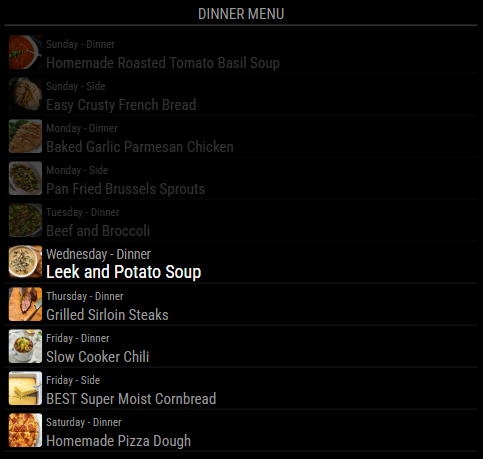
Get MMM-MealieMenu from GitHub. Just follow the installation instructions.
You must have Mealie installed somewhere as it is a self-host app.
Features
Bug Fixes
Bug Fixes
Bug Fixes
Features
Bug Fixes
Features
defaultPicture option to change the imageshowDescription to toggle the descriptiongroupId to fetch meal plans for a specific groupThis is based on the MMM-PaprikaMenu module.
Thanks to kaelspencer for developing that module.
@arus
There is a fix on the Github for this module.
https://github.com/sheyabernstein/MMM-pihole-stats/issues/10
I also created a PR with the fix here https://github.com/sheyabernstein/MMM-pihole-stats/pull/14