MagicMirror Forum
    • Recent
    • Tags
    • Unsolved
    • Solved
    • MagicMirror² Repository
    • Documentation
    • 3rd-Party-Modules
    • Donate
    • Discord
    • Register
    • Login
    A New Chapter for MagicMirror: The Community Takes the Lead
    Read the statement by Michael Teeuw here.

    MMM-PIR-Sensor-Lite does not switch HDMI off

    Scheduled Pinned Locked Moved Unsolved Troubleshooting
    43 Posts 7 Posters 20.4k Views 7 Watching
    Loading More Posts
    • Oldest to Newest
    • Newest to Oldest
    • Most Votes
    Reply
    • Reply as topic
    Log in to reply
    This topic has been deleted. Only users with topic management privileges can see it.
    • D Offline
      dkhorse74 @sdetweil
      last edited by

      @sdetweil
      that did it! Screen goes to sleep… now need to figure out how to get the doppler sensor to “wake-up” the monitor

      S 1 Reply Last reply Reply Quote 1
      • S Offline
        sdetweil @dkhorse74
        last edited by

        @dkhorse74 the module turns it back on… another place for the hdmi port…

        the sensor just signals movement, usually a high signal…

        the module then signals wake up and starts a time…

        no more high signals, then sleep…

        Sam

        How to add modules

        learning how to use browser developers window for css changes

        D 2 Replies Last reply Reply Quote 0
        • D Offline
          dkhorse74 @sdetweil
          last edited by

          @sdetweil
          yep, understood… Still not able to wake up the screen… I tested the sensor with a meter and getting correct input voltage… is there anything I could be missing?

          1 Reply Last reply Reply Quote 0
          • D Offline
            dkhorse74 @sdetweil
            last edited by

            @sdetweil
            Found another post where you shared a link on how to run a PY script to test the sensor:

            https://projects.raspberrypi.org/en/projects/parent-detector/3

            Going to try this later tonight.

            D 1 Reply Last reply Reply Quote 0
            • D Offline
              dkhorse74 @dkhorse74
              last edited by

              Got everything to work perfectly…

              For anyone else who maybe considering using the doppler sensor with a potentiometer, you can follow the “how-to” thread in my initial post BUT use the MMM-PIR-Sensor-Lite module only as it keeps things simple. The other PIR modules may not work with Debian 11 (Bullseye)

              As for the resolution, the mistake was on my end:

              • I had “GND” and “Vout” swapped on the board pins

              • I had to join my raspberry login id to group “gpio”

              The following page is very useful to test the functionality of the sensor before you implement the change to mirror config file (thanks to @sdetweil for posting the link in a different thread):

              https://projects.raspberrypi.org/en/projects/parent-detector/3

              Again thanks to all for the help…

              G 1 Reply Last reply Reply Quote 1
              • G Offline
                grena Module Developer @dkhorse74
                last edited by

                @dkhorse74

                Got everything to work perfectly…

                :thumbs_up:

                The following page is very useful to test the functionality of the sensor before you implement the change to mirror config file (thanks to @sdetweil for posting the link in a different thread): https://projects.raspberrypi.org/en/projects/parent-detector/3

                Yes, You can also run the python script of the module: python3 -u ~/MagicMirror/modules/MMM-PIR-Sensor-Lite/pir.py SENSOR_PIN

                @sdetweil

                another user noticed this only worked for the 1st HDMI port on the pi4.

                Yes, I add this point of vigilance at the beginning of the readme :white_heavy_check_mark:

                S D 2 Replies Last reply Reply Quote 1
                • S Offline
                  sdetweil @grena
                  last edited by

                  @grena a more better thing would be to make a parameter for config so the user can change it without editing your code.

                  Sam

                  How to add modules

                  learning how to use browser developers window for css changes

                  1 Reply Last reply Reply Quote 0
                  • D Offline
                    dkhorse74 @grena
                    last edited by dkhorse74

                    @grena said in MMM-PIR-Sensor-Lite does not switch HDMI off:

                    :thumbs_up: Yes, You can also run the python script of the module: python3 -u ~/MagicMirror/modules/MMM-PIR-Sensor-Lite/pir.py SENSOR_PIN

                    1 Reply Last reply Reply Quote 0
                    • L Offline
                      Laz
                      last edited by

                      I also have a problem displaying the flow from the MMM-RTSPStream module after turning on the screen on the motion sensor. The stream image does not return to the frame of the desired location. Was it possible to somehow defeat the image shift? I know that the module is no longer supported, but maybe who was able to find a solution? ((
                      This is the kind of screen I have after the motion sensor is triggered… (((
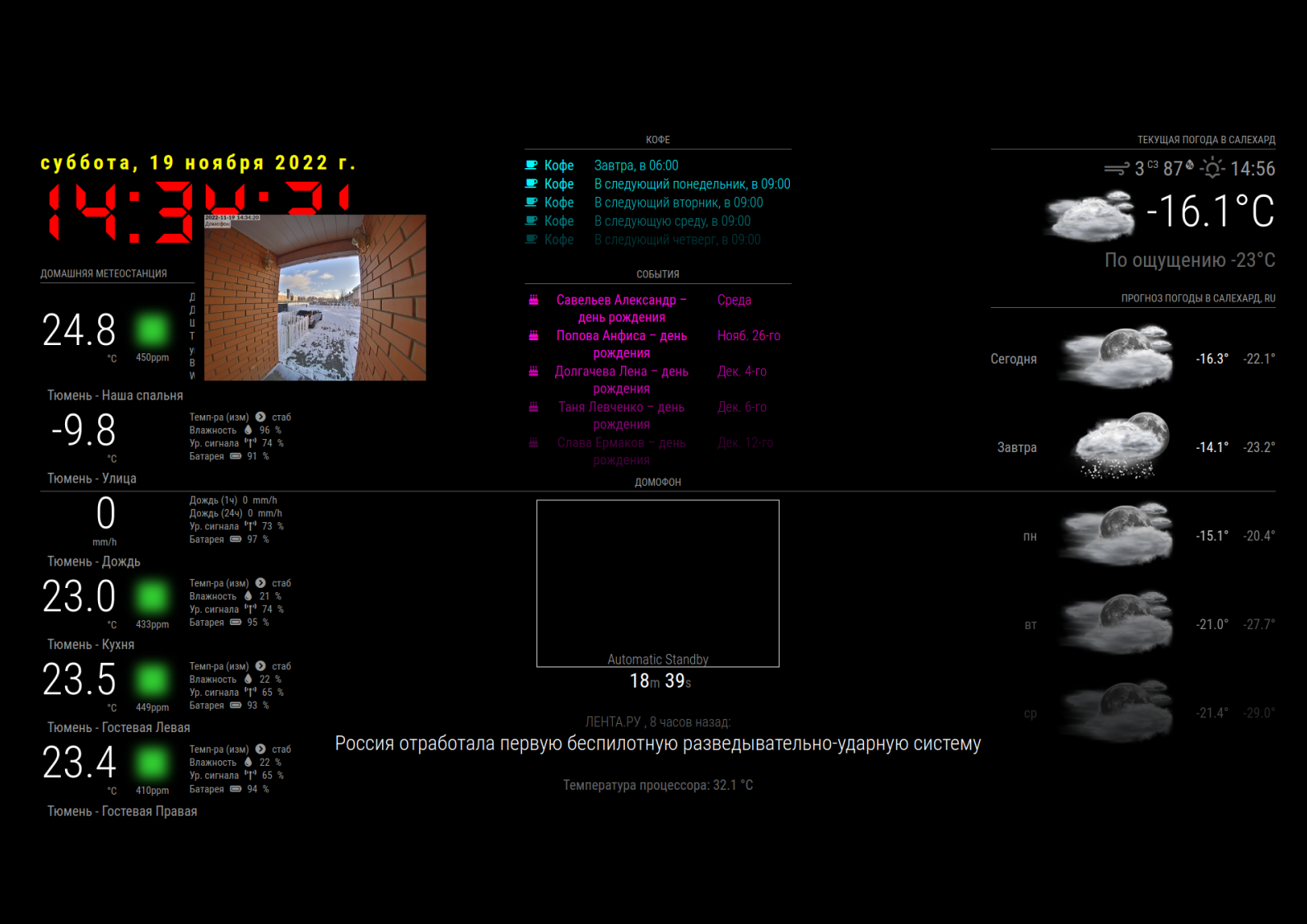
                      PIR_on.png

                      V 1 Reply Last reply Reply Quote 0
                      • V Offline
                        Volkae @Laz
                        last edited by

                        @Laz
                        I have exactly the same Problem using MMM-PIR-Sensor-Lite in combination with MMM-RTSPStream and even by using MMM-PIR-Sensor-Lite in combination with MMM-iFrame.

                        I have no idea…

                        1 Reply Last reply Reply Quote 0
                        • L Offline
                          Laz
                          last edited by

                          Tell me which command to restart MagicMirror? I want to try after turning on the screen to reboot the program itself.
                          Not raspberries, but mirror programs. Maybe it will help return the stream picture to the right place…?

                          S 1 Reply Last reply Reply Quote 0
                          • L Offline
                            Laz
                            last edited by

                            pm2 restart /home/vova/MagicMirror/installers/mm.sh

                            This command overloaded the program MM2 and returned the video stream to the right place in the RTSP frame…)

                            1 Reply Last reply Reply Quote 0
                            • S Offline
                              sdetweil @Laz
                              last edited by

                              @Laz pm2 status

                              will show u the apps that pm2 manages

                              pm2 restart xxxx

                              where xxx is the name or the number of the row

                              pm2 restart MagicMirror
                              or
                              pm2 restart 0

                              or if u have more that one app, like I do, pm2 restart all

                              on Linux, a convention is that passing --help to a command will show u it’s options

                              pm2 --help

                              Sam

                              How to add modules

                              learning how to use browser developers window for css changes

                              L 1 Reply Last reply Reply Quote 0
                              • L Offline
                                Laz @sdetweil
                                last edited by

                                @sdetweil Thank you !!! ))))

                                V 1 Reply Last reply Reply Quote 0
                                • V Offline
                                  Volkae @Laz
                                  last edited by

                                  Maybe there is an alternative using MMM-RTSPStream for showing a live stream from the own webcam…???

                                  1 Reply Last reply Reply Quote 0

                                  Hello! It looks like you're interested in this conversation, but you don't have an account yet.

                                  Getting fed up of having to scroll through the same posts each visit? When you register for an account, you'll always come back to exactly where you were before, and choose to be notified of new replies (either via email, or push notification). You'll also be able to save bookmarks and upvote posts to show your appreciation to other community members.

                                  With your input, this post could be even better 💗

                                  Register Login

                                  • 1
                                  • 2
                                  • 3
                                  • 2 / 3
                                  • First post
                                    Last post
                                  Enjoying MagicMirror? Please consider a donation!
                                  MagicMirror created by Michael Teeuw.
                                  Forum managed by Sam, technical setup by Karsten.
                                  This forum is using NodeBB as its core | Contributors
                                  Contact | Privacy Policy