MagicMirror Forum
    • Recent
    • Tags
    • Unsolved
    • Solved
    • MagicMirror² Repository
    • Documentation
    • 3rd-Party-Modules
    • Donate
    • Discord
    • Register
    • Login
    A New Chapter for MagicMirror: The Community Takes the Lead
    Read the statement by Michael Teeuw here.

    Display different Roomtemperature on MagicMirror

    Scheduled Pinned Locked Moved General Discussion
    31 Posts 4 Posters 14.9k Views 4 Watching
    Loading More Posts
    • Oldest to Newest
    • Newest to Oldest
    • Most Votes
    Reply
    • Reply as topic
    Log in to reply
    This topic has been deleted. Only users with topic management privileges can see it.
    • wishmaster270W Online
      wishmaster270 Module Developer @Xilef
      last edited by

      @Xilef Hi, the list sounds good. I use old mobile chargers to power the boards. I have heard that some had problems with mobile chargers but I had no problems for years now.

      1 Reply Last reply Reply Quote 0
      • XilefX Offline
        Xilef
        last edited by

        Hey im back @wishmaster270

        my parts arrived, and after 5 hours of Troubleshooting i was able to achieve this: (with the help of this tutorial)
        70a039b8-932a-412c-8365-5ccfd77ccd60-image.png

        Now i need just a little bit help to display the Temperature and Humidity on my mirror

        wishmaster270W 1 Reply Last reply Reply Quote 0
        • wishmaster270W Online
          wishmaster270 Module Developer @Xilef
          last edited by wishmaster270

          @Xilef
          Hi,
          thats great news.
          The screenshot shows that you setup the ESP32 and the sensor correctly.
          The main problem is that the ESP now displays a webpage.
          There are two possible ways now. Either you embed the webpage (as it is) into the mirror with a module like MMM-EmbedURL or to get the ESP to display the data machine readable.
          Maybe the sketch you flashed to the ESP already contains a way to read the data in a different format? Which one did you use?

          Edit: I think it is this one, am i right? Then there is no easy way.
          I think i can provide a sketch that is more “mirror friendly” but you will need to set a static IP for the ESP. Is this ok for you?

          You will need to change to your needs:

          • ##ADD_WIFI_SSID_HERE
          • ##ADD_WIFI_PASSWORD_HERE
          • IPAddress local_IP(192, 168, 0, 2);
          • IPAddress gateway(192, 168, 0, 1);
          • IPAddress subnet(255, 255, 255, 0);
          • IPAddress primaryDNS(192, 168, 0, 1);
          #include <WiFi.h>
          #include <Wire.h>
          #include <Adafruit_Sensor.h>
          #include <Adafruit_BME280.h>
          
          const char* ssid     = "##ADD_WIFI_SSID_HERE";
          const char* password = "##ADD_WIFI_PASSWORD_HERE";
          
          //ENTER STATIC IP OF THE ESP32 BOARD HERE
          IPAddress local_IP(192, 168, 0, 2);
          IPAddress gateway(192, 168, 0, 1);
          IPAddress subnet(255, 255, 255, 0);
          IPAddress primaryDNS(192, 168, 0, 1);
          IPAddress secondaryDNS(8, 8, 8, 8);
          
          Adafruit_BME280 bme;
          
          WiFiServer server(80);
          
          void setup()
          {
            Wire.begin();
            Serial.begin(115200);
          
            if (!WiFi.config(local_IP, gateway, subnet, primaryDNS, secondaryDNS)) {
              Serial.println("STA Failed to configure");
            }
          
            Serial.print("Connecting to ");
            Serial.println(ssid);
          
            WiFi.begin(ssid, password);
          
            while (WiFi.status() != WL_CONNECTED) {
              delay(500);
              Serial.print(".");
            }
          
            Serial.println("");
            Serial.println("WiFi connected!");
            Serial.print("IP address: ");
            Serial.println(WiFi.localIP());
            Serial.print("ESP Mac Address: ");
            Serial.println(WiFi.macAddress());
            Serial.print("Subnet Mask: ");
            Serial.println(WiFi.subnetMask());
            Serial.print("Gateway IP: ");
            Serial.println(WiFi.gatewayIP());
            Serial.print("DNS: ");
            Serial.println(WiFi.dnsIP());
          
            if (!bme.begin(0x76);) {
              Serial.println("Couldn't find sensor!");
              while (1);
            }
          
            server.begin();
          }
          
          void loop()
          {
            float temp = bme.readTemperature();
            float tempf = temp * 1.8 + 32;
            float rel_hum = bme.readHumidity();
          
            WiFiClient client = server.available();
            if (client) {
              Serial.println("New Client."); 
              client.println("{");
              client.print("  \"temperature_c\": ");
              client.print(temp);
              client.println(",");
              client.print("  \"temperature_f\": ");
              client.print(tempf);
              client.println(",");
              client.print("  \"humidity\": ");
              client.print(rel_hum);
              client.println(",");
              client.println("  \"error\": false");
              client.println("}");
              client.stop();
              Serial.println("Client disconnected.");
              Serial.println("");
            }
            delay(100);
          }
          

          You can use netcat to fetch the data:

          /bin/nc -w3 THE_IP_OF_THE_ESP 80
          

          And the result will be something like:

          {
             "humidity": 32.61236572265625,
             "temperature_c": 25.50150878906249, 
             "temperature_f": 77.9027158203125, 
             "error": false
          }
          

          This kind of JSON object then can be read by my MMM-Temperature module.

          S XilefX 2 Replies Last reply Reply Quote 1
          • S Offline
            sdetweil @wishmaster270
            last edited by sdetweil

            @wishmaster270 I created a sketch for my 8266, which is a json get. returns current temp and humidity.

            then I just fetch it when I want, similar to what u did

            Sam

            How to add modules

            learning how to use browser developers window for css changes

            wishmaster270W 1 Reply Last reply Reply Quote 0
            • wishmaster270W Online
              wishmaster270 Module Developer @sdetweil
              last edited by

              @sdetweil Hi Sam, i was to slow with editing my post. The Sketch i provided does exactly that.

              1 Reply Last reply Reply Quote 1
              • XilefX Offline
                Xilef @wishmaster270
                last edited by Xilef

                @wishmaster270 i think thats a good way to to it

                @wishmaster270 said in Display different Roomtemperature on MagicMirror:

                but you will need to set a static IP for the ESP

                So i need to set it manually in the router settings?

                @wishmaster270 said in Display different Roomtemperature on MagicMirror:

                #include <WiFi.h>…

                Thats what i need to flash on the esp , right?

                @wishmaster270 said in Display different Roomtemperature on MagicMirror:

                /bin/nc -w3 THE_IP_OF_THE_ESP 80

                idk what that’s supposed to be for

                and you have to explain to me in more detail what I should add to the IPs

                wishmaster270W 1 Reply Last reply Reply Quote 0
                • wishmaster270W Online
                  wishmaster270 Module Developer @Xilef
                  last edited by

                  @Xilef
                  You can but do not have to set the ip in the router. You either need a free address in the range that is NOT used by your routers DHCP server or maybe there is a setting to provide the device always with the same IP in your router. You then can set this IP for the ESP (as it is not used for any other DHCP device in the future then.

                  • the local_ip in the sketch is the IP you choose for the ESP (attention the numbers are separated with , and NOT ..
                  • the gateway is the IP of your router
                  • the subnet depends on your network but 255,255,255,0 will be fine in the most cases
                  • the primaryDNS is usually the IP of you router

                  yes the “include …” part is the one to be flashed to the ESP.

                  After you flashed the new Sketch to the ESP and booted it you can use the nc command to fetch the data from the shell of the mirror. The temperature module uses this command to get the data so you can make sure to see if it works without the need to install the module first.

                  XilefX 1 Reply Last reply Reply Quote 0
                  • XilefX Offline
                    Xilef @wishmaster270
                    last edited by Xilef

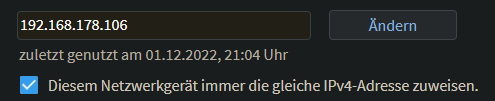
                    @wishmaster270 i guess thats what i need
                    6a5a5502-fd3f-4130-9566-f51875e9421f-image.png
                    “Always assign the same IPv4 address to this network device.”

                    And for the WIFI SSID and Passwort, behind the 2 ## right?

                    and where do i need to use the nc command? on the esp32 or on the raspberry pi?

                    wishmaster270W 1 Reply Last reply Reply Quote 0
                    • wishmaster270W Online
                      wishmaster270 Module Developer @Xilef
                      last edited by

                      @Xilef
                      Perfect. This is the right setting.

                      You need to replace the ##, too.
                      It will look something like:

                      const char* ssid     = "MY_WIFI_NETWORK";
                      const char* password = "123ABC456";
                      
                      IPAddress local_IP(192, 168, 178, 106);
                      IPAddress gateway(192, 168, 178, 1);
                      IPAddress subnet(255, 255, 255, 0);
                      IPAddress primaryDNS(192, 168, 178, 1);
                      IPAddress secondaryDNS(8, 8, 8, 8);
                      

                      To check if everything is set up correctly you can run:

                      /bin/nc -w3 192.168.178.106 80
                      
                      XilefX 1 Reply Last reply Reply Quote 0
                      • XilefX Offline
                        Xilef @wishmaster270
                        last edited by Xilef

                        @wishmaster270 the “/bin/nc -w3 192.168.178.106 80” command on the serial monitor message line?

                        :/

                        5056fdbb-8964-48ca-ada7-749e3b6ac4a2-image.png
                        11163a1a-2a91-4a92-8bc7-342dacec1778-image.png

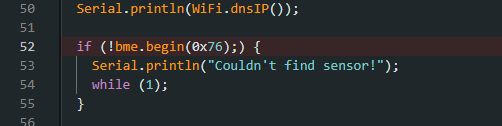
                        I would suggest to remove the clamp behind the ; ??

                        wishmaster270W 1 Reply Last reply Reply Quote 0
                        • wishmaster270W Online
                          wishmaster270 Module Developer @Xilef
                          last edited by

                          @Xilef
                          Sorry, my fault. You need to change line 52 to:

                          if (!bme.begin(0x76)) {
                          

                          Copy&Paste mistake of me

                          XilefX 1 Reply Last reply Reply Quote 0
                          • XilefX Offline
                            Xilef @wishmaster270
                            last edited by Xilef

                            @wishmaster270 i installed the module, but i cant display the data
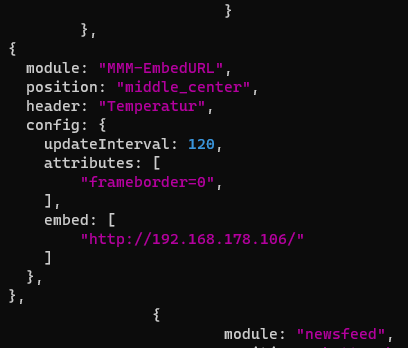
                            4fc4015c-43e3-4a94-bee3-2cbc143df891-image.png
                            what am i doing wrong, ah the esp32 says he couldnt find a sensor, thats weird
                            (edit: i tried another one and it worked this time)

                            wishmaster270W 1 Reply Last reply Reply Quote 0
                            • wishmaster270W Online
                              wishmaster270 Module Developer @Xilef
                              last edited by

                              @Xilef
                              You will need the MMM-Temperature module and not the Embed module as you do not want to display a website but parse the JSON data object and display its contents.
                              The config will look something like:

                              		{
                              			module: "MMM-Temperature",
                              			position: "bottom_right",
                              			config: {
                              				sensors: [
                              					{
                              					    name: "ESP",
                              					    script: "/bin/nc",
                              					    args: "-w3 192.168.178.106"
                                                  			},
                              				]
                              			},
                              		},
                              

                              But you will need to fix the missing sensor first.

                              Can you please check your wiring and use this sketch instead of the other one. I only removed one line which i do not think is the problem but i can not test the sketch at the moment.

                              #include <WiFi.h>
                              #include <Wire.h>
                              #include <Adafruit_Sensor.h>
                              #include <Adafruit_BME280.h>
                              
                              const char* ssid     = "##ADD_WIFI_SSID_HERE";
                              const char* password = "##ADD_WIFI_PASSWORD_HERE";
                              
                              //ENTER STATIC IP OF THE ESP32 BOARD HERE
                              IPAddress local_IP(192, 168, 0, 2);
                              IPAddress gateway(192, 168, 0, 1);
                              IPAddress subnet(255, 255, 255, 0);
                              IPAddress primaryDNS(192, 168, 0, 1);
                              IPAddress secondaryDNS(8, 8, 8, 8);
                              
                              Adafruit_BME280 bme;
                              
                              WiFiServer server(80);
                              
                              void setup()
                              {
                                Serial.begin(115200);
                              
                                if (!WiFi.config(local_IP, gateway, subnet, primaryDNS, secondaryDNS)) {
                                  Serial.println("STA Failed to configure");
                                }
                              
                                Serial.print("Connecting to ");
                                Serial.println(ssid);
                              
                                WiFi.begin(ssid, password);
                              
                                while (WiFi.status() != WL_CONNECTED) {
                                  delay(500);
                                  Serial.print(".");
                                }
                              
                                Serial.println("");
                                Serial.println("WiFi connected!");
                                Serial.print("IP address: ");
                                Serial.println(WiFi.localIP());
                                Serial.print("ESP Mac Address: ");
                                Serial.println(WiFi.macAddress());
                                Serial.print("Subnet Mask: ");
                                Serial.println(WiFi.subnetMask());
                                Serial.print("Gateway IP: ");
                                Serial.println(WiFi.gatewayIP());
                                Serial.print("DNS: ");
                                Serial.println(WiFi.dnsIP());
                              
                                if (!bme.begin(0x76)) {
                                  Serial.println("Couldn't find sensor!");
                                  while (1);
                                }
                              
                                server.begin();
                              }
                              
                              void loop()
                              {
                                float temp = bme.readTemperature();
                                float tempf = temp * 1.8 + 32;
                                float rel_hum = bme.readHumidity();
                              
                                WiFiClient client = server.available();
                                if (client) {
                                  Serial.println("New Client."); 
                                  client.println("{");
                                  client.print("  \"temperature_c\": ");
                                  client.print(temp);
                                  client.println(",");
                                  client.print("  \"temperature_f\": ");
                                  client.print(tempf);
                                  client.println(",");
                                  client.print("  \"humidity\": ");
                                  client.print(rel_hum);
                                  client.println(",");
                                  client.println("  \"error\": false");
                                  client.println("}");
                                  client.stop();
                                  Serial.println("Client disconnected.");
                                  Serial.println("");
                                }
                                delay(100);
                              }
                              
                              XilefX 2 Replies Last reply Reply Quote 0
                              • XilefX Offline
                                Xilef @wishmaster270
                                last edited by

                                @wishmaster270 i connected an other sensor and it doesnt showed me the error message, i will try the sketch tomorrow, the MMM_Temperature module is installed and works, but doesnt show any data, im gona try to fix it tomorrow

                                1 Reply Last reply Reply Quote 0
                                • XilefX Offline
                                  Xilef @wishmaster270
                                  last edited by Xilef

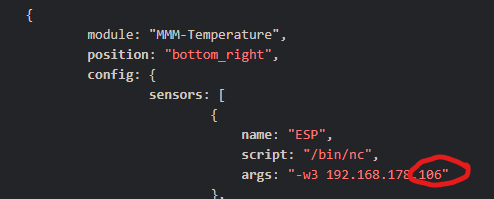
                                  @wishmaster270 everything worked, you just forgot to add the “80” here:
                                  f9b2ea9b-634b-484f-86d7-cfd3e04248ca-image.png

                                  i just set up a second sensor and cloned the module
                                  if i go into my browser and type the two different IPs every sensor shows his own data, but the mirror displays 2times the data of sensor 2:
                                  a7b7719e-9a73-4c45-8a3e-239acb3611d5-image.png

                                  (sensor1: “test” | sensor2: “test2”)
                                  how do i fix that?

                                  wishmaster270W 1 Reply Last reply Reply Quote 0
                                  • wishmaster270W Online
                                    wishmaster270 Module Developer @Xilef
                                    last edited by

                                    @Xilef Perfect. One step further.

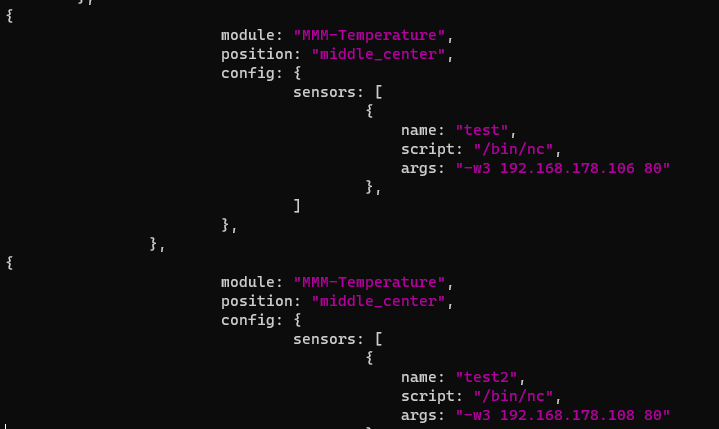
                                    You only need one instance of the module. So your config will look something like:

                                    		{
                                    			module: "MMM-Temperature",
                                    			position: "middle_center",
                                    			config: {
                                    				sensors: [
                                    					{
                                    					    name: "test",
                                    					    script: "/bin/nc",
                                    					    args: "-w3 192.168.178.106 80"
                                                        			},
                                    					{
                                    					    name: "test2",
                                    					    script: "/bin/nc",
                                    					    args: "-w3 192.168.178.108 80"
                                                        			},
                                    				]
                                    			},
                                    		},
                                    
                                    XilefX 1 Reply Last reply Reply Quote 0
                                    • XilefX Offline
                                      Xilef @wishmaster270
                                      last edited by

                                      @wishmaster270 yes, it works

                                      and in the future i can experiment with the MMM-ValuesByNotification Module to customize the module, right?

                                      and a big thank you for the help and the quick reply

                                      wishmaster270W 1 Reply Last reply Reply Quote 0
                                      • wishmaster270W Online
                                        wishmaster270 Module Developer @Xilef
                                        last edited by

                                        @Xilef Perfect.
                                        Yes, the ValuesByNotification module is very powerful but the configuration can be get complex very quickly. You will need my other module CommandToNotification, too.


                                        1 Reply Last reply Reply Quote 0

                                        Hello! It looks like you're interested in this conversation, but you don't have an account yet.

                                        Getting fed up of having to scroll through the same posts each visit? When you register for an account, you'll always come back to exactly where you were before, and choose to be notified of new replies (either via email, or push notification). You'll also be able to save bookmarks and upvote posts to show your appreciation to other community members.

                                        With your input, this post could be even better 💗

                                        Register Login

                                        • 1
                                        • 2
                                        • 2 / 2
                                        • First post
                                          Last post
                                        Enjoying MagicMirror? Please consider a donation!
                                        MagicMirror created by Michael Teeuw.
                                        Forum managed by Sam, technical setup by Karsten.
                                        This forum is using NodeBB as its core | Contributors
                                        Contact | Privacy Policy