MagicMirror Forum
    • Recent
    • Tags
    • Unsolved
    • Solved
    • MagicMirror² Repository
    • Documentation
    • 3rd-Party-Modules
    • Donate
    • Discord
    • Register
    • Login
    A New Chapter for MagicMirror: The Community Takes the Lead
    Read the statement by Michael Teeuw here.

    MMM-OpenWeatherForecast - Replacement for MMM-DarkSkyForecast

    Scheduled Pinned Locked Moved Utilities
    256 Posts 55 Posters 631.8k Views 57 Watching
    Loading More Posts
    • Oldest to Newest
    • Newest to Oldest
    • Most Votes
    Reply
    • Reply as topic
    Log in to reply
    This topic has been deleted. Only users with topic management privileges can see it.
    • BerkSmash1984B Offline
      BerkSmash1984
      last edited by BerkSmash1984

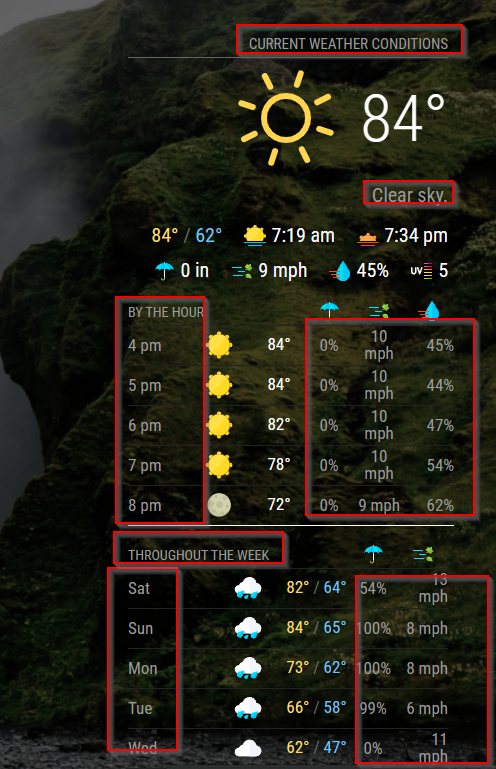
      Awesome module! Question for you: I am using MMM-Wallpaper and some of the text can be hard to read during certain wallpapers. I looked in the MMM-OpenWeatherForecast.css file but did not see an obvious place to change the color for the text highlighted in the red boxes below. I would like to set them to white (#FFFFFF). Can you tell me where in that css to set that? Thanks for your help!
      9b26e7ea-ca02-4335-909f-bbf64836c8ee-image.png

      S 1 Reply Last reply Reply Quote 0
      • S Do not disturb
        sdetweil @BerkSmash1984
        last edited by

        @BerkSmash1984 I do not know … but you can find out thru using the developers console

        see
        https://forum.magicmirror.builders/topic/14862/help-with-a-couple-css-issues?_=1679584458559

        Sam

        How to add modules

        learning how to use browser developers window for css changes

        BerkSmash1984B 1 Reply Last reply Reply Quote 0
        • BerkSmash1984B Offline
          BerkSmash1984 @sdetweil
          last edited by

          @sdetweil
          Thank you! I will dig into it via the dev console

          BKeyportB 1 Reply Last reply Reply Quote 0
          • BKeyportB Offline
            BKeyport Module Developer @BerkSmash1984
            last edited by BKeyport

            @BerkSmash1984

            It uses the defaults from MagicMirror for grey text. I use:

            root {
            	--color-text: #DDD;
            	--color-text-dimmed: #666;
            	--color-text-bright: #fff;
                  --color-background: #000;
            	
            }
            
            /* Originals: 
              --color-text: #999;
              --color-text-dimmed: #666;
              --color-text-bright: #fff;
              --color-background: #000;
            /*

            The "E" in "Javascript" stands for "Easy"

            BKeyportB BerkSmash1984B 3 Replies Last reply Reply Quote 0
            • BKeyportB Offline
              BKeyport Module Developer @BKeyport
              last edited by

              Anyone know how to get the entire table to center within the region? I don’t want to center the contents, only the position of the table being built by the app.

              thanks!

              The "E" in "Javascript" stands for "Easy"

              S 1 Reply Last reply Reply Quote 0
              • S Do not disturb
                sdetweil @BKeyport
                last edited by

                @BKeyport

                position: relative
                either use margin or x and width, margin is easier

                Sam

                How to add modules

                learning how to use browser developers window for css changes

                BKeyportB 1 Reply Last reply Reply Quote 0
                • BKeyportB Offline
                  BKeyport Module Developer @sdetweil
                  last edited by

                  @sdetweil the problem is that I can’t find the right CSS class to apply it to.

                  The "E" in "Javascript" stands for "Easy"

                  S 1 Reply Last reply Reply Quote 0
                  • S Do not disturb
                    sdetweil @BKeyport
                    last edited by sdetweil

                    @BKeyport did u use the dev console to examine the content? click on the element u mean to adjust?
                    https://forum.magicmirror.builders/topic/14862/help-with-a-couple-css-issues?_=1679584458559

                    may not be a class, so you would have to select more … just have to be careful if the table is in a div, in a div… then its ‘size’ and position are relative to the parent (div) …

                    .modulename table {
                    position: relative
                    ...
                    ...
                    }
                    

                    this is my goto for figuring out the selector ( the thing before the { )
                    https://www.w3schools.com/cssref/css_selectors.php

                    look at the css for the form in MMM-Config

                    https://github.com/sdetweil/MMM-Config/blob/main/webform.css

                    selector doesn’t have to start with a class…
                    note in the cheat sheet its ALWAYS selects ALL elements that match

                    Sam

                    How to add modules

                    learning how to use browser developers window for css changes

                    BKeyportB 1 Reply Last reply Reply Quote 0
                    • BKeyportB Offline
                      BKeyport Module Developer @BKeyport
                      last edited by BKeyport

                      @BerkSmash1984 FYI, there’s more ways to make things easier to read - fade the background - or add a background to the modules themselves.

                      Here’s how to add a background to the modules:

                      the .5 is the opacity in this case, I’ve got it set to 50% visible.

                      .module {
                        background-color: rgba(0,0,0,.5); 
                      }
                      

                      The "E" in "Javascript" stands for "Easy"

                      BKeyportB 1 Reply Last reply Reply Quote 0
                      • BKeyportB Offline
                        BKeyport Module Developer @sdetweil
                        last edited by

                        @sdetweil found it. Missing a * on the opening CSS when I did it…

                        .MMM-OpenWeatherForecast * {
                        	box-sizing: border-box;
                        	margin-left: auto;
                        	margin-right: auto;
                        }
                        

                        does it, for anyone else that runs across this.

                        The "E" in "Javascript" stands for "Easy"

                        1 Reply Last reply Reply Quote 0
                        • BKeyportB Offline
                          BKeyport Module Developer @BKeyport
                          last edited by

                          @BerkSmash1984 I’ve also found, in the documentation for MMM-Wallpaper, a “filter” option - If you don’t want to put a background on the modules, you can use this to improve readability.

                          The "E" in "Javascript" stands for "Easy"

                          1 Reply Last reply Reply Quote 1
                          • BerkSmash1984B Offline
                            BerkSmash1984 @BKeyport
                            last edited by BerkSmash1984

                            @BKeyport
                            Thanks for the responses! The filter for MMM-Wallpaper worked perfectly (I actually had values specified already but must have forget when I first setup the module). I dropped the grayscale and brightness down to 0.2 and that seems to be the sweet spot for ensure the default text color is legible, regardless of the background.

                            Thanks again for your help, I really appreciate it!

                            1 Reply Last reply Reply Quote 0
                            • C Offline
                              chris1971
                              last edited by chris1971

                              I started a new setup of and the module was working. After installation of other modules (e.g. google maps) the module isn’t working anymore. I tried to delete and reinstall and got following info:

                              Pi@raspberrypi:~/MagicMirror/modules/MMM-OpenWeatherForecast $ npm install

                              npm WARN old lockfile

                              npm WARN old lockfile The package-lock.json file was created with an old version of npm,

                              npm WARN old lockfile so supplemental metadata must be fetched from the registry.

                              npm WARN old lockfile

                              npm WARN old lockfile This is a one-time fix-up, please be patient…

                              npm WARN old lockfile

                              added 4 packages, and audited 391 packages in 57s

                              1 package is looking for funding

                              run npm fund for details

                              46 vulnerabilities (3 low, 15 moderate, 23 high, 5 critical)

                              To address all issues, run:

                              npm audit fix

                              Run npm audit for details.

                              Any recommendations?

                              S 1 Reply Last reply Reply Quote 0
                              • S Do not disturb
                                sdetweil @chris1971
                                last edited by

                                @chris1971 sadly some modules interfere with others. haven’t seen this combo as a problem before.

                                the messages just mean the module hasn’t been updated in a while…

                                i’d erase the package-lock.json
                                remove the node_modules folder
                                and npm install again

                                ignore the audit message nothing we can do about it.
                                or use the --no-audit parm on the npm install

                                Sam

                                How to add modules

                                learning how to use browser developers window for css changes

                                1 Reply Last reply Reply Quote 0
                                • C Offline
                                  chris1971
                                  last edited by

                                  thanks for the fast reply - do you have some more detailled steps from me as a “newbie”…

                                  S 1 Reply Last reply Reply Quote 0
                                  • S Do not disturb
                                    sdetweil @chris1971
                                    last edited by

                                    @chris1971 no… do exacty what I said… and try again …

                                    look in the logs, open the developers window (crtrl-shift-i on the mm screen keyboard), select the console tab and look for red error messages…

                                    Sam

                                    How to add modules

                                    learning how to use browser developers window for css changes

                                    1 Reply Last reply Reply Quote 0
                                    • C Offline
                                      chris1971
                                      last edited by

                                      o.k. deleted the package-lock.json and node_modules folder. No change…

                                      In which logs do I have to look?

                                      S 1 Reply Last reply Reply Quote 0
                                      • S Do not disturb
                                        sdetweil @chris1971
                                        last edited by

                                        @chris1971 logs, where u start MM and in the developers window as described in last post

                                        Sam

                                        How to add modules

                                        learning how to use browser developers window for css changes

                                        1 Reply Last reply Reply Quote 0
                                        • C Offline
                                          chris1971
                                          last edited by chris1971

                                          After some hours of installation I thought I was fine - all modules worked (but only once). komplett.JPG
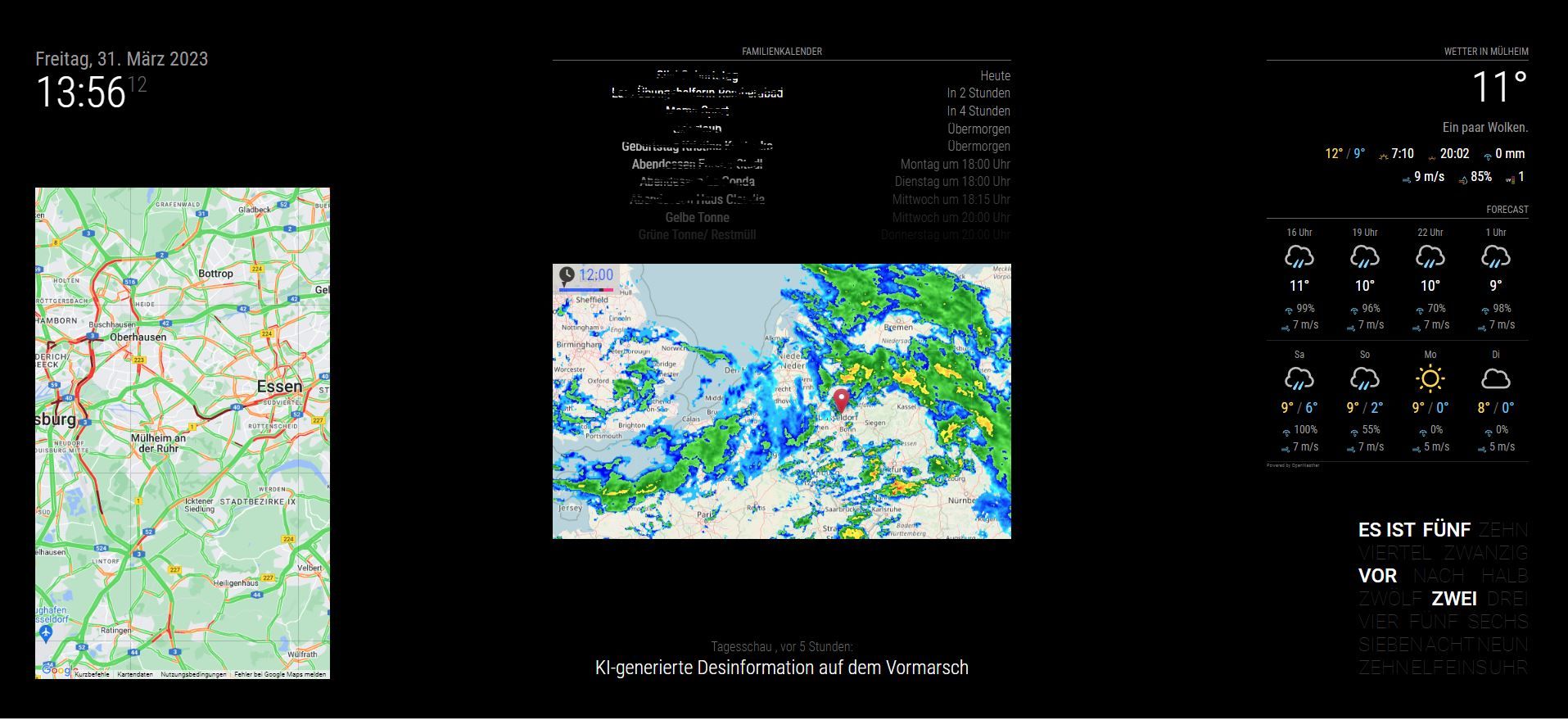
                                          When I restarted the mirror the weather module was not loading anymore…
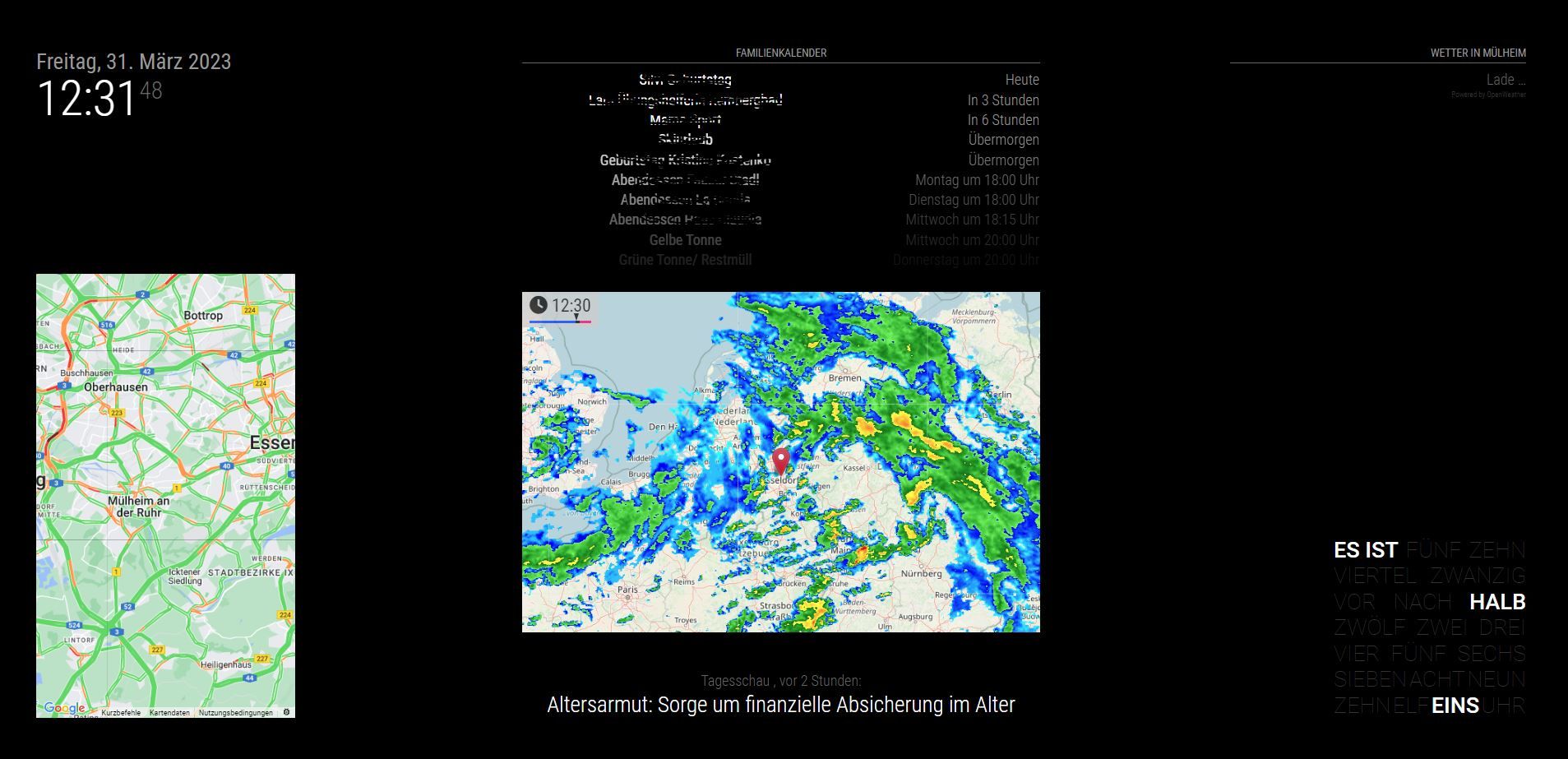
                                          Ohne Wetter.JPG

                                          I got following script after npm start:

                                          pi@raspberrypi:~/MagicMirror $ npm start

                                          magicmirror@2.22.0 start

                                          DISPLAY=“${DISPLAY:=:0}” ./node_modules/.bin/electron js/electron.js

                                          [31.03.2023 14:13.30.165] [LOG] Starting MagicMirror: v2.22.0

                                          [31.03.2023 14:13.30.177] [LOG] Loading config …

                                          [31.03.2023 14:13.30.193] [LOG] Loading module helpers …

                                          [31.03.2023 14:13.30.197] [LOG] No helper found for module: alert.

                                          [31.03.2023 14:13.30.247] [LOG] Initializing new module helper …

                                          [31.03.2023 14:13.30.249] [LOG] Module helper loaded: updatenotification

                                          [31.03.2023 14:13.30.251] [LOG] No helper found for module: clock.

                                          [31.03.2023 14:13.30.480] [LOG] Initializing new module helper …

                                          [31.03.2023 14:13.30.481] [LOG] Module helper loaded: MMM-OpenWeatherForecast

                                          [31.03.2023 14:13.31.255] [LOG] Initializing new module helper …

                                          [31.03.2023 14:13.31.258] [LOG] Module helper loaded: calendar

                                          [31.03.2023 14:13.31.261] [LOG] No helper found for module: MMM-TextClock.

                                          [31.03.2023 14:13.31.344] [LOG] Initializing new module helper …

                                          [31.03.2023 14:13.31.346] [LOG] Module helper loaded: newsfeed

                                          [31.03.2023 14:13.31.348] [LOG] No helper found for module: MMM-RAIN-MAP.

                                          [31.03.2023 14:13.31.358] [LOG] Initializing new module helper …

                                          [31.03.2023 14:13.31.359] [LOG] Module helper loaded: MMM-GoogleMapsTraffic

                                          [31.03.2023 14:13.31.361] [LOG] All module helpers loaded.

                                          [31.03.2023 14:13.31.869] [LOG] Starting server on port 8080 …

                                          [31.03.2023 14:13.31.892] [WARN] You’re using a full whitelist configuration to allow for all IPs

                                          [31.03.2023 14:13.31.940] [ERROR] Whoops! There was an uncaught exception…

                                          [31.03.2023 14:13.31.961] [ERROR] Error: listen EADDRINUSE: address already in use 0.0.0.0:8080

                                          at Server.setupListenHandle [as _listen2] (node:net:1432:16)

                                          at listenInCluster (node:net:1480:12)

                                          at doListen (node:net:1629:7)

                                          at process.processTicksAndRejections (node:internal/process/task_queues:84:21) {

                                          code: ‘EADDRINUSE’,

                                          errno: -98,

                                          syscall: ‘listen’,

                                          address: ‘0.0.0.0’,

                                          port: 8080

                                          }

                                          [31.03.2023 14:13.31.962] [ERROR] MagicMirror² will not quit, but it might be a good idea to check why this happened. Maybe no internet connection?

                                          [31.03.2023 14:13.31.963] [ERROR] If you think this really is an issue, please open an issue on GitHub: https://github.com/MichMich/MagicMirror/issues

                                          [31.03.2023 14:13.33.284] [LOG] Launching application.

                                          MESA-LOADER: failed to retrieve device information

                                          MESA-LOADER: failed to retrieve device information

                                          MESA-LOADER: failed to retrieve device information

                                          …/…/buildtools/third_party/libc++/trunk/include/vector:1425: assertion __n < size() failed: vector[] index out of bounds[1907:0331/141336.327833:ERROR:gpu_process_host.cc(991)] GPU process exited unexpectedly: exit_code=6

                                          MESA-LOADER: failed to retrieve device information

                                          MESA-LOADER: failed to retrieve device information

                                          MESA-LOADER: failed to retrieve device information

                                          …/…/buildtools/third_party/libc++/trunk/include/vector:1425: assertion __n < size() failed: vector[] index out of bounds[1907:0331/141337.916643:ERROR:gpu_process_host.cc(991)] GPU process exited unexpectedly: exit_code=6

                                          MESA-LOADER: failed to retrieve device information

                                          MESA-LOADER: failed to retrieve device information

                                          MESA-LOADER: failed to retrieve device information

                                          …/…/buildtools/third_party/libc++/trunk/include/vector:1425: assertion __n < size() failed: vector[] index out of bounds[1907:0331/141339.068693:ERROR:gpu_process_host.cc(991)] GPU process exited unexpectedly: exit_code=6

                                          [31.03.2023 14:13.55.813] [LOG] Shutting down server…

                                          [31.03.2023 14:13.55.823] [LOG] Stopping module helper: updatenotification

                                          [31.03.2023 14:13.55.825] [LOG] Stopping module helper: MMM-OpenWeatherForecast

                                          [31.03.2023 14:13.55.836] [LOG] Stopping module helper: calendar

                                          [31.03.2023 14:13.55.838] [LOG] Stopping module helper: newsfeed

                                          [31.03.2023 14:13.55.839] [LOG] Stopping module helper: MMM-GoogleMapsTraffic

                                          Any advice? Thanks again…

                                          S 1 Reply Last reply Reply Quote 0
                                          • S Do not disturb
                                            sdetweil @chris1971
                                            last edited by

                                            @chris1971 that means u have another instance of MagicMirror running already

                                            Sam

                                            How to add modules

                                            learning how to use browser developers window for css changes

                                            C 1 Reply Last reply Reply Quote 0

                                            Hello! It looks like you're interested in this conversation, but you don't have an account yet.

                                            Getting fed up of having to scroll through the same posts each visit? When you register for an account, you'll always come back to exactly where you were before, and choose to be notified of new replies (either via email, or push notification). You'll also be able to save bookmarks and upvote posts to show your appreciation to other community members.

                                            With your input, this post could be even better 💗

                                            Register Login

                                            • 1
                                            • 2
                                            • 8
                                            • 9
                                            • 10
                                            • 11
                                            • 12
                                            • 13
                                            • 10 / 13
                                            • First post
                                              Last post
                                            Enjoying MagicMirror? Please consider a donation!
                                            MagicMirror created by Michael Teeuw.
                                            Forum managed by Sam, technical setup by Karsten.
                                            This forum is using NodeBB as its core | Contributors
                                            Contact | Privacy Policy
