MagicMirror Forum
    • Recent
    • Tags
    • Unsolved
    • Solved
    • MagicMirror² Repository
    • Documentation
    • 3rd-Party-Modules
    • Donate
    • Discord
    • Register
    • Login
    A New Chapter for MagicMirror: The Community Takes the Lead
    Read the statement by Michael Teeuw here.

    BirdNET-PI-chart on MM2

    Scheduled Pinned Locked Moved Education
    35 Posts 5 Posters 16.9k Views 5 Watching
    Loading More Posts
    • Oldest to Newest
    • Newest to Oldest
    • Most Votes
    Reply
    • Reply as topic
    Log in to reply
    This topic has been deleted. Only users with topic management privileges can see it.
    • bheplerB Offline
      bhepler Module Developer @lmhmm
      last edited by

      @lmhmm - The key difference will be, IMHO, which data you want to display. If you want to display the chart from the first post from your own BirdNET-Pi installation, then go with the smart web display. My module will display everyone’s BirdNET hits around you, not just your own.

      @thgmirror can probably walk you through setting up the smart web display.

      1 Reply Last reply Reply Quote 0
      • bheplerB Offline
        bhepler Module Developer
        last edited by

        Okay, version 0.1.0 is ready. I think. Give it a go and let me know if you encounter any problems.

        MMM-BirdNET on GitHub

        thgmirrorT 1 Reply Last reply Reply Quote 0
        • thgmirrorT Offline
          thgmirror @bhepler
          last edited by

          @bhepler 404 when I try the link

          bheplerB 1 Reply Last reply Reply Quote 0
          • thgmirrorT Offline
            thgmirror @lmhmm
            last edited by thgmirror

            @lmhmm
            Currently, I’m using an RPI4 with BirdNET-Pi outside in the garden and an RPI3b as MM2. Both are in the same WIFI-net. Best is to use the standard-installation of BirdNET-Pi and to use the recommended names.

            1. install MMM-EasyPix at MM2
            2. add MMM-EasyPix to your config.js with birdnet.png as the name of the picture
            3. add the following code to a file called
              makedownloadbirdnet.py at the root-folder of MM2
              sudo nano makedownloadbirdnet.py
            #!/usr/bin/python
            # coding:utf-8
            #
            import os
            import urllib.request
            import datetime
            
            current_date = datetime.date.today()
            
            url = "http://birdnetpi.local/Charts/Combo-"  + str(current_date) + ".png"
            nix = "/home/pi/MagicMirror/modules/keinbild.png"
            out = "/home/pi/MagicMirror/modules/MMM-EasyPix/pix/birdnet.png"
            
            # Prüfen, ob es bereits eine Datei out im Verzeichnis gibt
            if os.path.exists(out):
            #   alte Datei löschen
                os.remove(out)
            
            # Herunterladen der Datei
            try:
                urllib.request.urlretrieve(url, out)
            except:
                os.system(f'cp "{nix}" "{out}"')
            
            1. Create a small picture with a hint, that a chart is not available, name it keinbild.png and store it in the modules-folder at MM2.
            2. Create a cronjob at MM2:
            * * * * sudo python3 makedownloadbirdnet.py
            
            L 1 Reply Last reply Reply Quote 0
            • L Offline
              lmhmm @thgmirror
              last edited by

              @thgmirror Blimey that’s a comprehensive answer!

              I’ll have to go my homework. I appreciate your comprehensive reply.

              Many thanks,

              Lorraine

              1 Reply Last reply Reply Quote 0
              • bheplerB Offline
                bhepler Module Developer @thgmirror
                last edited by

                @thgmirror - Sorry about that. Somehow, the repository was marked private. I’ve fixed it and it should work for you now.

                L 1 Reply Last reply Reply Quote 0
                • L Offline
                  lmhmm @bhepler
                  last edited by

                  @bhepler hello, I’ve successfully installed your module MMM-BirdNET and set the map to terrain and my Co ordinates etc.

                  So while I get up a nice map, there don’t seem to be any stations or dots showing at all. Just a map.

                  Also there’s no activity, just a map shows and nothing else.

                  Can you advise?

                  Lorraine

                  bheplerB 1 Reply Last reply Reply Quote 0
                  • bheplerB Offline
                    bhepler Module Developer @lmhmm
                    last edited by

                    @lmhmm - Absolutely. Let’s get you fixed up. Could you please post the relevant portion of your config.js? I want to try it on my test system and see if I can duplicate your problem.

                    L 3 Replies Last reply Reply Quote 0
                    • L Offline
                      lmhmm @bhepler
                      last edited by

                      @bhepler Hello Brian,

                      Please see the map and config. I have updated the module also and my mirror is up to date 2.24

                      Lorraine

                      Err not sure how to add the pictures?

                      1 Reply Last reply Reply Quote 0
                      • L Offline
                        lmhmm @bhepler
                        last edited by

                        @bheplerOkay here we go:

                        Config:

                        module: "MMM-BirdNET position:
                        "top_center
                        config: {
                        lat: 54.6633, lon: -3.3680, updateInterval: 3600000, popInterval:
                        30000,
                        dataUrl: “https://birdnet. cornell.edu/map/requeststats/” mapMode:
                        “terrain”
                        markercolor: “Light Blue” markerDistance: 300, //width:
                        “100px”
                        //height:
                        “100px”
                        zoomLevel: 7, //mapurl:
                        null,

                        1 Reply Last reply Reply Quote 0
                        • L Offline
                          lmhmm @bhepler
                          last edited by

                          @bhepler

                          IMG_3644.jpeg

                          I hope that means the photo is up too!

                          Lorraine

                          L bheplerB 2 Replies Last reply Reply Quote 0
                          • L Offline
                            lmhmm @lmhmm
                            last edited by

                            @lmhmm

                            Hi just wondered if you’d worked out why I’ve got no stations or feed just a map?

                            Thanks,

                            Lorraine

                            mumblebajM 2 Replies Last reply Reply Quote 0
                            • mumblebajM Offline
                              mumblebaj Module Developer @lmhmm
                              last edited by

                              @lmhmm Your config looks weird. You missing a bunch of commas.
                              Also, I think you may be getting the following error in the Developers Console (ctrl+shift+i). You can filter on MMM-BirdNET and see if you see the below error.

                              bec18c13-1d46-477f-bd84-a71167d5f2be-image.png

                              Check out my modules at: https://github.com/mumblebaj?tab=repositories
                              Check my blog-post: https://mumblebaj.xyz/
                              Check my MM Container: https://hub.docker.com/repository/docker/mumblebaj/magicmirror/general

                              1 Reply Last reply Reply Quote 0
                              • mumblebajM Offline
                                mumblebaj Module Developer @lmhmm
                                last edited by

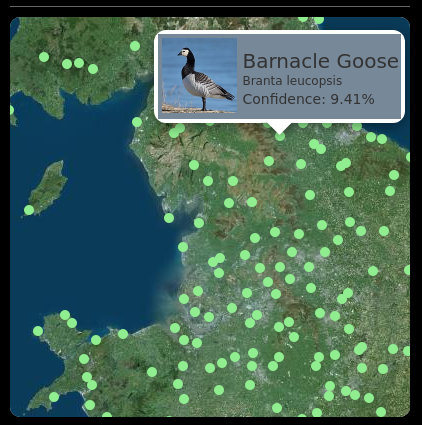
                                @lmhmm Also, check the dataUrl that you have. I changed it to the one in the module Github and then it worked fine.
                                4e156b7d-2d37-465a-8158-a0f50320e4dd-image.png

                                Check out my modules at: https://github.com/mumblebaj?tab=repositories
                                Check my blog-post: https://mumblebaj.xyz/
                                Check my MM Container: https://hub.docker.com/repository/docker/mumblebaj/magicmirror/general

                                1 Reply Last reply Reply Quote 0
                                • bheplerB Offline
                                  bhepler Module Developer @lmhmm
                                  last edited by

                                  @lmhmm - My apologies for the delay in responding. I’ve been out of the country for the past couple of weeks. I’ll get to your issue this weekend.

                                  1 Reply Last reply Reply Quote 0
                                  • bheplerB Offline
                                    bhepler Module Developer
                                    last edited by

                                    Hmm. It appears that the BirdNET website is down at the present time. There’s not much I can do about that. Which is weird, as it was definitely working yesterday and earlier today.

                                    As soon as it comes up, I’ll troubleshoot the config that @lmhmm posted.

                                    L 1 Reply Last reply Reply Quote 0
                                    • L Offline
                                      lmhmm @bhepler
                                      last edited by

                                      @bhepler

                                      So maybe I’ve got the wrong url? Can you advise the correct one? I thought I’d copied it direct? The code is my phone’s interpretation from a picture. There are no config errors as my mirror runs okays. It seems it’s maybe the url.

                                      Please advise,

                                      Thank you, I really appreciate your help,

                                      Lorraine

                                      bheplerB 1 Reply Last reply Reply Quote 0
                                      • bheplerB Offline
                                        bhepler Module Developer @lmhmm
                                        last edited by bhepler

                                        @lmhmm - The good news is that BirdNET appears to be back up. The better news is that if you do not include the dataUrl parameter, the default value should just make it work without issue. For example, here is my config that I am currently using for testing:

                                        {
                                        	module: "MMM-BirdNET",
                                        	position: "bottom_left",
                                        	config: {
                                        		popInterval: 15 * 1000,
                                        		popDelay: 2 * 1000,
                                        		markerColor: 'IndianRed',
                                        	}
                                        },
                                        

                                        I looked at the config snippet you posted and the immediate thing I noticed is that you do not appear to have a comma after the URL you specified for the dataUrl parameter. If that is the case, then all sorts of weird things could happen.

                                        I suggest that you copy & paste the config.js snippet I included above into your config.js and work from there. The lat & lon parameters you included in your post look good. You should be able to include those without issue. You’re pretty close to having it work the way you want. We should be able to get you up & running with little hassle.

                                        L 1 Reply Last reply Reply Quote 0
                                        • thgmirrorT thgmirror referenced this topic on
                                        • L Offline
                                          lmhmm @bhepler
                                          last edited by

                                          @bhepler Hello Brian,

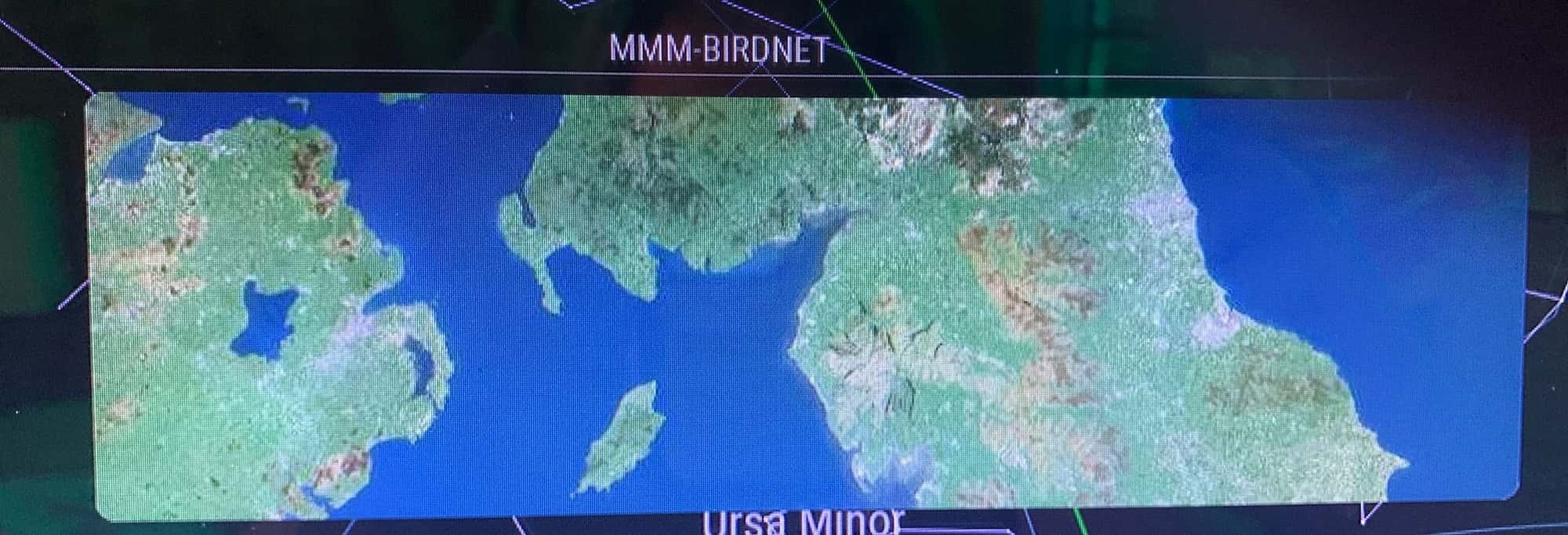
                                          After installing the latest version and removing the data url it now works! I just need to limit it to the area I particularly want rather than all Britain.

                                          Many thanks, it’s a joy,

                                          Lorraine
                                          1 Reply Last reply Reply Quote 1

                                          Hello! It looks like you're interested in this conversation, but you don't have an account yet.

                                          Getting fed up of having to scroll through the same posts each visit? When you register for an account, you'll always come back to exactly where you were before, and choose to be notified of new replies (either via email, or push notification). You'll also be able to save bookmarks and upvote posts to show your appreciation to other community members.

                                          With your input, this post could be even better 💗

                                          Register Login

                                          • 1
                                          • 2
                                          • 2 / 2
                                          • First post
                                            Last post
                                          Enjoying MagicMirror? Please consider a donation!
                                          MagicMirror created by Michael Teeuw.
                                          Forum managed by Sam, technical setup by Karsten.
                                          This forum is using NodeBB as its core | Contributors
                                          Contact | Privacy Policy

