MagicMirror Forum
    • Recent
    • Tags
    • Unsolved
    • Solved
    • MagicMirror² Repository
    • Documentation
    • 3rd-Party-Modules
    • Donate
    • Discord
    • Register
    • Login
    A New Chapter for MagicMirror: The Community Takes the Lead
    Read the statement by Michael Teeuw here.

    multiple modules in a region

    Scheduled Pinned Locked Moved Unsolved Troubleshooting
    42 Posts 5 Posters 20.1k Views 6 Watching
    Loading More Posts
    • Oldest to Newest
    • Newest to Oldest
    • Most Votes
    Reply
    • Reply as topic
    Log in to reply
    This topic has been deleted. Only users with topic management privileges can see it.
    • R Offline
      roth_nj @sdetweil
      last edited by

      @sdetweil

      hi sam. first off, thanks for the reply and all the work you do on this. I’ve been in it for about 2 weeks now and reading all kinds of threads getting myself familiar with it and see your posts all over the place trying to help

      can you eleborate on what you mean by “doesn’t honor the regions”?

      I can post a couple screen grabs but you’ll have to be patient. the forum limits posts/pics per post cause I just registered.

      the first pic there I have the clock/weather/weather spread out across the top and the second they are all stacked in the left. the pic and calendar stay the same and the calendar ends up on top of the weather modules on the left
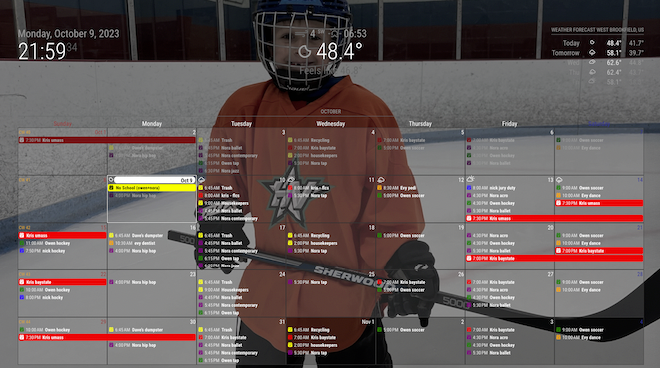
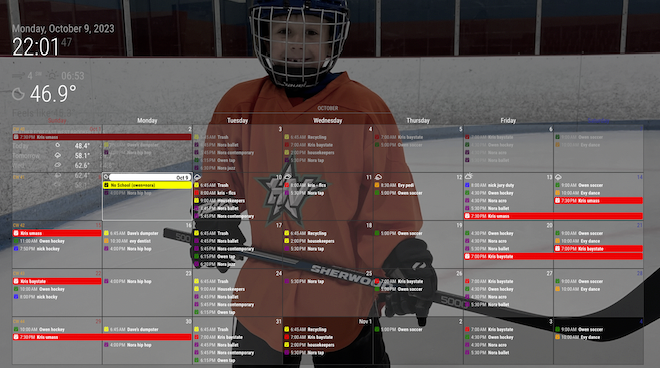
      38877661-5d76-44d7-a346-5d77c0e62c7c-image.png

      e200584f-cd8f-4211-bc6d-cde9921f9b93-image.png

      M 1 Reply Last reply Reply Quote 0
      • R Offline
        roth_nj
        last edited by

        in these 2 pictures I have the clock/weather/weather stacked together. in the first one, they are in the top_left region and the calendar is in the top_center. in the second the 3 are in the top_bar and the calendar is in the top_center. the only reason why I’m asking what you mean with it not honoring the region’s, is to me it looks like its both moving around in them and sizing appropriately to respect other modules [depending on where they are].
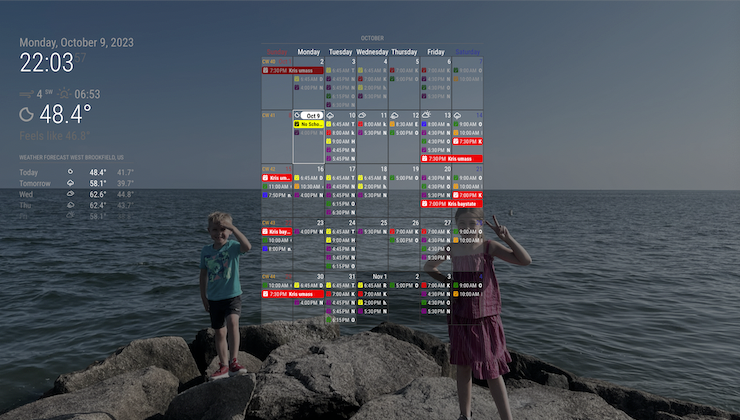
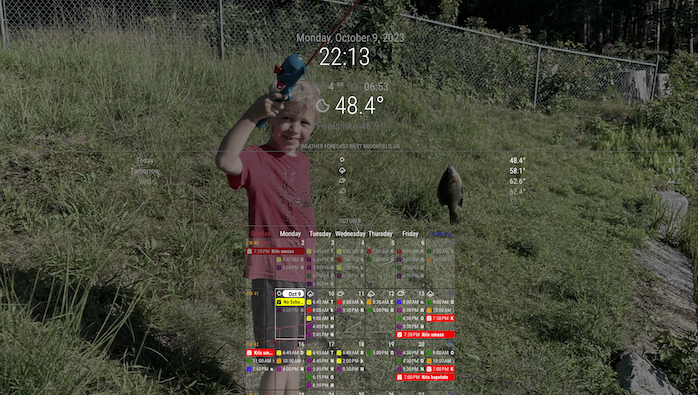
        ee016fd5-4221-4d2a-91c8-71cb0f9a37bb-image.png

        87e00b11-46a6-4ee2-80db-592733f4f6e3-image.png

        1 Reply Last reply Reply Quote 0
        • BKeyportB Offline
          BKeyport Module Developer @sdetweil
          last edited by BKeyport

          @sdetweil that being said, with a bit of CSS changes, you can get the calendar to grow quite a bit.

          I set mine to top_center, and use the following CSS to make it take up most of my center region and adjust it’s colors, cell sizes, etc…

          /* CalendarExt3 */
          .CX3 {
            --celllinecolor: #666;
            --cellbgcolor: rgba(0, 0, 0, 0.5);
            --cellheaderheight: 25px;
            --cellfooterheight: 2px;
            --defaultcolor: #FFF;
            --eventheight: calc(var(--fontsize) + 4px);
            --totalheight: calc(var(--eventheight) * var(--maxeventlines));
            --displayEndTime: none;
            --displayWeatherTemp: none;
            font-size: var(--fontsize);
            color: var(--defaultcolor);
            line-height: calc(var(--eventheight));
            min-width: 950px; 
          }
          

          With a little bit of work, and not putting anything in the right regions, you get the 2/3rds 1/3rd effect of Dakboard.

          The "E" in "Javascript" stands for "Easy"

          1 Reply Last reply Reply Quote 0
          • M Offline
            MMRIZE @roth_nj
            last edited by

            @roth_nj
            If you have a sketch (even with a hand), I may help you.

            R 2 Replies Last reply Reply Quote 0
            • M Offline
              MMRIZE @roth_nj
              last edited by MMRIZE

              @roth_nj
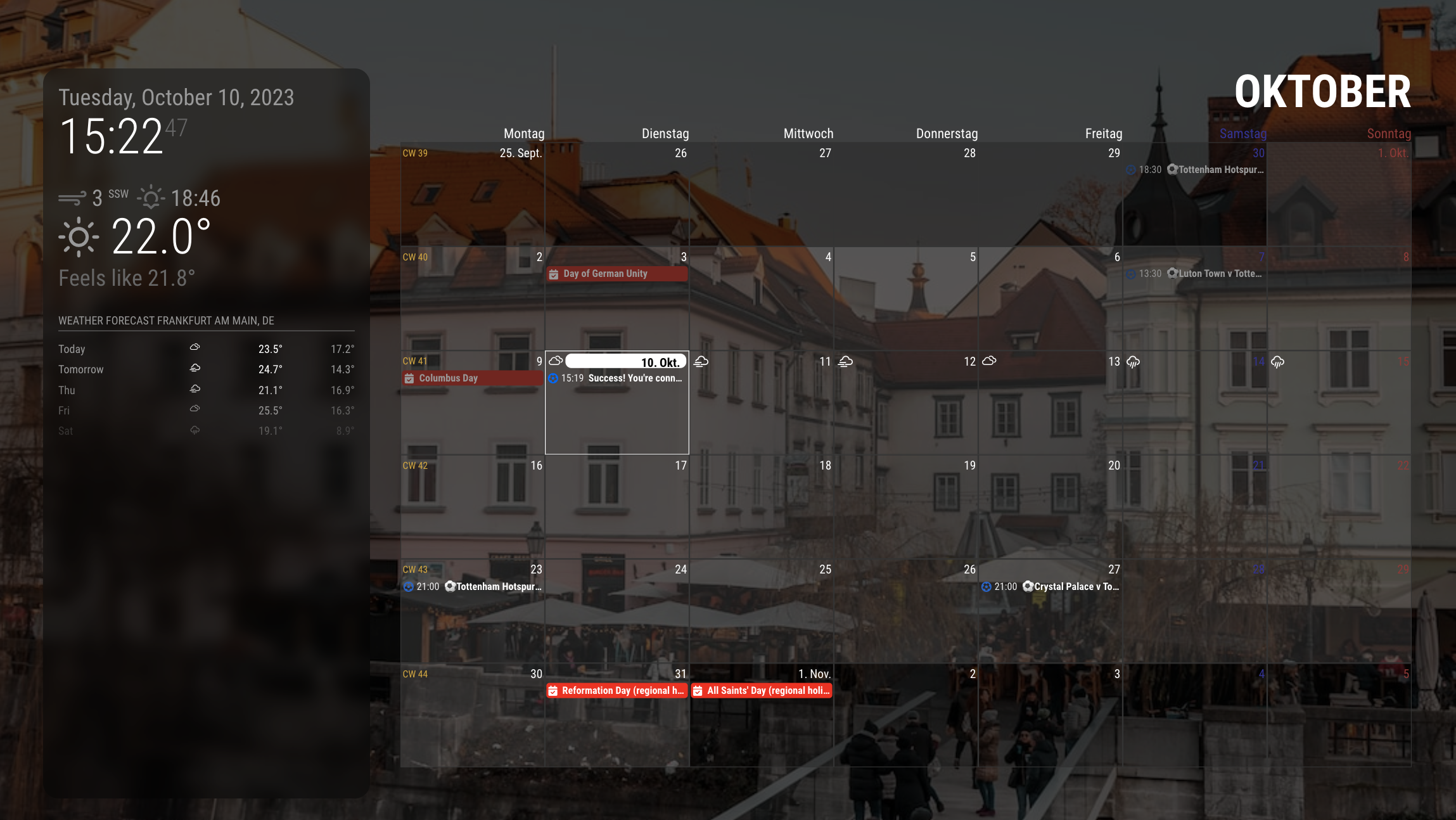
              image

              Is this similar to what you wanted? (DAKBoard style)

              .region.top.left {
                width: calc(25% - 60px);
                backdrop-filter: blur(10px) brightness(60%) grayscale(30%) drop-shadow(4px 4px 10px black);
                padding: 20px;
                border-radius: 20px;
                height: calc(100vh - 160px);
              }
              
              .region.top.right {
                width: calc(75% - 20px);
              }
              
              .region.center {
                display: none;
              }
              
              .module.MMM-CalendarExt3 .module-header {
                font-weight: bold;
                font-size: 300%;
                color: white;
                line-height: 100%;
                border-bottom: none;
              }
              

              I use only 3 regions. top_left top_right, and fullscreen_below.

              R 1 Reply Last reply Reply Quote 0
              • R Offline
                roth_nj @MMRIZE
                last edited by

                @MMRIZE

                this is the dakboard calendar that my wife wants. ive shown here several others (examples of both from dakboard and MM) and she likes this layout the best. i do agree its pretty clean looking. as stated before, it is essentially photos on the left 1/3rd and a calendar on the right 2/3rds in landscape view with some light modules on top of the pictures. im sure youve seen the pic floating around a lot.

                ive searched and read a lot on this and thats why i was stepping down the route of trying to get the modules into certain regions then going to try to mode with the css.
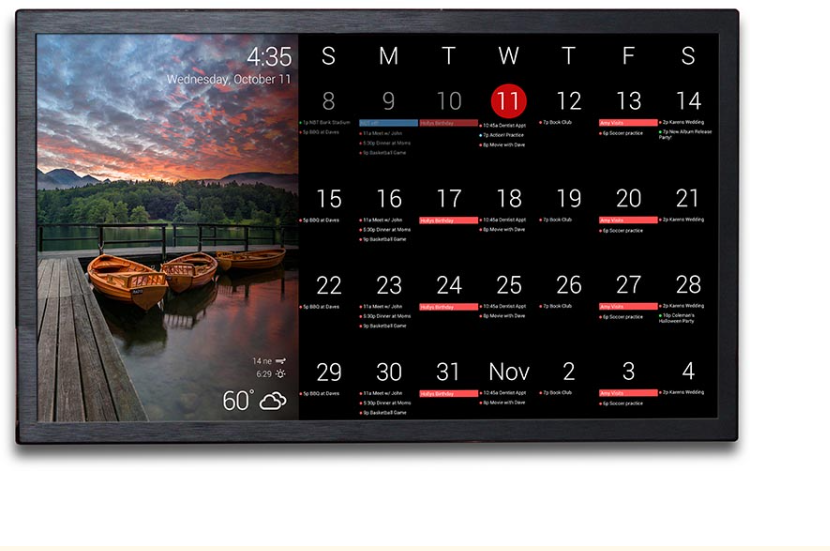
                549c3d40-b8b4-4971-965f-f08d2fd8bd6d-image.png

                M 1 Reply Last reply Reply Quote 0
                • R Offline
                  roth_nj @MMRIZE
                  last edited by

                  @MMRIZE @sdetweil

                  heres an idea: can a script be written that runs 2 instances of MM into 1 display at the same time? one being 1/3 of the screen and the other being the rest (or other 2/3rds)? then one instance of MM can run pictures fullscreen and the other can run the calendar full screen as well on its partition?

                  also, sorry if theres a few different dicussions going on at the same time now. with having to wait for posts to get approved theres a bit of a lag and its probably getting messy keeping thought streams straight now

                  M S 2 Replies Last reply Reply Quote 0
                  • M Offline
                    MMRIZE @roth_nj
                    last edited by

                    @roth_nj
                    There is no way to do so.
                    However, I think mimicking DAKBoard style to MM with some CSS juggling.

                    1 Reply Last reply Reply Quote 0
                    • S Offline
                      sdetweil @roth_nj
                      last edited by

                      @roth_nj said in multiple modules in a region:

                      with having to wait for posts to get approved

                      I am the one that reviews and approves posts… until you get a reputation of 2 or above…

                      rep is increases if someone likes your post(s). generally because you contributed something.

                      Sam

                      How to add modules

                      learning how to use browser developers window for css changes

                      1 Reply Last reply Reply Quote 0
                      • R Offline
                        roth_nj @MMRIZE
                        last edited by

                        @MMRIZE

                        that looks good and gives me an idea of something to try…

                        are there any other modules that post pictures to a region instead of full screen?

                        S 1 Reply Last reply Reply Quote 0
                        • S Offline
                          sdetweil @roth_nj
                          last edited by

                          @roth_nj said in multiple modules in a region:

                          are there any other modules that post pictures to a region instead of full screen?

                          you can try them…

                          i spent a lot of time on MMM-ImagesPhotos in fullscreen to get the aspect ratios correct as neither of the built in CSS settings (cover/contain) work properly (imho)

                          https://github.com/sdetweil/MMM-ImagesPhotos , but you can try it in other positions

                          Sam

                          How to add modules

                          learning how to use browser developers window for css changes

                          1 Reply Last reply Reply Quote 0
                          • M Offline
                            MMRIZE @roth_nj
                            last edited by

                            @roth_nj
                            similar?
                            mimic

                            R 1 Reply Last reply Reply Quote 0
                            • R Offline
                              roth_nj @MMRIZE
                              last edited by

                              @MMRIZE said in multiple modules in a region:

                              @roth_nj
                              similar?
                              mimic

                              that right there would be amazing

                              M 1 Reply Last reply Reply Quote 0
                              • M Offline
                                MMRIZE @roth_nj
                                last edited by MMRIZE

                                @roth_nj
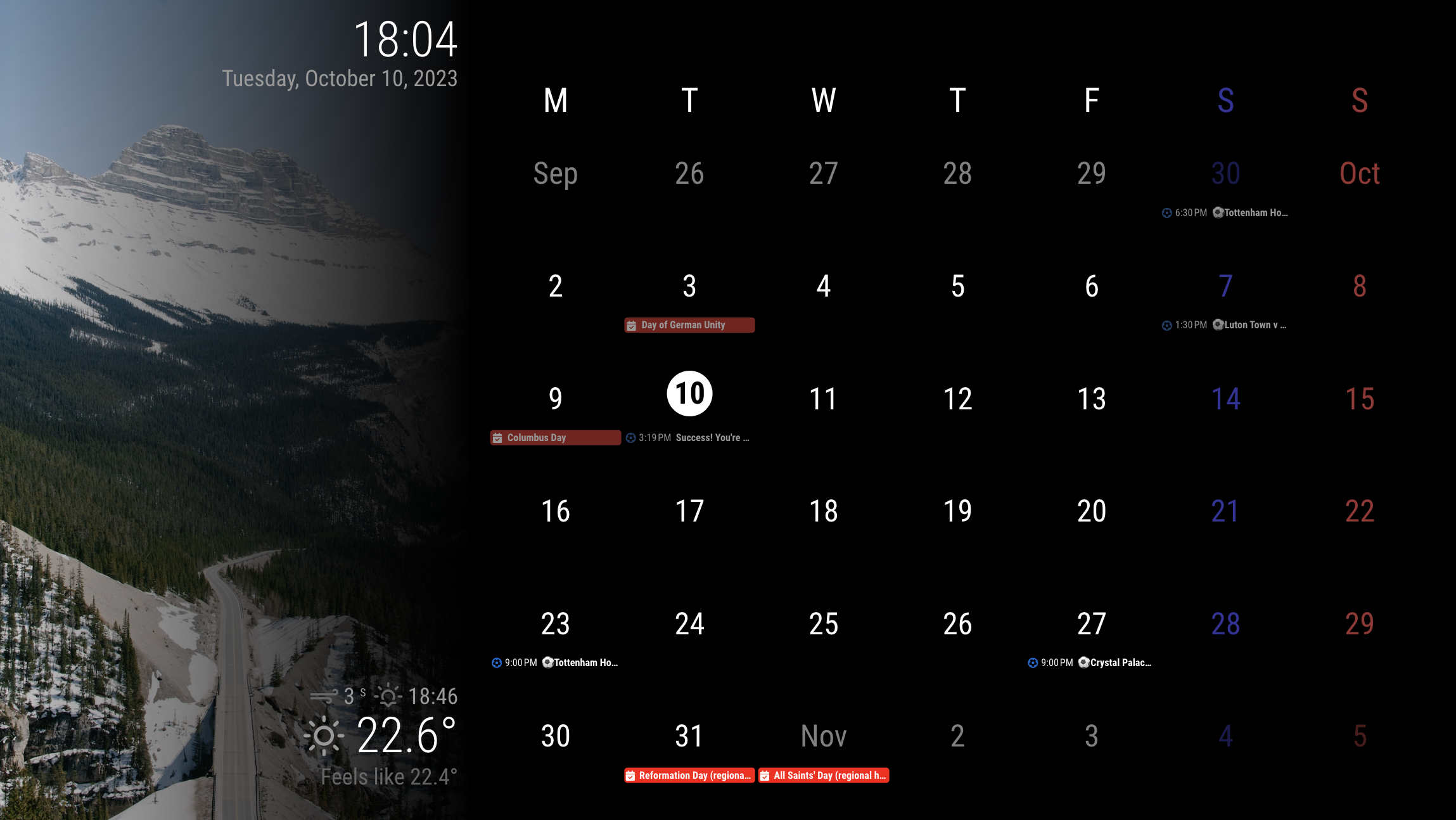
                                This would be just what you looked at in the previous screenshot.
                                Only for those modules on the screen, the CSS is severely overridden. So when you add additional modules, you should carefully handle them.
                                It is designed for resolution 1920 * 1080 horizon screen.

                                config

                                modules: [
                                	{
                                		module: "alert",
                                	},
                                	{
                                		module: "clock",
                                		position: "top_left",
                                		config: {
                                			displaySeconds: false,
                                			sendNotifications: false,
                                		},
                                	},
                                	{
                                		module: "calendar",
                                		//position: "top_left",
                                		config: {
                                			broadcastEvents: true,
                                			broadcastPastEvents: true,
                                			maximumEntries: 99,
                                			calendars: [
                                				{
                                					symbol: "calendar-check",
                                					url: "https://ics.calendarlabs.com/76/mm3137/US_Holidays.ics",
                                					color: "red",
                                				},
                                
                                				{
                                					symbol: "calendar-check",
                                					url: "https://calendar.google.com/calendar/ical/ko.german.official%23holiday%40group.v.calendar.google.com/public/basic.ics",
                                					color: "red",
                                				},
                                				{
                                					symbol: "futbol",
                                					url: "webcal://ics.ecal.com/ecal-sub/65254bc972b4f3000d0051df/Tottenham%20Hotspur%20FC.ics",
                                					color: "#0066CC",
                                				}
                                			]
                                		}
                                	},
                                	{
                                		module: "weather",
                                		position: "top_right",
                                		config: {
                                			weatherProvider: "openweathermap",
                                			type: "current",
                                			location: "Frankfurt",
                                			apiKey: "..."
                                		}
                                	},
                                	{
                                		module: "MMM-CalendarExt3",
                                		position: "bottom_bar",
                                		config: {
                                			locale: "en-US",
                                			mode: "month",
                                			maxEventLines: 3,
                                			headerWeekDayOptions: { weekday: 'narrow' },
                                			//firstDayOfWeek: 0,
                                			//minimalDaysOfNewYear: 1,
                                			useWeather: false,
                                		}
                                	},
                                	{
                                		module: "MMM-WeatherBackground",
                                	},
                                ]
                                

                                I used MMM-WeatherBackground for leftside background image, but you may use other modules.

                                See where the position I put the modules into and how they might be overridden in the CSS.

                                CSS (custom.css)

                                :root {
                                  --color-text: #999;
                                  --color-text-dimmed: #666;
                                  --color-text-bright: #fff;
                                  --color-background: black;
                                  --font-primary: "Roboto Condensed";
                                  --font-secondary: "Roboto";
                                  --font-size: 20px;
                                  --font-size-small: 0.75rem;
                                  --gap-body-top: 20px;
                                  --gap-body-right: 20px;
                                  --gap-body-bottom: 20px;
                                  --gap-body-left: 20px;
                                  --gap-modules: 20px;
                                }
                                
                                .fullscreen.below {
                                  width: 33.3%;
                                }
                                
                                .region.top.bar {
                                  width: calc(33.3% - 60px);
                                  padding: 20px;
                                  height: calc(100vh - 40px);
                                  position: absolute;
                                  top: -20px;
                                  left: 0;
                                  text-align: right;
                                  display: flex;
                                  flex-direction: column;
                                  justify-content: space-between;
                                  background-image: linear-gradient(to right, rgb(0 0 0 / 0%), rgb(0 0 0 / 100%));
                                }
                                
                                .region.top.left,
                                .region.top.right {
                                  box-sizing: border-box;
                                  text-align: right;
                                  top: 0;
                                  position: unset;
                                }
                                
                                .region.bottom {
                                  width: calc(66.7% - 20px);
                                  padding: 20px;
                                  height: calc(100vh - 80px);
                                  position: absolute;
                                  right: 0;
                                  top: 0;
                                }
                                
                                .region.bottom.left,
                                .region.bottom.right,
                                .region.center {
                                  display: none;
                                }
                                
                                .module.MMM-CalendarExt3 .module-header {
                                  height: 0;
                                  visibility: hidden;
                                  line-height: 0;
                                }
                                
                                .CX3 {
                                  --cellheaderheight: 80px;
                                }
                                
                                .CX3 .cell {
                                  border: none;
                                }
                                
                                .CX3 .cw {
                                  display: none;
                                }
                                
                                .CX3 .thisMonth {
                                  background-color: unset;
                                }
                                
                                .CX3 .cell:not(.thisMonth) .cellHeader .cellDate * {
                                  filter: brightness(0.5);
                                }
                                
                                .CX3 .weekGrid .weekday {
                                  font-size: 250%;
                                  line-height: 250%;
                                }
                                
                                .CX3 .cellHeader .cellDate {
                                  font-size: 250%;
                                  text-align: center;
                                  display: flex;
                                  justify-content: center;
                                  flex-direction: column;
                                  align-items: center;
                                }
                                
                                .CX3 .cell.today {
                                  border: none;
                                }
                                
                                .CX3 .cell.today .cellHeader {
                                  justify-content: center;
                                }
                                
                                .CX3 .cell.today .cellHeader .cellDate {
                                  border-radius: 50%;
                                  max-width: 60px;
                                  max-height: 60px;
                                }
                                
                                .CX3 .cell.today .cellHeader .cellDate .month {
                                  display: none;
                                }
                                
                                .CX3 .week:nth-child(2) .cell:first-child .cellDate :not(.month) {
                                  display: none;
                                }
                                
                                .CX3 .date_1 .cellDate .dateParts:not(.month) {
                                  display: none;
                                }
                                
                                .module.clock .digital {
                                  display: flex;
                                  flex-direction: column-reverse;
                                }
                                
                                
                                R S 2 Replies Last reply Reply Quote 0
                                • R Offline
                                  roth_nj @MMRIZE
                                  last edited by

                                  @MMRIZE

                                  that is awesome. looks like its actually in portrait but you rotated all the text to be read the other way? thats one way to skin that cat. i like it.

                                  so, i know im not the first one to ask for a configuration like this. i know because i spent quite i bit of time searching and reading through all i could (here, github, reddit, etc)… it might be worth while putting together a polished post saying for a dakboard clone?

                                  for reference. i went though and set up the dakboard but me being me, refused to pay for the upgrade. i needed it to handle 6 ical’s and wanted to be able to change the colors. simple things really, but they lock both those abilities behind the upgrade.

                                  again, thank you very much. ill play around with it again tonight after work. im sure ill end up having some questions sooner or later

                                  R 1 Reply Last reply Reply Quote 0
                                  • S Offline
                                    sdetweil @MMRIZE
                                    last edited by

                                    @roth_nj

                                    @MMRIZE said in multiple modules in a region:

                                    Only for those modules on the screen, the CSS is severely overridden. So when you add additional modules, you should carefully handle them.

                                    just be careful , as he whacked the css pretty hard here to make this work, and other modules may no longer fit properly…

                                    MM is after all, just a web page…

                                    Sam

                                    How to add modules

                                    learning how to use browser developers window for css changes

                                    R BKeyportB 2 Replies Last reply Reply Quote 0
                                    • R Offline
                                      roth_nj @sdetweil
                                      last edited by

                                      @sdetweil said in multiple modules in a region:

                                      @roth_nj

                                      @MMRIZE said in multiple modules in a region:

                                      Only for those modules on the screen, the CSS is severely overridden. So when you add additional modules, you should carefully handle them.

                                      just be careful , as he whacked the css pretty hard here to make this work, and other modules may no longer fit properly…

                                      MM is after all, just a web page…

                                      understood. as of now i only have the mmm_wallpaper and mmm_calenderext3 added in. i have half of the default modules turned off and only the clock+2 weathers still on atm. even if i do add something, it will be something like the default modules. something light and simple over the top of the photos

                                      1 Reply Last reply Reply Quote 0
                                      • BKeyportB Offline
                                        BKeyport Module Developer @sdetweil
                                        last edited by

                                        @sdetweil that’s half the fun of MM - whacking the CSS until you get what you want. :)

                                        The "E" in "Javascript" stands for "Easy"

                                        1 Reply Last reply Reply Quote 0
                                        • R Offline
                                          roth_nj @roth_nj
                                          last edited by

                                          @MMRIZE

                                          I was able to pop that code in easy enough and its all working well. this is all still running on my Mac to my monitor via electron so ill wait until I get it into my actual pi and wall display before going crazy with the finishing touches. (spacing, colors, boarders, edges, etc). hoping ill be able to get that part up and running this weekend.

                                          one thing I was playing around with now trying to tweak but not having any luck is the fade of the calendar pictures to the right side of them. I tried the fadeedges config option for the calendar in the main config file but it was breaking it. would it be a module/config thing? or a css thing?

                                          here’s what it looks like at the moment
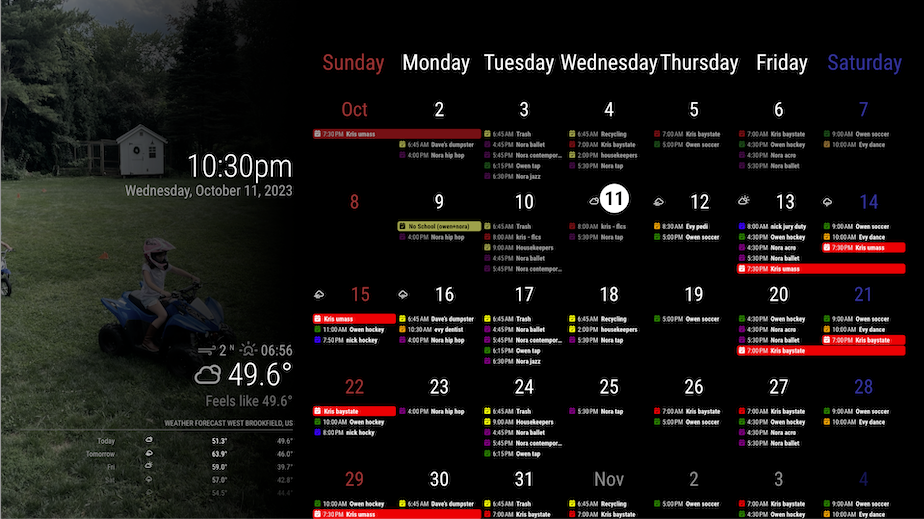
                                          ad23d6be-7e82-4f83-8d77-9482fb9bbfea-image.png

                                          M 1 Reply Last reply Reply Quote 0
                                          • M Offline
                                            MMRIZE @roth_nj
                                            last edited by MMRIZE

                                            @roth_nj
                                            That is not faded. It only assigns a pale blue colour to Saturday on cellHeader in CSS.
                                            You can find .weekday_6 things in MMM-CalendarExt3.css then override it in your custom.css.

                                            .CX3 .weekday_6 {
                                              color: #339;
                                            }
                                            

                                            And long-full-day name looks somewhat ugly, So you’d better consider headerWeekDayOptions: "short", or “narrow”.

                                            R 2 Replies Last reply Reply Quote 0

                                            Hello! It looks like you're interested in this conversation, but you don't have an account yet.

                                            Getting fed up of having to scroll through the same posts each visit? When you register for an account, you'll always come back to exactly where you were before, and choose to be notified of new replies (either via email, or push notification). You'll also be able to save bookmarks and upvote posts to show your appreciation to other community members.

                                            With your input, this post could be even better 💗

                                            Register Login

                                            • 1
                                            • 2
                                            • 3
                                            • 1 / 3
                                            • First post
                                              Last post
                                            Enjoying MagicMirror? Please consider a donation!
                                            MagicMirror created by Michael Teeuw.
                                            Forum managed by Sam, technical setup by Karsten.
                                            This forum is using NodeBB as its core | Contributors
                                            Contact | Privacy Policy