MagicMirror Forum
    • Recent
    • Tags
    • Unsolved
    • Solved
    • MagicMirror² Repository
    • Documentation
    • 3rd-Party-Modules
    • Donate
    • Discord
    • Register
    • Login
    A New Chapter for MagicMirror: The Community Takes the Lead
    Read the statement by Michael Teeuw here.

    Simple(?) module to send a notification every x minutes?

    Scheduled Pinned Locked Moved Solved Requests
    35 Posts 3 Posters 20.4k Views 3 Watching
    Loading More Posts
    • Oldest to Newest
    • Newest to Oldest
    • Most Votes
    Reply
    • Reply as topic
    Log in to reply
    This topic has been deleted. Only users with topic management privileges can see it.
    • S Offline
      sdetweil @UncleRoger
      last edited by

      @UncleRoger do a git pull in the module folder… just posted a fix

      Sam

      How to add modules

      learning how to use browser developers window for css changes

      UncleRogerU 1 Reply Last reply Reply Quote 0
      • UncleRogerU Offline
        UncleRoger @sdetweil
        last edited by

        @sdetweil
        Got the new version (typo in “notification”?) and it seems to work except that it ignores the interval and just constantly sends the notification.

        Also, there’s an error showing in the console log:

        Parameter mismatch in module.show: callback is not an optional parameter! 3 module.js:394:8
        

        with different numbers. I’m not sure that’s a problem (MMM-BackgroundSlideshow has the same error and it works fine) but I thought I’d mention it.

        S 1 Reply Last reply Reply Quote 0
        • S Offline
          sdetweil @UncleRoger
          last edited by

          @UncleRoger can u post the module config

          Sam

          How to add modules

          learning how to use browser developers window for css changes

          UncleRogerU 1 Reply Last reply Reply Quote 0
          • UncleRogerU Offline
            UncleRoger @sdetweil
            last edited by

            @sdetweil
            This is what I have:

            {
              module: 'MMM-SendNotification',
              position: 'top_right',
              classes: "fixed",
              config: {
                interval: 60000, // 1 minute interval
                notification: 'PAGE_CHANGED',
                payload: 1,
              },
            },
            

            Thank you for your patience and assistance! You are amazing!

            S 2 Replies Last reply Reply Quote 0
            • S Offline
              sdetweil @UncleRoger
              last edited by

              @UncleRoger no position, as there is no UI…

              Sam

              How to add modules

              learning how to use browser developers window for css changes

              1 Reply Last reply Reply Quote 0
              • S Offline
                sdetweil @UncleRoger
                last edited by sdetweil

                @UncleRoger I ran your config in debug ( npm start dev) with a stop on the actual sendNotification and it happens once every minute.

                I don’t have pages or carousel installed…
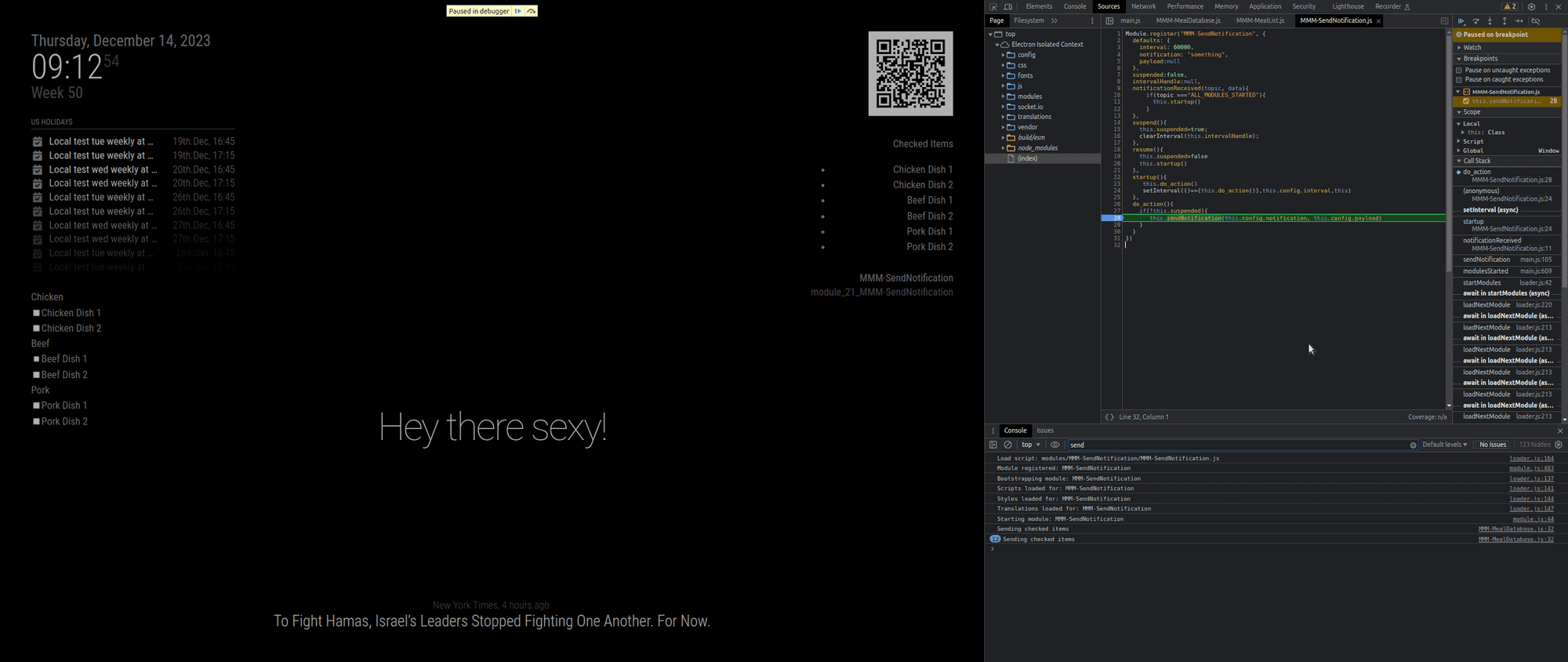
                Screenshot at 2023-12-14 09-13-43.png

                Sam

                How to add modules

                learning how to use browser developers window for css changes

                UncleRogerU 1 Reply Last reply Reply Quote 0
                • S Offline
                  sdetweil @MMRIZE
                  last edited by

                  @MMRIZE said in Simple(?) module to send a notification every x minutes?:

                  But sending notifications is harmless, so I put it into start, just for example.

                  not harmless to the receiver if not setup yet

                  Sam

                  How to add modules

                  learning how to use browser developers window for css changes

                  1 Reply Last reply Reply Quote 0
                  • UncleRogerU Offline
                    UncleRoger @sdetweil
                    last edited by

                    @sdetweil
                    I’ve no clue how to run it the way you did with the stop and all, but I did start commenting out modules and it seems that MMM-pages is the culprit.

                    Without it, SendNotification works fine but when it’s active, SendNotification sends multiple notifications per second:
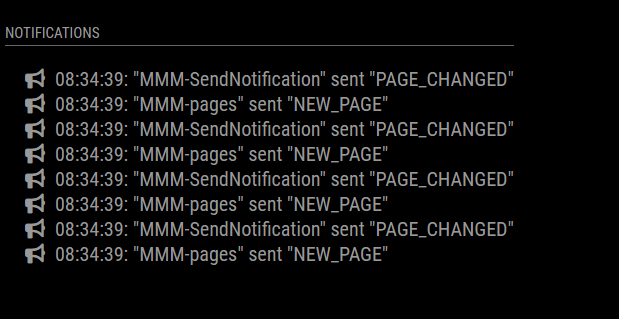
                    9ecae590-6ded-457d-95e8-22d29295e0a3-image.png
                    It may be that MMM-pages is suspending and resuming MMM-SendNotification with each change, even though it’s set as “fixed”, and maybe that’s triggering it?

                    It may be that this is just something that won’t work for me.

                    I really appreciate your help!

                    S 2 Replies Last reply Reply Quote 0
                    • S Offline
                      sdetweil @UncleRoger
                      last edited by

                      @UncleRoger ok, I’ll check it out… hang on…

                      Sam

                      How to add modules

                      learning how to use browser developers window for css changes

                      1 Reply Last reply Reply Quote 0
                      • S Offline
                        sdetweil @UncleRoger
                        last edited by sdetweil

                        @UncleRoger ok… it was pages (for the error)

                        if you are using my fork

                            cd ~/MagicMirror/modules/MMM-Pages
                            git pull 
                        

                        if u are NOT using my fork

                        cd ~/MagicMirror/modules
                        

                        then rename the MMM-Pages folder out of the way (the command is mv)
                        then

                        git clone https://github.com/sdetweil/MMM-Pages
                        

                        also, two parms need to be added

                        here is the updated config

                        			{
                                module: 'MMM-Pages',
                                config: {
                                        modules:
                                            [[ "page1" ],
                                             [ "page2" ],
                                        //     [ "page3"],
                                            ],
                                        fixed: [ "fixed" ],
                                        hiddenPages: {
                                            "screenSaver": [ "screensaver_page" ],
                                            "admin": [ "admin_page" ],
                                        },
                                        animationTime: 10000,
                                        rotationTime: 10000,
                                }
                              }
                        

                        rotationtime defaults to 0!!!

                        Sam

                        How to add modules

                        learning how to use browser developers window for css changes

                        UncleRogerU 1 Reply Last reply Reply Quote 0
                        • UncleRogerU Offline
                          UncleRoger @sdetweil
                          last edited by

                          @sdetweil
                          I switched to your fork and while it’s better, it’s still sending a notification every several seconds.
                          Here’s my config:

                          		{
                          			module: "MMM-Pages",
                                                  classes: "fixed",
                          			config:	{
                          				modules:[	[ "page1" ],
                          							[ "page2" ],
                          						],
                          				fixed: [ "fixed" ],
                          				rotationTime:	10000,
                          				animationTime:	10000,
                          			}
                          		},
                          

                          and

                                  {
                                      module: 'MMM-SendNotification',
                                      classes: "fixed",
                                      config: {
                                          interval: 3600000, // 1 minute interval
                                          notification: 'PAGE_CHANGED',
                                          payload: 1,
                                      },
                                  },
                          

                          (I upped the interval to see if that would do anything. It didn’t.)

                          I’ve commented out all the other modules except the clock, MMM-BackgroundSlideshow, and MMM-ViewNotifications.

                          S 1 Reply Last reply Reply Quote 0
                          • S Offline
                            sdetweil @UncleRoger
                            last edited by

                            @UncleRoger ok, git pull the latest
                            and restart

                            I now check to see if the handler was turned off on resume, so don’t start another

                            lmk

                            Sam

                            How to add modules

                            learning how to use browser developers window for css changes

                            UncleRogerU 1 Reply Last reply Reply Quote 0
                            • UncleRogerU Offline
                              UncleRoger @sdetweil
                              last edited by

                              @sdetweil
                              That worked! Thank you so much!

                              Now I am just being cheeky but if you are bored and want to add a feature, it would be great to be able to reset the timer based on a notification. (In my case, if MMM-Keypress sends a PAGE_INCREMENT notification to change pages, restart the timer from that point.)

                              Anyway, I am getting really close to having everything the way I want it and am hoping that I can build an actual frame for the mirror and mount it next week and I couldn’t have done it without all your help (and so many others, like @MMRIZE and everyone who wrote the modules I’m using.) So, really, thank you!

                              S 1 Reply Last reply Reply Quote 0
                              • S Offline
                                sdetweil @UncleRoger
                                last edited by

                                @UncleRoger done, git pull to update

                                if the notification received matches the configured notification restart the timer

                                Sam

                                How to add modules

                                learning how to use browser developers window for css changes

                                UncleRogerU 1 Reply Last reply Reply Quote 0
                                • UncleRogerU Offline
                                  UncleRoger @sdetweil
                                  last edited by

                                  @sdetweil
                                  You truly are amazing!

                                  Am I right in thinking that if I change this:

                                        } else if(topic==this.config.notification){
                                  

                                  to this:

                                        } else if(topic==this.config.resetNotification){
                                  

                                  and put this in the config:

                                  resetNotification: "DIFF_NOTIF",
                                  

                                  in addition to the notification: setting, then I can have it reset when a different notification is received? And I’m assuming all modules get all the notifications?

                                  This would be so that if someone comes up and pushed the button to switch to the info display close to the end of the timer, it will reset it so they have time to look at what they want.

                                  UncleRogerU S 3 Replies Last reply Reply Quote 0
                                  • UncleRogerU Offline
                                    UncleRoger @UncleRoger
                                    last edited by

                                    @sdetweil
                                    I made that change and it does indeed work as I’d hoped. This is totally awesome!

                                    Thank you!

                                    1 Reply Last reply Reply Quote 0
                                    • S Offline
                                      sdetweil @UncleRoger
                                      last edited by sdetweil

                                      @UncleRoger yes, make sure to add a default value in the defaults section

                                      one could consider a list of notifications that cause reset, then you can search the list w includes()

                                      as it’s a list, you could pre or postpend the notification to send to that list too

                                      this stops the code from growing with other else clauses

                                      resetNotifications:[]

                                      in start maybe,
                                      this.config.resetNotifications.unshift(this.config.notification)

                                      that puts the actual notification of the front of the list

                                      the in notificationReceived

                                      if(this.config.resetNotifications.includes(notification)
                                      resetTimer()

                                      only one test

                                      Sam

                                      How to add modules

                                      learning how to use browser developers window for css changes

                                      1 Reply Last reply Reply Quote 0
                                      • S Offline
                                        sdetweil @UncleRoger
                                        last edited by

                                        @UncleRoger said in Simple(?) module to send a notification every x minutes?:

                                        And I’m assuming all modules get all the notifications?

                                        yes, sendNotifications are broadcast to all modules

                                        Sam

                                        How to add modules

                                        learning how to use browser developers window for css changes

                                        1 Reply Last reply Reply Quote 0
                                        • UncleRogerU Offline
                                          UncleRoger
                                          last edited by

                                          @sdetweil
                                          Do modules each have their own timer or does resetting the timer in one module affect another?

                                          I ask because I have MMM-BackgroundSlideshow set to change pictures each hour and MMM-SendNotification set to send a notification to MMM-Pages to switch to page 1 every 5 minutes. But in this setup, the picture never changes. My hypothesis is that when SendNotification resets the timer after 5 minutes, that affects BGSS which then never gets to 1 hour to switch to the next picture.

                                          If I change BGSS to change pictures every 1 minute (or less than 5 minutes), the picture does change as expected.

                                          Mind you, it’s probably something I’ve done that’s screwed it up, but I figured I’d ask about this first just to eliminate it as the source of the issue.

                                          M UncleRogerU 2 Replies Last reply Reply Quote 0
                                          • M Offline
                                            MMRIZE @UncleRoger
                                            last edited by MMRIZE

                                            @UncleRoger
                                            Unfortunately, BGSS is implementing suspend method to stop it’s timer. So when you page rotator hides BGSS, it’s timer doesn’t work.
                                            If you have some knowledge of JS, you can make monkey-patch with MMM-ModuleMonkeyPatch to suspend method not to stop its timer.

                                            UncleRogerU 1 Reply Last reply Reply Quote 0

                                            Hello! It looks like you're interested in this conversation, but you don't have an account yet.

                                            Getting fed up of having to scroll through the same posts each visit? When you register for an account, you'll always come back to exactly where you were before, and choose to be notified of new replies (either via email, or push notification). You'll also be able to save bookmarks and upvote posts to show your appreciation to other community members.

                                            With your input, this post could be even better 💗

                                            Register Login

                                            • 1
                                            • 2
                                            • 1 / 2
                                            • First post
                                              Last post
                                            Enjoying MagicMirror? Please consider a donation!
                                            MagicMirror created by Michael Teeuw.
                                            Forum managed by Sam, technical setup by Karsten.
                                            This forum is using NodeBB as its core | Contributors
                                            Contact | Privacy Policy