MagicMirror Forum
    • Recent
    • Tags
    • Unsolved
    • Solved
    • MagicMirror² Repository
    • Documentation
    • 3rd-Party-Modules
    • Donate
    • Discord
    • Register
    • Login
    A New Chapter for MagicMirror: The Community Takes the Lead
    Read the statement by Michael Teeuw here.

    Changing icons of the modules Current Weather and Weather Forecast

    Scheduled Pinned Locked Moved Development
    301 Posts 30 Posters 1.6m Views 33 Watching
    Loading More Posts
    • Oldest to Newest
    • Newest to Oldest
    • Most Votes
    Reply
    • Reply as topic
    Log in to reply
    This topic has been deleted. Only users with topic management privileges can see it.
    • S Do not disturb
      sdetweil @Manu85
      last edited by

      @Manu85 i’ve never done this over vnc…

      the right panel is just hidden on your vnc screen. you might be able to scroll right

      if you are in the same house as MM, you dont need to use vnc to view the page

      as long as your config.js says

      address:"0.0.0.0",
      ipWhiltelist:[],
      

      then any machine on the same network can attach, so you can do this from your windows machine too… and do the debug from there as well

      Sam

      How to add modules

      learning how to use browser developers window for css changes

      M 1 Reply Last reply Reply Quote 0
      • M Offline
        Manu85 @sdetweil
        last edited by

        @sdetweil my js config says that!

        fig = {
        	address: "localhost", // Address to listen on, can be:
        	                      // - "localhost", "127.0.0.1", "::1" to listen on loopback interface
        	                      // - another specific IPv4/6 to listen on a specific interface
        	                      // - "", "0.0.0.0", "::" to listen on any interface
        	                      // Default, when address config is left out, is "localhost"
        	port: 8080,
        	ipWhitelist: ["127.0.0.1", "::ffff:127.0.0.1", "::1"], // Set [] to allow all IP addresses
        	                                                       // or add a specific IPv4 of 192.168.1.5 :
        	                                                       // ["127.0.0.1", "::ffff:127.0.0.1", "::1", "::ffff:192.168.1.5"],
        	                                                       // or IPv4 range of 192.168.3.0 --> 192.168.3.15 use CIDR format :
        	                                                       // ["127.0.0.1", "::ffff:127.0.0.1", "::1", "::ffff:192.168.3.0/28"],
        
        S 1 Reply Last reply Reply Quote 0
        • S Do not disturb
          sdetweil @Manu85
          last edited by

          @Manu85 yes, that means only apps INSIDE the same machine can connect

          change

          address:"localhost",  // means only inside same machine
          

          to

          address:"0.0.0.0",  // alows any device on any network this machine is connected to to connect
          

          then also the whitelist

          comment out the current line

          // ipWhitelist: [ 127.....
          

          and add a new line

             ipWhitelist:[],  // don't filter any connecting client addresses
          

          then restart mm…
          if you know the ip address of the pi (and u had to use it for vnc)
          then open a tab on you pc browser and do

          http://MM_ip_address????:8080
          

          Sam

          How to add modules

          learning how to use browser developers window for css changes

          M 2 Replies Last reply Reply Quote 0
          • M Offline
            Manu85 @sdetweil
            last edited by

            @sdetweil ok it’s done and it’s actually much better

            1 Reply Last reply Reply Quote 1
            • M Offline
              Manu85 @sdetweil
              last edited by

              @sdetweil by doing ctrl shift i my window opened like this
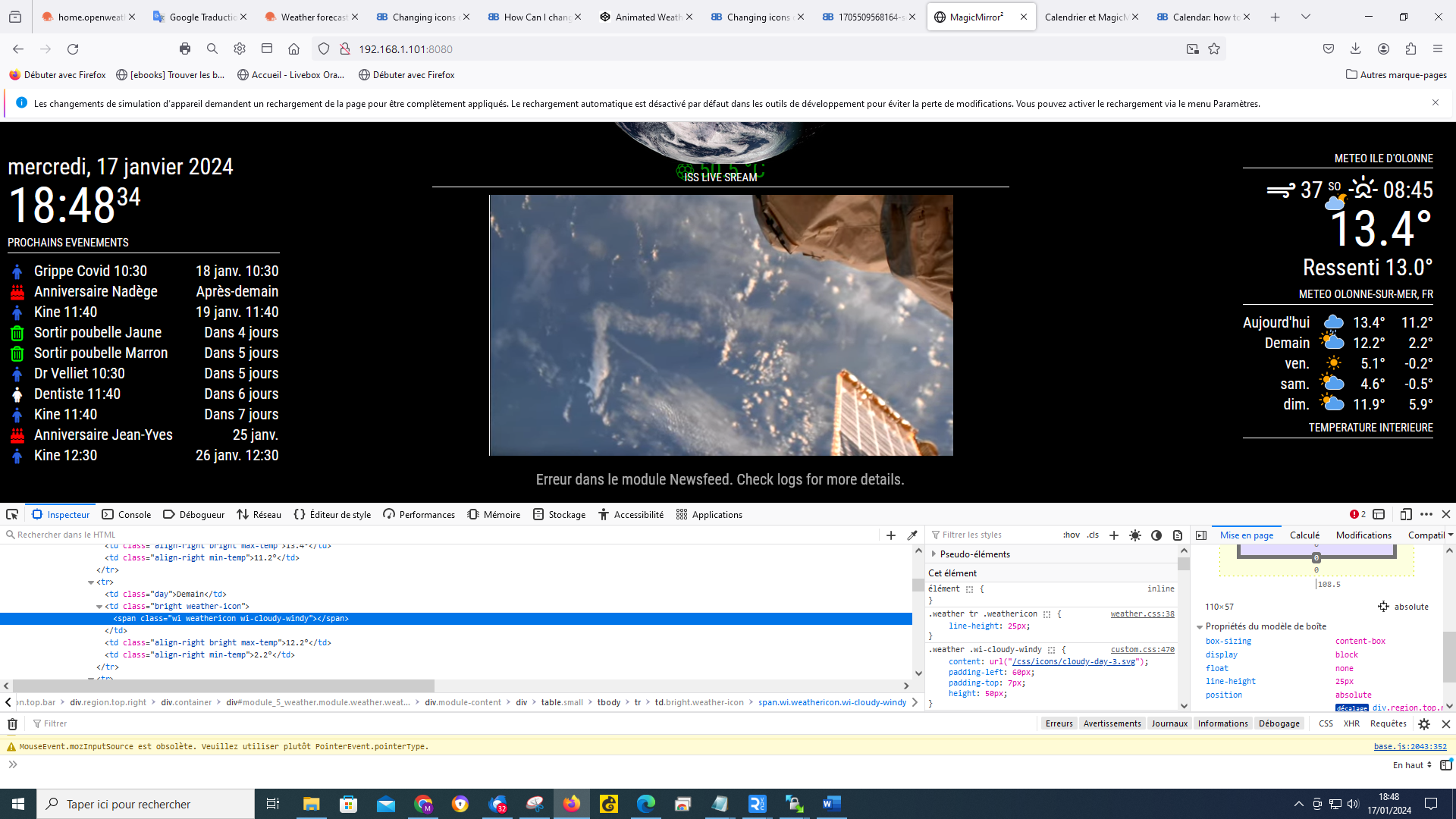
              a17db184-a179-47b4-a584-27f667f11577-image.png

              S 1 Reply Last reply Reply Quote 0
              • S Do not disturb
                sdetweil @Manu85
                last edited by sdetweil

                @Manu85 yes, it just has the developers window docked on the bottom…

                helps when trying to do layout… nothing changes

                if you want it docked on the right, use the … menu top right of the dev window and change it…

                Sam

                How to add modules

                learning how to use browser developers window for css changes

                M 1 Reply Last reply Reply Quote 0
                • M Offline
                  Manu85 @sdetweil
                  last edited by

                  @sdetweil
                  when I position myself on a weather icon, it gives this, I cannot choose several I have a “grid” which follows the mouse and which changes when I move
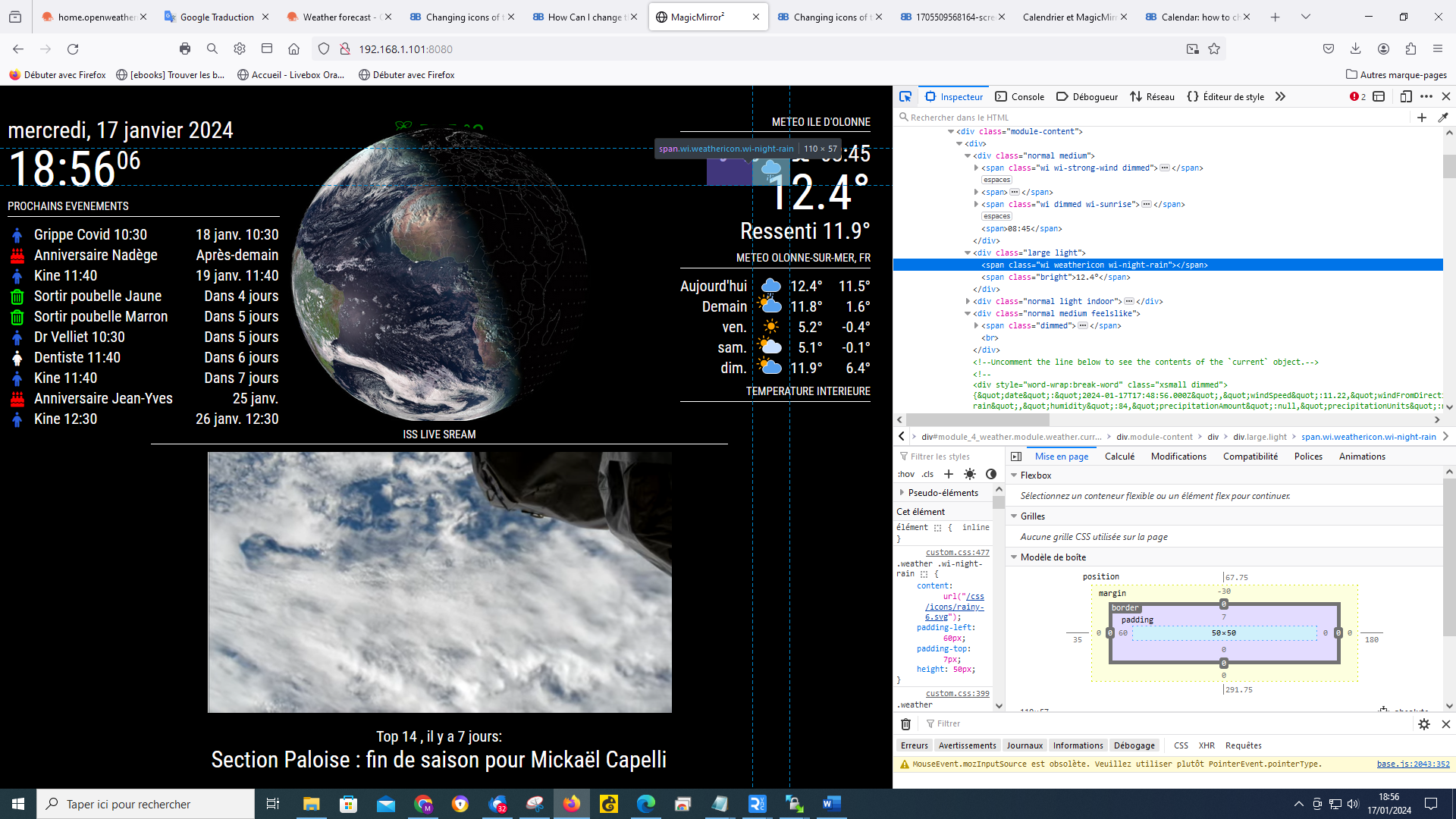
                  25dba6e0-b76b-4971-85bf-1db193f140d1-image.png

                  S 1 Reply Last reply Reply Quote 0
                  • S Do not disturb
                    sdetweil @Manu85
                    last edited by

                    @Manu85 yes, you have to drag the windows around/resize them in the developers window

                    Sam

                    How to add modules

                    learning how to use browser developers window for css changes

                    M 1 Reply Last reply Reply Quote 0
                    • M Offline
                      Manu85 @sdetweil
                      last edited by

                      @sdetweil like that ?

                      54d16384-db6b-4456-ac6f-8e41a3e2e114-image.png

                      S 1 Reply Last reply Reply Quote 0
                      • S Do not disturb
                        sdetweil @Manu85
                        last edited by

                        @Manu85 yes, very good…

                        now, up two lines is the module entry in the content,
                        and you can see that the extra class name has been added
                        (in pink)
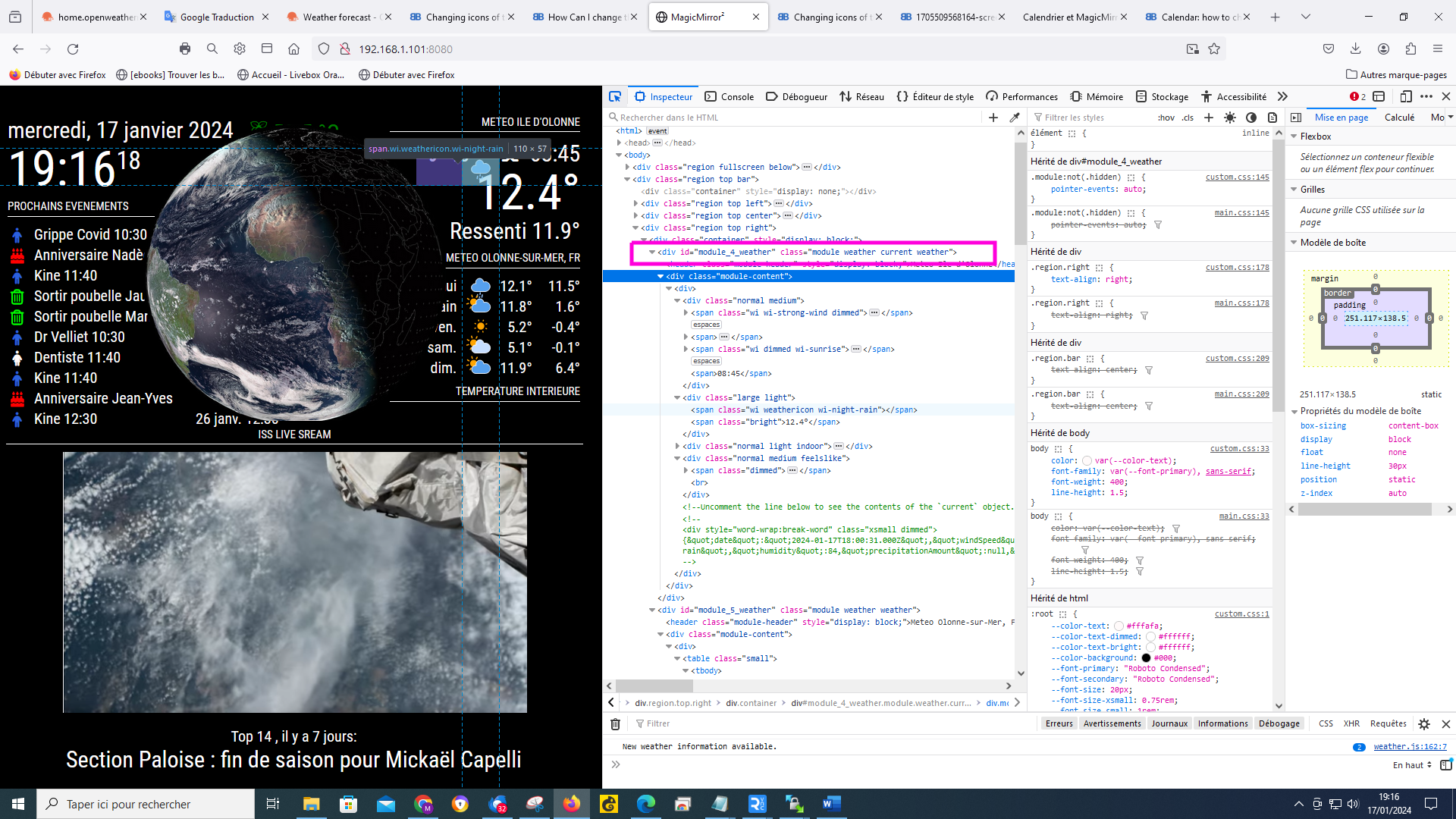
                        mm2.png

                        so, in custom.css

                        .current  xxx
                        

                        will target (select) content in that element tree

                        if you move down to one of the spans of the content
                        in green, and expand that , you will see the icon line,
                        if you select that in the next pane to the right you will see where the info comes from
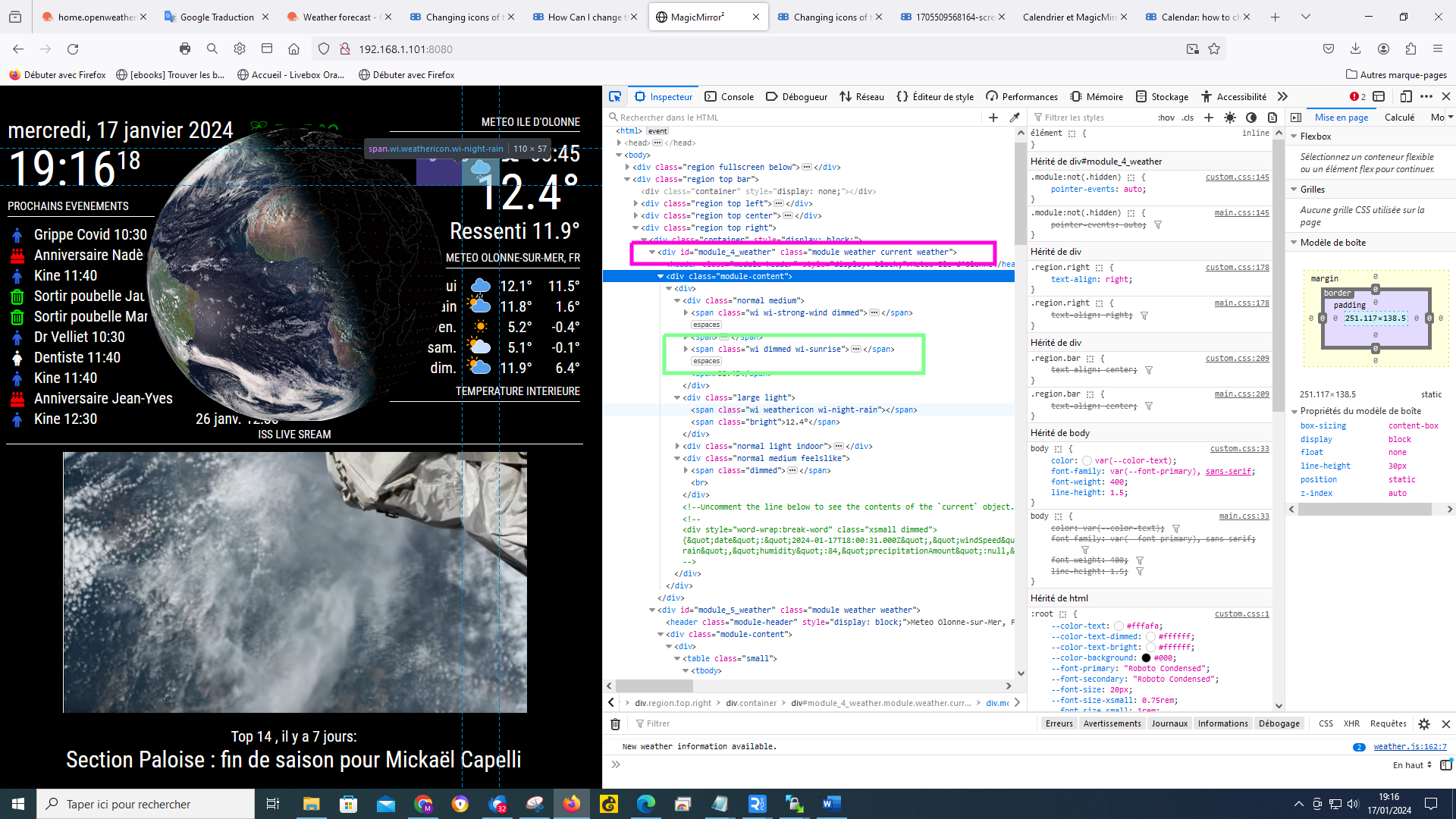
                        mm2.png

                        Sam

                        How to add modules

                        learning how to use browser developers window for css changes

                        M 1 Reply Last reply Reply Quote 0
                        • M Offline
                          Manu85 @sdetweil
                          last edited by

                          @sdetweil
                          I do what you tell me, but I must admit that I’m lost :-) I actually saw the “current” in the lines so that means that the icon is in the custom css, it’s that right? if so why can’t I manage it? you are too strong
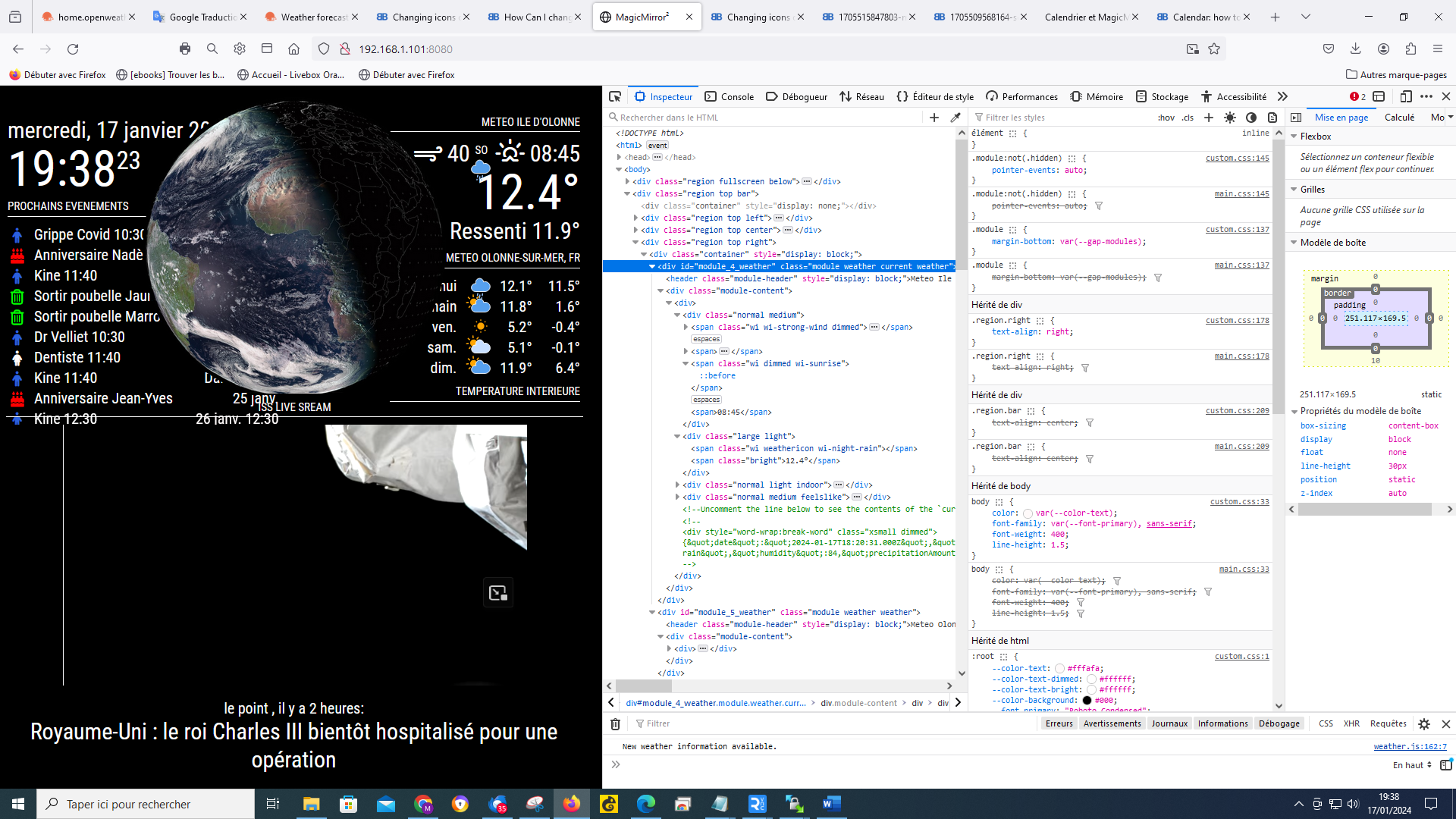
                          cea5c83f-c7c4-4d90-9051-606f3df0a6dd-image.png

                          S 1 Reply Last reply Reply Quote 0
                          • S Do not disturb
                            sdetweil @Manu85
                            last edited by

                            @Manu85 so close…

                            you have to click on the element with the icon name

                            here you have to expand the span element (gold box)
                            (the one you expanded below the gold box only has text in it, not an icon)
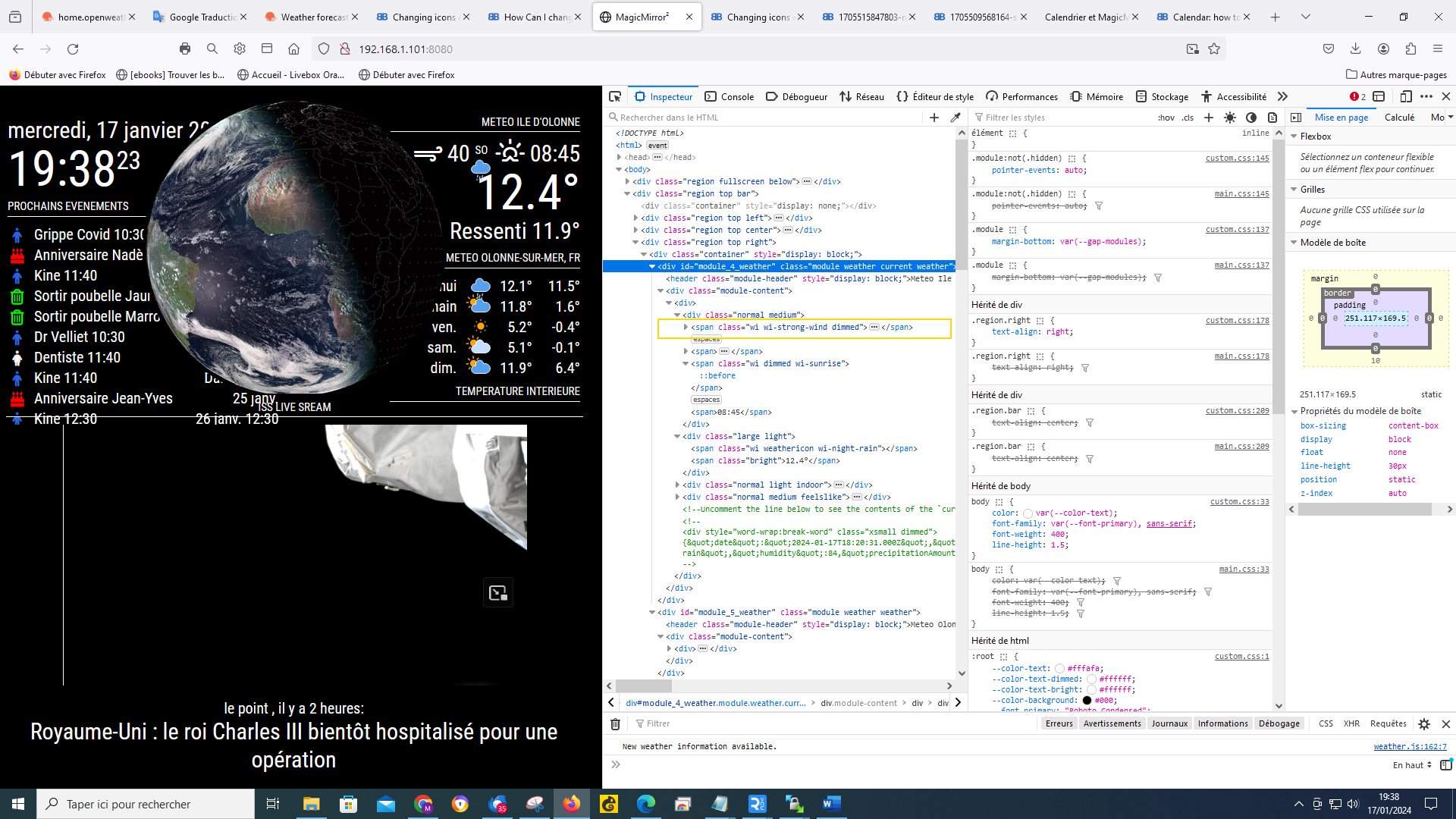
                            1705516732062-cea5c83f-c7c4-4d90-9051-606f3df0a6dd-image.png

                            Sam

                            How to add modules

                            learning how to use browser developers window for css changes

                            M 2 Replies Last reply Reply Quote 0
                            • M Offline
                              Manu85 @sdetweil
                              last edited by

                              @sdetweil
                              there, am I on it? I’m going to get there, I’m going to get there !!!
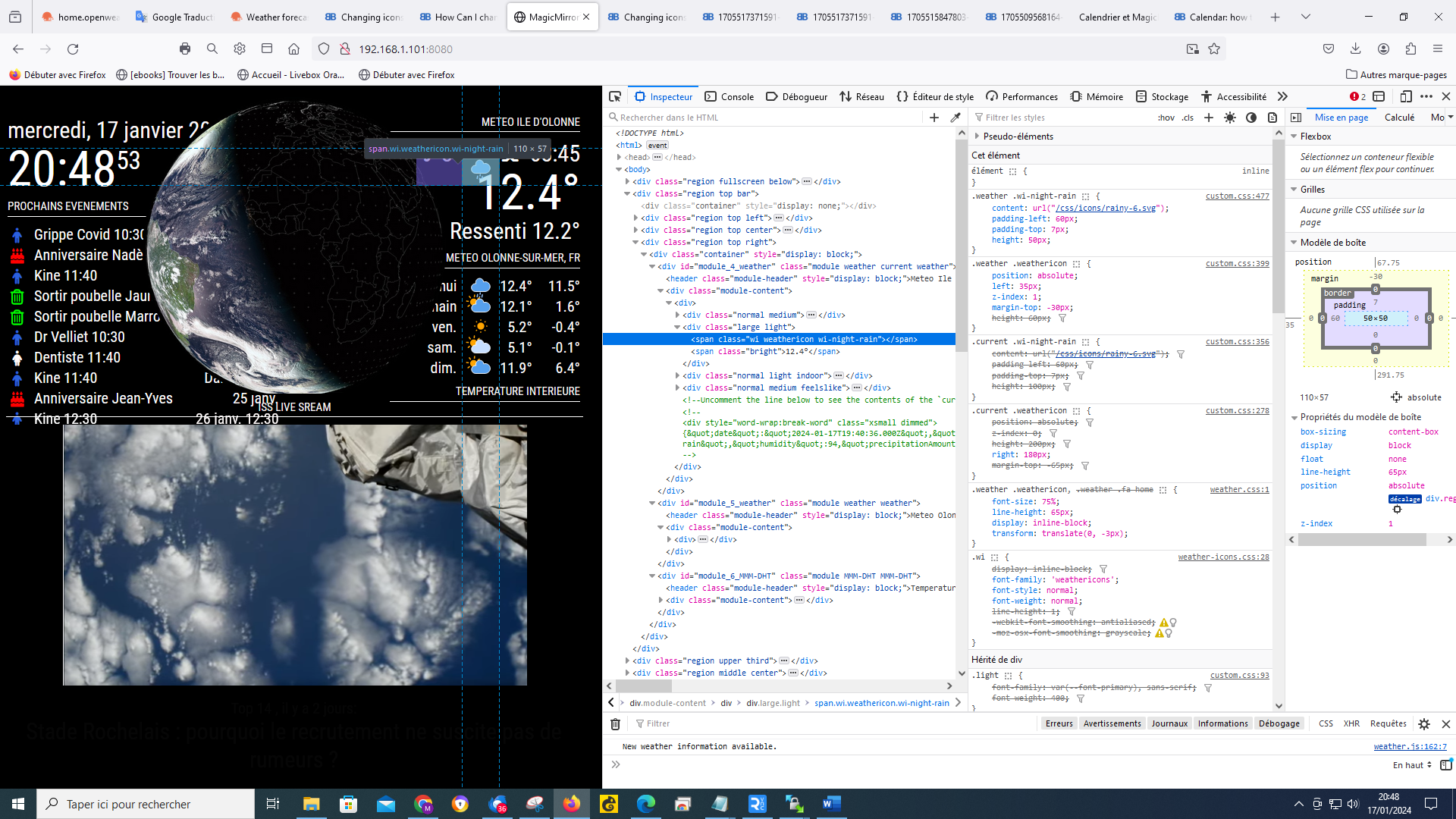
                              0b7d42b1-dbc6-400a-8caa-ec27c2a8b65c-image.png

                              S 1 Reply Last reply Reply Quote 0
                              • S Do not disturb
                                sdetweil @Manu85
                                last edited by

                                @Manu85 now in the second column of the dev windows you can see the icon info and where it came from, custom.css

                                Sam

                                How to add modules

                                learning how to use browser developers window for css changes

                                M 1 Reply Last reply Reply Quote 0
                                • M Offline
                                  Manu85 @sdetweil
                                  last edited by

                                  @sdetweil I try to move forward on the folder, I changed the destination folder for the “current” part by directing to a folder in css/icons/animated, but nothing changes, the supported icon is that of css/icons, red square (which keeps the properties, size, positioning of weather) I have the impression that “css/icons/animated” is not supported, green square, I think I am not far from the solution, but without your help I don’t think I’ll get there
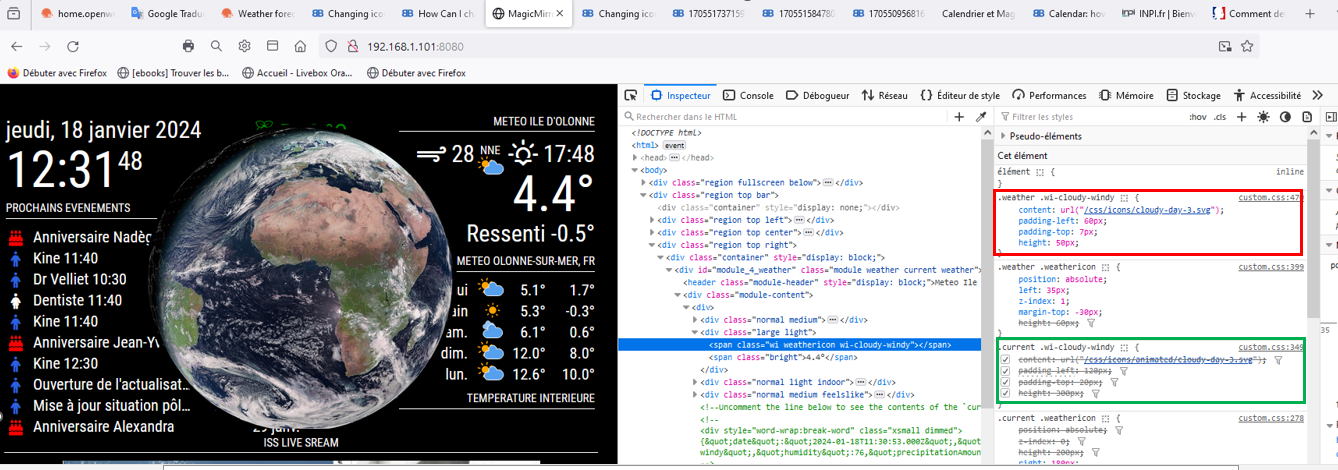
                                  f0e30e0a-ba89-494f-84a6-d5589b4b5a38-image.png

                                  1 Reply Last reply Reply Quote 0
                                  • M Offline
                                    Manu85 @sdetweil
                                    last edited by

                                    @sdetweil Thanks to you, I finally managed to configure the weather module with animated icons, I finally understood the advantages and the settings possible with the console (ctrl+shift+i) it also allowed me to make other settings on other modules, it’s been 5 years since I did this MM and I learned more with you in 3 days than in 5 years, a big thank you for your help
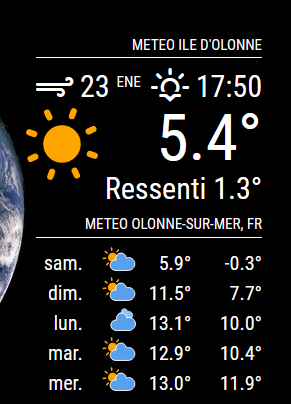
                                    ef2d9f2f-a4d6-479c-939c-4b3c32a72b60-image.png

                                    S 1 Reply Last reply Reply Quote 1
                                    • S Do not disturb
                                      sdetweil @Manu85
                                      last edited by

                                      @Manu85 awesome!! glad you got it.

                                      that dev window is amazing for what you can discover and try

                                      Sam

                                      How to add modules

                                      learning how to use browser developers window for css changes

                                      M 1 Reply Last reply Reply Quote 0
                                      • M Offline
                                        manu85340 @sdetweil
                                        last edited by

                                        @sdetweil
                                        I will actually look precisely at the possibilities of this window, a thousand thanks Sam

                                        S 1 Reply Last reply Reply Quote 0
                                        • S Do not disturb
                                          sdetweil @manu85340
                                          last edited by sdetweil

                                          @manu85340 the top right window allows you to set styles on the selected element

                                          any style supported by the browser… color, font, icon, padding, border, you name it…

                                          so, you can test out the effect you want and then copy/paste those to the entry for custom.css

                                          one other learning thing…

                                          in css

                                          the stuff before the {
                                          is called the selector clause… it ‘selects’ the elements that that the stuff INSIDE the {} will apply to…

                                          the selector clause will ALWAYS select ALL elements that match , ALWAYS ALL

                                          but you can make it very selective…, it can be quite complex…

                                          here I want to hide (display :none) an element generated by a library I used
                                          that didn’t apply to the output it generated

                                          .possibly-hidden-tab div:nth-child(2)  > div > div >div >ul >li:only-child >a[rel*="Item%201"] {
                                            display: none;
                                          }
                                          

                                          I use this page to help me with the selector clause possibilities and syntax
                                          https://www.w3schools.com/cssref/css_selectors.php

                                          sometimes it helps to look at the selector clause from right to left , what element is it, and how does it fit in the content its in.

                                          this selector clause is trying to find an <a (action/link) element with a title of “Item 1”

                                          Sam

                                          How to add modules

                                          learning how to use browser developers window for css changes

                                          M 1 Reply Last reply Reply Quote 0
                                          • M Offline
                                            Manu85 @sdetweil
                                            last edited by

                                            @sdetweil It’s really nice of you to share all these elements, I’m going to look at it while taking my time, I feel like the possibilities are endless

                                            S 1 Reply Last reply Reply Quote 0

                                            Hello! It looks like you're interested in this conversation, but you don't have an account yet.

                                            Getting fed up of having to scroll through the same posts each visit? When you register for an account, you'll always come back to exactly where you were before, and choose to be notified of new replies (either via email, or push notification). You'll also be able to save bookmarks and upvote posts to show your appreciation to other community members.

                                            With your input, this post could be even better 💗

                                            Register Login

                                            • 1
                                            • 2
                                            • 3
                                            • 4
                                            • 5
                                            • 6
                                            • 7
                                            • 8
                                            • 15
                                            • 16
                                            • 6 / 16
                                            • First post
                                              Last post
                                            Enjoying MagicMirror? Please consider a donation!
                                            MagicMirror created by Michael Teeuw.
                                            Forum managed by Sam, technical setup by Karsten.
                                            This forum is using NodeBB as its core | Contributors
                                            Contact | Privacy Policy