MagicMirror Forum
    • Recent
    • Tags
    • Unsolved
    • Solved
    • MagicMirror² Repository
    • Documentation
    • 3rd-Party-Modules
    • Donate
    • Discord
    • Register
    • Login
    A New Chapter for MagicMirror: The Community Takes the Lead
    Read the statement by Michael Teeuw here.

    UPDATE: Replaced my PIR-Sensor with a Doppler Microwave Sensor.

    Scheduled Pinned Locked Moved Tutorials
    103 Posts 17 Posters 108.2k Views 25 Watching
    Loading More Posts
    • Oldest to Newest
    • Newest to Oldest
    • Most Votes
    Reply
    • Reply as topic
    Log in to reply
    This topic has been deleted. Only users with topic management privileges can see it.
    • uros76U Offline
      uros76 @MickyVi
      last edited by

      @mickyvi as the last option maybe install the sensor on top or bottom of the mirror frame. Hide it in a small enclosure (wooden or hard paper or 3D printed extension to the frame) and paint the same color as the frame. If done nicely it won’t even look that bad. And it will for sure work :)

      My magicmirror projects: https://forum.magicmirror.builders/post/79889, https://forum.magicmirror.builders/post/93241 and https://forum.magicmirror.builders/post/94586

      1 Reply Last reply Reply Quote 0
      • FoziF Offline
        Fozi Project Sponsor @MickyVi
        last edited by Fozi

        @mickyvi That’s indeed really strange, and I can only guess that the mirror has a reflecting coating which prevents the signal from passing through the mirror. The thickness of the glass itself is not the limiting factor, as the signal usually passes even stone walls and can detect motion in adjacent rooms. I operated my sensor first behind the mirror, too, and it worked. It is a 4mm Pilkington. Later I moved it under the frame, because it was easier to trim the sensor and hid it behind a 3D-printed cover. Thus, I’d second @uros76 proposal to mount the sensor on top or on the bottom of the frame where it is not visible. Don’t give up!

        HowTo: Replace PIR Sensor with a RCWL-0516 Microwave Sensor

        1 Reply Last reply Reply Quote 0
        • M Offline
          MickyVi
          last edited by

          Hello everybody,

          I’m taking the path of the classic infrared PIR sensor.

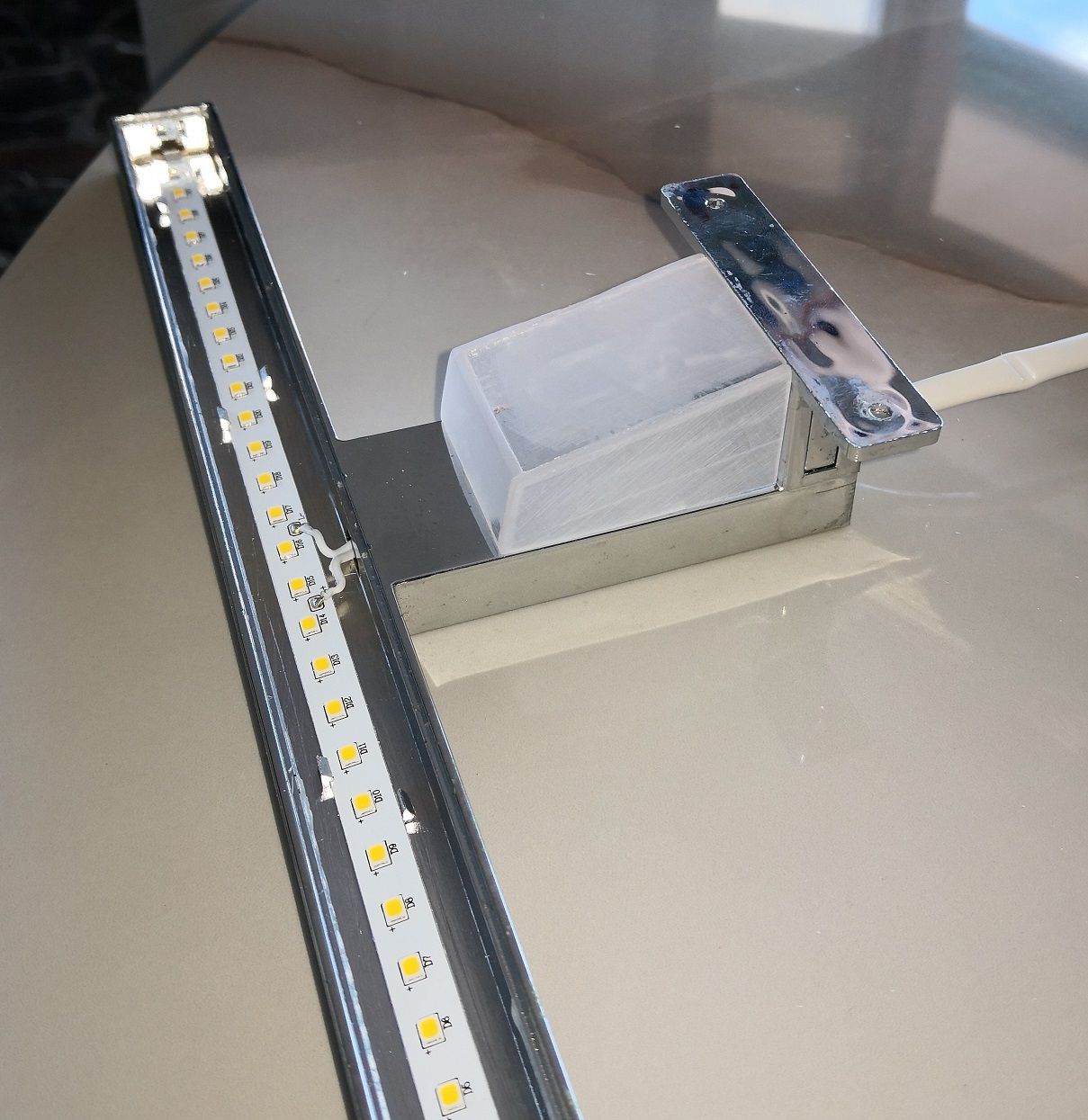
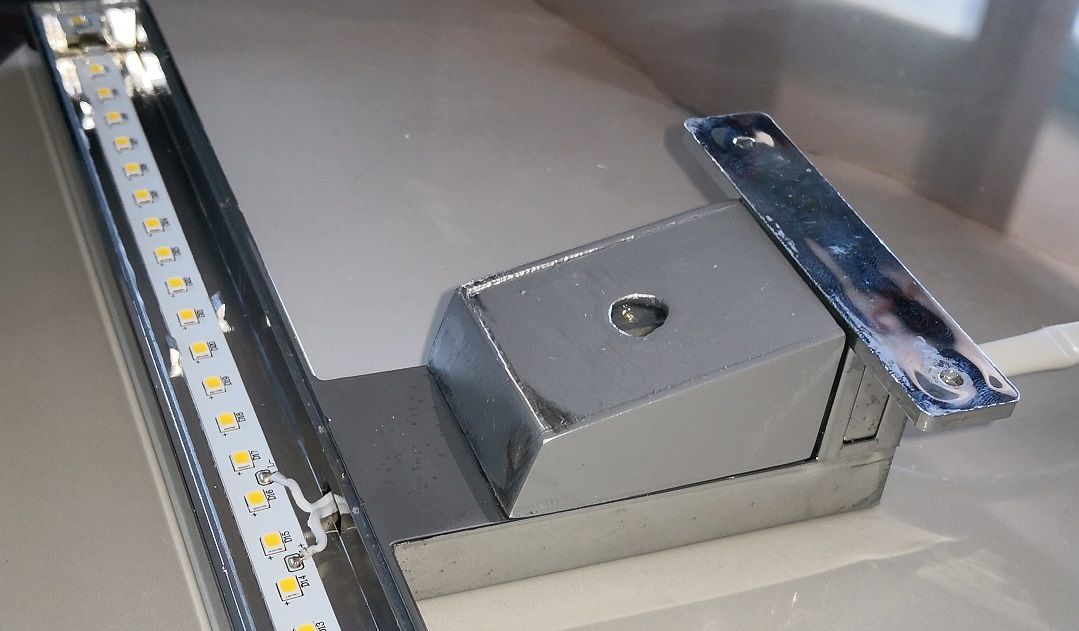
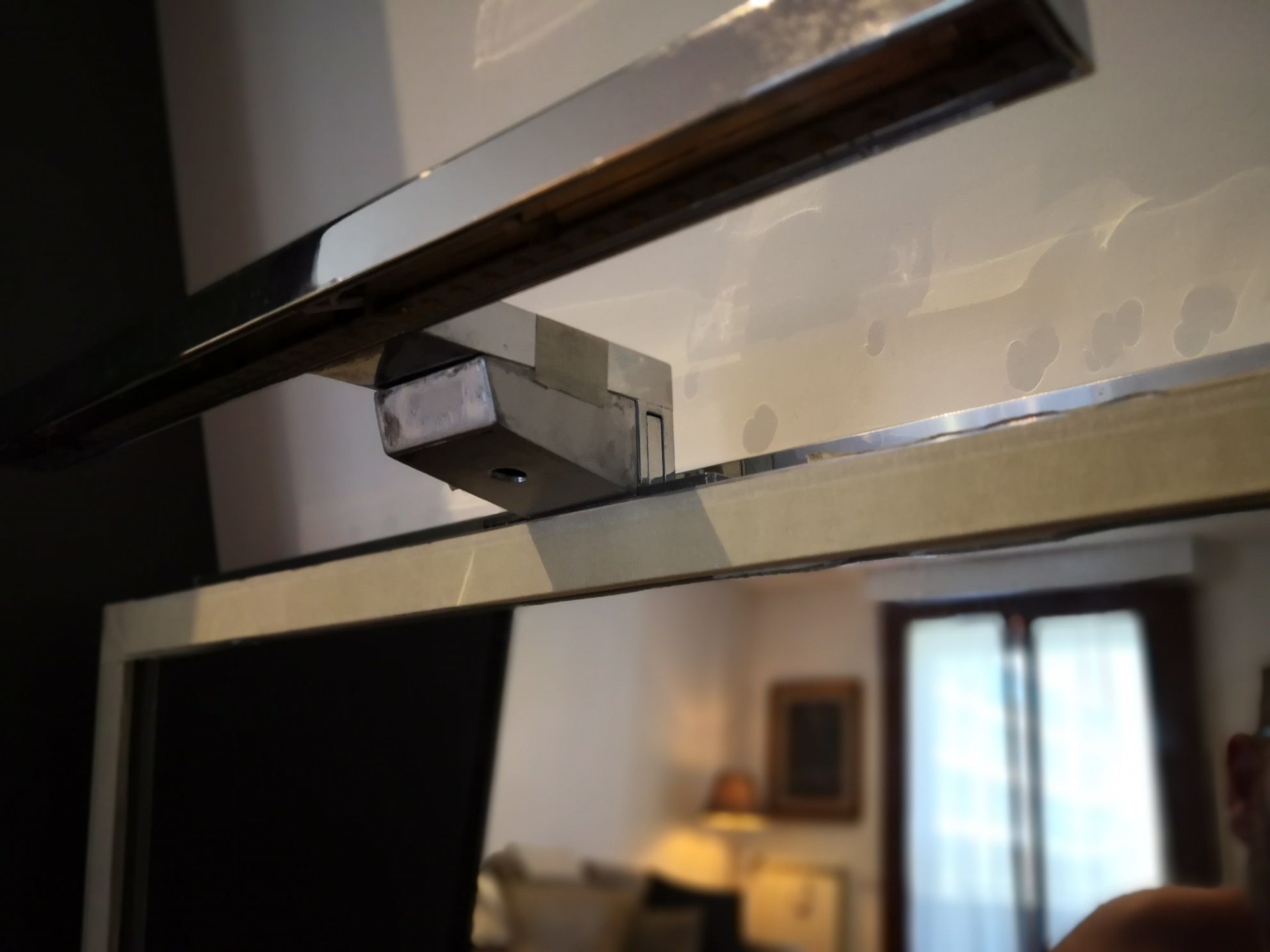
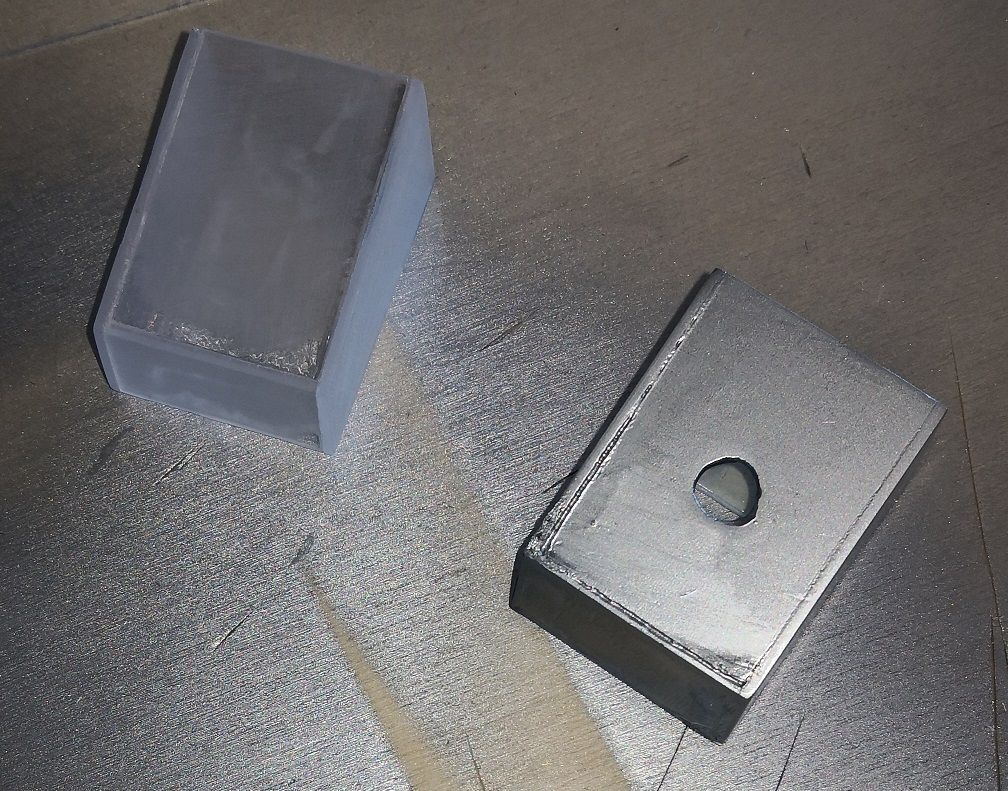
          I made two shells that can be attached under the two arms of the lamps above the mirrors.

          Here still in the assembly / painting phase:
          IMG_20210718_140209.jpg

          IMG_20210718_140227.jpg

          IMG_20210718_140310.jpg

          IMG_20210718_140518_1.jpg

          I’m gonna give a nice coat of chrome today and we should be there. :-)

          FoziF 1 Reply Last reply Reply Quote 2
          • FoziF Offline
            Fozi Project Sponsor @MickyVi
            last edited by

            @mickyvi That’s a totally awsome solution! Really cool!

            HowTo: Replace PIR Sensor with a RCWL-0516 Microwave Sensor

            M 1 Reply Last reply Reply Quote 0
            • M Offline
              MickyVi @Fozi
              last edited by

              @fozi
              Thanks, the compliments from such experienced people are always very welcome !!

              1 Reply Last reply Reply Quote 0
              • D dkhorse74 referenced this topic on
              • J Offline
                jordan1200
                last edited by

                Thank you for this awesome solution! I just got mine up and running with MMM-PIR-Sensor. I was wondering if any of you have got this microwave sensor to also work with MMM-NearCompliments? I was thinking since it was also inspired by PIR sensor, I could get it to work, but no luck yet.

                1 Reply Last reply Reply Quote 0
                • L Offline
                  Lipax
                  last edited by

                  hello,
                  i tried this with the microwave sensor, but im out of ideas. i get wrong positives every minute. (i check every 5 sec).
                  i added also the ferrite, tried another raspberry, different of these sensors (bought a 5 pack) and placed it in a different room. anyone got any ideas what else i could try?
                  or maybe similar microwave sensors i could try?

                  any help would be great, tyvm

                  uros76U 1 Reply Last reply Reply Quote 0
                  • uros76U Offline
                    uros76 @Lipax
                    last edited by

                    @Lipax said in UPDATE: Replaced my PIR-Sensor with a Doppler Microwave Sensor.:

                    hello,
                    i tried this with the microwave sensor, but im out of ideas. i get wrong positives every minute. (i check every 5 sec).
                    i added also the ferrite, tried another raspberry, different of these sensors (bought a 5 pack) and placed it in a different room. anyone got any ideas what else i could try?
                    or maybe similar microwave sensors i could try?

                    any help would be great, tyvm

                    Did you try and limit the range as described in beginning of this thread? For me option 2 helped to limit oversensitivity.

                    My magicmirror projects: https://forum.magicmirror.builders/post/79889, https://forum.magicmirror.builders/post/93241 and https://forum.magicmirror.builders/post/94586

                    L 1 Reply Last reply Reply Quote 0
                    • L Offline
                      Lipax @uros76
                      last edited by

                      @uros76
                      the range is not the problem. i get positives when nothing is moving near it

                      uros76U kayakbabeK 2 Replies Last reply Reply Quote 0
                      • uros76U Offline
                        uros76 @Lipax
                        last edited by

                        @Lipax this sensor is very sensitive and catches any movement 360 around from several meters away. I had same problem… If you don’t dial down the sensitivity-range you will keep getting false positives.

                        My magicmirror projects: https://forum.magicmirror.builders/post/79889, https://forum.magicmirror.builders/post/93241 and https://forum.magicmirror.builders/post/94586

                        1 Reply Last reply Reply Quote 1
                        • kayakbabeK Offline
                          kayakbabe @Lipax
                          last edited by

                          @Lipax try dialing down the sensitivity, it’s probably picking up dust or something small you can’t see.

                          1 Reply Last reply Reply Quote 0
                          • L Offline
                            Lipax
                            last edited by

                            thanks for the help, but i doubt its some kind of movement since its exactly every minute. i tried a different room and its the same.
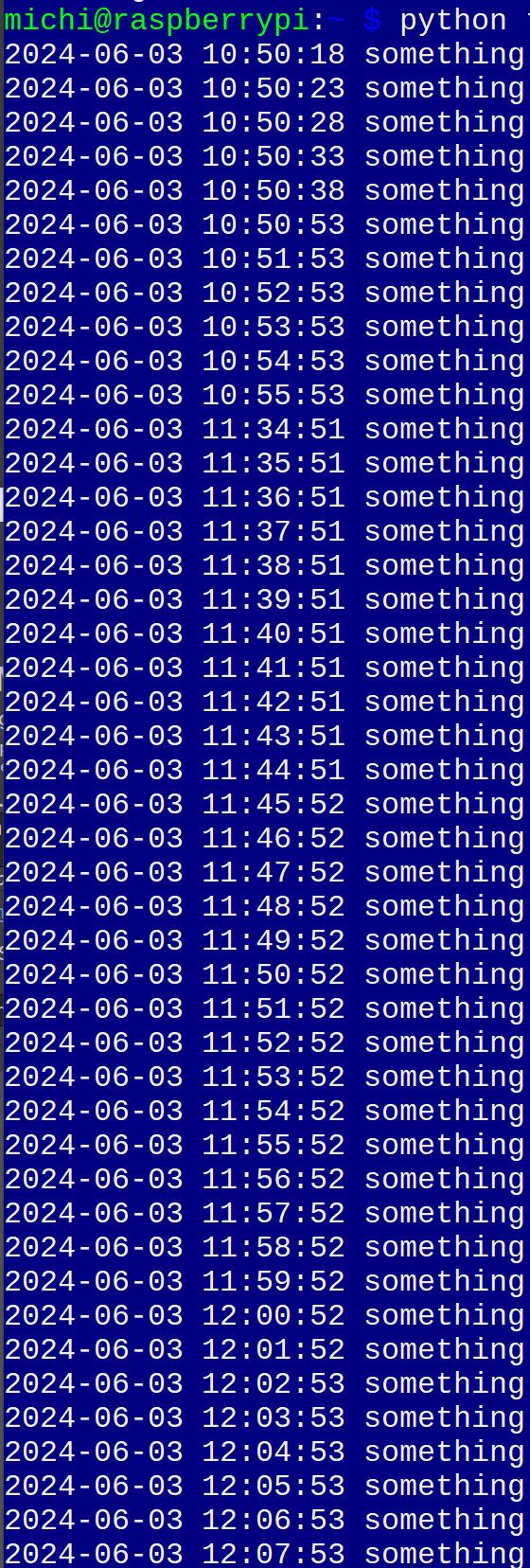
                            bewegung1.jpg

                            S 1 Reply Last reply Reply Quote 0
                            • S Offline
                              sdetweil @Lipax
                              last edited by

                              @Lipax please don’t submit duplicate posts…

                              all users with reputation below 2 have their posts reviewed… this eliminates all the porn, advertising and trash posts from the forum.

                              it just takes time for (me) to get to review the posts…

                              Sam

                              How to add modules

                              learning how to use browser developers window for css changes

                              L 1 Reply Last reply Reply Quote 1
                              • uros76U Offline
                                uros76
                                last edited by

                                Can you share your python code? Perhaps there’s something there

                                My magicmirror projects: https://forum.magicmirror.builders/post/79889, https://forum.magicmirror.builders/post/93241 and https://forum.magicmirror.builders/post/94586

                                1 Reply Last reply Reply Quote 0
                                • L Offline
                                  Lipax @sdetweil
                                  last edited by

                                  @sdetweil sry about that

                                  @uros76 i hope thats not the problem

                                  import RPi.GPIO as GPIO
                                  import time
                                  import datetime
                                  
                                  switch=11
                                  
                                  
                                  GPIO.setmode(GPIO.BOARD)
                                  GPIO.setup(switch, GPIO.IN)


                                  try:
                                      while True:
                                          if GPIO.input(switch) == 1:
                                              now = datetime.datetime.now()
                                              print(now.strftime("%Y-%m-%d %H:%M:%S"), "something")
                                              
                                          time.sleep(5)
                                          
                                          
                                  except KeyboardInterrupt:
                                      print("Bye Bye")
                                  finally:
                                      GPIO.cleanup()


                                  thanks for the help

                                  uros76U 1 Reply Last reply Reply Quote 0
                                  • uros76U Offline
                                    uros76 @Lipax
                                    last edited by uros76

                                    @Lipax try different gpio pin, like a pin 18 which is a GPIO 5. It’s default set to input function. Don’t forget to adjust the python code, change switch to 18.

                                    You might check the GPIO 0 (your pin 11) if it is set to input. Use command: raspi-gpio get 0 or raspi-gpio get to check all GPIO’s.

                                    Also, use a multimeter to measure the voltage coming out from sensor. It should be around 3.3V for few seconds when sensing detected. This way you can monitor if actual detection / voltage is coming from sensor.

                                    My magicmirror projects: https://forum.magicmirror.builders/post/79889, https://forum.magicmirror.builders/post/93241 and https://forum.magicmirror.builders/post/94586

                                    L 1 Reply Last reply Reply Quote 0
                                    • L Offline
                                      Lipax @uros76
                                      last edited by

                                      @uros76
                                      i forget to mention i already changed the pin, i first tried pin 7 before

                                      according to pinout.xyz my pin 11 is gpio 17

                                      GPIO 17: level=0 fsel=0 func=INPUT
                                      

                                      thank you very much for helping me, i dont have a multi meter but ill ask my father to do that. u think its not the sensor sending the signal? maybe it picks up something with the wire along the way? i dont have a engineering background.

                                      uros76U 1 Reply Last reply Reply Quote 0
                                      • uros76U Offline
                                        uros76 @Lipax
                                        last edited by

                                        @Lipax you need to be sure that sensor is not the cause.
                                        Measuring it’s sensing, output voltage and duration is a good way of confirming if sensor works ok.


                                        My magicmirror projects: https://forum.magicmirror.builders/post/79889, https://forum.magicmirror.builders/post/93241 and https://forum.magicmirror.builders/post/94586

                                        L 1 Reply Last reply Reply Quote 0
                                        • L Offline
                                          Lipax @uros76
                                          last edited by

                                          it took a long time but i tested the voltage, i can upload a video somewhere if u want. the wrong positive and the regular ones look the same for me. it kinda spikes to ~5v and then instantly goes to 3.3 and stabilizes

                                          uros76U 1 Reply Last reply Reply Quote 0
                                          • uros76U Offline
                                            uros76 @Lipax
                                            last edited by

                                            @Lipax there you go, nothing wrong with the software code. It’s the PIR sensor giving false positives. Nothing you can really do about that. Perhaps a different brand/quality of PIR sensor if it will help but I doubt.

                                            As mentioned before, due to exact same problem I gave up on PIR sensor completely and moved to the microwave. This works for me now over 3 years. without false positives.

                                            My magicmirror projects: https://forum.magicmirror.builders/post/79889, https://forum.magicmirror.builders/post/93241 and https://forum.magicmirror.builders/post/94586

                                            L 1 Reply Last reply Reply Quote 0

                                            Hello! It looks like you're interested in this conversation, but you don't have an account yet.

                                            Getting fed up of having to scroll through the same posts each visit? When you register for an account, you'll always come back to exactly where you were before, and choose to be notified of new replies (either via email, or push notification). You'll also be able to save bookmarks and upvote posts to show your appreciation to other community members.

                                            With your input, this post could be even better 💗

                                            Register Login

                                            • 1
                                            • 2
                                            • 3
                                            • 4
                                            • 5
                                            • 6
                                            • 5 / 6
                                            • First post
                                              Last post
                                            Enjoying MagicMirror? Please consider a donation!
                                            MagicMirror created by Michael Teeuw.
                                            Forum managed by Sam, technical setup by Karsten.
                                            This forum is using NodeBB as its core | Contributors
                                            Contact | Privacy Policy