MagicMirror Forum
    • Recent
    • Tags
    • Unsolved
    • Solved
    • MagicMirror² Repository
    • Documentation
    • 3rd-Party-Modules
    • Donate
    • Discord
    • Register
    • Login
    A New Chapter for MagicMirror: The Community Takes the Lead
    Read the statement by Michael Teeuw here.

    Raspberry Pi Zero W for Magic Mirror

    Scheduled Pinned Locked Moved Hardware
    79 Posts 10 Posters 58.0k Views 11 Watching
    Loading More Posts
    • Oldest to Newest
    • Newest to Oldest
    • Most Votes
    Reply
    • Reply as topic
    Log in to reply
    This topic has been deleted. Only users with topic management privileges can see it.
    • D Offline
      davidgagne @capedbuffethero
      last edited by

      @capedbuffethero Thanks! Please upvote if you found it valuable. I’m fairly new here and trying to improve my rep so all my posts aren’t held for moderation. :)

      C 1 Reply Last reply Reply Quote 0
      • C Offline
        capedbuffethero @davidgagne
        last edited by

        @davidgagne It appears I need 1 reputation to upvote.

        S 2 Replies Last reply Reply Quote 1
        • S Offline
          sdetweil @capedbuffethero
          last edited by

          @capedbuffethero really? I’ll check on that. didn’t used to be.

          Sam

          How to add modules

          learning how to use browser developers window for css changes

          1 Reply Last reply Reply Quote 2
          • S Offline
            sdetweil @capedbuffethero
            last edited by sdetweil

            @capedbuffethero can you try this again… we should have reset this option to 0
            downvote still requires rep of 1 or above…

            Sam

            How to add modules

            learning how to use browser developers window for css changes

            1 Reply Last reply Reply Quote 1
            • plainbrokeP Offline
              plainbroke @davidgagne
              last edited by

              @davidgagne
              Does it matter that you install firefox-esr
              but in the mm.sh script you just call it firefox ?
              I went to midori to get mine to work it would not recognize the firefox in mm.sh for some reason.

              Slow learner. But trying anyways.
              MM is on Raspberry Pi 4B w/8gb ram loaded on a 128gb nvme drive.
              Running Trixie and the latest MM version.

              S 1 Reply Last reply Reply Quote 0
              • S Offline
                sdetweil @plainbroke
                last edited by sdetweil

                @plainbroke the package is called firefox-esr

                the program name is firefox
                it must be on the path for mm.sh to execute it.
                I don’t know if installing the package does that.
                I don’t remember worrying about it

                the command

                which firefox
                should return the full path to the executable if it’s on the path.
                otherwise you can add its folder onto the path in the .profile or .bashrc scripts
                that setup the shell environment

                Sam

                How to add modules

                learning how to use browser developers window for css changes

                1 Reply Last reply Reply Quote 0
                • C Offline
                  capedbuffethero @davidgagne
                  last edited by capedbuffethero

                  @davidgagne said in Raspberry Pi Zero W for Magic Mirror:

                  Summary

                  • when running DISPLAY=:0 npm start I got an unexpected error
                  • follow up question: export external_browser=firefox doesn’t this export vanish as soon as my session ends? Do I have to do this every time?
                  • firefox is started and is visible on VNC
                  • firefox is not able to connect to the node server (I guess the node server is not running)

                  Details:
                  When executing this script:

                  cd ~/MagicMirror
                  export external_browser=firefox
                  DISPLAY=:0 npm start
                  

                  on this step: I get this output:

                  myname@raspberrypi:~ $ cd ~/MagicMirror
                  myname@raspberrypi:~/MagicMirror $ export external_browser=firefox
                  myname@raspberrypi:~/MagicMirror $ DISPLAY=:0 npm start
                  
                  > magicmirror@2.27.0 start
                  > ./run-start.sh $1
                  
                  ./run-start.sh: line 79:  8050 Killed                  node serveronly


                  these are the lines that precede line 79:

                      # if user explicitly configured to run server only (no ui local)
                      # OR there is no xwindows running, so no support for browser graphics
                      if [ "$serveronly." == "$true." ] || [ "$xorg." == "." -a $mac != 'Darwin' -a "$wait_for_x." != "." ]; then
                        # start server mode,
                        node serveronly
                      else
                        # start the server in the background
                        # wait for server to be ready
                        # need bash for this
                        exec 3< <(node serveronly)
                  

                  if we do export external_browser doesn’t that vanish as soon as the RPI is rebooted or if my session ends?

                  after a while the VNC client showed firefox start, but no URL, then the screen went white, then Firefox said “Unable to connect”

                  then I ran this script, I am tailing logs. What does “fix 'em up” script do

                • Execute fix'em-up script:
                  bash -c "$(curl -sL https://raw.githubusercontent.com/sdetweil/MagicMirror_scripts/master/fixuppm2.sh)"
                  
                • the last line is this: pm2 setup completed - Fri Jun 14 21:52:48 PDT 2024

                  cancelling the step DISPLAY=:0 npm start allows me to rerun this step, but the step always ends in failure.

                  UPDATE: “Unable to connect” is because Firefox cannot connect to the node server. VNC can connect without issue! The error is actually an error from the Firefox browser.

                  S 1 Reply Last reply Reply Quote 0
                  • S Offline
                    sdetweil @capedbuffethero
                    last edited by sdetweil

                    @capedbuffethero
                    the export is used on the MagicMirror system side. it is paired with the
                    node server execution, which launches MagicMirror without a ui.
                    then when the server is running, run-start.sh launches a browser to connect to the server

                    the export has nothing to do with vnc,
                    it is just used to tell run-start.sh which browser to launch. (on linux, env variables are NOT passed to children processes by default. you have to use the export keyword to enable it, for each env var you want to pass)

                    if you set the MagicMirror config.js.js to

                    address:"0.0.0.0",
                    ipWhitelist:[],
                    

                    then you can use a browser on your phone, Windows, Linux, or Mac system to view MagicMirror directly without vnc

                    the killed message is because you restarted MagicMirror, and run-start.sh found the server instance running already. so it must be stopped and restarted in case you changed the config

                    Sam

                    How to add modules

                    learning how to use browser developers window for css changes

                    1 Reply Last reply Reply Quote 0
                    • F Offline
                      funkdafied
                      last edited by

                      Hello all giving MM a try again on a Rpi zero and have been trying to run the script in this thread but keeping getting the following message
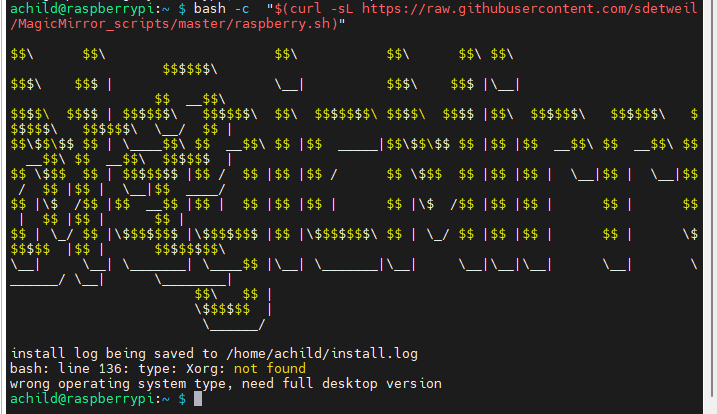
                      98df749c-1ae9-44bf-aea2-cd58f1c132c9-image.png

                      Am I missing something to by pass the Xorg check?

                      OS
                      achild@raspberrypi:~ $ cat /etc/os-release
                      PRETTY_NAME=“Raspbian GNU/Linux 12 (bookworm)”
                      NAME=“Raspbian GNU/Linux”
                      VERSION_ID=“12”
                      VERSION=“12 (bookworm)”
                      VERSION_CODENAME=bookworm
                      ID=raspbian
                      ID_LIKE=debian
                      HOME_URL=“http://www.raspbian.org/”
                      SUPPORT_URL=“http://www.raspbian.org/RaspbianForums”

                      S 1 Reply Last reply Reply Quote 0
                      • S Offline
                        sdetweil @funkdafied
                        last edited by sdetweil

                        @funkdafied I have just pushed a fix for that… (was a test for text mode or graphical mode)
                        (and I see I have to expand the test for the Bookworm compositor too,edit: just fixed that too)

                        but it won’t help in your situation…

                        you cannot run MagicMirror on bookworm successfully on a pi0-w, armv6l
                        takes too much memory

                        you need to use the legacy 32 bit image (bullseye)

                        Sam

                        How to add modules

                        learning how to use browser developers window for css changes

                        F 1 Reply Last reply Reply Quote 0
                        • F Offline
                          funkdafied @sdetweil
                          last edited by

                          @sdetweil thank you that worked to a point please have a look at the below with the errors I getting:
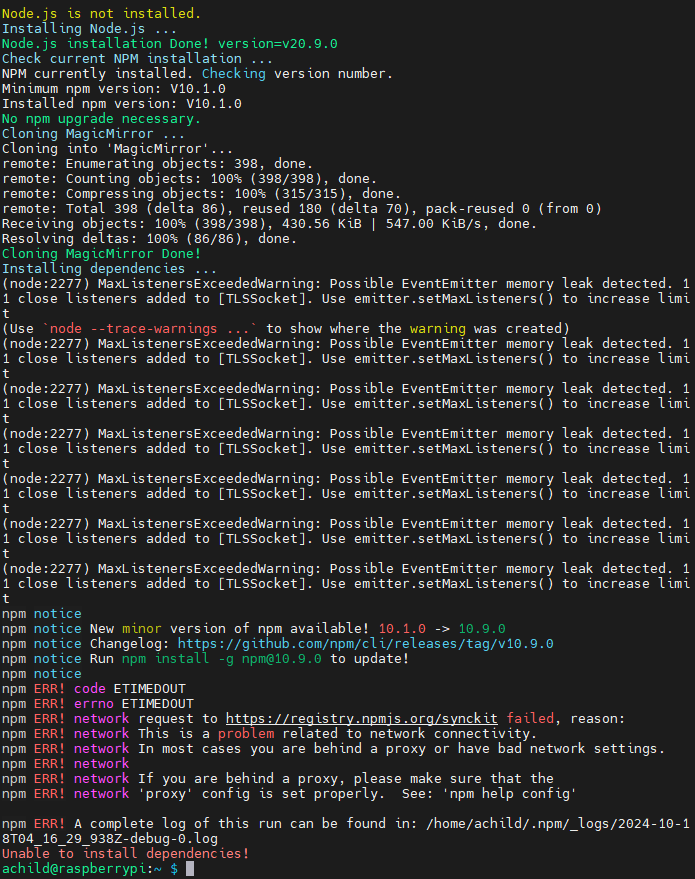
                          505c93ab-b6ef-4667-a3fb-490d53665bf5-image.png

                          S 1 Reply Last reply Reply Quote 0
                          • S Offline
                            sdetweil @funkdafied
                            last edited by

                            @funkdafied I cannot recreate this…

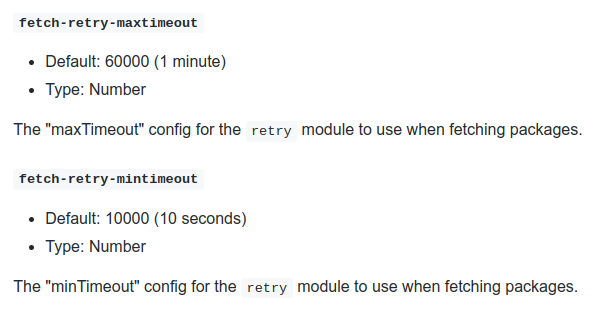
                            try this to increase the timeout

                            
                            You can extend timeout with those two commands:
                            
                            npm config set fetch-retry-maxtimeout 6000000
                            npm config set fetch-retry-mintimeout 1000000
                            enter image description here
                            
                            Source: https://docs.npmjs.com/cli/v9/using-npm/config#fetch-retry-maxtimeout


                            kTo3j.png

                            Sam

                            How to add modules

                            learning how to use browser developers window for css changes

                            F 1 Reply Last reply Reply Quote 0
                            • F Offline
                              funkdafied @sdetweil
                              last edited by

                              @sdetweil Thank you that did the trick. Only issue I see to be running into at the moment is Midori telling me it can’t find the page it is looking for.

                              S 1 Reply Last reply Reply Quote 0
                              • S Offline
                                sdetweil @funkdafied
                                last edited by

                                @funkdafied ok,

                                when you run on a device that doesn’t have electron support, it doesn’t get installed via MM as expected…

                                then my install script changes the startup to use my run-start.sh script

                                which launches MagicMirror in server mode
                                and waits for the ready message

                                >>>   Ready to go! Please point your browser to: http://0.0.0.0:8080   <<<
                                

                                and then launches midori like this (with whatever the port number is in the message)

                                midori http://localhost:8080 -e Fullscreen -e Navigationbar
                                

                                just for grins can you do

                                cd ~/MagicMirror
                                npm start server
                                

                                to see if that message appears

                                Sam

                                How to add modules

                                learning how to use browser developers window for css changes

                                S 1 Reply Last reply Reply Quote 0
                                • S Offline
                                  sdetweil @sdetweil
                                  last edited by

                                  @funkdafied I think we solved this on discord

                                  Sam

                                  How to add modules

                                  learning how to use browser developers window for css changes

                                  M 1 Reply Last reply Reply Quote 0
                                  • S schris88 referenced this topic on
                                  • M Offline
                                    Mayank Arora @sdetweil
                                    last edited by

                                    @sdetweil

                                    I made a magic mirror in my college time using Raspberry pi 3b+

                                    Integrated google assistant with youtube play also in it.

                                    Now i am graduated and doing job from past 2 years, i am thinking to build one for my home.

                                    Raspberry pi 4 and 5 are expensive, does raspberry pi zero works?

                                    Will google assistant work on it? And youtube also will work on it?

                                    If not youtube, will spotify work on it using pi zero

                                    Which raspberry pi zero will you recommend me

                                    S 1 Reply Last reply Reply Quote 0
                                    • S Offline
                                      sdetweil @Mayank Arora
                                      last edited by sdetweil

                                      @Mayank-Arora you need the pi0-2w at minimum and a fast sd card

                                      The google assistant module is no longer available
                                      Most of the MagicMirror modules for Spotify are display only,
                                      You need the raspotify system service to play ON the PI
                                      YouTube might work, but you have no voice control without GA

                                      Sam

                                      How to add modules

                                      learning how to use browser developers window for css changes

                                      1 Reply Last reply Reply Quote 0
                                      • R Offline
                                        roberto84
                                        last edited by

                                        Hi,

                                        i’m new to magicmirror,but i’m not able to install it on my raspberry pi zero 2w.
                                        What i did:
                                        -Flashed sd with raspberry pi image, choosing the desktop 64 bit version of raspberry pi os
                                        -Inserted sd to raspberry pi zero 2w
                                        -Installed dphys-swapfile to increase swap to 1 gb
                                        -rebooted raspberry pi zero 2w
                                        -Without any apt-update, i just ran the raspberry.sh script from sdetweil repo here
                                        https://github.com/sdetweil/MagicMirror_scripts

                                        Unfortunately,it tooks lot of time installing dependencies,more or less 1 hour, this sometimes cause my wifi connection to drop also, due to high i/o.
                                        Is this a normal scenario?could be this due to a bad sd card?
                                        thanks!

                                        S 1 Reply Last reply Reply Quote 0
                                        • S Offline
                                          sdetweil @roberto84
                                          last edited by sdetweil

                                          @roberto84 I do not know. I just installed 64 bit on 02w last week. It is fragile due to the low memory and increased swapping

                                          I can get the surf browser up, but it doesn’t update clock tick on seconds

                                          So I think the 32bit image is the only choice, maybe back to legacy

                                          Sam

                                          How to add modules

                                          learning how to use browser developers window for css changes

                                          R 1 Reply Last reply Reply Quote 0
                                          • R Offline
                                            roberto84 @sdetweil
                                            last edited by

                                            @sdetweil thanks for reply!
                                            So at the end ,retrying several times,I was able to install everything with your script.
                                            I installed pm2 also when asked,then I was able to see the default magic mirror display with calendar and so on.
                                            Unfortunately this occurred only first time,then at first reboot ,I see from pm2 logs that everything starts,but what I obtain its only a black screen with no modules loaded…
                                            Those are some error logs on ps2 when I run ps2 Magic mirror start

                                            [4086:0104/075509.190939:ERROR:content/browser/network_service_instance_impl.cc:613] Network service crashed, restarting service.
                                            [4086:0104/075554.525130:ERROR:content/browser/network_service_instance_impl.cc:613] Network service crashed, restarting service.
                                            [1381:0104/082529.351804:ERROR:content/browser/network_service_instance_impl.cc:613] Network service crashed, restarting service.
                                            [1381:0104/082634.504111:ERROR:content/browser/network_service_instance_impl.cc:613] Network service crashed, restarting service.

                                            But at the end it starts as you can notice from out logs

                                            [2026-01-04 08:24:33.145] [LOG] [app] Sockets connected & modules started …
                                            [2026-01-04 08:24:39.175] [LOG] [electron] Launching application.
                                            [2026-01-04 08:26:37.186] [INFO] [utils]

                                            System Information

                                            • SYSTEM: manufacturer: Raspberry Pi Foundation; model: Raspberry Pi Zero 2 W Rev 1.0; virtual: false; MM: 2.34.0
                                            • OS: platform: linux; distro: Debian GNU/Linux; release: 13; arch: arm64; kernel: 6.12.47+rpt-rpi-v8
                                            • VERSIONS: electron: 39.2.7; used node: 22.21.1; installed node: 22.21.1; npm: 10.9.4; pm2: 6.0.14
                                            • ENV: XDG_SESSION_TYPE: tty; MM_CONFIG_FILE: undefined
                                              WAYLAND_DISPLAY: wayland-0; DISPLAY: undefined; ELECTRON_ENABLE_GPU: undefined
                                            • RAM: total: 416.15 MB; free: 173.97 MB; used: 242.18 MB
                                            • OTHERS: uptime: 4 minutes; timeZone: Europe/Rome

                                            this is output of pm2 show MagicMirror

                                            Divergent env variables from local env
                                            ┌────────────────┬────────────────────────────────────┐
                                            │ PWD │ /home/pi │
                                            │ SSH_CONNECTION │ 192.168.1.14 47702 192.168.1.27 22 │
                                            │ TERM │ screen.xterm-256color │
                                            │ SHLVL │ 3 │
                                            │ XDG_SESSION_ID │ 16 │
                                            │ SSH_CLIENT │ 192.168.1.14 47702 22 │
                                            └────────────────┴────────────────────────────────────┘

                                            Also ps2 status report MagicMirror online.
                                            One important thing is that I can see MagicMirror contents correctly via the IP on Port 8080
                                            What else can I try?
                                            I also run your fixuppm.sh script ,but nothing changed.
                                            Thanks in advance!

                                            S 1 Reply Last reply Reply Quote 0

                                            Hello! It looks like you're interested in this conversation, but you don't have an account yet.

                                            Getting fed up of having to scroll through the same posts each visit? When you register for an account, you'll always come back to exactly where you were before, and choose to be notified of new replies (either via email, or push notification). You'll also be able to save bookmarks and upvote posts to show your appreciation to other community members.

                                            With your input, this post could be even better 💗

                                            Register Login

                                            • 1
                                            • 2
                                            • 3
                                            • 4
                                            • 4 / 4
                                            • First post
                                              Last post
                                            Enjoying MagicMirror? Please consider a donation!
                                            MagicMirror created by Michael Teeuw.
                                            Forum managed by Sam, technical setup by Karsten.
                                            This forum is using NodeBB as its core | Contributors
                                            Contact | Privacy Policy