MagicMirror Forum
    • Recent
    • Tags
    • Unsolved
    • Solved
    • MagicMirror² Repository
    • Documentation
    • 3rd-Party-Modules
    • Donate
    • Discord
    • Register
    • Login
    A New Chapter for MagicMirror: The Community Takes the Lead
    Read the statement by Michael Teeuw here.

    Calendar doubling events- Calendar & Calendar EXT3

    Scheduled Pinned Locked Moved Solved Troubleshooting
    20 Posts 3 Posters 2.3k Views 3 Watching
    Loading More Posts
    • Oldest to Newest
    • Newest to Oldest
    • Most Votes
    Reply
    • Reply as topic
    Log in to reply
    This topic has been deleted. Only users with topic management privileges can see it.
    • M Offline
      MMrustykayn66
      last edited by

      I just finished up my first Magic Mirror build. I updated Magic Mirror today as well as other modules it told me where out of date. After updating I started adding re-occurring tasks to my Google Calendar. I realised that these tasks are doubling. They display on the day the are supposed to occur as well as the day after. This does not occur for re-occurring tasks I added before updating.
      Its a pretty Vanilla install I am using the Calendar EXT3 module for my Calendar. I’m not really code literate, just good at following directions

      My Config File

      						// - another specific IPv4/6 to listen on a specific interface
      							// - "0.0.0.0", "::" to listen on any interface
      							// Default, when address config is left out or empty, is "localhost"
      	port: 8080,
      	basePath: "/",	// The URL path where MagicMirror² is hosted. If you are using a Reverse proxy
      									// you must set the sub path here. basePath must end with a /
      	//ipWhitelist: ["127.0.0.1", "::ffff:127.0.0.1", "::1"],	// Set [] to allow all IP addresses
      	ipWhitelist: [],
      									// or add a specific IPv4 of 192.168.1.5 :
      									// ["127.0.0.1", "::ffff:127.0.0.1", "::1", "::ffff:192.168.1.5"],
      									// or IPv4 range of 192.168.3.0 --> 192.168.3.15 use CIDR format :
      									// ["127.0.0.1", "::ffff:127.0.0.1", "::1", "::ffff:192.168.3.0/28"],
      
      	useHttps: false,			// Support HTTPS or not, default "false" will use HTTP
      	httpsPrivateKey: "",	// HTTPS private key path, only require when useHttps is true
      	httpsCertificate: "",	// HTTPS Certificate path, only require when useHttps is true
      
      	language: "en",
      	locale: "en-US",
      	logLevel: ["INFO", "LOG", "WARN", "ERROR"], // Add "DEBUG" for even more logging
      	timeFormat: 12,
      	units: "imperial",
      
      	modules: [
      		{
      			module: "alert",
      		},
      	
      		{
      			module: "updatenotification",
      			position: "top_bar"
      		},
      		{
      			module: "clock",
      			position: "top_right"
      		},
      		{
      			module: "calendar",
      			position: "top_right",
      			config: {
      				//wrapEvents: true,
      				broadcastPastEvents: true, // <= IMPORTANT to see past events
      				calendars: [
      					{
      			fetchInterval: 300000,
      			url: "https://calendar.google.com/calendar/***/basic.ics",
                              name: "Shandra", // <= RECOMMENDED to assign name
                              color: "blue" // <= RECOMMENDED to assign color		
      					},
      					{
      					url: "https://calendar.google.com/calendar/ical/en.usa%23holiday%40group.v.calendar.google.com/public/basic.ics",
                              name: "us_holiday", // <= RECOMMENDED to assign name
                              color: "red" // <= RECOMMENDED to assign color
      					},
      				]
      			}
      		},
      		{
                  module: "MMM-CalendarExt3",
                  position: "top_left",
                  title: "",
                  config: {
                          mode: "month",
                          instanceId: "basicCalendar",
                          locale: 'en-US',
                          maxEventLines: 6,
                          firstDayOfWeek: 0,
                          calendarSet: ['us_holiday', 'abfall', 'mytest', 'Shandra'],
              }
      	}, 
      		{
      			module: "compliments",
      			position: "bottom_center"
      		},
      		{
      			module: "weather",
      			position: "top_right",
      			config: {
      				weatherProvider: "openmeteo",
      				type: "current",
      				lat: 44.9429,
      				lon: -123.0351
      			}
      		},
      		{
      			module: "weather",
      			position: "top_right",
      			header: "Weather Forecast",
      			config: {
      				weatherProvider: "openmeteo",
      				type: "forecast",
      				lat: 44.9429,
      				lon: -123.0351
      			}
      		},
      		{
      	module: "MMM-Traffic",
      	position: "bottom_right",
      	config: {
      		accessToken: "pk.eyJ1IjoibW1ydXN0eWtheW42NiIsImEiOiJjbTE0MjFweGYxa3BwMmxvcnJqb2kzZTQ5In0.1_",
      		originCoords: "-",
      		destinationCoords: "-",
      		showSymbol: false,
      		firstLine: "{duration} mins",
      		secondLine: "Home to Schirle Elementary"
      	}
          },
          		{
      	module: "MMM-Traffic",
      	position: "bottom_right",
      	config: {
      		accessToken: "pk.eyJ1IjoibW1ydXN0eWtheW42NiIsImEiOiJjbTE0MjFweGYxa3BwMmxvcnJqb2kzZTQ5In0.1_HtZ4tllgp8MkK41SkAAQ",
      		originCoords: "-",
      		destinationCoords: " -


      ",
      		showSymbol: false,
      		firstLine: "{duration} mins",
      		secondLine: "Home to Work"
      	}
          },
          {
          module: 'MMM-Remote-Control',
          // uncomment the following line to show the URL of the remote control on the mirror
          position: 'bottom_left',
          // you can hide this module afterwards from the remote control itself
          config: {
              customCommand: {},  // Optional, See "Using Custom Commands" below
              showModuleApiMenu: true, // Optional, Enable the Module Controls menu
              secureEndpoints: true, // Optional, See API/README.md
              // uncomment any of the lines below if you're gonna use it
              // customMenu: "custom_menu.json", // Optional, See "Custom Menu Items" below
              // apiKey: "", // Optional, See API/README.md for details
              // classes: {} // Optional, See "Custom Classes" below
          }
      },
      		/*
      	    {
      			module: "newsfeed",
      			position: "bottom_center",
      			config: {
      				feeds: [
      					{
      						title: "New York Times",
      						url: "https://rss.nytimes.com/services/xml/rss/nyt/HomePage.xml"
      					}
      				],
      				showSourceTitle: true,
      				showPublishDate: true,
      				broadcastNewsFeeds: true,
      				broadcastNewsUpdates: true
      			}
      		},*/
      	]
      };
      
      /*************** DO NOT EDIT THE LINE BELOW ***************/
      if (typeof module !== "undefined") { module.exports = config; }
      
      S 1 Reply Last reply Reply Quote 0
      • S Offline
        sdetweil @MMrustykayn66
        last edited by

        @MMrustykayn66 we worked this offline
        He ended up w 2 instances of calendar module
        1 for ext events past and future
        1 for short list of this week’s next 10 events
        And the updated calendar module in test

        Sam

        How to add modules

        learning how to use browser developers window for css changes

        1 Reply Last reply Reply Quote 0
        • S Offline
          sdetweil @MMrustykayn66
          last edited by sdetweil

          @MMrustykayn66 the calendar has been a recurring problem.

          i have been working on resolving those problems.
          i have a test version you can try i am working on for the next release jan 1

          cd ~/MagicMirror 
          git fetch origin pull/3587/head:withfixes
          git checkout withfixes
          npm install
          

          let me know

          Sam

          How to add modules

          learning how to use browser developers window for css changes

          M 1 Reply Last reply Reply Quote 0
          • M Offline
            MMrustykayn66 @sdetweil
            last edited by

            @sdetweil I tried pasting into terminal and I got the error

            fatal: not a git repository (or any of the parent directories): .git

            was I supposed to be in the calendar folder when I executed that command

            S 1 Reply Last reply Reply Quote 0
            • S Offline
              sdetweil @MMrustykayn66
              last edited by sdetweil

              @MMrustykayn66 you need to be in the MagicMirror folder of course
              corrected the prior post

              Sam

              How to add modules

              learning how to use browser developers window for css changes

              M 2 Replies Last reply Reply Quote 0
              • M Offline
                MMrustykayn66 @sdetweil
                last edited by

                @sdetweil kinda figured something like that was the problem :)

                The double event issue has gone away but it broke other things.

                Calendar EXT3 is no longer displaying any information ( I increased the refresh rate to make sure it wasn’t a pull issue)
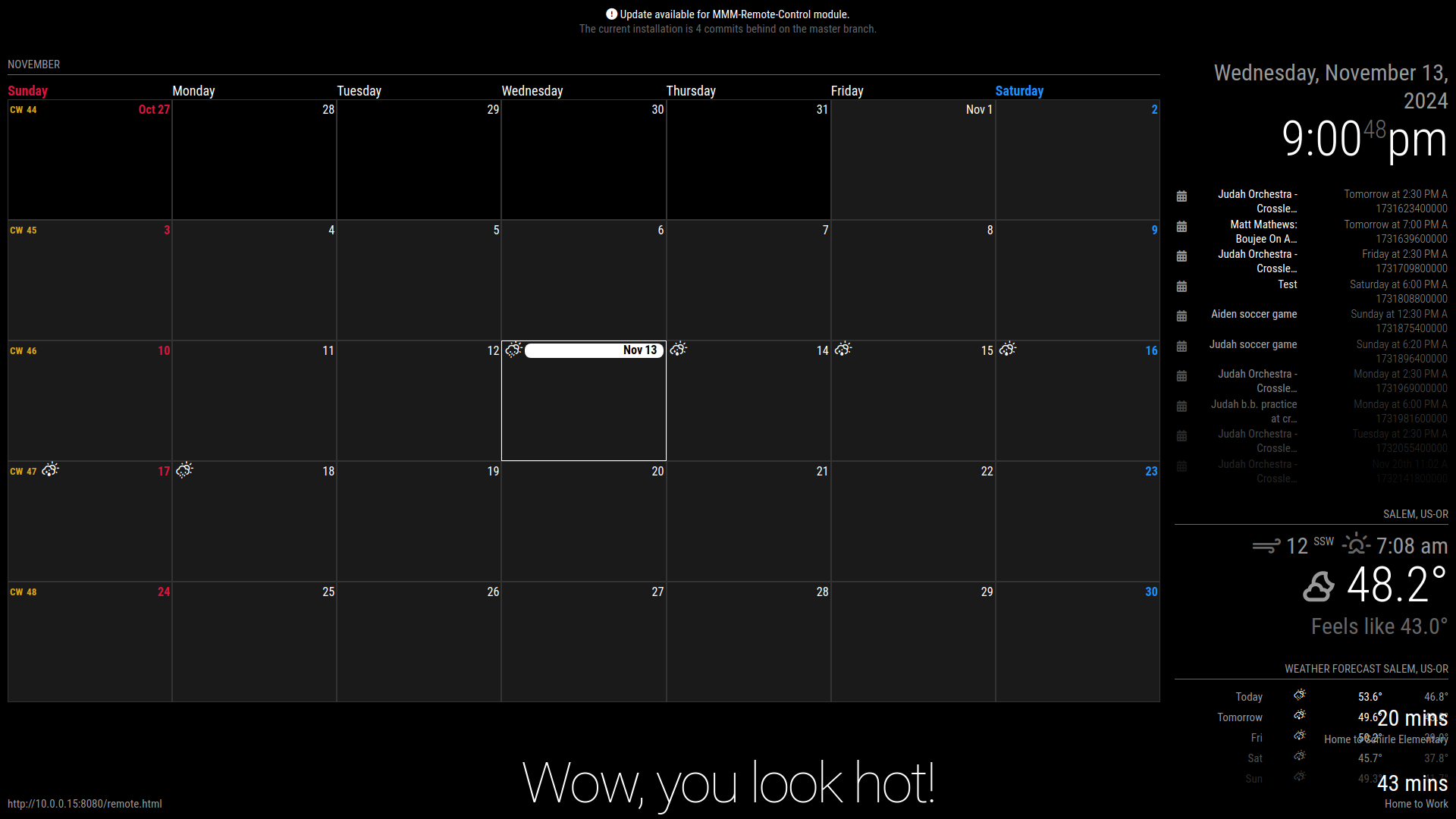
                Calendar is no longer showing the double entries but the is a number code bellow the date that is pushing the entire module beyond my layout. 20241113_21h00m48s_grim.png
                S 1 Reply Last reply Reply Quote 0
                • M Offline
                  MMrustykayn66 @sdetweil
                  last edited by

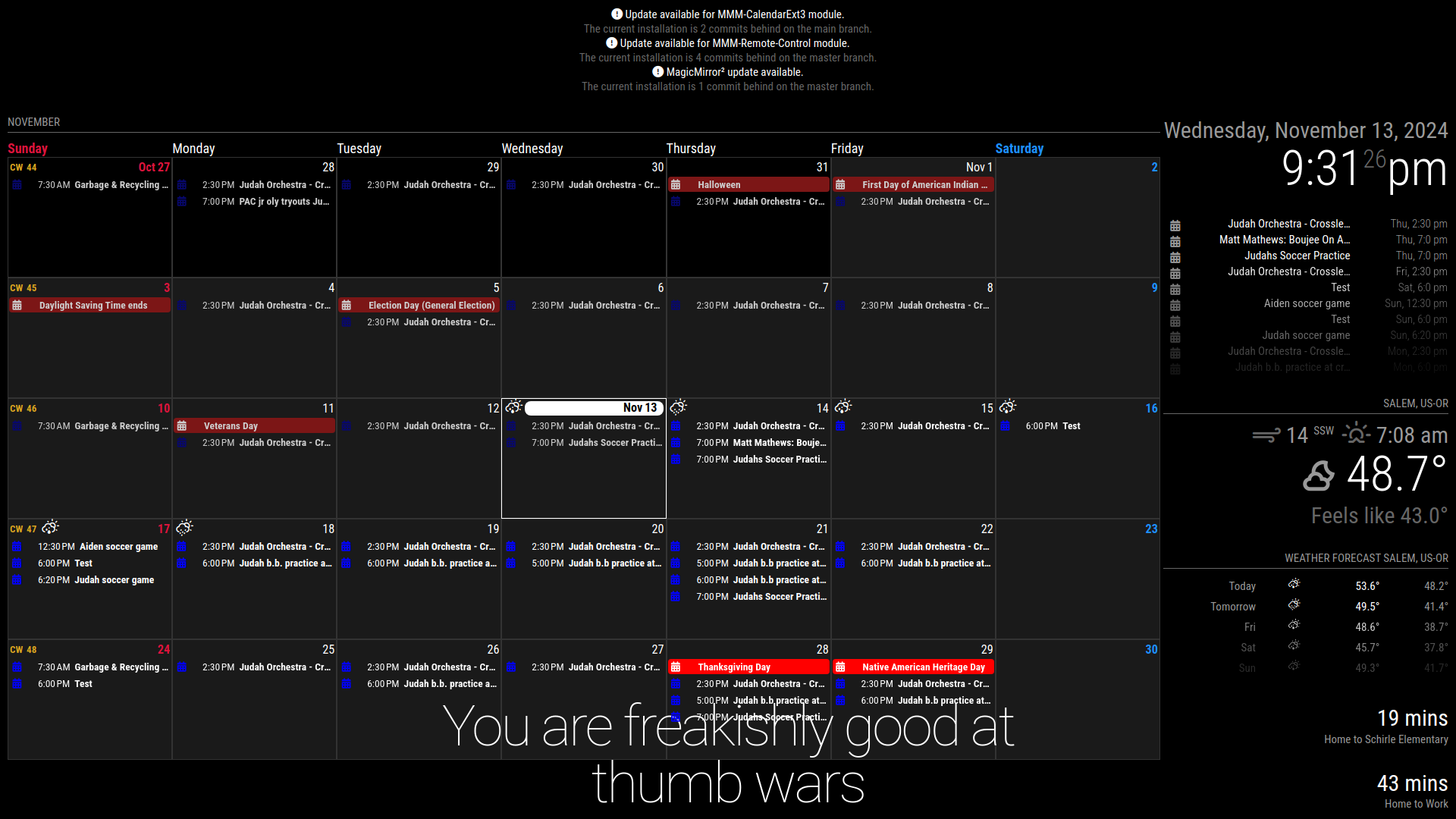
                  @sdetweil I tried reverting to the version I backed-up before I updated and it exhibits the same doubled entry error. Its version v2.28.0 20241113_21h31m26s_grim.png
                  1 Reply Last reply Reply Quote 0
                  • S Offline
                    sdetweil @MMrustykayn66
                    last edited by

                    @MMrustykayn66 ah. i had added that yesterday to debug a testing issue

                    i use ext3 on my test system and don’t see any impacts

                    Sam

                    How to add modules

                    learning how to use browser developers window for css changes

                    M 1 Reply Last reply Reply Quote 0
                    • M Offline
                      MMrustykayn66 @sdetweil
                      last edited by

                      @sdetweil Curiouser and Curiouser.

                      -I might try a fresh install this evening to see if that fixes the problem.

                      -Im inputting information to Google calendar via an iPhone. Probably not the problem but I will log into Calendar via my computer to see if that makes a difference. Probably not, but might be worth a try.

                      Only ideas I’ve had so far

                      Thanks for the Help , fingers crossed I can get this sorted soon as the significant other is less than impressed with her new calendar 🤣🤦‍♂️

                      S 2 Replies Last reply Reply Quote 0
                      • S Offline
                        sdetweil @MMrustykayn66
                        last edited by

                        @MMrustykayn66 the default refresh rate is slow, a few days

                        Sam

                        How to add modules

                        learning how to use browser developers window for css changes

                        M 1 Reply Last reply Reply Quote 0
                        • M Offline
                          MMrustykayn66 @sdetweil
                          last edited by

                          @sdetweil when I had nothing showing up on EXT3 I upped the refresh rate to every minute to see if that was the problem. Nothing ever loaded.

                          M 1 Reply Last reply Reply Quote 0
                          • M Offline
                            MMRIZE @MMrustykayn66
                            last edited by

                            @MMrustykayn66
                            Only Google calendars are affected? How about other calendar? Like the default sample calendar?

                            1 Reply Last reply Reply Quote 0
                            • S Offline
                              sdetweil @MMrustykayn66
                              last edited by

                              @MMrustykayn66 i cleaned up the debug, just git pull in the module folder with current branch on my pr, or install it again

                              Sam

                              How to add modules

                              learning how to use browser developers window for css changes

                              M 1 Reply Last reply Reply Quote 0
                              • M Offline
                                MMrustykayn66 @sdetweil
                                last edited by

                                @sdetweil

                                Re-entering the data via Google Calendars web interface seems to have fixed the problem. I deleted all entries that were added via Google calendar on IOS and re entered them. It seems to only affect events that are reoccurring.

                                Hopefully this provides insight to someone who knows why.

                                Thank you for all your help. Much appreciated

                                S 3 Replies Last reply Reply Quote 0
                                • S Offline
                                  sdetweil @MMrustykayn66
                                  last edited by

                                  @MMrustykayn66 i use ios all the time to manage my google calendar without problem. sometimes i pick the wrong calendar, family instead of personal, when my mirror is showing personal

                                  Sam

                                  How to add modules

                                  learning how to use browser developers window for css changes

                                  M 1 Reply Last reply Reply Quote 0
                                  • S Offline
                                    sdetweil @MMrustykayn66
                                    last edited by sdetweil

                                    @MMrustykayn66 did you reload the new calendar module code?

                                    I see there was a bug if your timezone was UTC. fixed. try git pull in the MM folder to get the update

                                    Sam

                                    How to add modules

                                    learning how to use browser developers window for css changes

                                    1 Reply Last reply Reply Quote 0
                                    • S Offline
                                      sdetweil @MMrustykayn66
                                      last edited by

                                      @MMrustykayn66 can you replicate this and show me the ics file (send via email)
                                      and show me your config for the calendar module
                                      (xxx out the private urls)

                                      Sam

                                      How to add modules

                                      learning how to use browser developers window for css changes

                                      1 Reply Last reply Reply Quote 0
                                      • M Offline
                                        MMrustykayn66 @sdetweil
                                        last edited by

                                        @sdetweil

                                        Sorry for the late reply.

                                        — I am only using two calendars currently. Googles Holiday calendar and one personal Calendar.

                                        — I reverted to the most current update before adding events VIA the web interface. After that I re-installed G Calendar for IOS and added a reoccurring event. I didn’t realise before that it is not doubling events. Its actually displaying the correct event , the same event on the next day and then on that day for all reoccurring events. IE I set up a reoccurring event for Sat at 9. It shows that event, one on Sunday at 9 and then one for every Sunday at 9 moving forward. Magic Mirror is the only place this happens.

                                        — I git pulled the release you are working on. Its giving me the same error it was before. Calendar module shows events correctly but nothing ever loads on EXT3. PM me your email address and I will send over the ICS. EXT3 is up to date.

                                        {
                                        			module: "calendar",
                                        			position: "top_right",
                                        			config: {
                                        				maximumEntries: 12,
                                        				//wrapEvents: true,
                                        				broadcastPastEvents: true, // <= IMPORTANT to see past events
                                        				calendars: [
                                        					{
                                        			fetchInterval: 50000,
                                        			url: "https://calendar.google.com/calendar/ical/teaxxxxxxx",
                                                                name: "Shandra", // <= RECOMMENDED to assign name
                                                                color: "blue" // <= RECOMMENDED to assign color		
                                        					},
                                        					{
                                        					url: "https://calendar.google.com/calendar/ical/en.usa%23holiday%40group.v.calendar.google.com/public/basic.ics",
                                                                name: "us_holiday", // <= RECOMMENDED to assign name
                                                                color: "red" // <= RECOMMENDED to assign color
                                        					},
                                        				]
                                        			}
                                        		},
                                        		{
                                                    module: "MMM-CalendarExt3",
                                                    position: "top_left",
                                                    title: "",
                                                    config: {
                                        		    refreshInterval: 60000,
                                                            mode: "month",
                                                            instanceId: "basicCalendar",
                                                            locale: 'en-US',
                                                            maxEventLines: 6,
                                                            firstDayOfWeek: 0,
                                                            calendarSet: ['us_holiday', 'abfall', 'mytest', 'Shandra'],
                                                }
                                        
                                        S 1 Reply Last reply Reply Quote 0
                                        • S Offline
                                          sdetweil @MMrustykayn66
                                          last edited by

                                          @MMrustykayn66 me email is the same userid at gmail

                                          by default the cal will NOT show a recurring event on different days . it shows the start . if its Monday and the event starts Tuesday and repeats daily thru Thursday,
                                          then the cal will show up on Tuesday.
                                          if u turn on splitevents then you will see tue/1, wed/2, thur/3

                                          broadcast psst events and # events at 12 will be a problem w large calendars.

                                          we never show past events.
                                          the fetcher gets the events as one big pile in date order then clips the list to the size specified

                                          look at the broadcasting message in the output of the npm start

                                          my calendar has 1600 events, only 3 this week

                                          maximum number of days would be better
                                          we scan back and forward that range. default is a year

                                          Ext3 wont display events that don’t fit in the visual timeframe weeks/month bring viewed

                                          Sam

                                          How to add modules

                                          learning how to use browser developers window for css changes

                                          M 1 Reply Last reply Reply Quote 0
                                          • M Offline
                                            MMrustykayn66 @sdetweil
                                            last edited by

                                            @sdetweil
                                            -the test event isn’t supposed to be on Sunday at all. Its only supposed to occur on Saturday. It shows up on Saturday for the first occurrence then the next Sunday and every Sunday after that.

                                            -Should I turn of broadcast past events? I have events set to 12 to push the calendar module out a little bit so everything is more visually balanced. If its not the right side column is a bit crunched and doesn’t line up properly with the left column where I have EXT3

                                            • My Broadcasting only has 579 events. SO a much ‘smaller’ calendar.

                                            • I assume visual event time-frame refers to the data that would only show for the weeks displayed. Nothing displays in the Calendar at all for any of the days, Personal or Holiday Calendar.

                                            S 1 Reply Last reply Reply Quote 0
                                            • S Offline
                                              sdetweil @MMrustykayn66
                                              last edited by

                                              @MMrustykayn66 we worked this offline
                                              He ended up w 2 instances of calendar module
                                              1 for ext events past and future
                                              1 for short list of this week’s next 10 events
                                              And the updated calendar module in test

                                              Sam

                                              How to add modules

                                              learning how to use browser developers window for css changes

                                              1 Reply Last reply Reply Quote 0
                                              • S sdetweil has marked this topic as solved on

                                              Hello! It looks like you're interested in this conversation, but you don't have an account yet.

                                              Getting fed up of having to scroll through the same posts each visit? When you register for an account, you'll always come back to exactly where you were before, and choose to be notified of new replies (either via email, or push notification). You'll also be able to save bookmarks and upvote posts to show your appreciation to other community members.

                                              With your input, this post could be even better 💗

                                              Register Login

                                              • 1 / 1
                                              • First post
                                                Last post
                                              Enjoying MagicMirror? Please consider a donation!
                                              MagicMirror created by Michael Teeuw.
                                              Forum managed by Sam, technical setup by Karsten.
                                              This forum is using NodeBB as its core | Contributors
                                              Contact | Privacy Policy