MagicMirror Forum
    • Recent
    • Tags
    • Unsolved
    • Solved
    • MagicMirror² Repository
    • Documentation
    • 3rd-Party-Modules
    • Donate
    • Discord
    • Register
    • Login
    A New Chapter for MagicMirror: The Community Takes the Lead
    Read the statement by Michael Teeuw here.

    MMM-CalendarExt3Agenda - how to hide days with no events and hide/filter out events with a keywords

    Scheduled Pinned Locked Moved Unsolved Troubleshooting
    22 Posts 4 Posters 5.0k Views 4 Watching
    Loading More Posts
    • Oldest to Newest
    • Newest to Oldest
    • Most Votes
    Reply
    • Reply as topic
    Log in to reply
    This topic has been deleted. Only users with topic management privileges can see it.
    • S Offline
      sdetweil @GrandizerGo
      last edited by sdetweil

      @GrandizerGo i think on the second you can use the filter
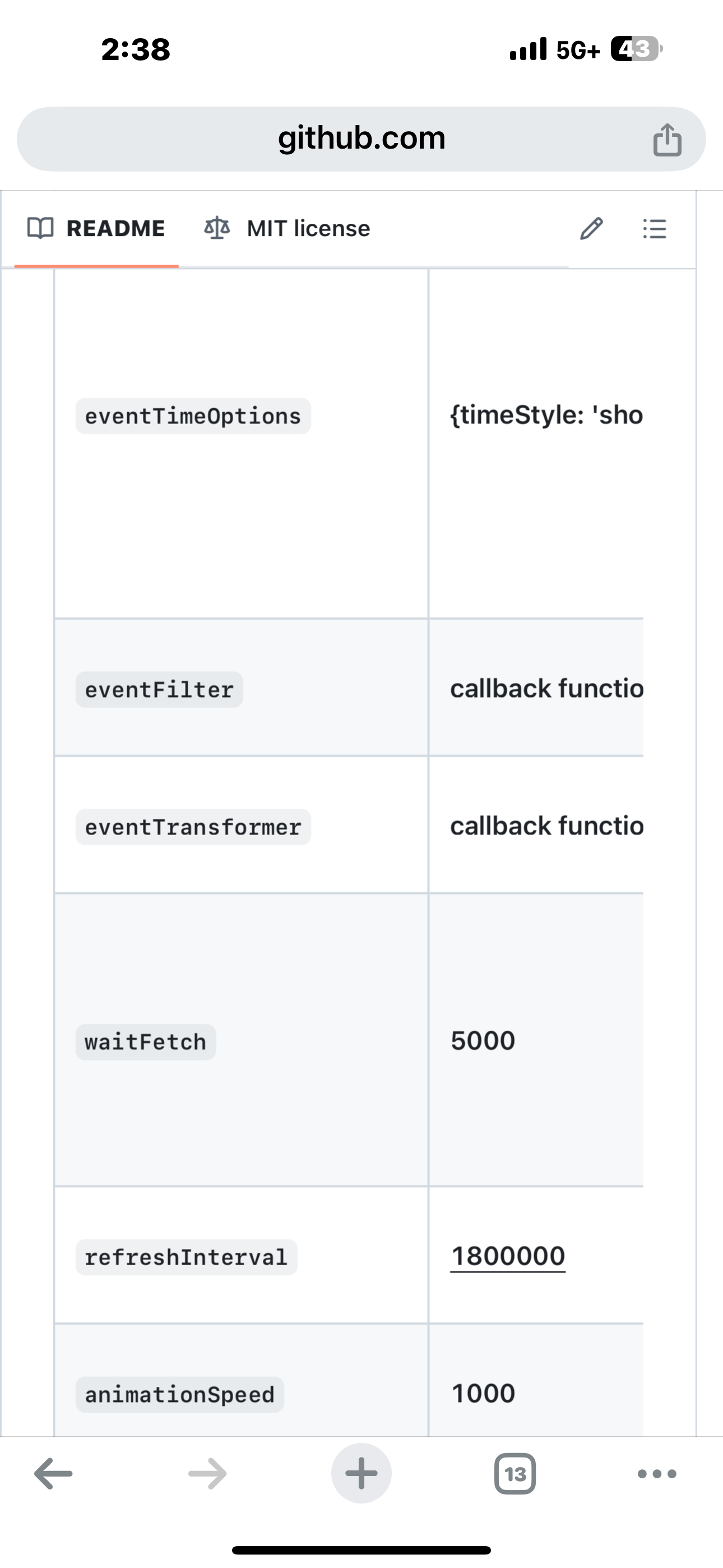
      IMG_0595.png IMG_0596.png

      if the filter routine returns true the event is kept

      dont know of remove days

      Sam

      How to add modules

      learning how to use browser developers window for css changes

      G 1 Reply Last reply Reply Quote 0
      • G Offline
        GrandizerGo @sdetweil
        last edited by

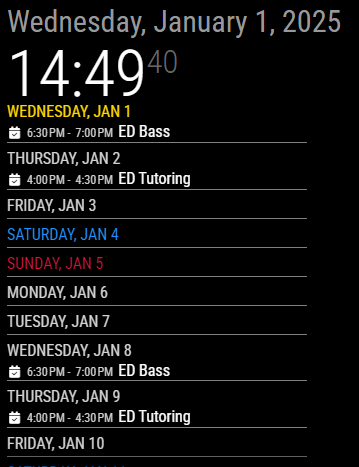
        @sdetweil Thanks, the eventFilter did the trick to help hide repeated events.

        Anyone know if it’s possible to filter out dates that have no entries hidden after the filter is applied?
        43dc7658-4eba-4dcd-8eb5-740cca2e7589-image.png

        S 1 Reply Last reply Reply Quote 0
        • S Offline
          sdetweil @GrandizerGo
          last edited by sdetweil

          @MMRIZE will have to answer that

          i know there is the function to handle all events

          but that doesn’t help if there no events for a date

          Sam

          How to add modules

          learning how to use browser developers window for css changes

          1 Reply Last reply Reply Quote 0
          • M Offline
            MMRIZE @GrandizerGo
            last edited by

            @GrandizerGo

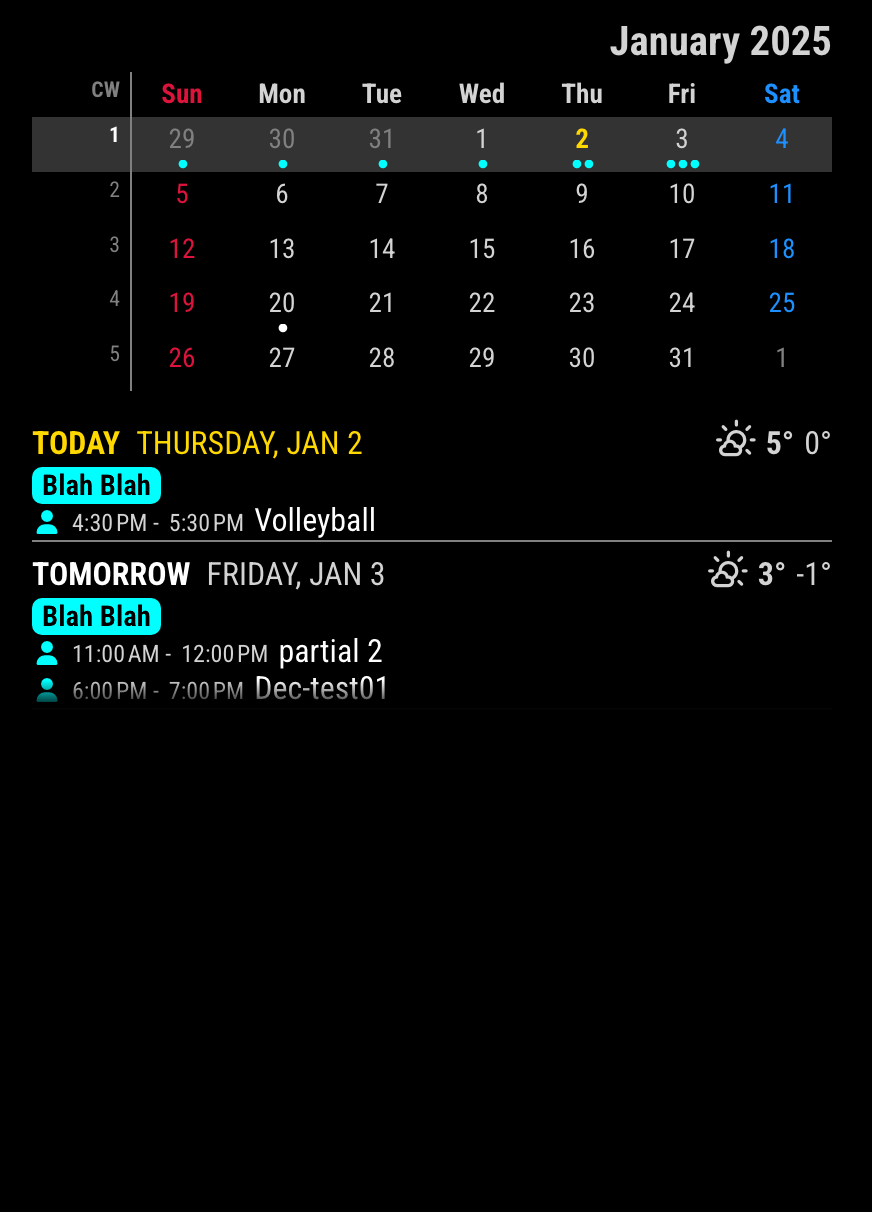
            To filter out the empty days

            There could be 2 ways of approaches for your exact purpose. The each ways are different, so choose one.

            1.

            d9ebe486-8de8-4e4b-83dc-c859f050912e-image.png

            /* CX3A config section of config/config.js */
            onlyEventDays: 5, // This will show 5 specific days which has at least one event on the day.
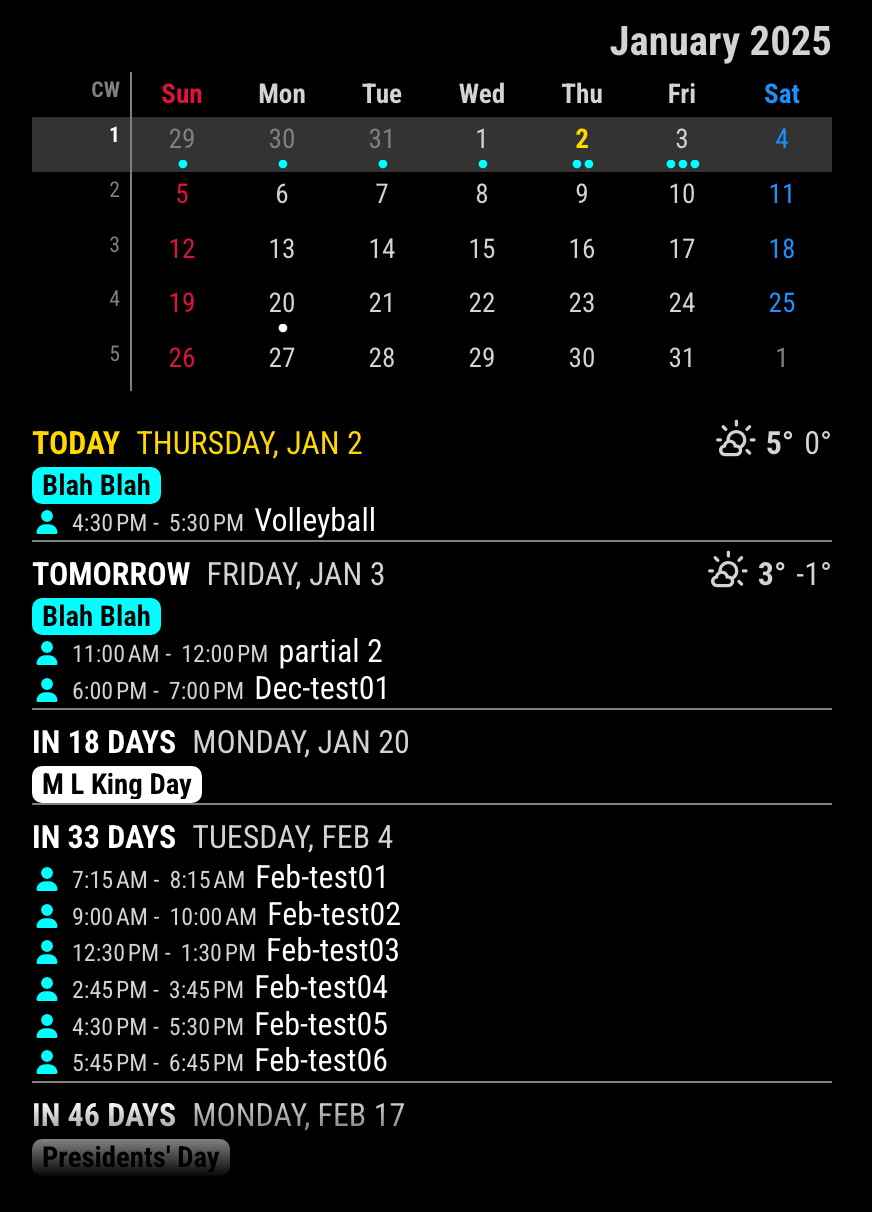
            

            cd16bca8-6022-4d5c-897d-ecb0a053f762-image.png

            2.

            Or you can hide empty days in the calendar scope with CSS.

            /* css/custom.css */
            .CX3A .agenda .cell[data-events-counts="0"] {
              display: none;
            }
            

            9f8a0c9b-1c15-488d-8293-a958775b6148-image.png

            S 1 Reply Last reply Reply Quote 1
            • S Offline
              sdetweil @MMRIZE
              last edited by

              @MMRIZE cool on the css approach

              Sam

              How to add modules

              learning how to use browser developers window for css changes

              G 1 Reply Last reply Reply Quote 0
              • G Offline
                GrandizerGo @sdetweil
                last edited by

                @MMRIZE Thanks! On the config.js method it worked right away! I set to 10 days and it works nicely.
                With the custom.css method it seems to only show about 4 events.

                1 Reply Last reply Reply Quote 0
                • R Offline
                  rkorell Module Developer
                  last edited by

                  Dear gurus,
                  I’m pretty new here and i do have the exact same problem as the original thread owner.
                  I’ve identified and tried the conig.cs approach with “onlyEventDays: 5,” but this doesn’t work for me unfortunately.
                  In addition other documented switches of this module
                  // useWeather: false ,
                  // showMiniMonthCalendar: false,
                  don’t work either for me.
                  Any idea?
                  Because of the other two switches I don’t want to play with CSS right now…
                  Thanks for any hint/advise!

                  Warmest regards,
                  Ralf

                  S 1 Reply Last reply Reply Quote 0
                  • S Offline
                    sdetweil @rkorell
                    last edited by

                    @rkorell can you show your ext3 config please

                    Sam

                    How to add modules

                    learning how to use browser developers window for css changes

                    R 1 Reply Last reply Reply Quote 0
                    • R Offline
                      rkorell Module Developer @sdetweil
                      last edited by

                      Dear @sdetweil ,
                      yes for sure, sorry…
                      It’s VERY basic, because my trials were ignored I doesn’t spent too much time on it yet…
                      As you can see I’ve disabled the not working parts (currently except the asked one - “onlyEventDays”.

                      
                      // Kalenderübersicht (Agendaview)
                      
                      		{
                      		  module: "MMM-CalendarExt3Agenda",
                      		  position: "top_left", 
                      		  header: "Wichtige Termine",
                      		  // useWeather: false ,
                      		  // showMiniMonthCalendar: false,
                      		  onlyEventDays: 1
                      
                      		},


                      Thanks for your prompt reply - I was tired yesterday night, so seen your query rigth now.
                      Warmest regards,
                      Ralf

                      S 1 Reply Last reply Reply Quote 0
                      • S Offline
                        sdetweil @rkorell
                        last edited by sdetweil

                        @rkorell ok, the problem is the config description

                        according to the documentation, all of these config items belong to MagicMirror
                        https://docs.magicmirror.builders/modules/configuration.html#module-configuration
                        everything INSIDE the config:{} section belongs to the module

                        but you don’t have a config section, should look like this

                        {
                                         module: "MMM-CalendarExt3Agenda",
                                         position: "top_left", 
                                         header: "Wichtige Termine",
                                         config: {    
                                               // useWeather: false ,
                                               // showMiniMonthCalendar: false,
                                               onlyEventDays: 1
                                         }
                        },
                        

                        Sam

                        How to add modules

                        learning how to use browser developers window for css changes

                        R 1 Reply Last reply Reply Quote 0
                        • R Offline
                          rkorell Module Developer @sdetweil
                          last edited by

                          .Dear Sam, @sdetweil ,

                          shame on me!
                          This is dumb.
                          thanks a lot for this hint.

                          If you are doing it right - it works …

                          I’m terribly embarrassed.
                          Regards,
                          Ralf

                          S 1 Reply Last reply Reply Quote 0
                          • S Offline
                            sdetweil @rkorell
                            last edited by

                            @rkorell we all learn new things every day…

                            Sam

                            How to add modules

                            learning how to use browser developers window for css changes

                            R 1 Reply Last reply Reply Quote 0
                            • R Offline
                              rkorell Module Developer @sdetweil
                              last edited by

                              @sdetweil , yes indeed.
                              After making a little bit of progress now I’m not able to understand why the module doosn’t do what I expect…
                              I try to change the icons as well as the color of the calendar events.
                              Icon works fine, color for icon as well but the “event” itself doesn’t change color.

                              I’ve figured out that the searchword is found - because it triggers the icon color as well as the icon color (regardless that the current searchword contains an German “Umlaut” (‘ü’).

                              I found a code snippet here and modified it to my requirements.

                              ev.color is the attribute I’ve used - this seems the right one.
                              But It only changes the icon color…

                              
                              		{
                              		  module: "MMM-CalendarExt3Agenda",
                              		  position: "top_left", 
                              		  //header: "Wichtige Termine",
                              		  config: {
                              			  
                              			        eventTransformer: (ev) => {
                              			            const customEvents = [
                              			              { keyword: "Gelber Sack", symbol: ["fa-solid fa-arrows-spin"], color: "yellow" },
                              			              { keyword: "Restmüll", symbol: ["fa-regular fa-trash-can"], color: "green" },
                              			              { keyword: "Biomüll", symbol: ["fa-regular fa-trash-can"], color: "brown" },
                              			              { keyword: "Papier", symbol: ["fa-solid fa-dumbbell"], color: "blue" },
                              			              { keyword: "Urlaub", symbol: ["fa-solid fa-dumbbell"], color: "cyan" },
                              			            ]
                              			            const found = customEvents.find((condition) => {
                              			              return ev.title.search(condition.keyword) !== -1
                              			            })
                              			            if (found) {
                              			                ev.icon = [ found.symbol ]
                              			                ev.color = found.color
                              			            }
                              			            if (ev.title.search('Restmüll') !== -1) {
                              			              ev.symbol = [ "fa-solid fa-cake-candles" ]
                              			            }
                              			            if (ev.title.search('Papier') !== -1) {
                              			              ev.symbol = [ "fa-regular fa-trash-can" ]
                              			            }
                              			            if (ev.title.search('Gelber Sack') !== -1) {
                              			              ev.symbol = [ "fa-solid fa-arrows-spin" ]
                              			            }
                              			            if (ev.title.search('Biomüll') !== -1) {
                              			              ev.symbol = [ "fa-regular fa-trash-can" ]
                              			            }
                              			            if (ev.title.search('Geb.') !== -1) {
                              			              ev.title = ev.title.replace('Geb.', '')
                              			              ev.symbol = [ "fa-solid fa-cake-candles" ]
                              			            }
                              			            return ev
                              			        },


                              					// useWeather: false ,
                              					showMiniMonthCalendar: false,
                              					//onlyEventDays: 10  -- Nur Tage mit terminen anzeigen ist in der custom.css eingetragen, DAS funktioniert...
                              		  
                              		  } 
                              
                              		},


                              Where is my error now?

                              :-)

                              TIA for any hint.
                              Regards,
                              Ralf

                              S 1 Reply Last reply Reply Quote 0
                              • S Offline
                                sdetweil @rkorell
                                last edited by

                                @rkorell sorry, don’t know… not my module… @MMRIZE will have to reply

                                Sam

                                How to add modules

                                learning how to use browser developers window for css changes

                                R 1 Reply Last reply Reply Quote 0
                                • R Offline
                                  rkorell Module Developer @sdetweil
                                  last edited by

                                  @sdetweil , thanks anyway!

                                  should I place a separate posting?
                                  Regards,
                                  Ralf

                                  S 1 Reply Last reply Reply Quote 0
                                  • S Offline
                                    sdetweil @rkorell
                                    last edited by

                                    @rkorell no, my reference of his userid will send him here when he has time. just understand that this is all volunteer, as time is available, no commitment for support.

                                    maybe others will jump in.

                                    Sam

                                    How to add modules

                                    learning how to use browser developers window for css changes

                                    R 1 Reply Last reply Reply Quote 0
                                    • R Offline
                                      rkorell Module Developer @sdetweil
                                      last edited by

                                      @sdetweil , yes, I’m fully aware of volunteer.
                                      So thanks a LOT!

                                      Ralf

                                      R 1 Reply Last reply Reply Quote 0
                                      • R Offline
                                        rkorell Module Developer @rkorell
                                        last edited by

                                        Dear Sam (@sdetweil ),
                                        short feedbacj from this end :-)
                                        I was able to found a compromize.
                                        I’ve found a months old thread with the guy whose mirror I saw and @MMRIZE regardins an equivalent “problem”.
                                        The mentioned CSS solution doesn’t work for me - for whatever reason

                                        /* In your custom.css */
                                        .CX3 .event.singleday .headline .title,
                                        .CX3 .event.singleday .headline .time {
                                          color: var(--calendarColor);
                                        }
                                        

                                        Doesn’t colour the textline.
                                        But in the same discoussion I identified the “idea” to use the fact that whole day events DO use the given color as I define in my config.
                                        So now the apperance isO.K.

                                        For reference to others who might have same issues the whole block here:

                                        {
                                        		  module: "MMM-CalendarExt3Agenda",
                                        		  position: "top_left", 
                                        		  //header: "Wichtige Termine",
                                        		  config: {
                                        			  
                                        			        eventTransformer: (ev) => {
                                        			            const customEvents = [
                                        			              { keyword: "Restmüll", symbol: ["fa-regular fa-trash-can"], color: "grey" },
                                        			              { keyword: "Papier", symbol: ["fa-solid fa-dumbbell"], color: "blue" },
                                        			              { keyword: "Gelber Sack", symbol: ["fa-solid fa-arrows-spin"], color: "yellow" },
                                        			              { keyword: "Biomüll", symbol: ["fa-regular fa-trash-can"], color: "brown" },
                                        			              { keyword: "Restmüll & Papier & Gelber Sack", symbol: ["fa-regular fa-trash-can"], color: "fuchsia" },
                                        			              { keyword: "Urlaub", symbol: ["fa-solid fa-dumbbell"], color: "cyan" },
                                        			              
                                        			            ]
                                        			            const found = customEvents.find((condition) => {
                                        			              return ev.title.search(condition.keyword) !== -1   
                                        			            })
                                        			            if (found) {
                                        			                ev.icon = [ found.symbol ]
                                        			                ev.color = found.color 
                                        			            }
                                        			            if (ev.title.search("Restmüll") !== -1) {
                                        			              ev.symbol = [ "fa-regular fa-trash-can" ],
                                        			              ev.isFullday = [true], 
                                        			              ev.color = "grey"  
                                        			            }
                                        			            if (ev.title.search("Papier") !== -1) {
                                        			              ev.symbol = [ "fa-regular fa-trash-can" ],
                                        			              ev.isFullday = [true],
                                        			              ev.color = "blue"  
                                        			            }
                                        			            if (ev.title.search("Gelber Sack") !== -1) {
                                        			              ev.symbol = [ "fa-solid fa-arrows-spin" ],
                                        			              ev.isFullday = [true],
                                        			              ev.color = "yellow"  
                                        			            }
                                        			            if (ev.title.search("Biomüll") !== -1) {
                                        			              ev.symbol = [ "fa-regular fa-trash-can" ],
                                        			              ev.isFullday = [true],
                                        			              ev.color = "brown"  
                                        			            }
                                        						if (ev.title.search("Restmüll & Papier & Gelber Sack") !== -1) {
                                        			              ev.symbol = [ "fa-regular fa-trash-can" ],
                                        			              ev.isFullday = [true],
                                        			              ev.title = "Alle Tonnen",
                                        			              ev.color = "fuchsia"
                                        			            }			            
                                        						if (ev.title.search("Urlaub") !== -1) {
                                        			              ev.symbol = [ "fa-regular fa-trash-can" ],
                                        			              ev.isFullday = [true],
                                        			              ev.color = "green"
                                        			            }
                                        
                                        			            return ev
                                        			        },


                                        Thanks for your support!
                                        Warmest regards,
                                        Ralf

                                        S M 2 Replies Last reply Reply Quote 0
                                        • S Offline
                                          sdetweil @rkorell
                                          last edited by

                                          @rkorell glad you have it working

                                          Sam

                                          How to add modules

                                          learning how to use browser developers window for css changes

                                          1 Reply Last reply Reply Quote 0
                                          • M Offline
                                            MMRIZE @rkorell
                                            last edited by MMRIZE

                                            @rkorell
                                            CX3A is identified with CSS selector “.CX3A” to be distinguished from CX3.

                                            R 1 Reply Last reply Reply Quote 0

                                            Hello! It looks like you're interested in this conversation, but you don't have an account yet.

                                            Getting fed up of having to scroll through the same posts each visit? When you register for an account, you'll always come back to exactly where you were before, and choose to be notified of new replies (either via email, or push notification). You'll also be able to save bookmarks and upvote posts to show your appreciation to other community members.

                                            With your input, this post could be even better 💗

                                            Register Login

                                            • 1
                                            • 2
                                            • 1 / 2
                                            • First post
                                              Last post
                                            Enjoying MagicMirror? Please consider a donation!
                                            MagicMirror created by Michael Teeuw.
                                            Forum managed by Sam, technical setup by Karsten.
                                            This forum is using NodeBB as its core | Contributors
                                            Contact | Privacy Policy