Read the statement by Michael Teeuw here.
MM always black screen with cursor
-
@sdetweil Thank you for the answer.
Ok, this evening I’ll show the ~/install.log and I’ll try to install MM with 32bit image.
I have another micro SD to test.
“show the messages for npm start” do you mean to copy the log screen I see from SSH?
To start MM I tried 3 ways:
1- from ssh “npm run start” “npm start”
2- from ssh the “DISPLAY=:0…(etc etc)” command
3- from terminal, directly on raspberry, “npm run start” and “npm start” -
@nowayto show
cd ~/MagicMirror
npm start >somefile.txtthen when screen up, ctrl-q
and look at somefile.txt
-
This is the result inside the *.txt
magicmirror@2.30.0 start
npm run start:x11magicmirror@2.30.0 start:x11
DISPLAY=“${DISPLAY:=:0}” ./node_modules/.bin/electron js/electron.js[2025-02-24 20:55:20.171] [LOG] Starting MagicMirror: v2.30.0
[2025-02-24 20:55:22.568] [LOG] Loading config …
[2025-02-24 20:55:22.695] [LOG] config template file not exists, no envsubst
[2025-02-24 20:55:31.157] [INFO] Checking config file /home/berrymirror/MagicMirror/config/config.js …
[2025-02-24 20:55:31.368] [INFO] Your configuration file doesn’t contain syntax errors :)
[2025-02-24 20:55:31.371] [INFO] Checking modules structure configuration …
[2025-02-24 20:55:33.349] [INFO] Your modules structure configuration doesn’t contain errors :)
[2025-02-24 20:55:33.364] [LOG] Loading module helpers …
[2025-02-24 20:55:33.371] [LOG] No helper found for module: alert.
[2025-02-24 20:55:33.399] [LOG] Initializing new module helper …
[2025-02-24 20:55:33.401] [LOG] Module helper loaded: updatenotification
[2025-02-24 20:55:33.404] [LOG] No helper found for module: clock.
[2025-02-24 20:55:34.525] [LOG] Initializing new module helper …
[2025-02-24 20:55:34.526] [LOG] Module helper loaded: calendar
[2025-02-24 20:55:34.532] [LOG] No helper found for module: compliments.
[2025-02-24 20:55:34.538] [LOG] No helper found for module: weather.
[2025-02-24 20:55:35.571] [LOG] Initializing new module helper …
[2025-02-24 20:55:35.572] [LOG] Module helper loaded: newsfeed
[2025-02-24 20:55:35.573] [LOG] All module helpers loaded.
[2025-02-24 20:55:35.711] [LOG] Starting server on port 8080 …
[2025-02-24 20:56:47.381] [LOG] Server started …
[2025-02-24 20:56:49.306] [LOG] Connecting socket for: updatenotification
[2025-02-24 20:56:50.754] [LOG] Starting module helper: updatenotification
[2025-02-24 20:56:50.897] [LOG] Connecting socket for: calendar
[2025-02-24 20:56:51.135] [LOG] Starting node helper for: calendar
[2025-02-24 20:56:51.155] [LOG] Connecting socket for: newsfeed
[2025-02-24 20:56:51.159] [LOG] Starting node helper for: newsfeed
[2025-02-24 20:56:51.421] [LOG] Sockets connected & modules started …
[2025-02-24 20:58:33.277] [LOG] Launching application. -
@nowayto i would wait a little longer, web app not open yet
or npm start dev, in the dev window select the console tab
see if there is an error displayed
-
After 1 millions of tests and trying… now it works.
It seems it start to work using “raspbian bookworm 32bit legacy”.
I tried with the non-legacy too and it didn’t work.
Is that possible?
I’m asking that because I know my 3 model A+ is 64bit capable.
Honestly, without your advice… I’ll never though it could be the OS.
Thank you a lot, now I’ll start a new chapter: the configuration -
@nowayto i think 64 bit is ok, IF you have the physical memory
3A doesnt -
S sdetweil has marked this topic as solved on
-
@nowayto configuration, try my MMM-Config module. also supports installing modules
-
@sdetweil
very interesting. I’ve installed it, but I can’t access to webpanel.
Tried with:
http://IP:PORT/configure
http://LOCALHOST:PORT/configure
no access.
tried with standard 8080 and another port chosen by me.
computer IP is whitelisted, and clearly on same network.
config check is OK~/MagicMirror/config $ npm run config:check
magicmirror@2.30.0 config:check
node js/check_config.js
[2025-02-26 15:19:04.776] [INFO] Checking config file /home/PINAME/MagicM irror/config/config.js …
[2025-02-26 15:19:04.960] [INFO] Your configuration file doesn’t contain syntax errors :)
[2025-02-26 15:19:04.962] [INFO] Checking modules structure configuration …
[2025-02-26 15:19:05.229] [INFO] Your modules structure configuration doesn’t c ontain errors :)Another little issues: sometimes I got black screen with cursor after “npm run start”
I have to restart it in order to making it work -
@nowayto did you add my module to config.js
{ module:"MMM-Config", position:"....one_of the positions", config:{ } }, -
-
@sdetweil
Yes i did and the config checker gave me the OKthis is the startup
npm run startmagicmirror@2.30.0 start
npm run start:x11magicmirror@2.30.0 start:x11
DISPLAY=“${DISPLAY:=:0}” ./node_modules/.bin/electron js/electron.js[2025-02-26 15:00:59.702] [LOG] Starting MagicMirror: v2.30.0
[2025-02-26 15:01:01.515] [LOG] Loading config …
[2025-02-26 15:01:01.525] [LOG] config template file not exists, no envsubst
[2025-02-26 15:01:10.865] [INFO] Checking config file /home/MYRASPBERRYNAME/MagicM irror/config/config.js …
[2025-02-26 15:01:11.018] [INFO] Your configuration file doesn’t contain syntax errors :)
[2025-02-26 15:01:11.020] [INFO] Checking modules structure configuration …
[2025-02-26 15:01:11.253] [INFO] Your modules structure configuration doesn’t c ontain errors :)
[2025-02-26 15:01:12.473] [LOG] Loading module helpers …
[2025-02-26 15:01:12.480] [LOG] No helper found for module: alert. -
@sdetweil
free -m
total used free shared buff/cache available
Mem: 426 180 91 81 155 112
Swap: 1023 225 798 -
@nowayto more log info, i dont see info for mmm-config
-
npm run start
magicmirror@2.30.0 start
npm run start:x11magicmirror@2.30.0 start:x11
DISPLAY=“${DISPLAY:=:0}” ./node_modules/.bin/electron js/electron.js[2025-02-26 15:00:59.702] [LOG] Starting MagicMirror: v2.30.0
[2025-02-26 15:01:01.515] [LOG] Loading config …
[2025-02-26 15:01:01.525] [LOG] config template file not exists, no envsubst
[2025-02-26 15:01:10.865] [INFO] Checking config file /home/MYRASPBNAME/MagicM irror/config/config.js …
[2025-02-26 15:01:11.018] [INFO] Your configuration file doesn’t contain syntax errors :)
[2025-02-26 15:01:11.020] [INFO] Checking modules structure configuration …
[2025-02-26 15:01:11.253] [INFO] Your modules structure configuration doesn’t c ontain errors :)
[2025-02-26 15:01:12.473] [LOG] Loading module helpers …
[2025-02-26 15:01:12.480] [LOG] No helper found for module: alert.
[2025-02-26 15:01:12.519] [LOG] Initializing new module helper …
[2025-02-26 15:01:12.522] [LOG] Module helper loaded: updatenotification
[2025-02-26 15:01:12.525] [LOG] No helper found for module: clock.
[2025-02-26 15:01:13.000] [LOG] Initializing new module helper …
[2025-02-26 15:01:13.001] [LOG] Module helper loaded: calendar
[2025-02-26 15:01:13.005] [LOG] No helper found for module: compliments.
[2025-02-26 15:01:13.007] [LOG] No helper found for module: weather.
[2025-02-26 15:01:42.730] [LOG] Initializing new module helper …
[2025-02-26 15:01:42.732] [LOG] Module helper loaded: MMM-Wallpaper
[2025-02-26 15:01:43.127] [LOG] Initializing new module helper …
[2025-02-26 15:01:43.128] [LOG] Module helper loaded: MMM-Config
[2025-02-26 15:01:43.437] [LOG] Initializing new module helper …
[2025-02-26 15:01:43.438] [LOG] Module helper loaded: newsfeed
[2025-02-26 15:01:43.439] [LOG] All module helpers loaded.
[2025-02-26 15:01:43.455] [LOG] Starting server on port **** …
[2025-02-26 15:02:26.268] [LOG] Server started …
[2025-02-26 15:02:26.271] [LOG] Connecting socket for: updatenotification
[2025-02-26 15:02:26.288] [LOG] Starting module helper: updatenotification
[2025-02-26 15:02:26.290] [LOG] Connecting socket for: calendar
[2025-02-26 15:02:26.291] [LOG] Starting node helper for: calendar
[2025-02-26 15:02:26.293] [LOG] Connecting socket for: MMM-Wallpaper
[2025-02-26 15:02:26.295] [LOG] Starting node helper for: MMM-Wallpaper
[2025-02-26 15:02:26.306] [LOG] Connecting socket for: MMM-Config
[2025-02-26 15:02:27.236] [LOG] Connecting socket for: newsfeed
[2025-02-26 15:02:27.237] [LOG] Starting node helper for: newsfeed
[2025-02-26 15:02:27.258] [LOG] Sockets connected & modules started …
[2025-02-26 15:02:44.884] [LOG] Launching application. -
@nowayto then you should be able to access the mmm-config urls
-
Exactly but I can’t access.
Now I’m trying give a whitelist complete access.The only error I see is a GPU process error but I don’t think is connected to the web server.
[2025-02-26 22:43:49.784] [LOG] Launching application.
[7194:0226/224359.949078:ERROR:gpu_process_host.cc(1007)] GPU process exited unexpectedly: exit_code=512
[2025-02-26 22:44:42.117] [LOG]
[7194:0226/224442.468308:ERROR:gpu_process_host.cc(1007)] GPU process exited unexpectedly: exit_code=512
[7194:0226/224504.822973:ERROR:gpu_process_host.cc(1007)] GPU process exited unexpectedly: exit_code=512
[2025-02-26 22:45:56.193] [INFO] System information:SYSTEM: manufacturer: Raspberry Pi Foundation; model: Raspberry Pi 3 Model A Plus Rev 1.1; virtual: false
OS: platform: linux; distro: Raspbian GNU/Linux; release: 11; arch: arm; kernel: 6.1.21-v7+
VERSIONS: electron: 32.3.1; used node: 20.18.1; installed node: 20.18.1; npm: 10.8.2; pm2: 5.4.3
OTHER: timeZone: Europe/Rome; ELECTRON_ENABLE_GPU: undefined
[2025-02-26 22:45:56.931] [LOG] Create new calendarfetcher for url: https://ics.calendarlabs.com/76/****MYCAL***** - Interval: 604800000
[2025-02-26 22:45:57.049] [LOG] Create new newsfetcher for url: http://www.MYRSS**- Interval: 300000
[2025-02-26 22:45:57.118] [INFO] updatenotification: Updater Class Loaded!
[2025-02-26 22:45:57.123] [INFO] updatenotification: Checking PM2 using…
[2025-02-26 22:45:57.125] [INFO] updatenotification: [PM2] You are not using pm2
[2025-02-26 22:45:57.128] [INFO] Checking git for module: MMM-Wallpaper
[2025-02-26 22:45:57.591] [INFO] Checking git for module: MMM-Config
[2025-02-26 22:45:57.893] [INFO] Checking git for module: MagicMirror
[2025-02-26 22:45:58.426] [INFO] Calendar-Fetcher: Broadcasting 10 events from https://ics.calendarlabs.com*****MYCAL****.
[2025-02-26 22:45:58.443] [INFO] Newsfeed-Fetcher: Broadcasting 10 items. -
@sdetweil
My fault. In config.js the adress was set in “localhost”… Sorry.
Now I set the IP and I granted the access -
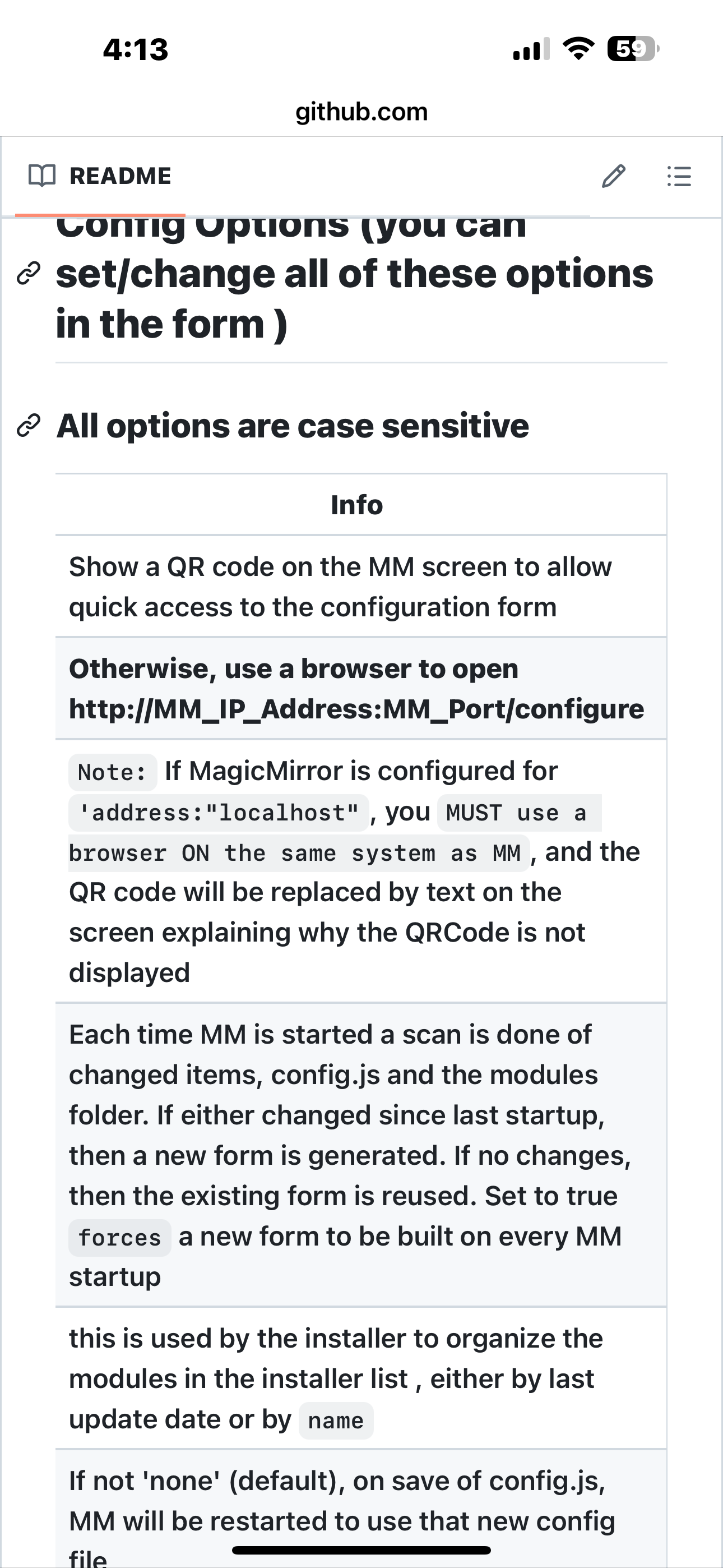
@nowayto yes, the doc mentions this, and if you had set
showQR:true
it would have displayed a message about localhost
Hello! It looks like you're interested in this conversation, but you don't have an account yet.
Getting fed up of having to scroll through the same posts each visit? When you register for an account, you'll always come back to exactly where you were before, and choose to be notified of new replies (either via email, or push notification). You'll also be able to save bookmarks and upvote posts to show your appreciation to other community members.
With your input, this post could be even better 💗
Register Login