Read the statement by Michael Teeuw here.
Dakboard layout for family dashboard
-
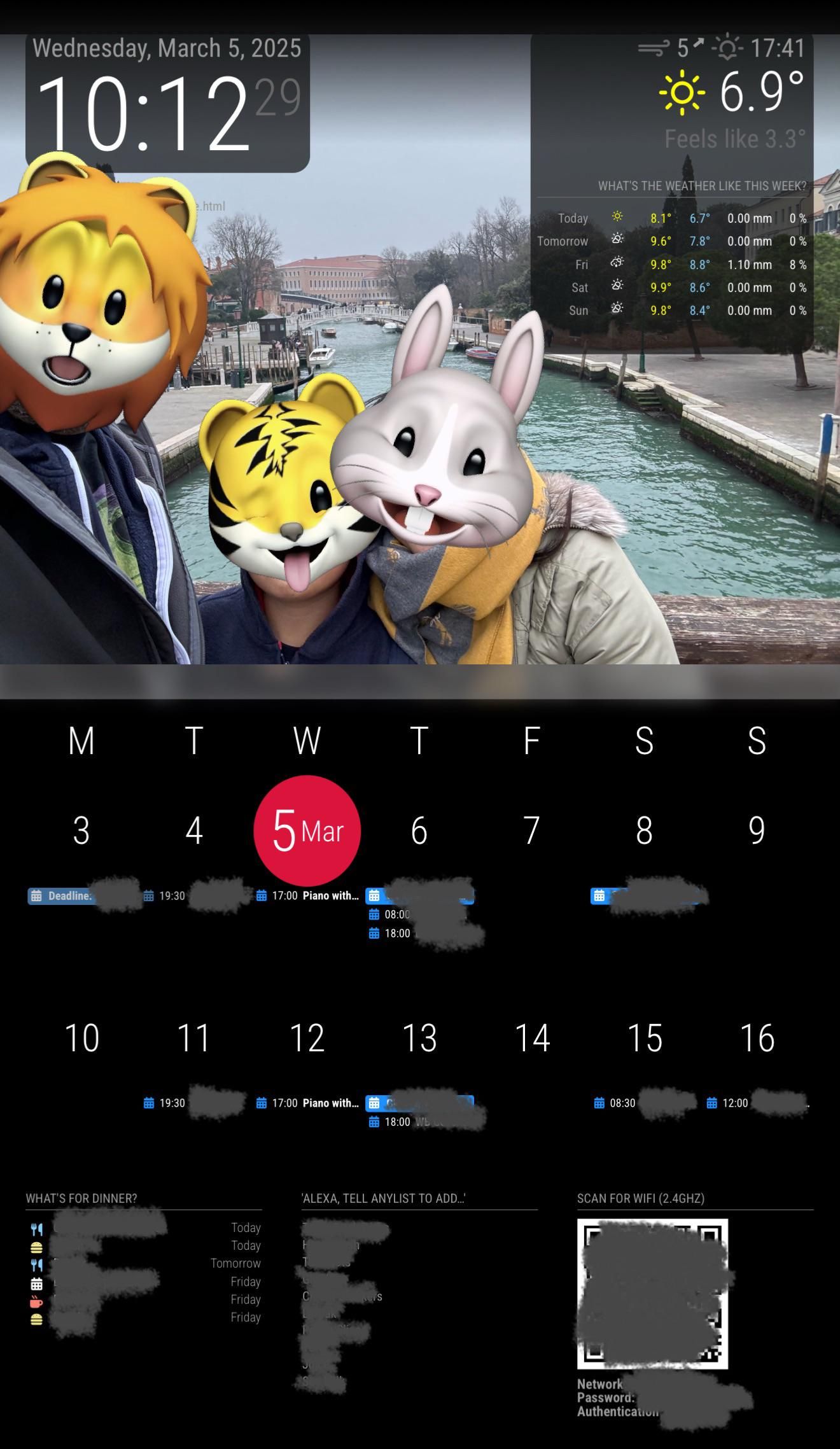
Sorry for yet another boring family dashboard, but I thought I’d share the progress I’ve made so far with making MMM-CalendarExt3 look like the calendar module in Dakboard.
I haven’t decided which modules I’ll keep for sure (I was having some compatibility issues between certain combinations) but the other ones you can see here are:
- Clock (standard)
- Calendar (standard by invisible)
- Weather (standard)
- MMM-AnyList (because we use AnyList for everything)
- MMM-WiFiPassword (for guests to access the wifi without bothering me)
- MMM-Remote-Control (for me to issue shutdown request via my phone)
I’m looking into building the mirror/frame next, as well as the necessary modules to give me a physical safe-shutdown button and any other physical controls that might be needed, depending on how much bloat I build into this device.
I’d really like to have an alternative to the standard weather module — perhaps to look more like the Dark Skies app or even the old yellow-and-blue Meteo weather app with the graphs, but sadly I’d have to develop my non-existent node.js skills before I could even consider building my own modules.
-
@QuackingPlums see the piratesky provider also a standalone module
see https://github.com/dankerthrone/MMM-PirateSkyForecast -
@sdetweil
Does this still function?
If so is it better than open weather forcast.?
I should say is it, more accurate. Open weather said we where supposed to get 15 inches of snow last night, maybe got 1.
I am kind of disappointed in it lately…
Looking for something better I guess. -
@plainbroke i dont use weather much, so no idea
-
-
@QuackingPlums hello, nice work ! how did you manage to make your calendar DAK like? Kind regards.
-
@com1cedric Hi, and thanks!
It took me a fair bit of trial and error since I’m not really an FE dev! This is the part of my custom.css that deals with MMM-CalendarExt3:
https://codeishot.com/3ukwf76lI’ve only tested it with my specific screen and with the MMM-CalendarExt3 module in the two-week mode that is shown above. Other configs may break it — I notice that if I open the URL in a browser tab on my laptop then the red circle gets squashed, so it’s probably very much dependent on the screen size and possibly even the pixel dimensions.
I should come back and take another look at that at some point.I also had to make a tiny tweak in the MMM-CalendarExt3.js file to allow single-character day-of-week initials, because I couldn’t work out how to change that in the config:
headerWeekDayOptions: { weekday: "narrow" // ##### EDITED FROM "long" ##### }, -
@QuackingPlums impressive, thank you! I am currently using calendarExt2 with satisfaction, but I will try calendarExt3 during the spring and test it. Take car and one more time, congrats for your work.
-
@com1cedric Looks great so far. For the weather module, maybe check out MMM-WeatherChart or MMM-OpenWeatherForecast — they offer more visual options without needing heavy node.js work. Also, adding a physical shutdown button is a smart move for reliability. Keep us posted on the frame build!

Hello! It looks like you're interested in this conversation, but you don't have an account yet.
Getting fed up of having to scroll through the same posts each visit? When you register for an account, you'll always come back to exactly where you were before, and choose to be notified of new replies (either via email, or push notification). You'll also be able to save bookmarks and upvote posts to show your appreciation to other community members.
With your input, this post could be even better 💗
Register Login