Read the statement by Michael Teeuw here.
MMM-CalendarExt3Agenda - Two questions
-
Hi,
I have two questions about this Module.-
Is it possible to show the current day’s activities all day, even after they’ve passed, and just turn them Gray when they’re done? I happened to check my MM today before it had refreshed and saw some older items from this morning showing in gray because they were already done. I thought that was actually a neat feature so I’m wondering if I can have it stay that way until Midnight and then that day’s events fall off and the next day’s activities stay on the screen until the next midnight. Is that possible?
-
I like the skipDuplicated flag, but my kids get confused because they don’t see all of their events on the screen. It just picks one of them and uses that calendar icon and the other one gets hidden. If I turn it off, then many things are shown 2 or 3 times. I’m wondering if there’s any way to have an in-between option. Is there any way to have duplicated events only show up once, but have their table layout modified to show all the calendar icons shown at the beginning so you can tell who the event is duplicated for.
So instead of showing:
A 10AM EventName
B 10AM EventNameCould it show:
A / B 10AM EventNameThis would reduce the clutter of having two events, but still show you that the event is for more than one person.
Something like this:
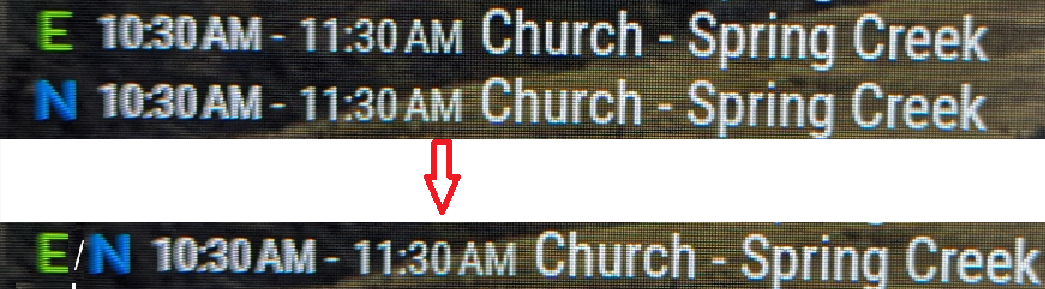
And if my wife and kids all have the same event, then it’d need to have all three calendar letters in there.
Thanks.
-
-
@Kelemvor can’t answer the first, but on the second
there is a handler you can code for the
eventPayload property that gets to examine and modify ALL the events for this calendar before being processed by the agenda drawer…so you could discover the 3 individual events and collapse them to one (delete the other two) and change the title to a/b/c ,
eventPayload: (list)={ for( let i in list){ // list.forEach(event)=>{ // different approaches let event = list[i] // not needed in list.forEach // be careful not to delete/add entries to 'list' while processing it.. // so maybe make an updated list and return that do whatever for this event } return list }, -
@Kelemvor the events have class
.passedapplied, so you could have a css entryfor
.CX3 .today .passed {
    some color shading
}
.today moves at midnight
-
@sdetweil Thanks. I’ll take a look tomorrow when my brain is fresh. ;)
-
There’s already this in the CSS that makes the passed events Gray:
.CX3A .event.passed {
filter: brightness(0.6) grayscale(0.33);
}But, there must be something else that removes them completely when it updates so they don’t show at all.
-
As for the #1 question, look at these config items:
startDayIndex
endDayIndex
That will adjust your view to specific days -
startDayIndex: 0will set it to start on the current day, and then continue for the number of days listed inendDayIndex -
@BKeyport said in MMM-CalendarExt3Agenda - Two questions:
As for the #1 question, look at these config items:
startDayIndex
endDayIndex
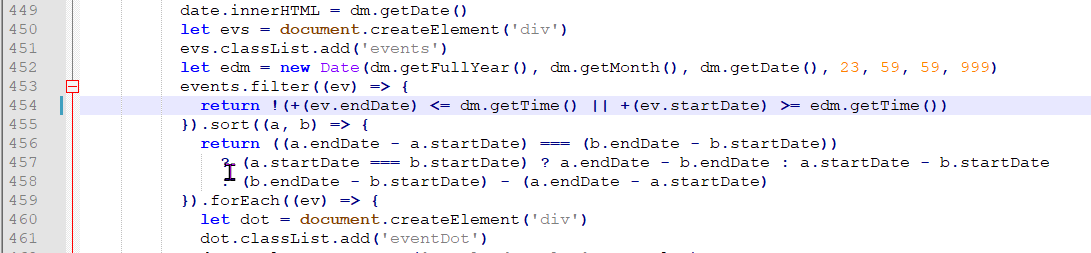
Those are already set correctly. There’s something hard coded somewhere that removes events that are in the past from showing, even if they’re from Today. If those settings were wrong I wouldn’t see anything from today.
-
Maybe something in this section if I’m deciphering things correctly…
-
@Kelemvor do you have
broadcastPastEvents: true,set in the default calendar app? -
@Kelemvor Actually, I think you might be right - does look hardcoded.
-
@BKeyport said in MMM-CalendarExt3Agenda - Two questions:
@Kelemvor do you have
broadcastPastEvents: true,set in the default calendar app?Not if that goes in the normal Config area. Does that make ALL events from the entire calendar get passed over to Ext3? Is that going to overload anything since it’s decades of events? :)
-
@Kelemvor It won’t overload anything. broadcastPastEvents is required to show old events.
-
@BKeyport I know it says its broadcasting 400+ events so I’m assuming it’s sending old stuff.
-
@Kelemvor I pretty much bet it’s that setting - with it I get what you want:

The “E” in “Javascript” stands for “Easy”
-
I think I fixed it and I Just found a typo in the official documentation:
On this page:
https://docs.magicmirror.builders/modules/calendar.html#configuration-optionsThe first instance of broadcastPastEvents is wrong.

It should say pastDaysCount, not maximumNumberofDays,

Anyway, I set broadcastPastEvents to True and PastDaysCount to 1. It seems to be showing now. I’ll know more tomorrow afternoon.
-
oh, and you can specify past events per calendar:
-
@Kelemvor I wouldn’t know the details on that part of the thing - I let my calendar spew the entire of the data download - it don’t hurt a thing.
-
@BKeyport Oh sheesh. After my change it’s now showing the entire mini calendar with all the events on it. It wasn’t like that before so it’s definitely sending things it wasn’t. I have the PastDays thing set to 1, in the base calendar but EXT3 calendar is showing events for all of March so that flag doesn’t seem to work right or something.
-
@Kelemvor pastDaysCount is an advisory to other modules. they dont have to honor it
we send all the events, there was a bug in clipping, i ‘fixed’ for 2.30, but made it worse. the temp fix removes clipping on past events
maximum days sets the range to view in cal, default 365 days

Hello! It looks like you're interested in this conversation, but you don't have an account yet.
Getting fed up of having to scroll through the same posts each visit? When you register for an account, you'll always come back to exactly where you were before, and choose to be notified of new replies (either via email, or push notification). You'll also be able to save bookmarks and upvote posts to show your appreciation to other community members.
With your input, this post could be even better 💗
Register Login