MagicMirror Forum
    • Recent
    • Tags
    • Unsolved
    • Solved
    • MagicMirror² Repository
    • Documentation
    • 3rd-Party-Modules
    • Donate
    • Discord
    • Register
    • Login
    A New Chapter for MagicMirror: The Community Takes the Lead
    Read the statement by Michael Teeuw here.

    i need help w pi imager and ssh, headless, oops, user error

    Scheduled Pinned Locked Moved General Discussion
    15 Posts 3 Posters 3.6k Views 3 Watching
    Loading More Posts
    • Oldest to Newest
    • Newest to Oldest
    • Most Votes
    Reply
    • Reply as topic
    Log in to reply
    This topic has been deleted. Only users with topic management privileges can see it.
    • karsten13K Offline
      karsten13 @sdetweil
      last edited by

      @sdetweil

      another interesting fact, if I open the settings in the imager to flash another
      the password fields (user and wifi) are filled with junk text, maybe encrypted… but the values I entered are not visible

      thats normal

      which version of pi imager are you using? Latest which is v1.9.0?

      And you are using the right user + passwd (I often forget to set the correct user)?

      The pi imager writes a file user-data into the root dir of the sd-card which has yaml content, you can check the content (e.g. user) and also try to override passwd, maybe it works unencrypted, otherwise you can try to encrypt with htpasswd.

      wifi has own file network-.con (yaml too).

      S 1 Reply Last reply Reply Quote 0
      • S Do not disturb
        sdetweil @karsten13
        last edited by

        @karsten13 I get imager 1.8.5 on mac, ubuntu, and windows, clicking the link on the images page for the tool

        same userid/password I always use for sbc systems to test…
        same wifi and password too…

        there is junk in the files… nothing I can understand…

        I am not a system setup guy.
        mac cannot access the rootfs partition, only the bootfs
        can’t get the sd card attached to the ubuntu VM… gr…

        Sam

        How to add modules

        learning how to use browser developers window for css changes

        S karsten13K R 3 Replies Last reply Reply Quote 0
        • S Do not disturb
          sdetweil @sdetweil
          last edited by sdetweil

          @karsten13 I can get to the partitions from my chromebook…

          there is no user-data, there is a script firstrun.sh which is linked to the cmdline.txt

          systemd.run=/boot/firstrun.sh systemd.run_success_action=reboot
          

          but it has not created the user I defined… only pi is in /home

          so my guess is the firstrun.sh didn’t
          and it never reboots

          on the sd card, firstrun.sh and cmdline.txt are the only two changed files,
          yesterday at noon, which is when the last flash finished

          Sam

          How to add modules

          learning how to use browser developers window for css changes

          1 Reply Last reply Reply Quote 0
          • karsten13K Offline
            karsten13 @sdetweil
            last edited by

            @sdetweil

            files should be in same directory as config.txt and cmdline.txt. Maybe the OS deletes them after initial reading? So you may have to look for this files before you insert the sd-card into the pi …

            example of user-data:

            [mm@pi4-argon efi]$ cat user-data
            #cloud-config
            hostname: pi4-argon
            manage_etc_hosts: true
            packages:
            - avahi-daemon
            apt:
              conf: |
                Acquire {
                  Check-Date "false";
                };
            
            users:
            - name: mm
              groups: users,adm,dialout,audio,netdev,video,plugdev,cdrom,games,input,gpio,spi,i2c,render,sudo
              shell: /bin/bash
              lock_passwd: false
              passwd: $5$wEw...
              ssh_authorized_keys:
                - ssh-rsa AAAA...
              sudo: ALL=(ALL) NOPASSWD:ALL
            
            
            timezone: Europe/Berlin
            keyboard:
              model: pc105
              layout: "de"
            

            example of network-.con:

            [mm@pi4-argon efi]$ cat network-.con
            version: 2
            wifis:
              renderer: networkd
              wlan0:
                dhcp4: true
                optional: true
                access-points:
                  "k13":
                    password: "cbd..."
            
            S 1 Reply Last reply Reply Quote 0
            • S Do not disturb
              sdetweil @karsten13
              last edited by sdetweil

              @karsten13 nope, right after flash, those files are not there.
              the firstrun and cmdline.txt have todays date, I am showing hidden files (if any)
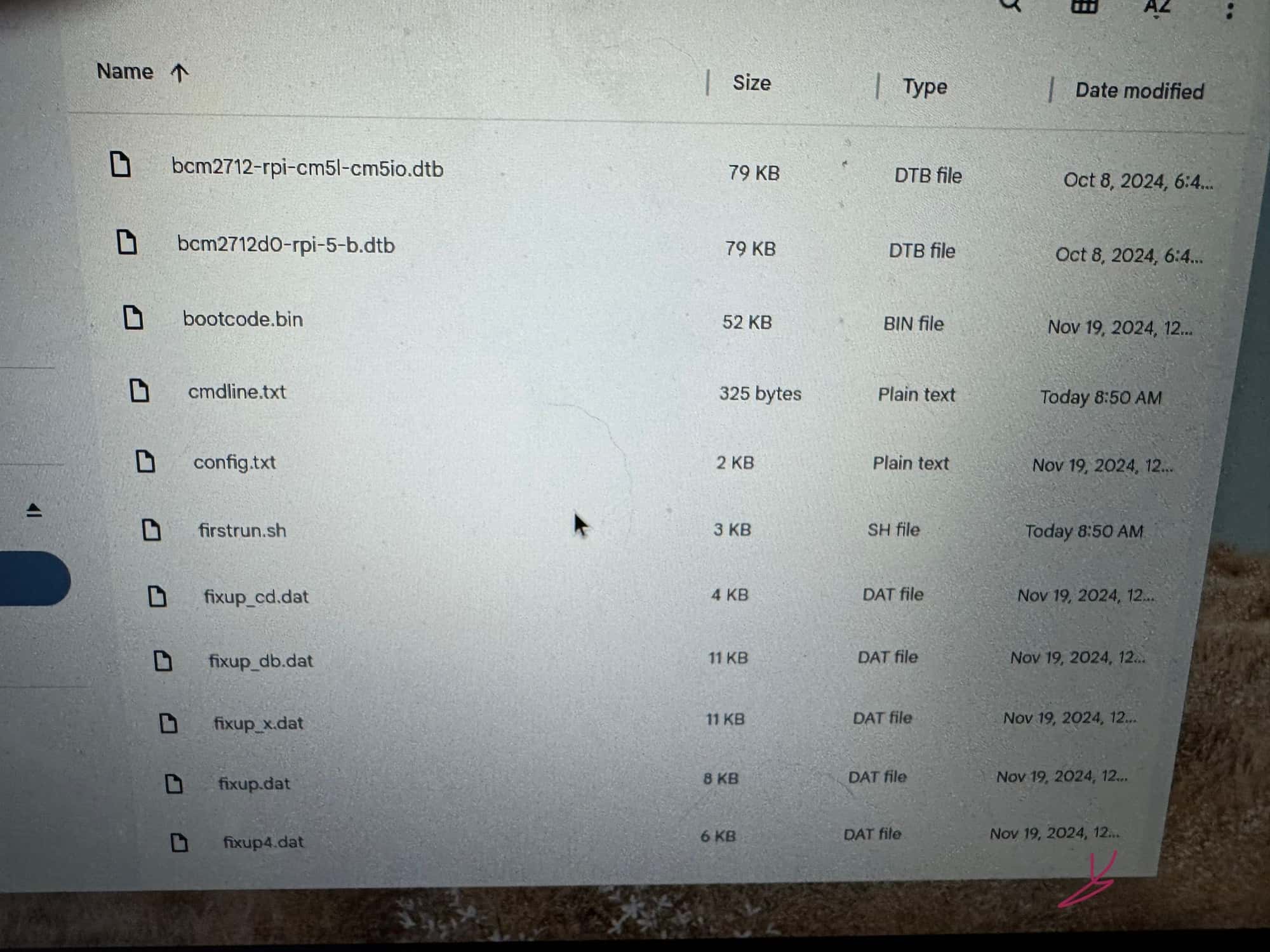
              IMG_0894.jpeg

              Sam

              How to add modules

              learning how to use browser developers window for css changes

              S 1 Reply Last reply Reply Quote 0
              • S Do not disturb
                sdetweil @sdetweil
                last edited by sdetweil

                well then…

                turns out the pi5 I picked to bring with me has the nvme hat on, and boots to the nvme drive, NOT the sd card…doah!!..

                after some thinking, I found the right user/pw combo…

                never mind…

                BUT that explains why the sd card wasn’t used!!

                Sam

                How to add modules

                learning how to use browser developers window for css changes

                karsten13K 1 Reply Last reply Reply Quote 0
                • karsten13K Offline
                  karsten13 @sdetweil
                  last edited by

                  @sdetweil

                  and I learned more about pi imager, the stuff it writes seems to depend on the OS, with my examples above I used fedora, now looking at a raspian pi os lite I don’t see the files.

                  There now is a userconf.txt with only user/password …

                  S 1 Reply Last reply Reply Quote 0
                  • S Do not disturb
                    sdetweil @karsten13
                    last edited by

                    @karsten13 I don’t see that at all on bookworm full

                    Sam

                    How to add modules

                    learning how to use browser developers window for css changes

                    1 Reply Last reply Reply Quote 0
                    • R Offline
                      rkorell Module Developer @sdetweil
                      last edited by rkorell

                      @sdetweil said

                      I am not a system setup guy.

                      Dear Sam,
                      you may aware of this - than please ignore it…

                      You’ve described that you have put a SD card in your NVME-HAT’ed Pi and your Pi has not booted from SD but from NVME…

                      You can steer this with the BOOT_ORDER entry in eeprom configuration.
                      This code is read right to left to determine the boot order and should (in your case) be: 0xf461:

                      1 = Check SD card
                      6 = Check PCIe NVME
                      4 = Check USB drive
                      f = Start again

                      You can check this:

                      sudo rpi-eeprom-config
                      

                      If boot order is not as desired you can edit this with

                      sudo -E rpi-eeprom-config --edit
                      
                      enter or modify to:
                      BOOT_ORDER=0xf461


                      (In my configuration this opens the nano editor in which ctrl-O writes the changes to disk and ctrl-X leaves the editor.
                      eeprom-config then modifies the system and a reboot is neccessary)

                      With this configuration you will lose a tiny bit of time for the SD-card check but it enables you to insert a SD card and boot from there despite the NVME is connected as well.

                      Regards,
                      Ralf

                      S 1 Reply Last reply Reply Quote 0
                      • S Do not disturb
                        sdetweil @rkorell
                        last edited by

                        @rkorell thanks. i had clearly set the boot order wrong.

                        Sam

                        How to add modules

                        learning how to use browser developers window for css changes

                        R 1 Reply Last reply Reply Quote 1
                        • R Offline
                          rkorell Module Developer @sdetweil
                          last edited by rkorell

                          @sdetweil This is a single error :-)
                          try to count mine - you will win ! :-)

                          S 1 Reply Last reply Reply Quote 0
                          • S Do not disturb
                            sdetweil @rkorell
                            last edited by

                            @rkorell this is not a contest. if we all work together things will always improve

                            Sam

                            How to add modules

                            learning how to use browser developers window for css changes

                            R 1 Reply Last reply Reply Quote 0
                            • R Offline
                              rkorell Module Developer @sdetweil
                              last edited by

                              @sdetweil you’re absolutely true!

                              • just kidding !

                              Ralf

                              S 1 Reply Last reply Reply Quote 0
                              • S Do not disturb
                                sdetweil @rkorell
                                last edited by

                                @rkorell i knew you were teasing me. thank you for that!

                                Sam

                                How to add modules

                                learning how to use browser developers window for css changes

                                1 Reply Last reply Reply Quote 1

                                Hello! It looks like you're interested in this conversation, but you don't have an account yet.

                                Getting fed up of having to scroll through the same posts each visit? When you register for an account, you'll always come back to exactly where you were before, and choose to be notified of new replies (either via email, or push notification). You'll also be able to save bookmarks and upvote posts to show your appreciation to other community members.

                                With your input, this post could be even better 💗

                                Register Login

                                • 1 / 1
                                • First post
                                  Last post
                                Enjoying MagicMirror? Please consider a donation!
                                MagicMirror created by Michael Teeuw.
                                Forum managed by Sam, technical setup by Karsten.
                                This forum is using NodeBB as its core | Contributors
                                Contact | Privacy Policy