MagicMirror Forum
    • Recent
    • Tags
    • Unsolved
    • Solved
    • MagicMirror² Repository
    • Documentation
    • 3rd-Party-Modules
    • Donate
    • Discord
    • Register
    • Login
    A New Chapter for MagicMirror: The Community Takes the Lead
    Read the statement by Michael Teeuw here.

    mm-pir-hide-all

    Scheduled Pinned Locked Moved System
    14 Posts 10 Posters 10.6k Views 10 Watching
    Loading More Posts
    • Oldest to Newest
    • Newest to Oldest
    • Most Votes
    Reply
    • Reply as topic
    Log in to reply
    This topic has been deleted. Only users with topic management privileges can see it.
    • P Offline
      phrazelle
      last edited by

      https://github.com/phrazelle/mm-pir-hide-all

      This is a modification of the MM-Hide-All module (https://github.com/masters1222/mm-hide-all) by masters1222. It requires the MMM-PIR-Sensor module (https://github.com/paviro/MMM-PIR-Sensor) by paviro to be installed as well, as the hiding/unhiding is triggered by the “USER_PRESENCE” notification sent.

      This was created by Josh Mclaughlin to circumvent an issue with the MMM-PIR-Sensor module where a TV doesn’t have power saving settings and killing the HDMI signal from the RPi forces the TV to shut off automatically.

      This essentially brings up a black box to cover the screen after a set amount of time that disappears upon a USER_PRESENCE notification from the MMM-PIR-Sensor module.

      A 1 Reply Last reply Reply Quote 1
      • A Offline
        Atheose @phrazelle
        last edited by

        @phrazelle As someone who is having trouble with the MMM-PIR-Sensor module, this is a lifesaver! Going to give it a try today.

        Thanks @phrazelle!

        1 Reply Last reply Reply Quote 0
        • N Offline
          Nususu
          last edited by

          Great addition to the PIR-Sensor module. I’ve got it working on my mirror, but the only issue is that when the sensor detects movement, the screen only stays active for about a second, then goes to sleep again. Is there a line in your code that I could modify so that when movement is detected, the mirror stays on for a set duration (maybe 4 minutes)? I’ve been looking at the code but I’m new to this so I don’t really know where to start.

          lolobyteL D 2 Replies Last reply Reply Quote 0
          • lolobyteL Offline
            lolobyte @Nususu
            last edited by lolobyte

            @Nususu

            I think this is not a software problem.

            On your Sensor are two variable resistors.

            One for the sensitivity and one for the delay time.

            Take a screwdriver and adjust the delay time.
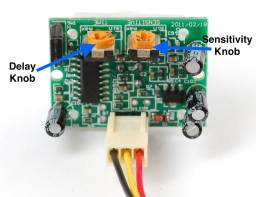
            0_1485443478213_pirBack.jpg

            N 1 Reply Last reply Reply Quote 0
            • N Offline
              Nususu @lolobyte
              last edited by Nususu

              @lolobyte thanks for your reply. I am actually not using a PIR sensor, but a microwave radar sensor as I wanted to put the sensor behind the glass. After looking into it, I found that I can install a resistor on the sensor to set delay to 30 seconds.

              https://www.amazon.com/gp/aw/d/B01JA7K2EM/ref=mp_s_a_1_7?ie=UTF8&qid=1485446060&sr=8-7&pi=AC_SX236_SY340_QL65&keywords=microwave+sensor&dpPl=1&dpID=51f4ntKudYL&ref=plSrch

              If I want more than 30 seconds, would placing a higher resistance resistor on it work?

              lolobyteL 1 Reply Last reply Reply Quote 0
              • lolobyteL Offline
                lolobyte @Nususu
                last edited by

                @Nususu
                Wow, nice.
                Please send me all your information what you have because i want to build and test it by my mirror.

                1 Reply Last reply Reply Quote 0
                • P Offline
                  phrazelle
                  last edited by

                  Agreed, I think altering the delay on the sensor would fix the issue.

                  That being said, the microwave radar sensor sounds awesome! I’d like to see it in action as well.

                  1 Reply Last reply Reply Quote 0
                  • O Offline
                    Oliver_Tooth
                    last edited by

                    Hi,

                    I’m struggling to get this working, i’m just receiving a black screen that doesn’t want to exit. I’ve tested the PIR sensor with a simple python script and it works fine, i’m just having trouble getting it to integrate with the mirror. Any advice?

                    1 Reply Last reply Reply Quote 0
                    • M Offline
                      magicR
                      last edited by

                      Hi,
                      I did some changes because of the fading-effect.
                      All Modules fades now In and Out correctly.
                      Here is my repo: https://github.com/s72817/MMM-PIR-Fade-HIDE

                      Greetings

                      C M 2 Replies Last reply Reply Quote 1
                      • C Offline
                        coltography @magicR
                        last edited by

                        @magicr how do I implement your repo to get the fade working? Do I add it in as another module or merge your files within the mm-pir-hide-all module? I can’t get it working

                        M S 2 Replies Last reply Reply Quote 0
                        • M Offline
                          magicR @coltography
                          last edited by

                          @coltography sorry for the late answer :/
                          You need the MMM-PIR-Sensor Module.
                          A config example:
                          {
                          module: “MMM-PIR-Sensor”,
                          config: {
                          sensorPin: 23,
                          powerSaving: false
                          }
                          },
                          {
                          module: “MMM-PIR-Fade-HIDE”,
                          position: “fullscreen_below”,
                          config: {
                          fadeInTime: 1000,
                          fadeOutTime: 3000,
                          }
                          },

                          cheers Richard

                          1 Reply Last reply Reply Quote 0
                          • S Offline
                            sdetweil @coltography
                            last edited by sdetweil

                            @coltography the hide() api, takes an optional amount of time

                            search ‘hide’ in the development doc
                            https://github.com/MichMich/MagicMirror/tree/master/modules

                            this.hide(speed, callback, options)
                            

                            Sam

                            How to add modules

                            learning how to use browser developers window for css changes

                            1 Reply Last reply Reply Quote 0
                            • D Offline
                              dvbit @Nususu
                              last edited by

                              @Nususu hi i have a microwave sensor too is the resistance mod needed? I do not want to reopen the mirror…

                              1 Reply Last reply Reply Quote 0
                              • M Offline
                                majik655 @magicR
                                last edited by

                                @magicR Wondering if you can help me…
                                I have implemented your module on my magic mirror with PIR sensor.

                                The issue I seem to have with ALL hiding modules is it seems the PIR is initiating BOTH hiding AND unhiding.

                                I just can not seem to figure out what is going on. I can adjust the delay and sensitivity if I need to on the sensor but I dont think I need to mess with that at this moment…

                                I really just want the mirror to be on… say for 20 minutes… then if no trigger … hide.
                                Then turn on when triggered and stay on for 20 minutes… rinse and repeat.

                                Can you help me ?

                                My config is below:

                                                {
                                                        module: 'MMM-PIR-Sensor',
                                                        config: {
                                                        sensorPin: '22',
                                                        powerSaving: false,
                                                        }
                                                },
                                                        {
                                                module: "mm-pir-hide-all",
                                                position: "fullscreen_below",
                                                config: {
                                                        fadeInTime: '1000',
                                                        fadeOutTime: '300000',
                                                        }
                                                },
                                
                                
                                1 Reply Last reply Reply Quote 0

                                Hello! It looks like you're interested in this conversation, but you don't have an account yet.

                                Getting fed up of having to scroll through the same posts each visit? When you register for an account, you'll always come back to exactly where you were before, and choose to be notified of new replies (either via email, or push notification). You'll also be able to save bookmarks and upvote posts to show your appreciation to other community members.

                                With your input, this post could be even better 💗

                                Register Login

                                • 1 / 1
                                • First post
                                  Last post
                                Enjoying MagicMirror? Please consider a donation!
                                MagicMirror created by Michael Teeuw.
                                Forum managed by Sam, technical setup by Karsten.
                                This forum is using NodeBB as its core | Contributors
                                Contact | Privacy Policy