MagicMirror Forum
    • Recent
    • Tags
    • Unsolved
    • Solved
    • MagicMirror² Repository
    • Documentation
    • 3rd-Party-Modules
    • Donate
    • Discord
    • Register
    • Login
    A New Chapter for MagicMirror: The Community Takes the Lead
    Read the statement by Michael Teeuw here.

    MMM-Chores - Manage and keep track of your household Chores

    Scheduled Pinned Locked Moved Utilities
    104 Posts 19 Posters 28.5k Views 20 Watching
    Loading More Posts
    • Oldest to Newest
    • Newest to Oldest
    • Most Votes
    Reply
    • Reply as topic
    Log in to reply
    This topic has been deleted. Only users with topic management privileges can see it.
    • S Do not disturb
      sdetweil @khayfer
      last edited by

      @khayfer can you open the MagicMirror page from that machine?

      many browsers have started to implement local network access security. i know on my mac, i cannot access my 3d print server w chrome anymore. i have to use safari

      Sam

      How to add modules

      learning how to use browser developers window for css changes

      K 1 Reply Last reply Reply Quote 0
      • K Offline
        khayfer @sdetweil
        last edited by

        @sdetweil yes, I’m able to use the browser in the pi. I can navigate the internet no problem, but the moment I type the ip address, it still says could not connect to the server.
        I then tried it on multiple different devices/browsers on the same wifi and they all say the same thing.

        S 1 Reply Last reply Reply Quote 0
        • S Do not disturb
          sdetweil @khayfer
          last edited by

          @khayfer and you are doing
          http://address:port

          for MagicMirror
          port from config.js
          on the same machine
          you can use localhost

          http://localhost:8080

          ip addr
          

          will give you the address of the pi
          from your laptop

          http://xxxxx:8080
          

          where xxxxx was the addr from ip addr

          Sam

          How to add modules

          learning how to use browser developers window for css changes

          1 Reply Last reply Reply Quote 0
          • M Offline
            mischag
            last edited by

            my MMM-Chores is playing up big time now…
            after the last update, not the most recent one, but the one before that, my chores list now is just a long list of everything coming up for ever…
            it’s not just displaying the next days chores, but every chore. and if you tick off a chore being completed, it then just add’s that next time the chore is due to the bottom of the list. and there’s no end in sight on my magic mirror, but also no end in sight for the admin page. I’ll ‘complete’ a job, but then it just adds it to the bottom of the page…
            anyone else having major issues with it? was working great before… and I worked out that the magic mirror needs to be running to get into the admin portal page. but now my mirror just looks like this…
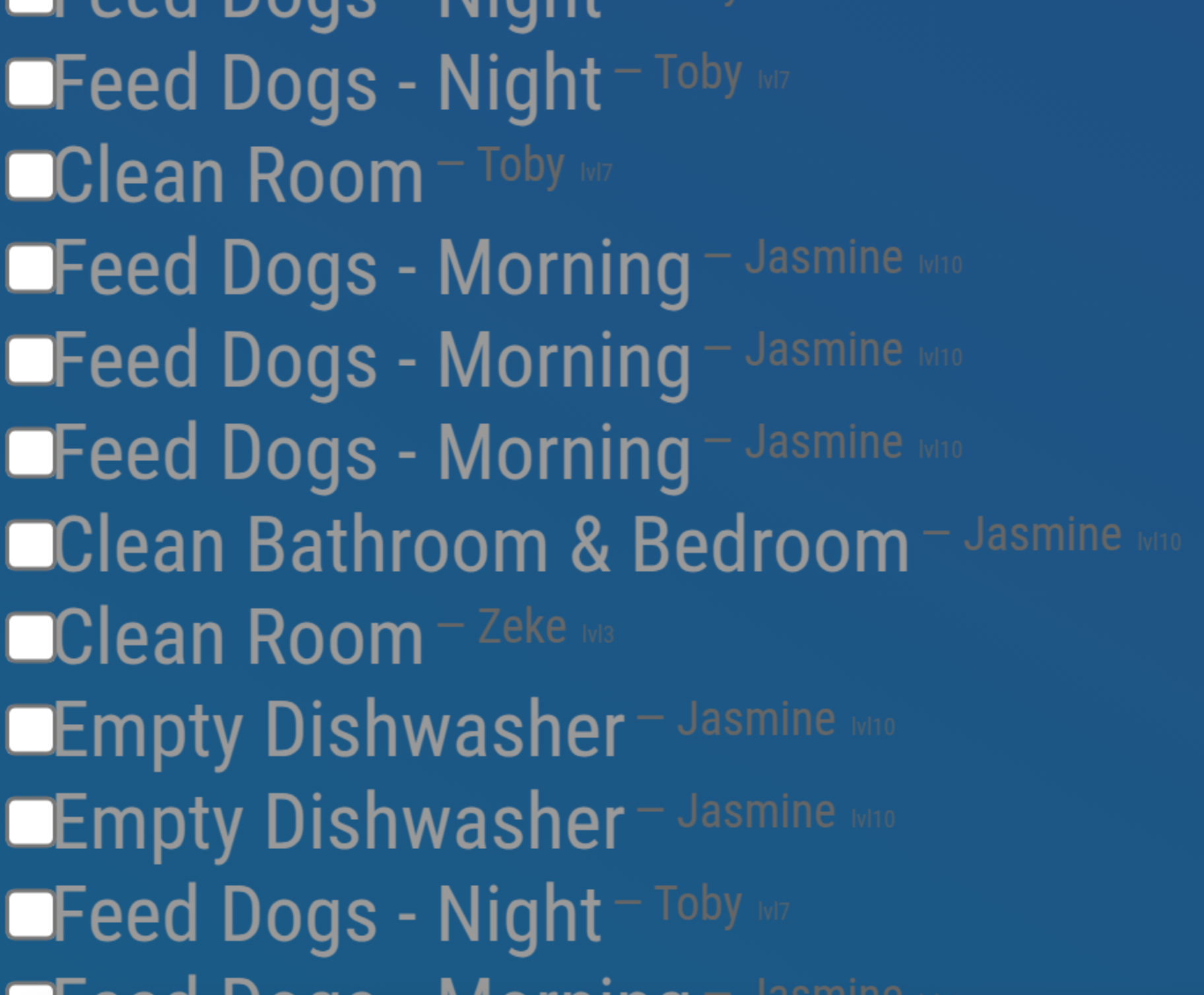
            Screen Shot 2025-08-05 at 11.01.17 am.png

            Any help much appreciated as the kids can’t tick off when completed anymore…
            Thanks

            PierreGodeP 2 Replies Last reply Reply Quote 0
            • PierreGodeP Offline
              PierreGode Module Developer @mischag
              last edited by sdetweil

              @mischag Hi!
              latest update a lot settings has being moved to the webpage.

              It should work with the old config.js but might be acting up.

              try with the new settings. enabling show past tasks will show only past tasks that are not completed.

              make sure your config.js has

              {
                module: "MMM-Chores",
                position: "bottom_right",
                header: "Chores",
                config: {
                  updateInterval: 60 * 1000,
                  adminPort: 5003,
                  openaiApiKey: "your-openApi-key here",
                  settings: "unlocked", // set a 6 digit pin like "000000" to lock settings popup with a personal pin, change 000000 to any 6 digit password you want, or comment this out to lock settings completely
              // other options can be set in the admin portal
                  levelTitles: [
                  // titles for every 10 levels
                    "Junior",
                    "Apprentice",
                    "Journeyman",
                    "Experienced",
                    "Expert",
                    "Veteran",
                    "Master",
                    "Grandmaster",
                    "Legend",
                    "Mythic"
                  ]
                }
              },
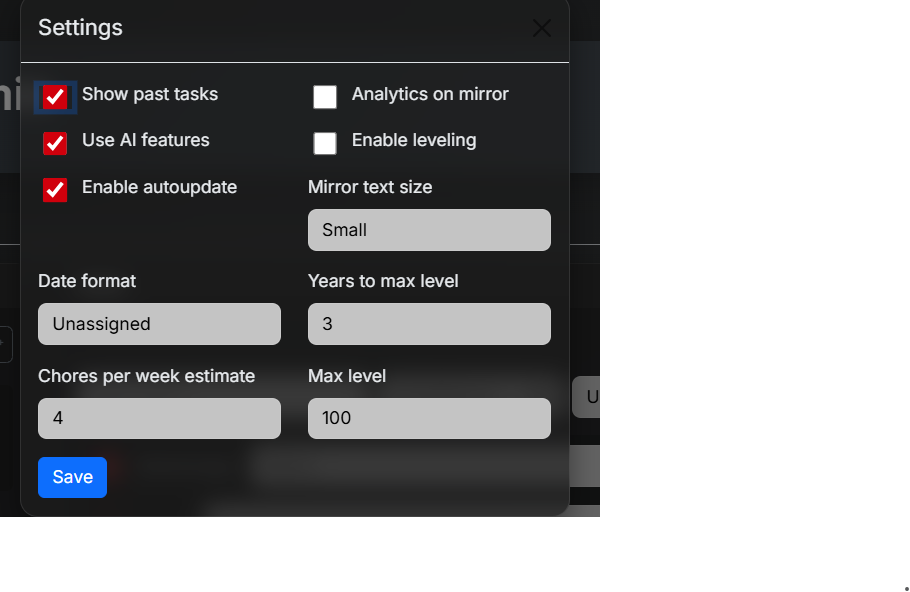
              

              f0b73199-e382-4746-9468-1591dbb198ce-image.png

              J 1 Reply Last reply Reply Quote 0
              • PierreGodeP Offline
                PierreGode Module Developer @mischag
                last edited by

                @mischag said in MMM-Chores - Manage and keep track of your household Chores:

                but now my mirror just looks like this…

                @mischag said in MMM-Chores - Manage and keep track of your household Chores:

                eciated as the kids can’t tick off

                PierreGodeP 1 Reply Last reply Reply Quote 0
                • PierreGodeP Offline
                  PierreGode Module Developer @PierreGode
                  last edited by

                  If you cant make the new settings work for you, you could jump back to an older version
                  git checkout uiimproovments and restart the module

                  1 Reply Last reply Reply Quote 0
                  • J Offline
                    JohnGalt @PierreGode
                    last edited by

                    @PierreGode – What does the ‘Chores per Week Estimate’ do?

                    What is it estimating, and what does it do with the estimate?

                    PierreGodeP 1 Reply Last reply Reply Quote 0
                    • PierreGodeP Offline
                      PierreGode Module Developer @JohnGalt
                      last edited by

                      @JohnGalt
                      It was supposed to show total completed chores per user per week, but it was bugging. Do you have the latest version?

                      J 1 Reply Last reply Reply Quote 0
                      • J Offline
                        JohnGalt @PierreGode
                        last edited by

                        @PierreGode – OK, thanks. I was just wondering what it is estimating, and what it is supposed to do with the estimates.

                        1 Reply Last reply Reply Quote 0
                        • B Offline
                          bossier17
                          last edited by

                          Hi! How does MMM-Chores determine current date for tasks? I create a task in the Admin page for today, but it only shows if I have the “Show past tasks” option checked. The “created” and “assigned” date are correct in the data.json file. The raspberry pi looks like it is in correct location and time zone.

                          PierreGodeP 1 Reply Last reply Reply Quote 0
                          • PierreGodeP Offline
                            PierreGode Module Developer @bossier17
                            last edited by PierreGode

                            @bossier17
                            MMM‑Chores reads the current date from JavaScript’s built‑in Date object, which pulls time information directly from the host system’s clock. The display logic calls new Date() to obtain “today,”

                            Test it creating a clock.js with and run it with node clock.js this is what the app uses

                            const now = new Date();
                            console.log(new Date().toString());

                            B 1 Reply Last reply Reply Quote 0
                            • B Offline
                              bossier17 @PierreGode
                              last edited by

                              @PierreGode said in MMM-Chores - Manage and keep track of your household Chores:

                              const now = new Date();
                              console.log(new Date().toString());

                              hmmm I can’t figure it out. clock.js returns the correct date/time. But I cannot get today’s tasks to show on the mirror. Somehow the display Chores on the Mirror is showing tomorrow’s chores only. If I put a chore in the admin page for tomorrow it will display. But chores I put in with today’s date only show if I have “Show Past Tasks” checked. Any ideas?

                              PierreGodeP 1 Reply Last reply Reply Quote 0
                              • PierreGodeP Offline
                                PierreGode Module Developer @bossier17
                                last edited by

                                @bossier17
                                I made an update that I hope resolves the issue.
                                Update the module with git pull
                                /Pierre

                                B 1 Reply Last reply Reply Quote 0
                                • B Offline
                                  bossier17 @PierreGode
                                  last edited by

                                  @PierreGode Awesome! That worked. Thanks so much!

                                  1 Reply Last reply Reply Quote 1
                                  • PierreGodeP Offline
                                    PierreGode Module Developer
                                    last edited by

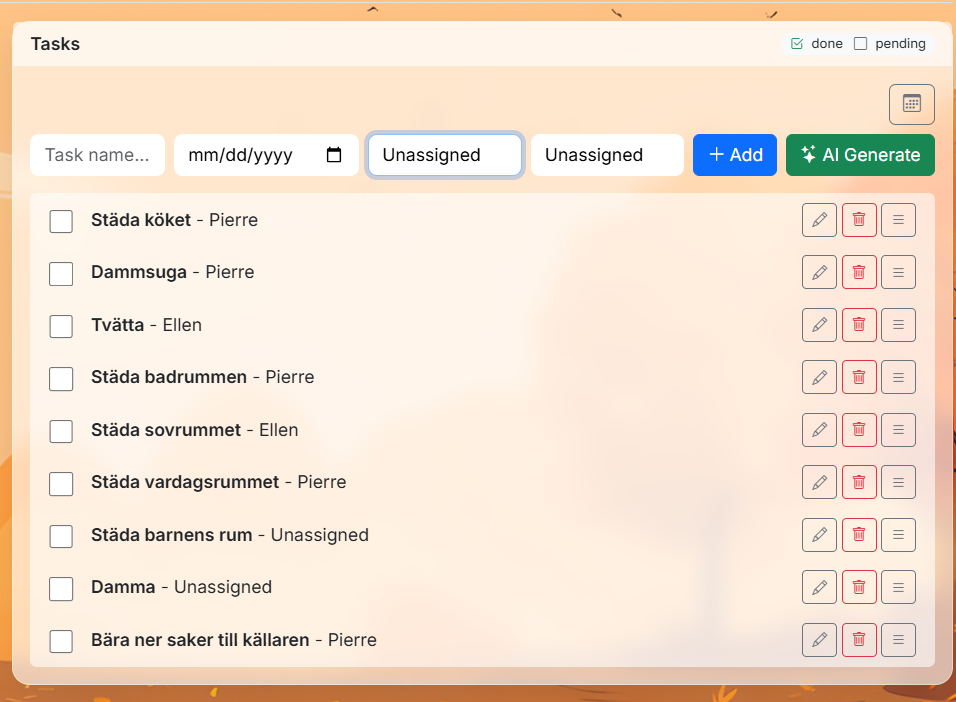
                                    Major update on its way coming days!

                                    • added optional login with possibility to add both write permission user and read only user.
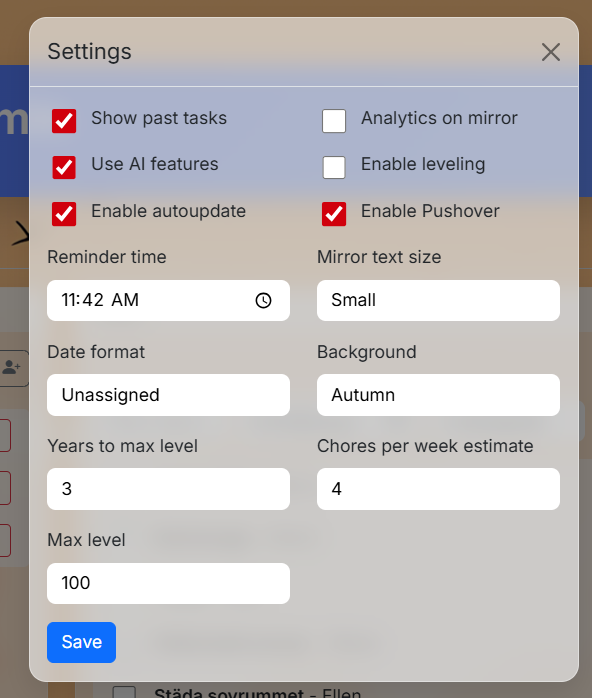
                                    • added pushover notification possibility+ configuration to set daily reminders at specific time.
                                    • added background images " 4 seasons"
                                      -reworked task list, moved up user assignment to creation space
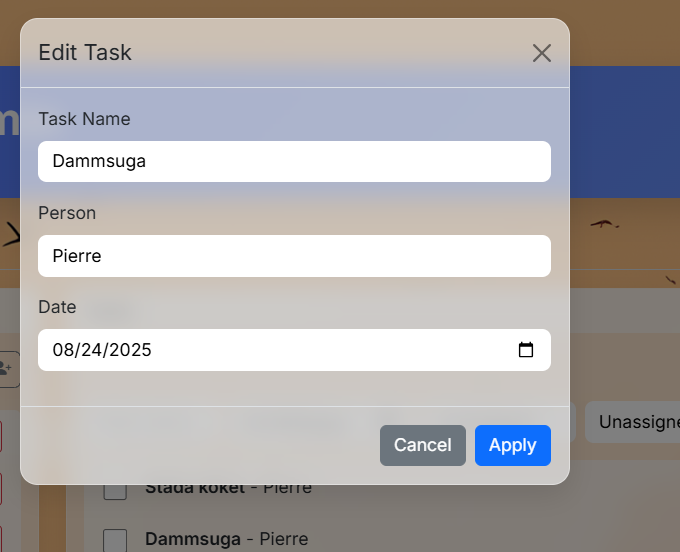
                                      -reworked edit option to be a form to be able to update task description, user and date

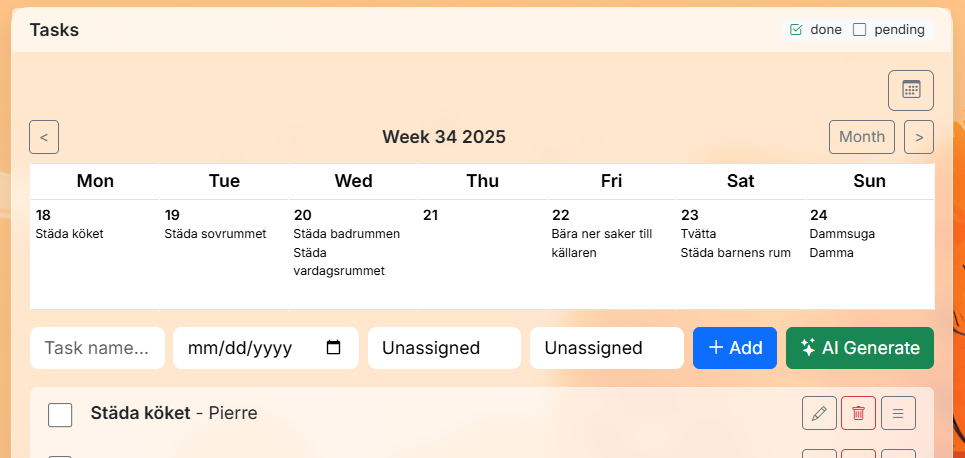
                                    see images below
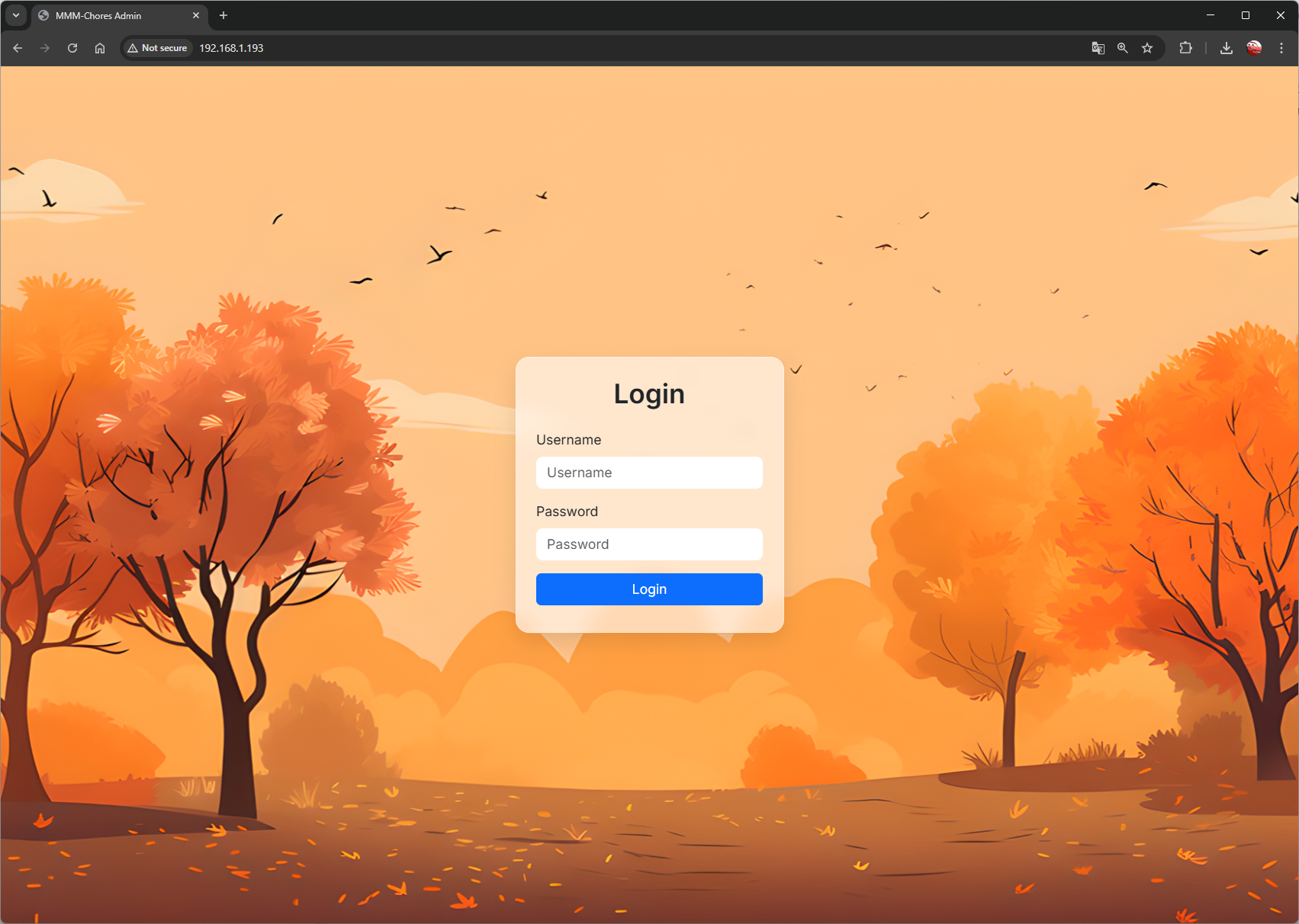
                                    a43f3d78-4d8f-4fd4-a4f7-05cab7c1da37-image.png
                                    070963db-a593-4dfb-a9c9-e7bd20885e85-image.png
                                    992970af-c794-4c5e-a4df-312cafc672d8-image.png
                                    dba8b888-7a15-4c1e-bd10-e26794e9b96c-image.png
                                    790b179f-e8b2-4a2f-815d-678758290eaf-image.png

                                    1 Reply Last reply Reply Quote 0
                                    • A Offline
                                      atwist
                                      last edited by

                                      Is it possible to have a recurring weekday only task? Just Monday-Friday?

                                      1 Reply Last reply Reply Quote 0
                                      • PierreGodeP Offline
                                        PierreGode Module Developer
                                        last edited by

                                        @johngalt @sdetweil @redbeardedninja @sarote @mischag @plainbroke @

                                        New big update out now.
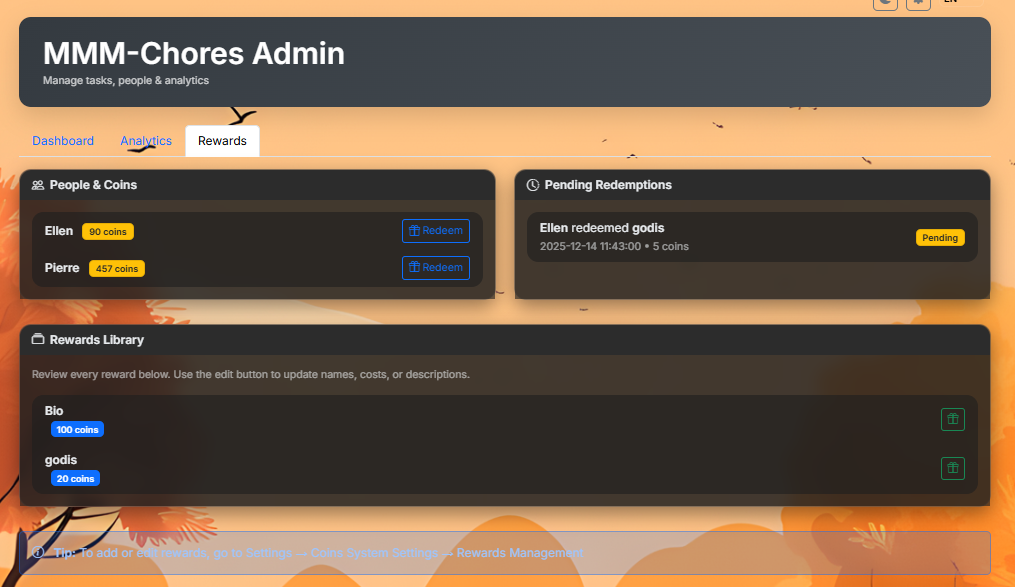
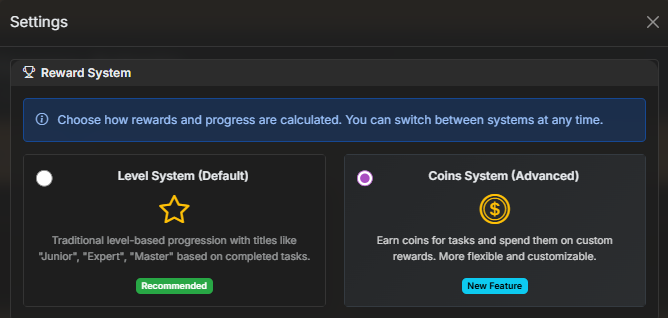
                                        New reward system
                                        more recurring options

                                        Fixes and updates.

                                        eaff4adb-f0ca-4eb8-a8b0-e18692e174e9-image.png
                                        33e69ea0-e02c-4d75-8228-8910dfa81257-image.png

                                        1 Reply Last reply Reply Quote 1
                                        • E Offline
                                          ewingfox
                                          last edited by sdetweil

                                          Hello! New user here, love the UI (especially the admin features!) I’m building a secret Christmas gift for my wife (who is obsessed with organization). I was about to give up on MM - until I found your module!

                                          Question: I see daily, weekly, monthly options - is there a feature to set reoccurring events that are Monday Friday? This is specific to kids who may have daily ‘weekday’ tasks to do that aren’t required on Saturday or Sunday. I’m happy to skip the UI - aka, create an event in the UI and then tweak the underlying config via CLI.

                                          Thank you!!!

                                          E
                                          EDIT:

                                          took a gander at your code (yeah, you are a pro - this is REALLY CLEAN (I’m a hack, but I know good work when I see it lol). Looks like an update to the getNextDate function, adding the pattern to the admin html file and the lang pack (I only added it to the enlish one (remember, hack here) seems to work pretty well. I’ll search a bit further and do a little testing to see how it behaves - but… a thing?

                                          E

                                          function getNextDate(dateStr, recurring) {
                                            const d = new Date(dateStr);
                                            if (recurring === "daily") {
                                              d.setDate(d.getDate() + 1);
                                            } else if (recurring === "weekly") {
                                              d.setDate(d.getDate() + 7);
                                            } else if (recurring === "monthly") {
                                              d.setMonth(d.getMonth() + 1);
                                            } else if (recurring === "yearly") {
                                              d.setFullYear(d.getFullYear() + 1);
                                            } else if (recurring && recurring.startsWith("every_")) {
                                              // Custom recurring patterns: every_X_days, every_X_weeks, first_monday_month
                                              const parts = recurring.split("_");
                                              if (parts[1] === "X" && parts[2] === "days") {
                                                const days = parseInt(parts[3]) || 2;
                                                d.setDate(d.getDate() + days);
                                              } else if (parts[1] === "X" && parts[2] === "weeks") {
                                                const weeks = parseInt(parts[3]) || 2;
                                                d.setDate(d.getDate() + (weeks * 7));
                                              } else if (recurring === "first_monday_month") {
                                                // First Monday of next month
                                                d.setMonth(d.getMonth() + 1);
                                                d.setDate(1);
                                                // Find first Monday
                                                while (d.getDay() !== 1) {
                                                  d.setDate(d.getDate() + 1);
                                                }
                                              } else {
                                                return null;
                                              }
                                            } else {
                                              return null;
                                            }
                                            return d.toISOString().slice(0, 10);
                                          }
                                          

                                          34d49e4b-e53b-4fac-be14-3b4d6a278d73-image.png

                                          S 1 Reply Last reply Reply Quote 0
                                          • S Do not disturb
                                            sdetweil @ewingfox
                                            last edited by

                                            @ewingfox please always code block for code, config and logs

                                            paste the text into the message editor window, blank line above and below
                                            select the text just pasted
                                            hit the </> button on the message editor toolbar

                                            I fixed prior

                                            Sam

                                            How to add modules

                                            learning how to use browser developers window for css changes

                                            E 1 Reply Last reply Reply Quote 2

                                            Hello! It looks like you're interested in this conversation, but you don't have an account yet.

                                            Getting fed up of having to scroll through the same posts each visit? When you register for an account, you'll always come back to exactly where you were before, and choose to be notified of new replies (either via email, or push notification). You'll also be able to save bookmarks and upvote posts to show your appreciation to other community members.

                                            With your input, this post could be even better 💗

                                            Register Login

                                            • 1
                                            • 2
                                            • 3
                                            • 4
                                            • 5
                                            • 6
                                            • 4 / 6
                                            • First post
                                              Last post
                                            Enjoying MagicMirror? Please consider a donation!
                                            MagicMirror created by Michael Teeuw.
                                            Forum managed by Sam, technical setup by Karsten.
                                            This forum is using NodeBB as its core | Contributors
                                            Contact | Privacy Policy