Read the statement by Michael Teeuw here.
MMM-Webuntis
-
@HeikoGr Sorry, for the delayed reply. You are acorrect, also works without debug mode. Seems there was some other hickup with the server and just next time I enabled debug again is was working again. So all fine.
-
Achtung, ich habe eine neue Version veröffentlicht und dabei die Konfigurations Variablen umbenannt - es muss die config.js angepasst werden.
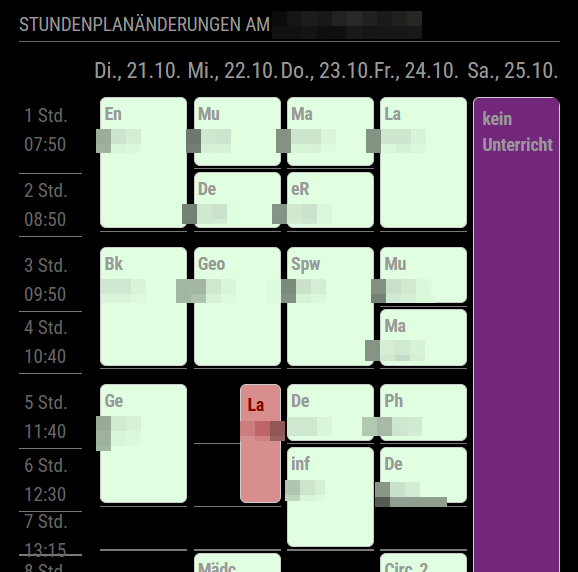
Dafür habe ich jetzt aber auch eine Tabellenansicht implementiert:
-
@HeikoGr
Hallo & Vielen Dank für dieses tolle Modul!
I do love the module and especially the grid-view.Is there a way to limit the number of hours displayed?
By that the vertical height of the grid-view could be reduced, I suppose.I am asking because the generated table is exceeding the needed length to display the last hours of actual school, especially when there are weekdays in the grid which span across the whole day, like “kein Unterricht”.
I see there is a grid-comlumn-end, but I struggle to use it properly.
Thanks a lot in advance for any hint :-) -
@thk thank you for you kind word. I was able to implement a new config option “maxGridLessons” which will cut-off everything below the configured lesson. A “… more” badge is placed if an actual lesson is hidden because of this cutoff.
-
@HeikoGr
Perfect!
Thank you so much for this fast feature implementation, exactly what I was looking for. -
Attention / Important
(for our school) Untis GmbH changed url and schoolname.
You may need to log in your (childrens) account(s) an edit the config.js according to the new values.At least they didn’t switch off te old json-rpc api MMM-Webuntis is using
-
@schmucke, @HeikoGr
I have the same situation and i finally managed to receive the timetable for my daughter by using parents account. She did not register herself for Webuntis so no chance. I made a research on the module and the webuntis API.By concept the function
getOwnClassTimetableForRange(rangeStart, rangeEnd);must fail, because the parents account does not have an own timetable. So I used the function
getTimetableForRange(rangeStart, rangeEnd, id, WebUntisElementType.STUDENT);The trick was to determine which “id” is to use. The id is meant as student’s id, in my case of my daughter. So I had to make a detour via
const studentList = await untis.getStudents();I made a debug output of
studentListto console and searched for the name of my daughter and found the id I needed for the function above. This list is very long because it showed all students of school (more than one thousand).
Afterwards I could use the function and received her timetable successfully.
It only worked by login with username & pass not by qrcode and only by hardcoded id because I did not find a filter method for the studentList, e.g. by name, etc. If available it should be possible not hardcoded but by config - Param. -
that’s great - i will look how i may use this in my module.
Thank you -
Ein guten Morgen,
ich benutze Ihr WebUntis nun schon seid geraumer Zeit.
Leider musste ich feststellen das seid ca. 2Wochen keine Verbindung mehr zu WebUntis stattfindet.
mir wird jedes mal Error code 404 angezeigt.
Was ich mir leider nicht vorstellen kann, da ich es auch über Handy nutze und dort alle Termine sowie den Stundenplan einsehen kann.Es wäre nett wenn ich dafür etwas Hilfe bekommen könnte damit dies wieder angezeigt wird.
MfG
Krause -
@Rondejavu gerne:
Ich vermute, dass die Antwort schon hier im Forum ca. 3 Beiträge obendrüber steht. Untis hat an den Servern gearbeitet - evtl. müssen hier die Verbindungsparamter neu eingestellt werden.
-
@HeikoGr Moin,
ja das ist mir klar … aber welche … da ich nur Zugang mit Benutzer und Passwort habe und keinen QR code … und auf der Website gibt es auch keinen link mehr um es iwie extern zu teilen bzw. der link funktioniert nicht in dem Modul … daher meine frage was ich jetzt machen soll …
ich danke dir schon mal im voraus
-
- Bei webuntis mit dem Schüleraccount anmelden.
- Links unten auf den Account Namen klicken
- Im rechten Panel auf “Freigaben” gehen
- Dort gibt es den Link zum QR Code mit allen Paramtern für MMM-Webuntis.
eine andere Anmeldemethode (über die Elternaccounts) habe ich leider noch nicht erfolgreich implementieren können.
-
Nabend …
wir haben nur einen Zugang, dann denke ich das wir nur den Elternzugang habe. Denn ich habe unten links leider keine möglichkeit irgendeinen QR-Code erstellen zu lassen.
Anbei mal ein Bild was ich zu sehen bekomme …
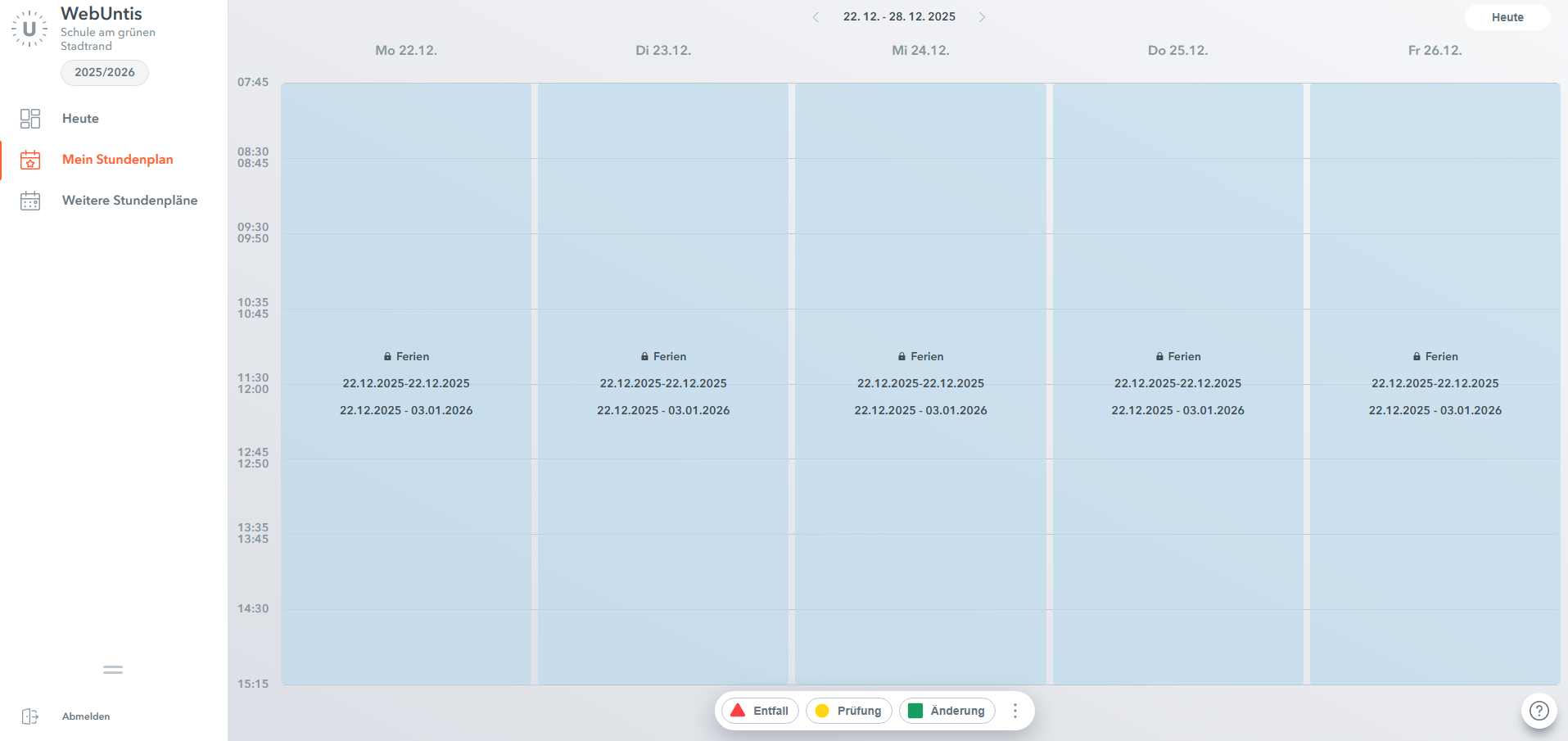
Danke im Voraus und falls man sich nicht liest … schöne Feiertage …
-
@Rondejavu Danke, dir auch schöne Feiertage.
Ich arbeite bereits an einer massiven Überarbeitung.
Dann sollte auch ein direkter Login funktionieren.Wenn ihr aber einen Zugang für die ganze Klasse habt (keine eigenen Benutzernamen) kann es sein, dass du mir helfen musst das lauffähig zu bekommen, da ich keine Testmöglichkeit habe Klassenaccounts zu testen.
-
@HeikoGr Frohe Weihnachten
klar helfe dir gerne … meld dich einfach und dann schauen wir mal …
-
Hello everyone,
version 0.5.0. of my MMM-Webuntis module is out.
Major improvement: you don’t need the student based login anymore.Please read the detailed readme.
unfortunately I am not able to test any edge case myself. -
Hallo @heikogr.
Danke für die Arbeit und die ganzen Updates der letzten Tage …
Die haben mich leider nur rein bisschen überfordert. Was für einen displayMode muss ich denn einstellen, dass ich wieder nur die Stundenausfälle sehe - also wirklich nur eine Info, wenn eine Stunde ausfällt. Hab leider nicht allzuviel Platz für die Grid View auf meinem MM, sonst würde ich die natürlich nehmen.
DANKE!!!
Schönen Abend.
Robert -
Du hast recht, die vielen Möglichkeiten machen alles sehr unübersichtlich. Sorry. Die Schule meiner Kinder nutzt Umtis ziemlich viel - daher will ich so viel wie möglich anzeigen lassen können. Die meisten Optionen sind jedoch optional. Du kannst dich langsam heranarbeiten.
Eigentlich solltest du nichts ändern müssen. Per default sollten lessons und exams (also Ausfälle und Klassenarbeiten) angezeigt werden.
So sieht es mit Elternaccount aus. Angezeigt werden dann die ausfallenden stunden heute und morgen von allen Kinder:
        {
            module: "MMM-Webuntis",
            header: "Stundenplanänderungen ",
            position: "top_right",
            config: {
                updateInterval: 5 * 60 * 1000,

                username: 'USERNAME',
                password: 'PASSWORT',
                school: 'SCHULE',
                server: 'SCHULE.webuntis.com',

                displayMode: 'lessons',
                lessons: {
                      nextDays: 1, // widget-specific days ahead
                    },

            }
        },
Wenn du einen Schüler spezifischen qr login hast, bleibt dieser im students object stehen - wie bisher. Der eltern Block fällt dann weg.
-
@RobertMuc achso, ganz vergessen zu erwähnen: ich hab auch sehr wenig Platz (oder zu viele Informationen) auf meinem display. Aus dem Grund setze ich das wundervolle Modul MMM-Carousel ein. Das Grid ist dann auf Seite 2.
-
Danke Heiko für die schnelle Antwort. Ich hatte tatsächlich das lessons Objekt falsch. Danke auch nochmal für den Hinweis mit dem Carousel. Sehr gute Idee.
Gruß und Danke!!!
Robert
Hello! It looks like you're interested in this conversation, but you don't have an account yet.
Getting fed up of having to scroll through the same posts each visit? When you register for an account, you'll always come back to exactly where you were before, and choose to be notified of new replies (either via email, or push notification). You'll also be able to save bookmarks and upvote posts to show your appreciation to other community members.
With your input, this post could be even better 💗
Register Login