Read the statement by Michael Teeuw here.
Module MMM-pages not working after Upgrading to 2.38
-
Hi,
I manually updated to 2,38 just now.
After re-installing all my modules and copying my cutom.css and config.js, my MagicMirror is playing up.
I use MMM-pages which seems to have stopped working.
This is my MMM-pages config{ module: "MMM-pages", config: { rotationTime: 1000 * 30, // rotate every 30 seconds modules:[ ["MMM-MyCommute","MMM-CountDown","MMM-OpenWeatherForecast","clock","MMM-PublicTransportHafas","MMM-DWD-Pollen","MMM-Fuel"], // page 1 ["MMM-CalendarExt3"], // page 2 ], fixed: [ // modules that are always shown "MMM-Wallpaper", "updatenotification", "MMM-Cursor", "MMM-page-indicator", "newsfeed", ], }, },The logfile does not really give me any clues:
[2026-10-01 20:34:50.483] [ERROR] [unknown] (node:1417) UnhandledPromiseRejectionWarning: TypeError: data is not iterable
    at NodeHelper.processApodData (/home/pi/MagicMirror/modules/MMM-Wallpaper/node_helper.js:624:25)
    at NodeHelper.processResponse (/home/pi/MagicMirror/modules/MMM-Wallpaper/node_helper.js:284:21)
    at /home/pi/MagicMirror/modules/MMM-Wallpaper/node_helper.js:238:16
    at process.processTicksAndRejections (node:internal/process/task_queues:104:5)
(Use `electron --trace-warnings ...` to show where the warning was created)
[2026-10-01 20:34:50.484] [ERROR] [unknown] (node:1417) UnhandledPromiseRejectionWarning: Unhandled promise rejection. This error originated either by throwing inside of an async function without a catch block, or by rejecting a promise which was not handled with .catch(). To terminate the node process on unhandled promise rejection, use the CLI flag `--unhandled-rejections=strict` (see https://nodejs.org/api/cli.html#cli_unhandled_rejections_mode). (rejection id: 1)
Only workaround I have found is to disable MMM-CalendarExt3.
Disabling MMM-pages has no effect - same problem as if MMM-pages is enabled…
Any Idea what is happening ?It all worked perfectly on 2.37
-
@p1lspeda I think you are using my fork of pages… they have changed the official one since then
but the wallpaper error is in the node_helper…
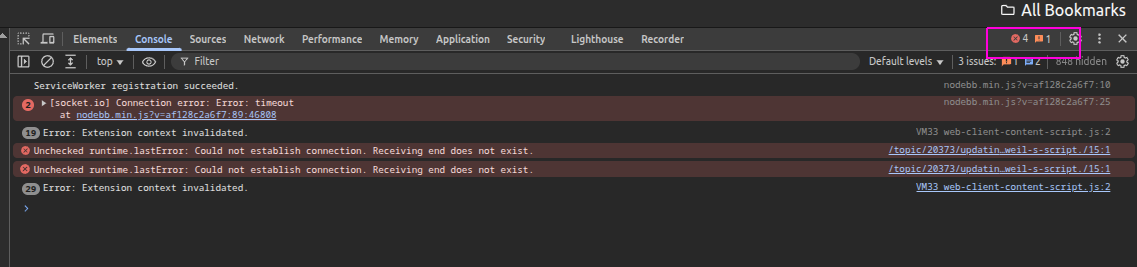
can you open the developers console
ctrl-shift-i (lower case letter eye)
select the console tab
and look around for any errors, top right would be a number of those as well (pink box)
-
@sdetweil
First of all: thanks for taking the time to help.
The MMM-pages module I am using is: https://github.com/edward-shen/MMM-pages
After disabling the MMM-pages module, the MMM-Wallpaper Error has vanished from my logfile.
I stated before I had disabled MMM-pages: this was incorrect, I had simply disabled page-2 within the MMM-pages config.Weirdly my the MMM-PublicTransportHafas has also failed to work under 2.38.
It just shows up as “UNDEFINED” and no logfile entry.[2026-10-01 21:32:56.041] [WARN] [apis] MMM-Fuel: Filtered stationIds list is empty [2026-10-01 21:40:10.987] [WARN] [apis] MMM-Fuel: Filtered stationIds list is empty /home/pi/MagicMirror/node_modules/electron/dist/electron exited with signal SIGINT [2026-10-01 21:43:21.195] [WARN] [apis] MMM-Fuel: Filtered stationIds list is empty -
@p1lspeda I think @kristjanesperanto has worked on both those modules recently
-
@p1lspeda Could you share the first error shown in the browser console? Where exactly does Hafas display
UNDEFINED, and isstationNameset?Which versions of MMM-pages, MMM-PublicTransportHafas and Node.js are you running?
Which MMM-Wallpaper module are you using: kolbyjack’s or jupadin’s?
-
@KristjanESPERANTO
Hi,
thanks to you too for taking the time to help.
Let me try and answer your questions.
According to the changelog, I am running version 1.5.1 of MMM-pages## [1.5.1](https://github.com/edward-shen/MMM-pages/compare/v1.5.0...v1.5.1) (2026-08-12)According to the changelog, I am runnung version 4.5.2 of MMM-PublicTransportHafas
## [4.5.2](https://github.com/KristjanESPERANTO/MMM-PublicTransportHafas/compare/v4.5.1...v4.5.2) (2026-08-31)Node.js:
this is weird - the install.log from sam’s install/upgrade script states v. 22.22.2Node currently installed. Checking version number. Minimum Node version: v22.22.2 Installed Node version: v22.22.2 No Node.js upgrade necessary.a nodejs -v shows something entirely different
pi@magicmirror:~ $ date
Fri  2 Oct 06:21:37 CEST 2026
pi@magicmirror:~ $ nodejs -v
v20.19.2
As for the MMM-Wallpaper: I am using kolbyjack’s version
stationName is set
...
stationID: "3029051",
stationName: "Höfchen/Listmann",   // Replace with your station name!
...
The UNDEFINED is shown on my screen

I think this is the first error I could find in the console browser
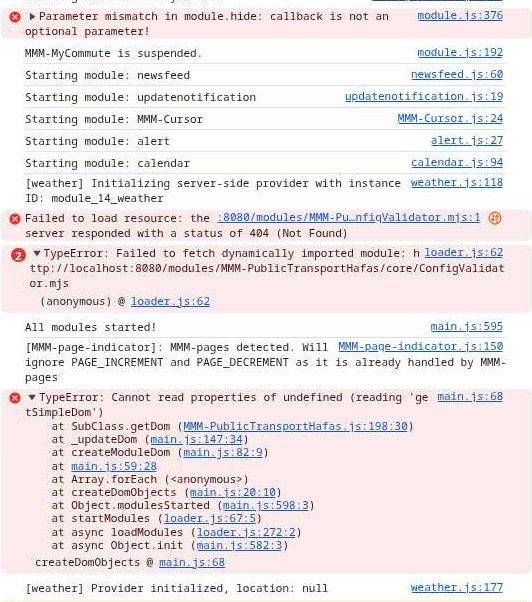
Edit:
I have updated nodejs to v24 and I have updated MMM-Wallpaper (I noticed kolbyjack had updated his git 3hrs ago).
My MagicMirror-error.log does not show any errors/home/pi/MagicMirror/node_modules/electron/dist/electron exited with signal SIGINT [2026-10-02 07:00:27.480] [WARN] [apis] MMM-Fuel: Filtered stationIds list is empty -
I have done some more debugging and I have 2 issues:
1st Issue is MMM-PublicTransportHafas: I have just updated to https://github.com/KristjanESPERANTO/MMM-PublicTransportHafas and the issue has been resolved.2nd issue was with MMM-pages:
After starting MagicMirror, my mirror would switch directly to the 2nd page.
The automatic switching between page 0 and page 1 stopped working
Only after I had manually switched to my 2nd page (clicking on the indicator provided by MMM-pages-indicator), the automatic switch started working and my Mirror is almost back up and running.It seems as if I have identified MMM-pages as the culprit.
-
@p1lspeda Thanks for the update! Could you share your current MMM-pages config and the console messages from startup until you switch pages manually?
-
@KristjanESPERANTO
Here goes:
my MMM-pages config:{ module: "MMM-pages", config: { //rotationTime: 1000 * 30, // rotate every 30 seconds timings: { default: 30000, 0: 30000, }, modules: [ ["MMM-MyCommute","MMM-CountDown","MMM-OpenWeatherForecast","clock","MMM-PublicTransportHafas","MMM-DWD-Pollen","MMM-Fuel"], // page 1 //["clock"], ["MMM-CalendarExt3"], // page 2 ], fixed: [ // modules that are always shown "MMM-Wallpaper", "updatenotification", "MMM-Cursor", "MMM-page-indicator", "newsfeed" ], }, },And while I was trying to get the info/errors from the console browser - as it always happens - my MagicMirror started up without any issues.
No idea what has changed - but it is working.
Btw: while I was writing this reply, I got an update notification for MMM-pages. I updated the module and everything seems to be working fine.Thanks for your patience and help
-
                                            ["MMM-MyCommute","MMM-CountDown","MMM-OpenWeatherForecast","clock","MMM-PublicTransportHafas","MMM-DWD-Pollen","MMM-Fuel"], // page 1
                                            //["clock"],
                                            ["MMM-CalendarExt3"], // page 2
just for a side discussion, there is another way to config pages
using a page name like “page1” (you had this comment at the end // page 1)
and then adding the classes:“page1”, to all the modules you want on page1…I always had trouble remembering where this module was when I was looking at its specific config, had to scroll back to pages config, lost where I was in config, then have to find it again… repeat too many times
and the page names can be anything
mom, dad, joey, mary, stocks, weather, whatever
i call the fixed section , “fixed”
then the page def looks cleanand the modules tell me where they are… never have to look back and forth , where was this again?
so your def would have been
{
                        module: "MMM-pages",
                        config: {
                                //rotationTime: 1000 * 30,         // rotate every 30 seconds
                                timings: {
                                                default: 30000,
                                                0: 30000,
                                        },
                                modules: [
                                                ["page1",
                                                 "page2"
                                                ],
                                fixed: [ "fixed"  ]                       // modules that are always shown
                                },
                },
then on the def for MMM-CalendarExt3
                {
                      module:"MMM-Calendar-Ext3",
                      position: .....,
                      classes:"page2",
                      ...
                      config: {
                             ext3 config parms
                      }
                }
if you want the same module on multiple pages, just add the space separated list of page names
classes:"page2 page5", // in any order

Hello! It looks like you're interested in this conversation, but you don't have an account yet.
Getting fed up of having to scroll through the same posts each visit? When you register for an account, you'll always come back to exactly where you were before, and choose to be notified of new replies (either via email, or push notification). You'll also be able to save bookmarks and upvote posts to show your appreciation to other community members.
With your input, this post could be even better 💗
Register Login