MagicMirror Forum
    • Recent
    • Tags
    • Unsolved
    • Solved
    • MagicMirror² Repository
    • Documentation
    • 3rd-Party-Modules
    • Donate
    • Discord
    • Register
    • Login
    A New Chapter for MagicMirror: The Community Takes the Lead
    Read the statement by Michael Teeuw here.

    MMM-TrafficCal - Dynamically display commutes based on calendar entries

    Scheduled Pinned Locked Moved Utilities
    13 Posts 6 Posters 10.6k Views 7 Watching
    Loading More Posts
    • Oldest to Newest
    • Newest to Oldest
    • Most Votes
    Reply
    • Reply as topic
    Log in to reply
    This topic has been deleted. Only users with topic management privileges can see it.
    • C Offline
      chewitt86 @RedNax
      last edited by

      @RedNax This is potentially a very cool module, I’m still working on incorporating it into my mirror (I’m not a coder so takes me a while) but I did have a question as to whether or not I could change the module to have a fixed destination rather than to look up from a calendar?

      RedNaxR 1 Reply Last reply Reply Quote 0
      • RedNaxR Offline
        RedNax Module Developer @chewitt86
        last edited by

        @chewitt86 There already is a static version of this (in fact, i hijacked it to make mine :) ) https://github.com/SamLewis0602/MMM-Traffic

        C 1 Reply Last reply Reply Quote 1
        • G Offline
          gismo2006
          last edited by

          Hi, some days ago I try to use your module. I installed everything like you write at your readme file. I create a new calender. But It didn’t work. After some try, I read that it use a new function in the calender module. So I try to change to the develop tree. But after that my magic mirror didn’t start again. So I copy a previous version I have saved and the mirror started normally.

          Greets gismo

          1 Reply Last reply Reply Quote 0
          • C Offline
            chewitt86 @RedNax
            last edited by

            @RedNax Brilliant! thanks very much!

            1 Reply Last reply Reply Quote 0
            • ? Offline
              A Former User
              last edited by A Former User

              A fantastic enhancement on the origional by the looks of it, thanks for taking the time RedNax.

              Question, all installed and configured.

              Apart from https://www.npmjs.com/package/request (npm install request)
              Any recommended method for installation on a mac?

              Thanks

              S 1 Reply Last reply Reply Quote 0
              • S Offline
                shashank @Guest
                last edited by

                @wjdw87 hi, I installed this module, i cannot see any display on MM with regards to TrafficCalc, may i know the steps how to enter info on a gmail calander for MYTRIP and Destination

                1 Reply Last reply Reply Quote 0
                • B Offline
                  Bobby @RedNax
                  last edited by

                  @RedNax I have some problems with this module. How should be a correct calendar entry? I cannot see anything on the mirror. This ist the only thing in the log:

                  received TRAFFIC_COMMUTE
                  TRAFFIC URLS: 
                  received TRAFFIC_COMMUTE
                  TRAFFIC URLS: 
                  received TRAFFIC_COMMUTE
                  TRAFFIC URLS: 
                  received TRAFFIC_COMMUTE
                  TRAFFIC URLS: 


                  Thanks
                  Bobby

                  RedNaxR 1 Reply Last reply Reply Quote 0
                  • RedNaxR Offline
                    RedNax Module Developer @Bobby
                    last edited by RedNax

                    @Bobby

                    Hi Bobby,

                    Your config should be something like this:

                    	{
                    		module: "MMM-TrafficCal",
                    		position: "top_left",
                    		classes: "dimmed medium",
                    		config: {
                    			api_key: "API KEY to the calendar holding your trip planning, could optionally be a seperate one",
                    			origin: "Damrak 1, Amsterdam", // Your default trip origin. Must be an unambiguous google resolvable adress
                    			tripkey: "MYTRIPS", // A keyword to identify a TrafficCal calendar entry
                    			chinangeColor: true,
                    			limitYellow: 25,
                    			limitRed: 50,
                    			traffic_model: "pessimistic",
                    			interval: 120000
                    		}
                    	},
                    
                        
                        An example of an entry:
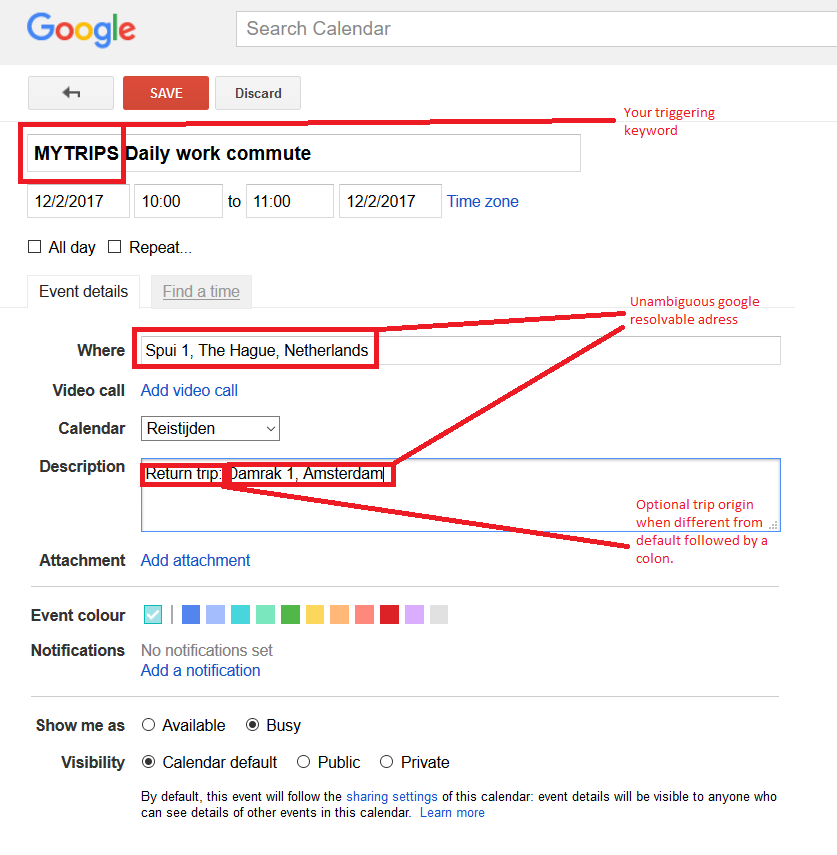
                    

                    0_1486889620335_upload-cccf478f-b636-4ff2-962e-f4491bda83f8

                    You’ll have to run a calendar module with the MYTRIPS calendar entries in it. You can optionally hide it using the remote control module.

                    	{
                    		module: "calendar",
                    		header: "Trips",
                    		position: "top_left",
                    		fetchInterval: 60000,
                    		config: {
                    			maximumNumberOfDays: 1,
                    			calendars: [
                    				{
                    					symbol: "calendar-check-o ",
                    					url: "https://calendar.google.com/calendar/ical/YOUR URL TO THE TRIPS CALENDAR",
                    					maximumNumberOfDays: 1
                    				}
                    			],
                    			titleReplace: {
                    				"De verjaardag van ": "",
                    				"'s birthday": ""
                    			}
                    		}
                    	},
                    

                    Good luck!

                    B S 2 Replies Last reply Reply Quote 1
                    • B Offline
                      Bobby @RedNax
                      last edited by

                      @RedNax Thx, for your answer. I have solved my problem, my destination has German “umlaute (ä, ü, ö)” in name. Thus the google request did not clear. This is not utf-8. An other question is, what does ist mean “ipv”?

                       mycommute.commute + ' ipv ' + mycommute.noTraffic 
                      

                      Thanks fpr your help
                      Bobby

                      RedNaxR 1 Reply Last reply Reply Quote 0
                      • RedNaxR Offline
                        RedNax Module Developer @Bobby
                        last edited by

                        @Bobby Whoops, thats a Dutch abbreveation of ‘instead of’… Should really make that a config item… :S

                        RedNaxR 1 Reply Last reply Reply Quote 0
                        • RedNaxR Offline
                          RedNax Module Developer @RedNax
                          last edited by

                          @RedNax New version has these strings as config items…

                          1 Reply Last reply Reply Quote 0
                          • S Offline
                            shashank @RedNax
                            last edited by

                            @RedNax hi, i created the Calendar and able to view the MYTRIP details but TrafficCalc is not working
                            how and where to get this ApiKey
                            api_key: “API KEY to the calendar holding your trip planning, could optionally be a seperate one”,

                            1 Reply Last reply Reply Quote 0

                            Hello! It looks like you're interested in this conversation, but you don't have an account yet.

                            Getting fed up of having to scroll through the same posts each visit? When you register for an account, you'll always come back to exactly where you were before, and choose to be notified of new replies (either via email, or push notification). You'll also be able to save bookmarks and upvote posts to show your appreciation to other community members.

                            With your input, this post could be even better 💗

                            Register Login

                            • 1 / 1
                            • First post
                              Last post
                            Enjoying MagicMirror? Please consider a donation!
                            MagicMirror created by Michael Teeuw.
                            Forum managed by Sam, technical setup by Karsten.
                            This forum is using NodeBB as its core | Contributors
                            Contact | Privacy Policy