Read the statement by Michael Teeuw here.
Magic Mirror minus the mirror
-
I am going to build a magic mirror with out the mirror. Basically I purchased the raspberry pi touchscreen and will use that as the screen. The display will be all the cool weather and time widgets on the magic mirror. I envision placing this in the kitchen as a quick heads up on time, weather. Thinking maybe to show pictures or display headline news??? Not sure. What would be some great modules or widgets for the display?
-
-
yes that is what I am talking about. Magic Mirror minus the mirror. We don’t need it to be a + music player. But this is similar to what I envision.
-
@jaymichael78 said in Magic Mirror minus the mirror:
I am going to build a magic mirror with out the mirror. Basically I purchased the raspberry pi touchscreen and will use that as the screen. The display will be all the cool weather and time widgets on the magic mirror. I envision placing this in the kitchen as a quick heads up on time, weather. Thinking maybe to show pictures or display headline news??? Not sure. What would be some great modules or widgets for the display?
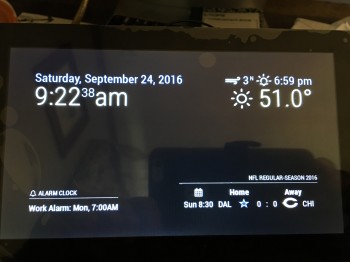
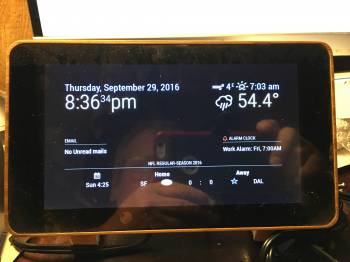
I built a 7" version… the photos are on here somewhere LOL Touch alarm clock that shows weather, emails, NFL scores, and alarm clock :)
Right now I’m building a 32" version for the kitchen… that will run lights, door locks, thermostat and give information. Will be running strawberrys voice module as well as a 32" IR touch frame… so yeah I love MM you can do so much with it! :)
Here’s the 7" version… :)
-
@cowboysdude I think you have almost the same setup I want. In fact I think you have the same touchcreen stand I got.
-
@jaymichael78 said in Magic Mirror minus the mirror:
@cowboysdude I think you have almost the same setup I want. In fact I think you have the same touchcreen stand I got.
I made a stand but liked this one much better!! I’m here to tell you that it works VERY well!! Nice alarm clock and at night it turns the screen off so no bright light :)
-
Nice I am working on it now
-
That was my original purpose of this project. This is where I am at right now, I’m still adding things, and stylizing. Pay no attention to the colors, just practicing css and helping see the different sections.
I plan on building a frame to mount this to the side panel of my fridge.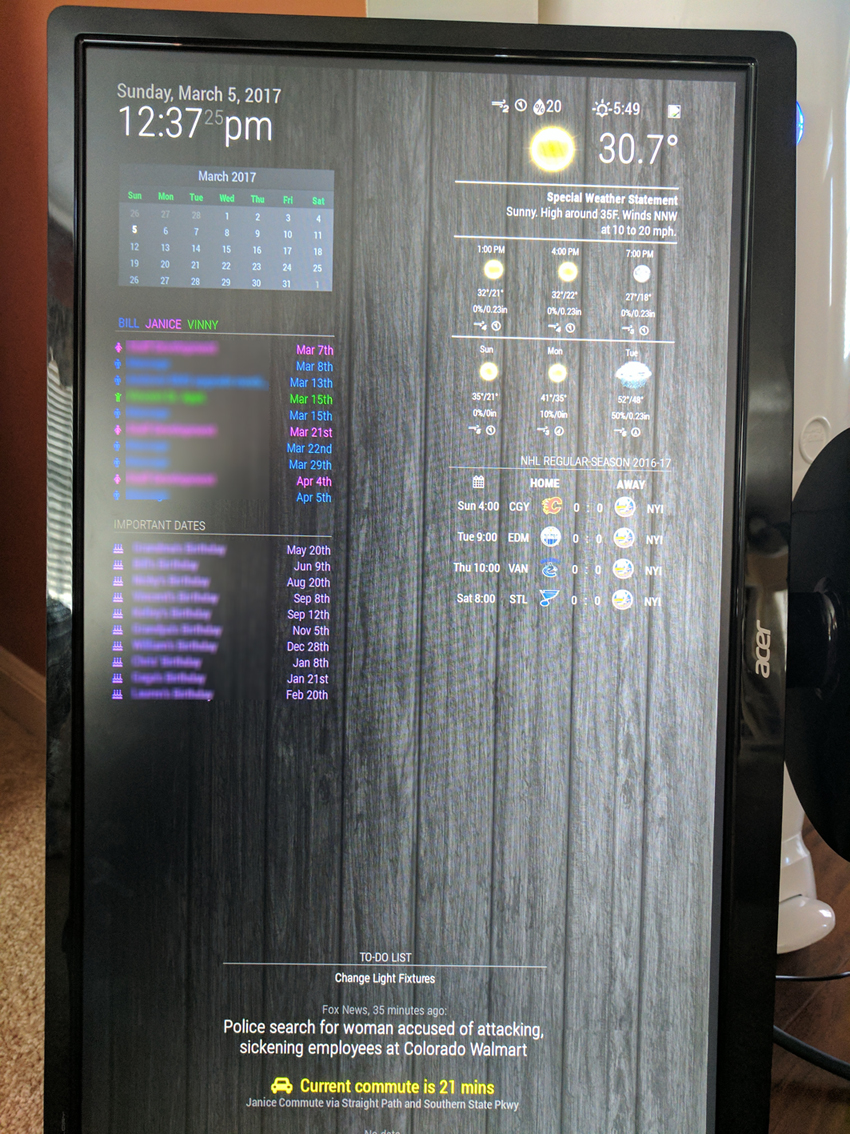
-
@billp100 That is awesome. I am just working with the config file. How to you change the icons? Also trying to figure out how to add the electron options in correctly. I need to change the screen size.
-
@jaymichael78 I’m not home, so I don’t have my config file, but in the config.js under the first calendar module, I added 3 calendars so far, plan on adding 2 more for the other kids, but for each one, you can choose a color and icon from FontAwesome. Just add the config option defaultSymbol and pick your icon. The default one is a calendar icon.
I was also able to edit the header to color code the names and their calendar, by adding some html style coding.
-
@billp100 That is awesome! I would love to take a look at your config file if you are willing to share. Thanks!
-
@jaymichael78 When I get home, I will upload the config file
-
@billp100 Thumbs up
-
@jaymichael78 Here you go…
/* Magic Mirror Config Sample * * By Michael Teeuw http://michaelteeuw.nl * MIT Licensed. */ var config = { port: 8080, ipWhitelist: ["192.168.1.18", "::ffff:127.0.0.1", "::1"], language: 'en', timeFormat: 12, units: 'imperial', modules: [ { module: 'alert', }, { module: 'clock', position: 'top_left' }, { module: 'calendar_monthly', position: 'top_left', config: { cssStyle:'slate' } }, { module: 'calendar', header: ' Bill Janice Vinny ', position: 'top_left', config: { colored: 'true', calendars: [ { symbol: 'male', url: 'Calendar link', color:'#4286f4' }, { symbol: 'child', url: 'Calendar link', color:'#33cc33' }, { symbol: 'female', url: 'Calendar link', color:'#eb42f4' } ], } }, { module: 'calendar', header: 'Important Dates', position: 'top_left', config:{ colored: 'true', calendars: [ { symbol: 'users', url: 'Calendar link', color: '#ffff00' }, { symbol: 'birthday-cake', url: 'Calendar link', color: '#b380ff' } ], } }, { module: 'MMM-Wunderlist', position: 'bottom_center', header: 'To-Do List', config: { accessToken: 'your access token', clientID: 'your client id', lists: ["MM List"] } }, { module: 'MMM-WunderGround', position: 'top_right', config: { apikey: 'your api key', // private; don't share! pws: 'pws:KNYHUNTI41', //culemborg coloricon: 'true', hourly: '1', fctext: '1', layout: "horizontal", fcdaycount: "3", fcdaystart: "0", hourlyinterval: "3", hourlycount: "2", alerttime: 10000, alerttruncatestring: "english:", roundTmpDecs: 1, UseCardinals: 0, layout: "horizontal", sysstat: 0 } }, { module: 'newsfeed', position: 'bottom_center', config: { feeds: [ { title: "Fox News", url: "http://feeds.foxnews.com/foxnews/latest?format=xml" } ], showSourceTitle: true, showPublishDate: true } }, { module: 'MMM-Traffic', position: 'bottom_center', classes: 'dimmed medium', //optional, default is 'bright medium', only applies to commute info not route_name config: { api_key: 'your api key', mode: 'driving', origin: 'starting address', destination: 'destination address', route_name: 'nickname', show_summary: true, changeColor: true, showGreen: true, limitYellow: 5, //Greater than 5% of journey time due to traffic limitRed: 20, //Greater than 20% of journey time due to traffic traffic_model: 'pessimistic', interval: 120000 //2 minutes } }, { module: 'MMM-MTA', position: 'bottom_center', config: { sStation: 'DPK', mtaAPIKey: '9e9374cf6751033431c1f54a4e7576c3' //API KEY needs to be requested from datamine.mta.info }, }, { module: 'MMM-NHL', position: 'top_right', config: { colored: 'true', focus_on: [2], datesToLookAhead: '7', } }, ] }; /*************** DO NOT EDIT THE LINE BELOW ***************/ if (typeof module !== 'undefined') {module.exports = config;} -
@jaymichael78 Here is the custom css
/***************************************************** * Magic Mirror * * Custom CSS * * * * By Michael Teeuw http://michaelteeuw.nl * * MIT Licensed. * * * * Add any custom CSS below. * * Changes to this files will be ignored by GIT. * *****************************************************/ header { text-transform: uppercase; font-family: "Roboto Condensed"; font-size: 20px; font-weight: 300; } body { margin: 30px; position: absolute; height: calc(100%-50px); width: calc(100%-50px); background-image: url('bg1.jpg'); backgroung-repeat: no-repeat; background-size: 1920; } .newsfeed, div#module_7_newsfeed { width: 550px; font-size: 12px; } -
@billp100
Boolean values and numbers should be written without " or ’ -
@billp100 thanks! This really is nice. You did good work. I appreciate you sharing this seeing the two side by side really helps me understand how to manage this better. Big week, will get back fo it this weekend.
-
@yawns Thank you for the clarification. I wasn’t sure why some values needed the " or ', basically if the config file loaded, I counted that as a success
@jaymichael78 Thanks for the compliment. Next step is building a frame for it to mount on the fridge. Plus I’ll be still tinkering away at the contents.
-
Some explanation from @strawberry-3-141
'false'is a string and astringalways represents thebooleantrue, so'test','true'and'false'all become true it doesn’t matter what the content of the string is.There are multiple types:
- object
{} - array
[] - number
2,-17and3.14 - string
"I am a string"and'me too' - boolean
trueorfalse
- object
-
@billp100 this is spectacular.



Hello! It looks like you're interested in this conversation, but you don't have an account yet.
Getting fed up of having to scroll through the same posts each visit? When you register for an account, you'll always come back to exactly where you were before, and choose to be notified of new replies (either via email, or push notification). You'll also be able to save bookmarks and upvote posts to show your appreciation to other community members.
With your input, this post could be even better 💗
Register Login