MagicMirror Forum
    • Recent
    • Tags
    • Unsolved
    • Solved
    • MagicMirror² Repository
    • Documentation
    • 3rd-Party-Modules
    • Donate
    • Discord
    • Register
    • Login
    A New Chapter for MagicMirror: The Community Takes the Lead
    Read the statement by Michael Teeuw here.

    MMM-Nest

    Scheduled Pinned Locked Moved Utilities
    nestthermostatutility
    37 Posts 15 Posters 38.4k Views 14 Watching
    Loading More Posts
    • Oldest to Newest
    • Newest to Oldest
    • Most Votes
    Reply
    • Reply as topic
    Log in to reply
    This topic has been deleted. Only users with topic management privileges can see it.
    • mochmanM Offline
      mochman Module Developer @willharwell
      last edited by

      @willharwell Glad to hear it!

      1 Reply Last reply Reply Quote 0
      • mochmanM Offline
        mochman Module Developer
        last edited by

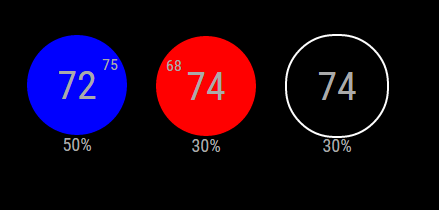
        I’ve updated the module for all of those that use multi-thermostat setups. You now have the option to select the thermostat you want to see in “nest mode”, or you’re able to see all of your thermostats in a “grid mode”.

        Thermostat Select
        Grid Mode

        [card:mochman/MMM-Nest]

        1 Reply Last reply Reply Quote 0
        • E Offline
          eugekiller
          last edited by

          Hi I was wondering if some one can give me a hand with this Module.
          So i am trying to set this up and have a dum question. How do you “Run getToken.sh”

          How would i put that in to the terminal?

          I Know i would direct it to the MMM-Nest folder and then from there would i put “npm start getToken.sh”

          1 Reply Last reply Reply Quote 0
          • yawnsY Offline
            yawns Moderator
            last edited by

            On the terminal type bash getToken.sh

            1 Reply Last reply Reply Quote 0
            • tidus5T Offline
              tidus5
              last edited by yawns

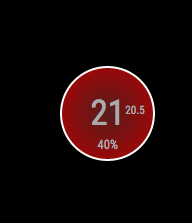
              0_1481642822085_Screen Shot 2016-12-13 at 16.25.04.png

              changed the CSS

              for who want

              .heating {
              width: 130px;
              height: 130px;
              background: red;
              background: radial-gradient(#571d1d, #b30000);
              -moz-border-radius: 50px;
              -webkit-border-radius: 50px;
              border-radius: 70px;
              line-height: 130px;
              font-size: 50px;
              text-align: center;
              position: relative;
              border: 4px solid #FFF;
              }
              
              .cooling {
              width: 130px;
              height: 130px;
              background: blue;
              background: radial-gradient(#0a237a, #436cc0);
              -moz-border-radius: 50px;
              -webkit-border-radius: 50px;
              border-radius: 70px;
              line-height: 130px;
              font-size: 50px;
              text-align: center;
              position: relative;
              border: 4px solid #FFF;
              }
              
              .heatingHC {
              width: 130px;
              height: 130px;
              background: red;
              background: radial-gradient(#571d1d, #b30000);
              -moz-border-radius: 50px;
              -webkit-border-radius: 50px;
              border-radius: 70px;
              line-height: 130px;
              font-size: 40px;
              text-align: center;
              position: relative;
              border: 4px solid #FFF;
              }
              
              .coolingHC {
              width: 130px;
              height: 130px;
              background: blue;
              background: radial-gradient(#0a237a, #436cc0);
              -moz-border-radius: 50px;
              -webkit-border-radius: 50px;
              border-radius: 70px;
              line-height: 130px;
              font-size: 40px;
              text-align: center;
              position: relative;
              border: 4px solid #FFF;
              }
              
              .off {
              width: 130px;
              height: 130px;
              border: 4px solid white;
              background: black;
              -moz-border-radius: 50px;
              -webkit-border-radius: 50px;
              border-radius: 70px;
              line-height: 130px;
              font-size: 50px;
              text-align: center;
              position: relative;
              }
              
              .heatingText {
                font-size:medium;
                position: absolute;
              top: -5px;
              right: 40px;
                width: 0;
              }
              
              .coolingText {
                font-size:medium;
                position: absolute;
              top: -5px;
              right: 40px;
                width: 0;
              }
              
              .humidityText {
                position:absolute;
                font-size:large;
                top: 35%;
                width: 100%;
              }
              
              .nameText {
               font-size:medium;
               text-align:center;
               width:33%;
              }
              
              .center {
               text-align:center;
              }
              
              .heatingCell {
               background:red;
               background:linear-gradient(to right, #990000 , red, #990000);
              }
              
              .coolingCell {
               background-color:blue;
               background:linear-gradient(to right, #000099 , blue, #000099);
              }
              
              .fanIcon {
               height:15px;
               width:15px;
               position:absolute;
               top: 72%;
               right: 42%;
              }
              
              mochmanM 1 Reply Last reply Reply Quote 1
              • mochmanM Offline
                mochman Module Developer @tidus5
                last edited by

                @tidus5 Thanks! I’m terrible at CSS, I just keep changing numbers until it looks right to me.

                1 Reply Last reply Reply Quote 1
                • foxF Offline
                  fox
                  last edited by

                  I am looking forward when Nest sells officially in germany.

                  Whats about the cameras? Also Nest outdoor camera supported?

                  Issues With MMM-WatchDog known?

                  https://forum.magicmirror.builders/post/29827

                  Useful for PIR-Sensor: https://forum.magicmirror.builders/post/21299

                  mochmanM 1 Reply Last reply Reply Quote 0
                  • mochmanM Offline
                    mochman Module Developer @fox
                    last edited by

                    @fox I don’t have a camera so I’m not too sure how to program for it. The API does allow you to get data from the camera as well as take snapshots. The API also gives you the video URL which I imagine you can use to get video on the mirror.

                    1 Reply Last reply Reply Quote 0
                    • Mitch1138M Offline
                      Mitch1138
                      last edited by

                      I just installed this and everything worked as described. I have two thermostats, is there a way to increase the font size of the “list” view (it looks like the css only applies to the thermostat graphic view?). Thanks

                      mochmanM 1 Reply Last reply Reply Quote 0
                      • mochmanM Offline
                        mochman Module Developer @Mitch1138
                        last edited by

                        @Mitch1138 You may be able to change the .center part of the css to change the font size. I’m not to sure though, I don’t know much about CSS. Sorry.

                        1 Reply Last reply Reply Quote 0
                        • Mitch1138M Offline
                          Mitch1138
                          last edited by

                          Thanks for the suggestion. I couldn’t get this to work and couldn’t find the css setting that changes the font size, it looks like most of the settings are for the thermostat graphic, not the list.

                          1 Reply Last reply Reply Quote 0
                          • mochmanM Offline
                            mochman Module Developer
                            last edited by

                            You might have to add some custom css to MagicMirror itself to get this to work the way you want it to. I’m not entirely sure how to do that, but I bet there are a bunch of posts in this forum with the answer.

                            Mitch1138M 1 Reply Last reply Reply Quote 0
                            • S Offline
                              soqueen
                              last edited by soqueen

                              I know this is a dumb question but is the Pin you get when you run the getToken script the same as the token that you put into the config file? If not where do I get a token from? I seem to only have a pin, a product id and a product secret…

                              When I added in the Pin to the token field and run mm… I get a Loading… where the module should be…

                              1 Reply Last reply Reply Quote 0
                              • Mitch1138M Offline
                                Mitch1138 @mochman
                                last edited by

                                @mochman Many thanks. For now, changing the table font size in Nest.js seems to work (table.classList.add(“xsmall”, “table”); to table.classList.add(“small”, “table”);). I will keep looking at how to get this into custom.css.

                                strawberry 3.141S 1 Reply Last reply Reply Quote 0
                                • strawberry 3.141S Offline
                                  strawberry 3.141 Project Sponsor Module Developer @Mitch1138
                                  last edited by

                                  @Mitch1138 did you try .MMM-Nest table.xsmall.table { font-size: 20px; line-height: 25px; } ?

                                  Please create a github issue if you need help, so I can keep track

                                  1 Reply Last reply Reply Quote 1
                                  • Mitch1138M Offline
                                    Mitch1138
                                    last edited by

                                    @strawberry-3.141 said in MMM-Nest:

                                    .MMM-Nest table.xsmall.table { font-size: 20px; line-height: 25px; }

                                    I am impressed. This worked perfectly. By adding it to the custom.css I can change size and spacing by changing the px sizes. Many thanks.

                                    1 Reply Last reply Reply Quote 0
                                    • mochmanM Offline
                                      mochman Module Developer
                                      last edited by

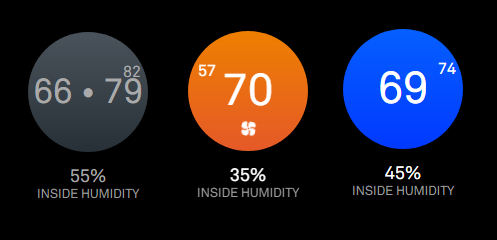
                                      I updated the css using edits from @j-e-f-f. The nest display looks closer to what the actual nest thermostat looks like. 0_1496072888357_nest.png
                                      1 Reply Last reply Reply Quote 1
                                      • pugslyP Offline
                                        pugsly
                                        last edited by

                                        Any chance on integrating the nest protect smoke detectors?

                                        1 Reply Last reply Reply Quote 0
                                        • mochmanM Offline
                                          mochman Module Developer
                                          last edited by

                                          @pugsly Sure. What kind of info would you be looking for on it? From what I see on the API, we can read CO Alarm State, Smoke Alarm State, Battery Health, and some other things people probably don’t want to see.

                                          What I’m thinking right now is putting a colored ring (like the one on the smoke detector) around the thermostat circle to indicate good, warning, or emergency status. Any ideas?

                                          1 Reply Last reply Reply Quote 0
                                          • pugslyP Offline
                                            pugsly
                                            last edited by

                                            Well, I have 3 of them so not sure how to display but I do like the colored ring based on status. There are also alerts that could be displayed as well.
                                            0_1496267942592_IMG_7336.PNG

                                            0_1496267906419_IMG_7335.PNG

                                            1 Reply Last reply Reply Quote 0

                                            Hello! It looks like you're interested in this conversation, but you don't have an account yet.

                                            Getting fed up of having to scroll through the same posts each visit? When you register for an account, you'll always come back to exactly where you were before, and choose to be notified of new replies (either via email, or push notification). You'll also be able to save bookmarks and upvote posts to show your appreciation to other community members.

                                            With your input, this post could be even better 💗

                                            Register Login

                                            • 1
                                            • 2
                                            • 1 / 2
                                            • First post
                                              Last post
                                            Enjoying MagicMirror? Please consider a donation!
                                            MagicMirror created by Michael Teeuw.
                                            Forum managed by Sam, technical setup by Karsten.
                                            This forum is using NodeBB as its core | Contributors
                                            Contact | Privacy Policy