MagicMirror Forum
    • Recent
    • Tags
    • Unsolved
    • Solved
    • MagicMirror² Repository
    • Documentation
    • 3rd-Party-Modules
    • Donate
    • Discord
    • Register
    • Login
    A New Chapter for MagicMirror: The Community Takes the Lead
    Read the statement by Michael Teeuw here.

    Sync private iCloud calendar with MagicMirror

    Scheduled Pinned Locked Moved Tutorials
    162 Posts 58 Posters 389.8k Views 65 Watching
    Loading More Posts
    • Oldest to Newest
    • Newest to Oldest
    • Most Votes
    Reply
    • Reply as topic
    Log in to reply
    This topic has been deleted. Only users with topic management privileges can see it.
    • D Offline
      Doubleve
      last edited by Doubleve

      everything is good

      BehB 1 Reply Last reply Reply Quote 0
      • L Offline
        l0cal
        last edited by

        That sounds good for me. Does it work with reminders on the same way?

        BehB schwoediauerS 2 Replies Last reply Reply Quote 0
        • BehB Offline
          Beh @Doubleve
          last edited by

          @Doubleve Hmmm…

          Maybe you have to allow your localhost address to the MagicMirror ipWhiteList option in your config. Just add ipWhitelist: ["127.0.0.1", "::ffff:127.0.0.1"], to your config right before the modules option. Maybe the calendar module can not access the .ics file if this is not allowed…

          1 Reply Last reply Reply Quote 0
          • BehB Offline
            Beh @l0cal
            last edited by

            @l0cal Yes this should work.

            Just add "VTODO" to the item_types array in your vdirsyncer config as described in the vdirsyncer docs here: https://vdirsyncer.pimutils.org/en/stable/config.html?highlight=VEVENT#storage-caldav.

            L 1 Reply Last reply Reply Quote 0
            • L Offline
              l0cal @Beh
              last edited by

              @Beh yeah that are good news for me.

              in the last few weeks I was looking for a solution for it and I did not find anything

              1 Reply Last reply Reply Quote 0
              • R Offline
                ribermon
                last edited by

                I have a question

                So far I managed to sync one calendar from one iCloud account, but I would like to sync also a second calendar from a second iCloud account, is this possible?

                Thanks
                Ricardo

                BehB 1 Reply Last reply Reply Quote 0
                • BehB Offline
                  Beh @ribermon
                  last edited by

                  Hey @ribermon!

                  Yes, this should be possible. You just have to add another configuration scheme for your second icloud account to the vdirsyncer config. I didn’t try it, but something like that should work:

                  # vdirsyncer configuration for MagicMirror.
                  #
                  # Move it to ~/.vdirsyncer/config or ~/.config/vdirsyncer/config and edit it.
                  # Run `vdirsyncer --help` for CLI usage.
                  #
                  # Optional parameters are commented out.
                  # This file doesn't document all available parameters, see
                  # http://vdirsyncer.pimutils.org/ for the rest of them.
                  
                  [general]
                  # A folder where vdirsyncer can store some metadata about each pair.
                  status_path = "~/.vdirsyncer/status/"
                  
                  # CALDAV Sync for iCloud 1
                  [pair iCloud1_to_MagicMirror]
                  a = "Mirror_iCloud1"
                  b = "iCloud1"
                  collections = ["HERE-GOES-THE-UUID-OF-THE-CALENDAR-YOU-WANT-TO-SYNC"]
                  
                  # Calendars also have a color property
                  metadata = ["displayname", "color"]
                  
                  [storage Mirror_iCloud1]
                  # We need a single .ics file for use with the mirror (Attention! This is really slow on big amounts of events.)
                  type = "singlefile"
                  # We'll put the calendar file to a readable location for the calendar module
                  path = "/home/pi/MagicMirror/modules/calendars/%s.ics"
                  
                  [storage iCloud1]
                  type = "caldav"
                  url = "https://caldav.icloud.com/"
                  # Authentication credentials
                  username = "YOUR-ICLOUD-EMAIL-ADDRESS"
                  password = "HERE-GOES-YOUR-APP-SPECIFIC-ICLOUD-PASSWORD"
                  # We only want to sync in the direction TO the mirror, so we make iCloud readonly
                  read_only = true
                  # We only want to sync events
                  item_types = ["VEVENT"]
                  # We need to keep the number of events low, so we'll just sync the next month
                  # Adjust this to your needs
                  start_date = "datetime.now() - timedelta(days=1)"
                  end_date = "datetime.now() + timedelta(days=30)"
                  
                  
                  # CALDAV Sync for iCloud 2
                  [pair iCloud2_to_MagicMirror]
                  a = "Mirror_iCloud2"
                  b = "iCloud2"
                  collections = ["HERE-GOES-THE-UUID-OF-THE-CALENDAR-YOU-WANT-TO-SYNC"]
                  
                  # Calendars also have a color property
                  metadata = ["displayname", "color"]
                  
                  [storage Mirror_iCloud2]
                  # We need a single .ics file for use with the mirror (Attention! This is really slow on big amounts of events.)
                  type = "singlefile"
                  # We'll put the calendar file to a readable location for the calendar module
                  path = "/home/pi/MagicMirror/modules/calendars/%s.ics"
                  
                  [storage iCloud2]
                  type = "caldav"
                  url = "https://caldav.icloud.com/"
                  # Authentication credentials
                  username = "YOUR-ICLOUD2-EMAIL-ADDRESS"
                  password = "HERE-GOES-YOUR-APP-SPECIFIC-ICLOUD2-PASSWORD"
                  # We only want to sync in the direction TO the mirror, so we make iCloud readonly
                  read_only = true
                  # We only want to sync events
                  item_types = ["VEVENT"]
                  # We need to keep the number of events low, so we'll just sync the next month
                  # Adjust this to your needs
                  start_date = "datetime.now() - timedelta(days=1)"
                  end_date = "datetime.now() + timedelta(days=30)"
                  
                  R 2 Replies Last reply Reply Quote 0
                  • R Offline
                    ribermon @Beh
                    last edited by

                    This post is deleted!
                    1 Reply Last reply Reply Quote 0
                    • R Offline
                      ribermon @Beh
                      last edited by

                      @Beh I manage to discover the calendars from my second iCloud account but then I don’t manage to sync my calendars there, any idea, thanks

                      BehB 1 Reply Last reply Reply Quote 0
                      • BehB Offline
                        Beh @ribermon
                        last edited by Beh

                        @ribermon No I have no idea. But since this is actually a vdirsyncer-problem and has nothing to do with the mirror itself, I suggest you dig the vdirsyncer-Documentation:

                        https://vdirsyncer.pimutils.org/en/stable/

                        1 Reply Last reply Reply Quote 0
                        • B Offline
                          bgz
                          last edited by

                          Hi Beh

                          Sorry if I´m too newbie… I´m following your step-by step and I get stuck in one place…

                          When creating a config file, I type:

                           touch ~/.vdirsyncer/config
                          

                          and I get:
                          Can´t do ‘touch’ on ‘/home/pi.vdirsyncer/config’: The file or directory doesn´t exist

                          What am I doing wrong?

                          Thanks.

                          BehB 1 Reply Last reply Reply Quote 0
                          • BehB Offline
                            Beh @bgz
                            last edited by

                            Hey, @bgz! No problem, I’m glad to help if I have time for that :)

                            first: the path should be /home/pi/.vdirsyncer/config you forgot the slash after “pi”

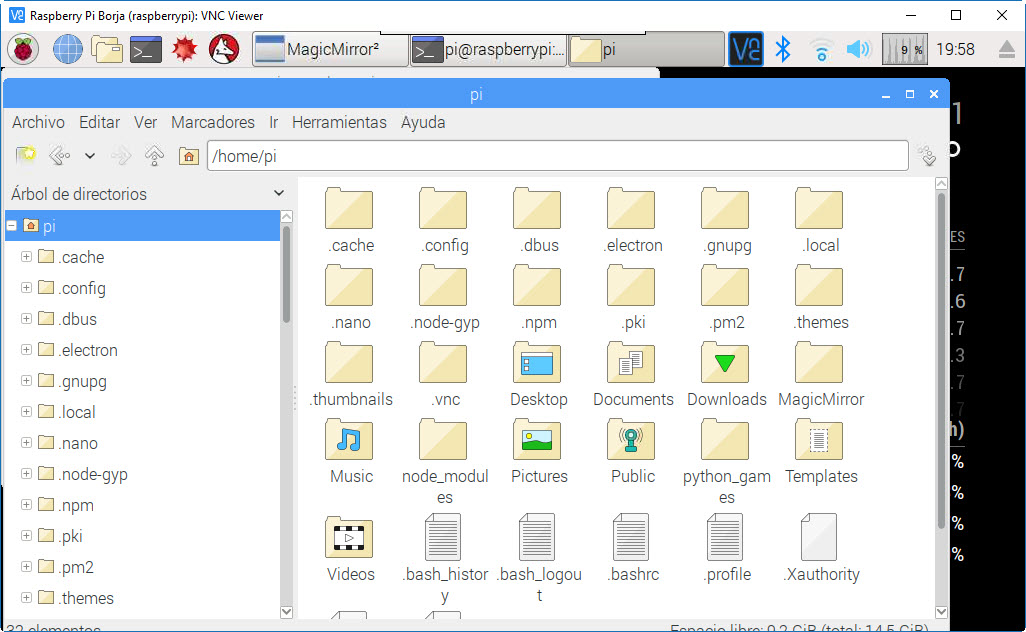
                            additionally, it seems, that the folder does not exist. Please make sure, that the folder .vdirsyncer exists in your user’s home directory. You can create it by typing mkdir .vdirsyncer when you are inside the home directory

                            1 Reply Last reply Reply Quote 0
                            • B Offline
                              bgz
                              last edited by

                              Hi Beh.

                              For some reason I have no .vdirsyncer directory under /home/pi/

                              Any ideas?

                              Thanks for your patience.

                              bgz
                              0_1514055561829_23-12-2017 19-58-58.jpg

                              BehB schwoediauerS 2 Replies Last reply Reply Quote 0
                              • BehB Offline
                                Beh @bgz
                                last edited by

                                @bgz Please read answers carefully. If it doesn’t exist, just create it. I described the creation in my last answer.

                                Mykle1M 1 Reply Last reply Reply Quote 2
                                • Mykle1M Offline
                                  Mykle1 Project Sponsor Module Developer @Beh
                                  last edited by

                                  @Beh said in Sync private iCloud calendar with MagicMirror:

                                  Please read answers carefully

                                  Amen

                                  Create a working config
                                  How to add modules

                                  1 Reply Last reply Reply Quote 0
                                  • schwoediauerS Offline
                                    schwoediauer @Beh
                                    last edited by schwoediauer

                                    @Beh Hi Beh, great work it’s a little bit tricky but it works fine on my side. One additional Information. I got an error by syncing after modification of an event on iCloud side. Therefore is necessary to modify the conflict_resolution in the config file as described here: https://vdirsyncer.pimutils.org/en/stable/config.html#pair-section

                                    I added this section in my configuration:

                                    CALDAV Sync

                                    [pair iCloud_to_MagicMirror]
                                    a = “Mirror”
                                    b = “iCloud”
                                    collections = [“65CFC60E-8888-4B7A-B8DB-0043A969A041”]
                                    conflict_resolution = “b wins”

                                    after first sync…

                                    pi@pi_mirror:/etc/systemd/user $ /usr/bin/vdirsyncer sync
                                    Syncing iCloud_to_MagicMirror/65CFC60E-8888-4B7A-B8DB-0043A969A041
                                    Doing conflict resolution for item 247C105F-156B-41DC-B1D6-BFDB7C753BDC…

                                    second sync imports the modified event in my .ics file

                                    have a nice Day!

                                    1 Reply Last reply Reply Quote 0
                                    • schwoediauerS Offline
                                      schwoediauer @bgz
                                      last edited by

                                      @bgz Good morning Create an “hidden” folder by command mkdir .vdirsyncer, and check it by command ls - lisa

                                      B 1 Reply Last reply Reply Quote 0
                                      • R Offline
                                        ribermon
                                        last edited by

                                        Also you have to create first the file, it does not exist, so first create it following the path said by Beh and inside the folder create the file

                                        1 Reply Last reply Reply Quote 0
                                        • ildottoreI Offline
                                          ildottore
                                          last edited by

                                          @Beh: First I want to thank you for this tutorial! Great job!

                                          It syncs my iCloud calender fine, but not birthdays which are placed from the contacts app.

                                          Can someone advice me?

                                          Thanks in advance!

                                          BehB 1 Reply Last reply Reply Quote 0
                                          • B Offline
                                            bgz @schwoediauer
                                            last edited by

                                            @schwoediauer

                                            Thanks schwoediauer and the others.
                                            I finally got it and it is up & syncing!!

                                            1 Reply Last reply Reply Quote 0

                                            Hello! It looks like you're interested in this conversation, but you don't have an account yet.

                                            Getting fed up of having to scroll through the same posts each visit? When you register for an account, you'll always come back to exactly where you were before, and choose to be notified of new replies (either via email, or push notification). You'll also be able to save bookmarks and upvote posts to show your appreciation to other community members.

                                            With your input, this post could be even better 💗

                                            Register Login

                                            • 1
                                            • 2
                                            • 3
                                            • 4
                                            • 5
                                            • 8
                                            • 9
                                            • 1 / 9
                                            • First post
                                              Last post
                                            Enjoying MagicMirror? Please consider a donation!
                                            MagicMirror created by Michael Teeuw.
                                            Forum managed by Sam, technical setup by Karsten.
                                            This forum is using NodeBB as its core | Contributors
                                            Contact | Privacy Policy