Read the statement by Michael Teeuw here.
show integer logs from python script as diagram in MM ?
-
Hey guys,
i am trying again to get a new feature to my MM ^^
Background Story:
I finally installed a second Raspberry Pi on my heat oil tank for measuring the tank level.
Therefore i am using a HC-SR04 and a python script i found in the web.
As the script just showed the actual measurement in the console, i modified it to write the logs in a *.txt and a *.html file.
The script will be executed once a day via crontab.The index.html will be completely overwritten every time the script will be executed. Then the file will be uploaded to my NAS.
Actually i am using an iFrame module in the MM to show the result. This was just for trying it out :)The *.txt file is doing the longtime log of the results. At the moment it writes a time stamp and the result at the end of the file.
For future measurements i could also just print the result (in the script it is “Liter”).Question:
My aim is to show the longtime logs in a diagram on the MM. Probably this is just possible with html and an iFrame module, right or not?
It should look like this, just in MM-style:
https://forum-raspberrypi.de/attachment/5997-monatsansicht-03-jpg/or this: https://www.raspberrypi.org/forums/viewtopic.php?t=83808
If so, could someone help me find a good solution? Because writing html with python isn’t that easy^^
And I master neither python nor htmlHere comes the tank.py:
#!/usr/bin/env python
# -*- coding: utf-8 -*-

# import required modules
import time
import datetime
import RPi.GPIO as GPIO
import os
import ftplib

GPIO.setwarnings(False)

print("Fair volume...")

# define GPIO pins
GPIOTrigger = 18
GPIOEcho    = 24

# function to measure the distance
def MeasureDistance():
  # set trigger to high
  time.sleep(0.2)
  GPIO.output(GPIOTrigger, True)

  # set trigger after 10µs to low
  time.sleep(0.0001)
  GPIO.output(GPIOTrigger, False)

  # store initial start time
  StartTime = time.time()

  # store start time
  while GPIO.input(GPIOEcho) == 0:
    StartTime = time.time()

  # store stop time
  while GPIO.input(GPIOEcho) == 1:
    StopTime = time.time()

  # calculate distance
  TimeElapsed = StopTime - StartTime
  Distance = (TimeElapsed * 34400) / 2

  return Distance

# main function
def main():
  try:
#    while True:
      Distance0 = MeasureDistance()
      Distance01 = MeasureDistance()
      Distance02 = MeasureDistance()
      Distance03 = MeasureDistance()
      Distance04 = MeasureDistance()
      Distance05 = MeasureDistance()
      Distance06 = MeasureDistance()
      Distance07 = MeasureDistance()
      Distance08 = MeasureDistance()
      Distance09 = MeasureDistance()
      Distance10 = MeasureDistance()
      Distance11 = MeasureDistance()
      Distance12 = MeasureDistance()
      Distance13 = MeasureDistance()
      Distance14 = MeasureDistance()
      Distance15 = MeasureDistance()
      Distance16 = MeasureDistance()
      Distance17 = MeasureDistance()
      Distance18 = MeasureDistance()
      Distance19 = MeasureDistance()
      Distance20 = MeasureDistance()
      Distance_sum = Distance01 + Distance02 + Distance03 + Distance04 + Distance05 + Distance06 + Distance07 + Distance08 + Distance09 + Distance10 + Distance11 + Distance12 + Distance13 + Distance14 + Distance15 + Distance16 + Distance17 + Distance18 + Distance19 + Distance20
      Distance = round(Distance_sum / 20,1)
#    Meine Tanks haben Maximal 3.200 Liter bei 150 cm Füllhöhe
#    Zusätzlich 9 cm Offset vom Einbauort des Sensors;
      Fuelstand = 150 - Distance
      Liter = 3200 / 141 * Fuelstand
      Zeit = time.time()
      ZeitStempel = datetime.datetime.fromtimestamp(Zeit).strftime('%Y-%m-%d_%H:%M:%S')
      print (ZeitStempel),("Entfernung: %.1f cm" % Distance),(" Fuelhoehe: %.1f cm" % Fuelstand),(" Liter: %.0f l" % Liter)
      time.sleep(1)

      Auslesezeitpunkt = datetime.datetime.fromtimestamp(Zeit).strftime('%d.%m.%Y um %H:%M:%S Uhr')

	# write result in *.txt file (add to last line)
      file = open("longtimelog.txt", "a")
      file.write(str(Auslesezeitpunkt))
      file.write(":\n")
      file.write("Ölstand = ")
      file.write(str(Liter))
      file.write("\n\n")
      file.close()

	# write result to *.html file (will be overwritten)
      file = open("index.html", "w")
      file.write("<p></p>")
      file.write(str(Auslesezeitpunkt))
      file.write(":<p>")
      file.write("Oelstand = ")
      file.write(str(Liter))
      file.write("</p>")
      file.write("<p></p><p></p><p></p>")
      file.close()

      print("Logs updated")
      time.sleep(1)
      print("Upload actual log...")

	# Lädt die index.html Datei auf das NAS
      filename = "index.html"
      ftp = ftplib.FTP("192.168.178.220")
      ftp.login("USER_NAME", "PASSWORD")
      ftp.cwd("/web")
      os.chdir(r"/home/pi")
      myfile = open("index.html", 'r')
      ftp.storlines('STOR ' + "index.html", myfile)
      myfile.close()

      time.sleep(1)

      print("Upload done")

  # reset GPIO settings if user pressed Ctrl+C
  except KeyboardInterrupt:
    print("Measurement stopped by user")
    GPIO.cleanup()

if __name__ == '__main__':
  # use GPIO pin numbering convention
  GPIO.setmode(GPIO.BCM)

  # set up GPIO pins
  GPIO.setup(GPIOTrigger, GPIO.OUT)
  GPIO.setup(GPIOEcho, GPIO.IN)

  # set trigger to false
  GPIO.output(GPIOTrigger, False)

  # call main function
  main()
Even this thought is not makable i would like to thank you guys ahead ;)
edit:
oh, and i found this here, but i don’t know if this would help.
-
@cruunnerr Hi, i dont know if u would like what i have but i made the same u want to have.
I also use a HC-SR04 and a python script, i think its the same u use i put all results in a json file and than
i read it with my openhab server so now i can display via (MMM-Openhab) the actual filling on my mirror.
Also to get a diagram is no problem . I would realy recomment u to take a look at openhab and what it can do. In case of questions please contact me … Robert -
I use highcharts to make a diagram for my gas station price module. It’s quite easy to implement and use if you have the data in an object.
-
since u wrote the brilliant Openhab module this would really be a good option :)
I will keep that in mind.@doubleT
i will take a look at it. looks great. But i am sure i will have questions :Dedit:
i also found this: https://forum.magicmirror.builders/topic/2470/mmm-chart-view-your-graphs-on-your-mirror
But what is meant by “JSON data source”? is it just a *.js file with text in it? And is that the only file needed to use this module? i am still looking. ^^
-
so i actually edited my python script, so that the results will be automatically loaded up to my MySQL Database on the Synology NAS.
With PHP i can show the Data as a diagram :)
So now i could use an iFrame module.
So far so good ^^ (never thought i get this working)next days i will take a look at the MMM-Chart Module and the OpenHAB solution. (or a other that maybe works with MySQL)
For those, who are interested so far:
#!/usr/bin/env python # -*- coding: utf-8 -*- # import required modules import time import datetime import RPi.GPIO as GPIO import os import ftplib import mysql import mysql.connector GPIO.setwarnings(False) # define server data # ftpserver = "..." //optional, when needed uncomment the FTP-Upload further down # ftpuser = "..." # ftppassword = "..." # ftppath = "/web" sqlhost = "..." sqlport = "..." sqluser = "..." sqlpassword = "..." sqldb = "Tank" # define GPIO pins GPIOTrigger = 18 GPIOEcho = 24 # function to measure the distance def MeasureDistance(): # set trigger to high time.sleep(0.2) GPIO.output(GPIOTrigger, True) # set trigger after 10µs to low time.sleep(0.0001) GPIO.output(GPIOTrigger, False) # store initial start time StartTime = time.time() # store start time while GPIO.input(GPIOEcho) == 0: StartTime = time.time() # store stop time while GPIO.input(GPIOEcho) == 1: StopTime = time.time() # calculate distance TimeElapsed = StopTime - StartTime Distance = (TimeElapsed * 34400) / 2 return Distance print("Messe Volumen...") # main function def main(): try: # while True: Distance0 = MeasureDistance() Distance01 = MeasureDistance() Distance02 = MeasureDistance() Distance03 = MeasureDistance() Distance04 = MeasureDistance() Distance05 = MeasureDistance() Distance06 = MeasureDistance() Distance07 = MeasureDistance() Distance08 = MeasureDistance() Distance09 = MeasureDistance() Distance10 = MeasureDistance() Distance11 = MeasureDistance() Distance12 = MeasureDistance() Distance13 = MeasureDistance() Distance14 = MeasureDistance() Distance15 = MeasureDistance() Distance16 = MeasureDistance() Distance17 = MeasureDistance() Distance18 = MeasureDistance() Distance19 = MeasureDistance() Distance20 = MeasureDistance() Distance_sum = Distance01 + Distance02 + Distance03 + Distance04 + Distance05 + Distance06 + Distance07 + Distance08 + Distance09 + Distance10 + Distance11 + Distance12 + Distance13 + Distance14 + Distance15 + Distance16 + Distance17 + Distance18 + Distance19 + Distance20 Distance = round(Distance_sum / 20,1) # Meine Tanks haben Maximal 3.200 Liter bei 150 cm Füllhöhe # Zusätzlich 9 cm Offset vom Einbauort des Sensors; Fuelstand = 150 - Distance Liter = 3200 / 141 * Fuelstand Zeit = time.time() ZeitStempel = datetime.datetime.fromtimestamp(Zeit).strftime('%Y-%m-%d_%H:%M:%S') print (ZeitStempel),("Entfernung: %.1f cm" % Distance),(" Fuelhoehe: %.1f cm" % Fuelstand),(" Liter: %.0f l" % Liter) time.sleep(.1) Auslesezeitpunkt = datetime.datetime.fromtimestamp(Zeit).strftime('%d-%m-%Y_%H:%M:%S') Tag = datetime.datetime.fromtimestamp(Zeit).strftime('%Y-%m-%d') Uhr = datetime.datetime.fromtimestamp(Zeit).strftime('%H:%M:%S') # schreibe Langzeitmessung in *.csv Datei file = open("longtimelog.csv", "a") file.write(str(Tag)) file.write(", ") file.write(str(Liter)) file.write("\n") file.close() # schreibe aktuelle Messung in *.csv Datei file = open("log.csv", "w") file.write(str(Tag)) file.write(", ") file.write(str(Liter)) file.write("\n") file.close() print("Logs aktualisiert") time.sleep(.1) print("Upload Logs auf FTP...") # Lädt die longtimelog.csv Datei auf das NAS # filename = "longtimelog.csv" # ftp = ftplib.FTP(ftpserver) # ftp.login(ftpuser, ftppassword) # ftp.cwd(ftppath) # os.chdir(r"/home/pi") # myfile = open("longtimelog.csv", 'r') # ftp.storlines('STOR ' + "longtimelog.csv", myfile) # myfile.close() # Lädt die log.csv Datei auf das NAS # filename = "log.csv" # ftp = ftplib.FTP(ftpserver) # ftp.login(ftpuser, ftppassword) # ftp.cwd(ftppath) # os.chdir(r"/home/pi") # myfile = open("log.csv", 'r') # ftp.storlines('STOR ' + "log.csv", myfile) # myfile.close() time.sleep(.1) print("Verbinde mit MySQL-Datenbank...") time.sleep(.1) try: connection = mysql.connector.connect(host = sqlhost, port = sqlport, user = sqluser, passwd = sqlpassword, db = sqldb) except: print "Keine Verbindung zum MySQL-Server" exit(0) cursor = connection.cursor() cursor.execute("INSERT INTO Volumen VALUES (%s,%s)", (Tag,Liter,)) cursor.close() connection.commit() time.sleep(.1) print("Upload erfolgreich") # reset GPIO settings if user pressed Ctrl+C except KeyboardInterrupt: print("Measurement stopped by user") GPIO.cleanup() if __name__ == '__main__': # use GPIO pin numbering convention GPIO.setmode(GPIO.BCM) # set up GPIO pins GPIO.setup(GPIOTrigger, GPIO.OUT) GPIO.setup(GPIOEcho, GPIO.IN) # set trigger to false GPIO.output(GPIOTrigger, False) # call main function main() -
@cruunnerr You could use a
mysqlmodule to query your database, create a route to output a JSON file, then useMMM-Chartsto display.Problem with config or JavaScript? Copy/paste it into JSHint.
Check out the detailed walkthroughs on install, config, modules, etc. -
@ninjabreadman said in show integer logs from python script as diagram in MM ?:
create a route to output a JSON file
alright, that sound makable for me i think. ^^Will take a look. Thank you
edit: ehm…first question :D
i installed this now (seems to be newer). But where to start? Where i need to create the file, and what type of file, and how will it be loaded?
Is it a javascript file, which must be saved somewhere in the node directory? -
I have been following this, but I didn’t have time to comment.
You asked about the. json file. Simplyfied, it’s a file that holds a (JS) object for data sharing.
{{date:"2018-01-01", litre:500},{date:"2018-01-02", litre:498},{date:"2018-01-03", litre:495}}Probably comparable to what you did with your txt file.
For a working solution, that would actually be enough. Grab the json, handle the object, print the result with highcharts.
To me, the SQL db seems a bit “heavy weight” for such a simple use case, but it’s solid if you can make it work. Just my opinion. -
@cruunnerr @doubleT It would certainly be more easily handled in JSON or even a CSV (easiest to append readings). You can then set up
crontorsyncthe file to your mirror, load the file with annpmpackage likecsvorfast-csv, and display inMMM-Chart(I would modifyMMM-Chartto load the CSV directly). -
Yes, that’d be the easiest option. Could be running tonigt. ;)
Personally, I’d go with the json, though. I did it like this with Highcharts.js, which seems familiar to MMM-Charts:node-helper.js:
const fs = require("fs");
//...
    socketNotificationReceived: function(notification, payload) {
        if (notification === "UpdateChart") {
        	this.getChart();
        }
    },
    getChart: function() {

		var rawdata = fs.readFileSync('path/to/my.json');
		var history = JSON.parse(rawdata);
		var history = history.slice(-84); // 12 per day x 7 = I only want the last 84 data points
		this.sendSocketNotification("ChartUpdate", history);
	}
module.js:
getScripts: function() { return [ this.file("highcharts/highcharts.js"), this.file("highcharts/series-label.js"), this.file("highcharts/exporting.js") ] }, socketNotificationReceived: function(notification, payload) { if (notification === "ChartUpdate") { this.getChart(payload); } }, getChart: function(history) { var chart = ""; for(i = 0; i < history.length; i++) { if (i === 0) { chart = history[i].litre; } else { chart = chart + ", " + history[i].price; } } var maxi = Math.max.apply(Math, JSON.parse("[" + chart + "]")); var highest = maxi.toString() + " L"; var mini = Math.min.apply(Math, JSON.parse("[" + chart + "]")); var lowest = mini.toString() + " L"; Highcharts.chart('module-chart', { // the id of the div to contain the chart! chart: { height: 175, margin: 0, left: 0 }, plotOptions: { series: { marker: { enabled: false } } }, tooltip: { pointFormat: "Value: {point.y:.2f}" }, yAxis: { min: mini-0.05, max: maxi+0.05, tickInterval: 0.05, plotLines: [{ value: this.price, dashStyle: 'solid', width: 1, color: { linearGradient: [0, 0, 900, 0], stops: [ [0, 'rgba(255, 255, 255, 0.1)'], [1, 'rgba(255, 255, 255, 0.2)'] ] } }, { value: Math.max.apply(Math, JSON.parse("[" + pricelist + "]")), dashStyle: 'dot', width: 1, color: { linearGradient: [0, 0, 900, 0], stops: [ [0, 'rgba(255, 255, 255, 0.2)'], [1, 'rgba(255, 255, 255, 0.3)'] ] }, label: { text: highest, x: -2, y: -7 } }, { value: Math.min.apply(Math, JSON.parse("[" + pricelist + "]")), dashStyle: 'dot', width: 1, color: { linearGradient: [0, 0, 900, 0], stops: [ [0, 'rgba(255, 255, 255, 0.2)'], [1, 'rgba(255, 255, 255, 0.3)'] ] }, label: { text: lowest, x: -2, y: 13 } }] }, series: [{ data: JSON.parse("[" + pricelist + "]"), // here's the action step: 'center', lineWidth: 2, color: { linearGradient: [0, 0, 900, 0], stops: [ [0, 'rgba(255, 255, 255, 0.4)'], [1, 'rgba(255, 255, 255, 1)'] ] } }] }); } -
wow, thank u guys for your effort :)
personally for me this project is not that easy, because i need to learn and understand several languages at the same time. So pls be patient ^^
While u posted here i was able to create a JSON file from the mysql database. But the results were looking like this:
[{"Datum":"2018-02-03T23:00:00.000Z","Volumen":2488},{"Datum":"2018-02-03T23:00:00.000Z","Volumen":2488},]thats probably because the columns in the database are defined as “date” (not datetime) and “decimal”
I think i would get this right and could load this into the MMM-Chart.But now u guys posted several solutions. The easiest would be to create a CSV and log this directly with the MMM-Chart @ninjabreadman said.
To create the CSV is no problem for me, but how changing the MMM-Chart… i need to pass a.t.m. ^^Actually i’m not sure how node.js and npm works so i need to read and try a little bit more to understand it better :)
@doubleT
How exactly would highcharts work together with the MM? Is it just like a web page or what? :D
How to start it, where to put the files, and how to implement to MM?
For me it looks nearly like an own module for the MM.Sorry for the much questions, but i am trying not just to use a finished solution. I want to nearly understand that whole stuff XD
Thank you guys, u are great
edit:
So i changed the columns definition from “date” to “text”.
Now my with the javascript using node i can get a JSON file looks correct:[{"Datum":"2018-02-04","Volumen":2490},{"Datum":"2018-02-04","Volumen":2488},]but i am using a very very simple script i think and i am just able to execute it manually by typing in terminal “node script.js”
also i don’t know in what direction this has to be saved.var mysql = require('mysql'); var fs = require('fs'); var connection = mysql.createConnection({ host: 'xxx.xxx.xxx.xxx', port: '3307', user: '...', password: '...', database: 'Tank' }); connection.connect(); connection.query('SELECT * from Volumen', function(err, results, fields) { if(err) throw err; fs.writeFile('results.json', JSON.stringify(results), function (err) { if (err) throw err; console.log('Saved!'); }); }); connection.end(); -
Sorry, I didn’t want to confuse you. I’d suggest Highcharts if you want to build your own module (which I thought you were going for in the beginning). It’s a library that you load (you load the scripts) and use. You address it, tell it the id of the element where the chart should sit and the data it should show along with some parameters on how to show it.
But maybe in your case you really want to use MMM-Chart. On first look it seems like the JSON you have there should be totally enough! No CSV needed, as far as I can see from the readme.
What he has is similar to your JSON:
[["2017-04-21 15:58:00",8.3,95.5],["2017-04-21 14:55:00",9.3,90.5],["2017-04-21 12:56:00",10.7,87.7],["2017-04-21 11:53:00",10.5,87.7],["2017-04-21 11:01:00",10.6,88.8]]It’s just that he has arrays in an array and you have objects with keys and values in an array.
I didn’t check, but maybe MMM-Chart works with your style, too. Else, you could try to get your JSON to write as arrays in an array:[["2018-02-03T23:00:00.000Z",2488],["2018-02-03T23:00:00.000Z",2488]]From then on, MMM-Chart should print your chart.
BTW. please check if you can edit your process/function that writes your JSON so there is no comma after the last object (or array, if you change it).
-
@doubleT
i edited my post while u wrote this ^^for the first i didn’t want to create a own module, but maybe later, when i understand the stuff good.
as u can read in my edit, i can create a JSON with the script i posted. but i don’t know where to put the script to execute it automatically every 24 hours or something like that.
because i think using cronjob would be the wrong way, right? :D
edit:
i just tried the MMM-Charts module, but i even cannot get this to work with a sample JSON.
i created a test.json and loaded it up to my NAS.[["2018-02-04",2490],["2018-02-05",2488]]in the MM config.js i used this config:
{
                        module: 'MMM-Chart',
                        position: 'middle_center',
                        header: 'Tankvolumen',
                        config: {
                                name: "test",
                                url: "http://192.168.178.220/test.json",
                                xaxisLabelTicks: true,
                                maintainAspectRatio: false,
                                graphLabel0: "Volumen",
                                graphLineColor0: "rgba(200, 200, 200, 1)",
                                graphTickColor0: "rgba(200, 200, 200, 0.8)",
                                graphFillColor0: "rgba(200, 200, 200, 0.4)",
                                xaxisTimeUnit: "hour",
                                xaxisTimeFormatLabels: "HH:mm",
                        }
                },
and modified the custom.css as said in the readme like this:
.test {
	width: 1060px;
	height: 180px;
}
But it just shows the header and a long line below.
i am sure i don’t use the module the correct way. ^^ -
@cruunnerr said in show integer logs from python script as diagram in MM ?:
as u can read in my edit, i can create a JSON with the script i posted. but i don’t know where to put the script to execute it automatically every 24 hours or something like that.
because i think using cronjob would be the wrong way, right? :DThat’s exactly what a cronjob is for. ;)
But yeah, that’s on the serving side. You have to make sure the file is updated (read, altered, saved) or overwritten entirely.
I checked MMM-Chart and have the same issue, not even his own example is working. Tried some debugging but didn’t get very far. I don’t know what’s wrong.
Let’s take a step back because I think there are some things that are not necessarry.
You read the volume with a RasPi and it’s logged to a file on your NAS. Regular updates to that file work already?
It’s also saved to a MySQL database?
You have a Script that makes a JSON from the database? But it’s not yet regularly updated? Does this Script run on the measuring RasPi or the Mirror?I’d make the measuirng Pi save a JSON to the NAS. Make sure it’s working and the format is clean. MySQL database and another script are not necessarry that way. Then I’d make the Mirror read the JSON.
Shoot me a PM (in German), I think I have an idea.
-
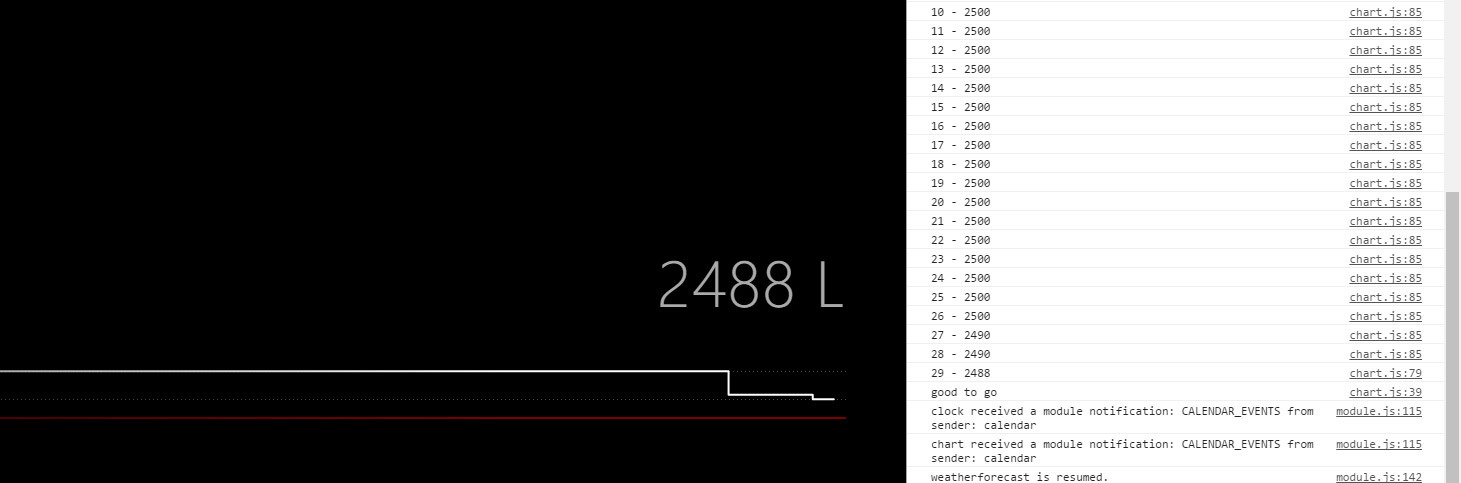
As promised, I changed a few things to my module and now it should work with your JSON (the one with the format you told me in PM:)
[{"Datum":"2018-02-04","Volumen":2500},{"Datum":"2018-02-04","Volumen":2500}]In the future, I’d like to make this more independent with the key being set in the config (not everyone wants “Volumen” as key). There are some other to-do’s as well, but I had it running.
Check it out and let me know: https://github.com/TTigges/MMM-Oiltank
One note: It should work if you address your file with
file: "http://192.168.0.123/yourfile.json"or whatever the ip of your NAS is. Check the readme for more info.It’s not yet ready to be presented as a full running module, so I’ll keep it low key in here for now.
-
Hey mate,
tried your module and it works :D
So atm i am using the python script to write the results to the mysql database. 2 minutes later runs a node app, which creates a JSON file and put that to my NAS.
Your module grabs this JSON every hour and shows the results on my mirror :)
For me the next step is to let the python script directly write a JSON file, but i need to find a solution for that.I appreciate with your ToDo list.
It would be cool to set more things in the default config part. Things like refreshTime, high and width and if the chart will show dynamically or static. Last thing means, if the chart will show on the left side the scale from fix points (e.g. min. 0 Litre and max. 3000 Litre) or if it will show the scale depending on the last datas from the JSON (like atm).
Just a thought… ^^And a very cool killer feature would be, to calculate the date, when the tank will be totally empty depending on the consumption from the last 100 days or something like that. But i think that would be too much. :D
Anyhow i am just brainstorming. U did a great work, which i can directly use for my mirror and you have my greatest respect. Thank you and please let me know when i can help u with your ToDo list ^^
So now i will take a look on your codes and try to understand what you did XD
-
You are welcome. You’re also welcome to play with the code and adapt it to your needs and if you have suggestions on what to change, let me know.
The module is ment to sit at the bottom and fill the whole width. Where would you like to place it alternatively? Some of that positioning is adjusted in the css right now, so depending on the position it would need different css settings.
The prediction on when the tank will be empty is on my to do list (check the Code). Shouldn’t be too hard. But it’d involve read Ingo the dates and that’s something I kept out for now (internationally different time formats and all that).
-
@doubleT Thats my actual sorting:

I would like to show it in the middle below the clock.
I installed the microwave sensor on my tank now and began measuring :)
So a.t.m. there is only one log and now graph is shown ^^ Will wait now for the next log to see if everything is working fine :)I will play around with the code but today and tomorrow my nephew is to visit, so i need to move that :D



Hello! It looks like you're interested in this conversation, but you don't have an account yet.
Getting fed up of having to scroll through the same posts each visit? When you register for an account, you'll always come back to exactly where you were before, and choose to be notified of new replies (either via email, or push notification). You'll also be able to save bookmarks and upvote posts to show your appreciation to other community members.
With your input, this post could be even better 💗
Register Login