MagicMirror Forum
    • Recent
    • Tags
    • Unsolved
    • Solved
    • MagicMirror² Repository
    • Documentation
    • 3rd-Party-Modules
    • Donate
    • Discord
    • Register
    • Login
    A New Chapter for MagicMirror: The Community Takes the Lead
    Read the statement by Michael Teeuw here.

    MMM-Domiticz

    Scheduled Pinned Locked Moved Utilities
    68 Posts 18 Posters 51.2k Views 18 Watching
    Loading More Posts
    • Oldest to Newest
    • Newest to Oldest
    • Most Votes
    Reply
    • Reply as topic
    Log in to reply
    This topic has been deleted. Only users with topic management privileges can see it.
    • P Offline
      Peter
      last edited by

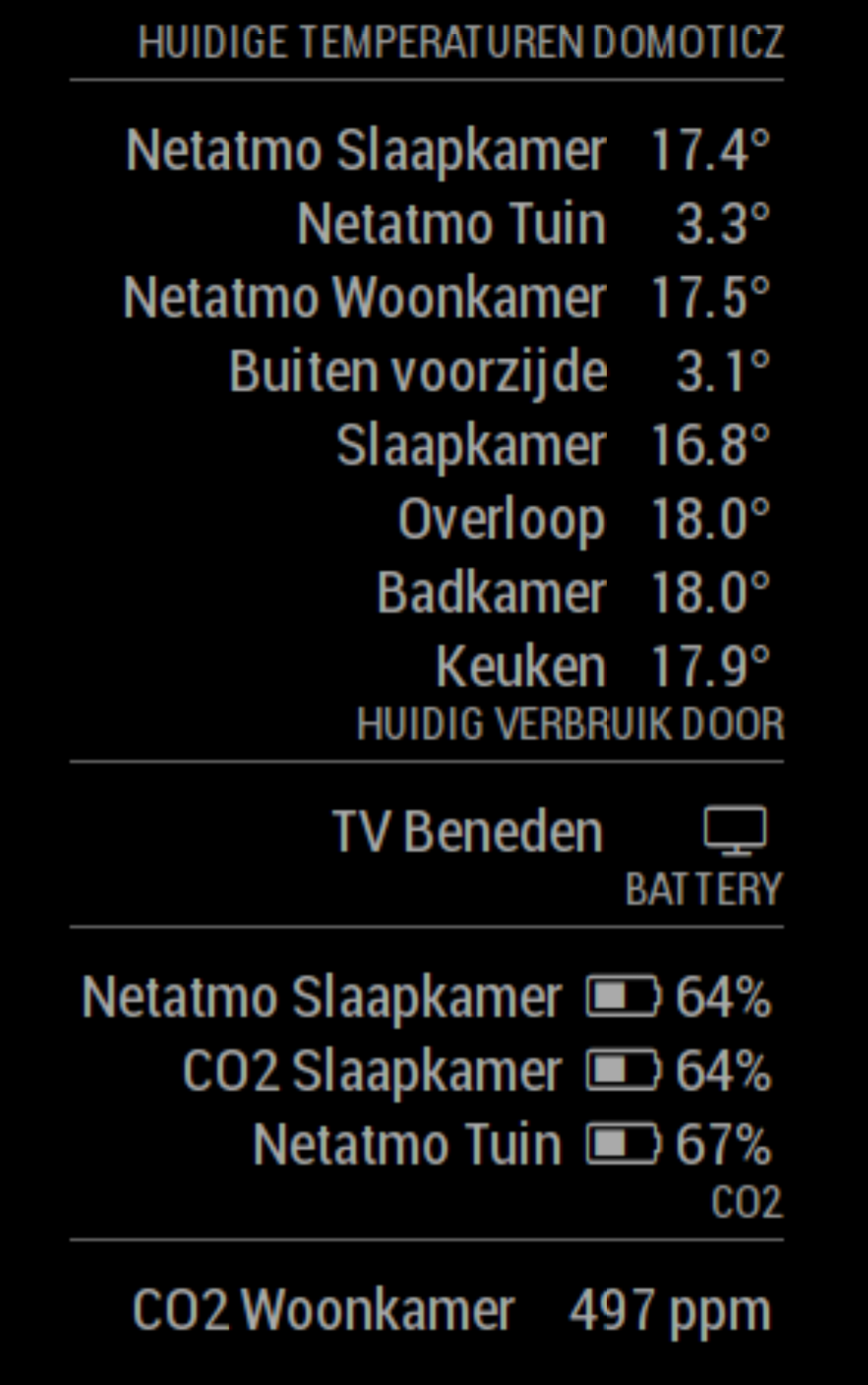
      I have Domoticz running and I can see the lights that are “on” on the Magic Mirror screen.
      But I also have several Somfy blinds; they work fine with Domoticz, but how can I see them on the MM screen?
      Can anybody give me a help?
      Peter

      1 Reply Last reply Reply Quote 0
      • C Offline
        Charley Module Developer
        last edited by

        @Peter I have just updated the module. Now blinds are included.

        Just update your config.js with a ‘blindsTitle’ and add ‘blinds’ to showItems

        MMM-Bose-Soundtouch, MMM-Domoticz, MMM-crypto-portfolio, MMM-Fibaro, MMM-rain-forecast

        P 1 Reply Last reply Reply Quote 0
        • P Offline
          Peter @Charley
          last edited by

          @Charley can you give me some more help?
          I have 4 screens, id: 1,2,3,4 and 5 for all the screens together.
          I would like to see when the screens are open or closed.
          And if possible: with coloured symbols.
          Can you tell me what to put in config.js?
          Peter

          1 Reply Last reply Reply Quote 0
          • C Offline
            Charley Module Developer
            last edited by

            @peter
            Look at the GitHub page there is an updated config.js example that should help.

            MMM-Bose-Soundtouch, MMM-Domoticz, MMM-crypto-portfolio, MMM-Fibaro, MMM-rain-forecast

            1 Reply Last reply Reply Quote 0
            • P Offline
              Peter
              last edited by

              It works!
              Thanks!
              The only thing I would like to change is the color of the icons.
              Peter

              1 Reply Last reply Reply Quote 0
              • C Offline
                Charley Module Developer
                last edited by

                @Peter What colours would you like and for what state (On, Off, Open Close)

                MMM-Bose-Soundtouch, MMM-Domoticz, MMM-crypto-portfolio, MMM-Fibaro, MMM-rain-forecast

                1 Reply Last reply Reply Quote 0
                • P Offline
                  Peter
                  last edited by

                  Maybe lights off, outlets off and screens open in white.
                  Lights on, outlets on and screens down in yellow.
                  Peter

                  1 Reply Last reply Reply Quote 0
                  • C Offline
                    Charley Module Developer
                    last edited by Charley

                    I have added colour yellow to closed Blinds/shutters.
                    There is no added colour to lights, outlets because the are not visible when they are inactive.
                    However if you like to add a colour you can change the code in line 72
                    make sure you have a space between small and yellow just before the i-element for the icons

                    MMM-Bose-Soundtouch, MMM-Domoticz, MMM-crypto-portfolio, MMM-Fibaro, MMM-rain-forecast

                    P 1 Reply Last reply Reply Quote 0
                    • P Offline
                      Peter @Charley
                      last edited by

                      @Charley thanks, it works!
                      Maybe you can answer another question: when I close or open the screens with domotics, the icons changes ( and the text open- close) in my Magic Mirror screen but when I close or open the screens with the original remote the icon does not change on the MM screen, only on the domoticz screen.
                      I hope my question is clear enough.

                      Peter

                      1 Reply Last reply Reply Quote 0
                      • C Offline
                        Charley Module Developer
                        last edited by

                        Hello Peter,

                        There are two different things. One is Domoticz and the other is MagicMirror.
                        The module requests data from Domoticz. It is a reply in json.
                        This comes from my shutter.

                        {
                                 "AddjMulti" : 1.0,
                                 "AddjMulti2" : 1.0,
                                 "AddjValue" : 0.0,
                                 "AddjValue2" : 0.0,
                                 "BatteryLevel" : 255,
                                 "CustomImage" : 0,
                                 "Data" : "Open",
                                 "Description" : "",
                                 "DimmerType" : "abs",
                                 "Favorite" : 0,
                                 "HardwareID" : 7,
                                 "HardwareName" : "ZwaveUSB",
                                 "HardwareType" : "OpenZWave USB",
                                 "HardwareTypeVal" : 21,
                                 "HaveDimmer" : true,
                                 "HaveGroupCmd" : true,
                                 "HaveTimeout" : false,
                                 "ID" : "00000501",
                                 "Image" : "Light",
                                 "IsSubDevice" : false,
                                 "LastUpdate" : "2018-04-16 08:37:09",
                                 "Level" : 255,
                                 "LevelInt" : 255,
                                 "MaxDimLevel" : 100,
                                 "Name" : "Rolluik",
                                 "Notifications" : "false",
                                 "PlanID" : "7",
                                 "PlanIDs" : [ 7 ],
                                 "Protected" : false,
                                 "ShowNotifications" : true,
                                 "SignalLevel" : "-",
                                 "Status" : "Open",
                                 "StrParam1" : "",
                                 "StrParam2" : "",
                                 "SubType" : "Switch",
                                 "SwitchType" : "Blinds Inverted",
                                 "SwitchTypeVal" : 6,
                                 "Timers" : "true",
                                 "Type" : "Light/Switch",
                                 "TypeImg" : "blinds",
                                 "Unit" : 1,
                                 "Used" : 1,
                                 "UsedByCamera" : false,
                                 "XOffset" : "698",
                                 "YOffset" : "1168",
                                 "idx" : "31"
                              },
                        

                        The Image in this record is not the image in the MagicMirror. The MagicMirror Icons are from Fontawesome version 4.7 there is now a version 5 available but doesn’t like to work along 4.7 in MagicMirror.

                        The icons you see in my module are based on the type of device retrieved with the json file from Domoticz. See the lines in my code from 55 to line 71

                        There are no icons for shutters/shades or similar in fontawesome. That is why I use the status text from Domoticz. (In the Netherlands the webinterface is in Dutch but you will see that the status of the blinds are in English)

                        Hope this clarifies the icon issue.

                        MMM-Bose-Soundtouch, MMM-Domoticz, MMM-crypto-portfolio, MMM-Fibaro, MMM-rain-forecast

                        1 Reply Last reply Reply Quote 0
                        • C Offline
                          Charley Module Developer
                          last edited by

                          Updated today with Humidity and the possibility to not show the subMenus.

                          I choose not to add the Barometric Pressure and Sound Levels from Netatmo because my screen would be high enough in portrait mode.

                          MMM-Bose-Soundtouch, MMM-Domoticz, MMM-crypto-portfolio, MMM-Fibaro, MMM-rain-forecast

                          1 Reply Last reply Reply Quote 0
                          • J Offline
                            jaminben
                            last edited by

                            Hi Charley,

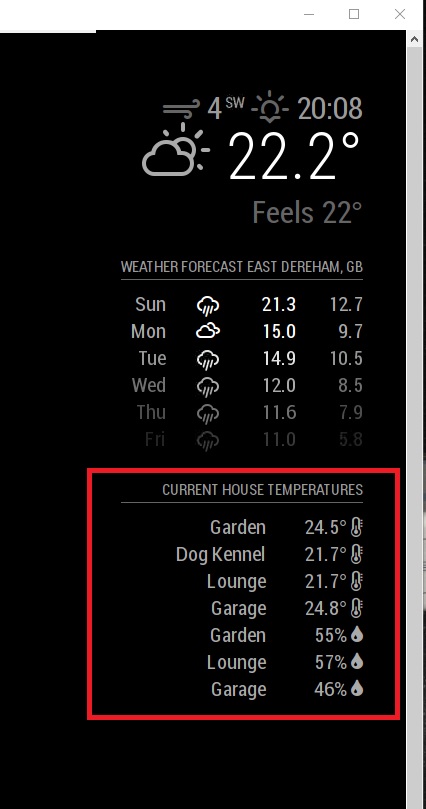
                            I’m a newbie to MM so excuse me if the answer is obvious… the temperature and humidity work correctly but is there a way to display one after the other for the same sensor… so in my example screenshot you can see it lists all the temperatures first and then the humidity readings.

                            Anyway, many thanks for creating the module… it’s fantastic :)
                            0_1524401116389_house Tempretures.jpg

                            1 Reply Last reply Reply Quote 0
                            • C Offline
                              Charley Module Developer
                              last edited by Charley

                              @jaminben Thanks for the thank you, i am still working on it to make it better.

                              You can add more in your config.js settings

                                    showItems: ['temperature','energy','battery','co', 'blinds','humidity','baro'],   // possible items  temperature, energy, battery, co, blinds, humidity,  baro


                              Could you please reply with your config settings for this module .(delete any personal information ip,username or password)

                              I think I misread your question, however all sensors data are grouped in the newest version.

                              MMM-Bose-Soundtouch, MMM-Domoticz, MMM-crypto-portfolio, MMM-Fibaro, MMM-rain-forecast

                              J 1 Reply Last reply Reply Quote 0
                              • J Offline
                                jaminben @Charley
                                last edited by

                                @Charley said in MMM-Domiticz:

                                @jaminben Thanks for the thank you, i am still working on it to make it better.

                                You can add more in your config.js settings

                                      showItems: ['temperature','energy','battery','co', 'blinds','humidity','baro'],   // possible items  temperature, energy, battery, co, blinds, humidity,  baro


                                Could you please reply with your config settings for this module .(delete any personal information ip,username or password)

                                I think I misread your question, however all sensors data are grouped in the newest version.

                                @Charley

                                My config.js file…

                                /* Magic Mirror Config Sample
                                 *
                                 * By Michael Teeuw http://michaelteeuw.nl
                                 * MIT Licensed.
                                 *
                                 * For more information how you can configurate this file
                                 * See https://github.com/MichMich/MagicMirror#configuration
                                 *
                                 */
                                
                                var config = {
                                	address: "localhost", // Address to listen on, can be:
                                	                      // - "localhost", "127.0.0.1", "::1" to listen on loopback interface
                                	                      // - another specific IPv4/6 to listen on a specific interface
                                	                      // - "", "0.0.0.0", "::" to listen on any interface
                                	                      // Default, when address config is left out, is "localhost"
                                	port: ******,
                                	ipWhitelist: ["127.0.0.1", "::ffff:127.0.0.1", "::1", "********"], // Set [] to allow all IP addresses
                                	                                                       // or add a specific IPv4 of 192.168.1.5 :
                                	                                                       // ["127.0.0.1", "::ffff:127.0.0.1", "::1", "::ffff:192.168.1.5"],
                                	                                                       // or IPv4 range of 192.168.3.0 --> 192.168.3.15 use CIDR format :
                                	                                                       // ["127.0.0.1", "::ffff:127.0.0.1", "::1", "::ffff:192.168.3.0/28"],
                                
                                	language: "en",
                                	timeFormat: 24,
                                	units: "metric",
                                
                                	modules: [
                                		{
                                			module: "alert",
                                		},
                                		{
                                			module: "updatenotification",
                                			position: "top_bar"
                                		},
                                		{
                                			module: "clock",
                                			position: "top_left"
                                		},
                                		{
                                			module: "calendar",
                                			header: "*******",
                                			position: "top_left",
                                			config: {
                                				calendars: [
                                					{
                                						symbol: "calendar-check-o ",
                                						url: "********"
                                					}
                                				]
                                			}
                                		},
                                		{
                                			module: "compliments",
                                			position: "lower_third"
                                		},
                                		{
                                			module: "currentweather",
                                			position: "top_right",
                                			config: {
                                				location: "*******",
                                				locationID: "*****",  //ID from http://www.openweathermap.org/help/city_list.txt
                                				appid: "******"
                                			}
                                		},
                                		{
                                			module: "weatherforecast",
                                			position: "top_right",
                                			header: "Weather Forecast",
                                			config: {
                                				location: "********",
                                				locationID: "*******",  //ID from http://www.openweathermap.org/help/city_list.txt
                                				appid: "*****"
                                			}
                                		},
                                		{
                                			module: "newsfeed",
                                			position: "bottom_bar",
                                			config: {
                                				feeds: [
                                					{
                                						title: "BBC News",
                                						url: "http://feeds.bbci.co.uk/news/uk/rss.xml"
                                					}
                                				],
                                				showSourceTitle: true,
                                				showPublishDate: true
                                			}
                                		},
                                		{
                                			module: "MMM-Domoticz",
                                			position: "top_right",   // see mirror setting for options
                                			config: {          
                                				updateInterval: 45, // every 45 seconds
                                				apiBase: '******',
                                				apiPort: ****,
                                				apiUser: "*******",
                                					apiPw: "********",
                                				temperatureTitle: "Current House Temperatures",
                                				moduleTitle: "My smart home by Domoticz",
                                				energyTitle: "Energy used by",
                                				batteryTitle: "Battery level",
                                				coTitle: "CO2 level",
                                				blindsTitle: "Blinds",
                                				energyNow: "Currently",
                                				energyTotal: "Energy used",
                                				batteryThreshold: 20,
                                						coThreshold: 650,
                                				subMenus: true,
                                				showItems: ['temperature'],   // possible items  temperature, energy
                                				excludedDevices: ['none','add your own']  // Device that will not be shown
                                			}
                                		},
                                		{
                                			module: 'MMM-Todoist',
                                			position: 'top_right',	// This can be any of the regions. Best results in left or right regions.
                                			header: 'Todoist', // This is optional
                                			config: { // See 'Configuration options' for more information.
                                				accessToken: '********',
                                				maximumEntries: 60,
                                				updateInterval: 10*60*1000, // Update every 10 minutes
                                				projects: [ 166564794 ],
                                				fade: false
                                		  }
                                		},
                                	]
                                
                                };
                                
                                /*************** DO NOT EDIT THE LINE BELOW ***************/
                                if (typeof module !== "undefined") {module.exports = config;}


                                What I was trying to was something like:

                                Garden 24.1 (temperature)
                                55% (humidity)
                                Lounge 20.2 (temperature)
                                45% (humidity)
                                Garage 22.1 (temperature)
                                48% (humidity)

                                Rather than:

                                Garden 24.1 (temperature)
                                Lounge 20.2 (temperature)
                                Garage 22.1 (temperature)
                                Garden 55% (humidity)
                                Lounge 45% (humidity)
                                Garage 48% (humidity)

                                1 Reply Last reply Reply Quote 0
                                • J Offline
                                  jaminben
                                  last edited by

                                  @Charley

                                  I just updated to the new version and it only shows the temperature now… not sure if that was intended or not.

                                  1 Reply Last reply Reply Quote 0
                                  • C Offline
                                    Charley Module Developer
                                    last edited by Charley

                                    You need to add humidity and baro to the showItems part in config.js
                                    to see all options (someone asked in PM to block humidity)

                                     showItems: ['temperature','energy','battery','co', 'blinds','humidity','baro']
                                    

                                    It will now show the way you like it

                                    0_1524409121269_all together.png

                                    MMM-Bose-Soundtouch, MMM-Domoticz, MMM-crypto-portfolio, MMM-Fibaro, MMM-rain-forecast

                                    J 1 Reply Last reply Reply Quote 0
                                    • J Offline
                                      jaminben @Charley
                                      last edited by

                                      @Charley

                                      Very cool… can I make one suggestion? How about if it detects that it already has a name present for the temperature it doesn’t display the name for the humidity and/or baro just the value? That way you don’t get duplicate names for the same sensor.

                                      I can see in yours you have Woonkamer (Living Room) repeated 3 times which I assume is the same sensor?

                                      1 Reply Last reply Reply Quote 0
                                      • C Offline
                                        Charley Module Developer
                                        last edited by Charley

                                        Yes they are all the same sensor. I will try in the coming days if I am able to get those properly.

                                        Just made it. if you pull the upgrade it is there

                                        MMM-Bose-Soundtouch, MMM-Domoticz, MMM-crypto-portfolio, MMM-Fibaro, MMM-rain-forecast

                                        J 1 Reply Last reply Reply Quote 0
                                        • J Offline
                                          jaminben @Charley
                                          last edited by

                                          @Charley said in MMM-Domiticz:

                                          Yes they are all the same sensor. I will try in the coming days if I am able to get those properly.

                                          Just made it. if you pull the upgrade it is there

                                          Very nice… it works as expected :)

                                          Next request… is there a way to sort them some how?

                                          Sorry, I know I’m a PITA.

                                          J 1 Reply Last reply Reply Quote 0
                                          • J Offline
                                            jaminben @jaminben
                                            last edited by

                                            @Charley

                                            Ah, no… ignore my last comment. I can sort them via my Domoticz Dashboard.

                                            Once again, MANY THANKS… I really appreciate the work you’ve done.

                                            Very Cool Stuff.

                                            1 Reply Last reply Reply Quote 0

                                            Hello! It looks like you're interested in this conversation, but you don't have an account yet.

                                            Getting fed up of having to scroll through the same posts each visit? When you register for an account, you'll always come back to exactly where you were before, and choose to be notified of new replies (either via email, or push notification). You'll also be able to save bookmarks and upvote posts to show your appreciation to other community members.

                                            With your input, this post could be even better 💗

                                            Register Login

                                            • 1
                                            • 2
                                            • 3
                                            • 4
                                            • 1 / 4
                                            • First post
                                              Last post
                                            Enjoying MagicMirror? Please consider a donation!
                                            MagicMirror created by Michael Teeuw.
                                            Forum managed by Sam, technical setup by Karsten.
                                            This forum is using NodeBB as its core | Contributors
                                            Contact | Privacy Policy