MagicMirror Forum
    • Recent
    • Tags
    • Unsolved
    • Solved
    • MagicMirror² Repository
    • Documentation
    • 3rd-Party-Modules
    • Donate
    • Discord
    • Register
    • Login
    A New Chapter for MagicMirror: The Community Takes the Lead
    Read the statement by Michael Teeuw here.

    How to change icons

    Scheduled Pinned Locked Moved Custom CSS
    15 Posts 5 Posters 16.1k Views 5 Watching
    Loading More Posts
    • Oldest to Newest
    • Newest to Oldest
    • Most Votes
    Reply
    • Reply as topic
    Log in to reply
    This topic has been deleted. Only users with topic management privileges can see it.
    • HrierebH Offline
      Hriereb
      last edited by

      Hi everyone,
      I recently bought a raspi 3b+ and I’m trying to build my own magic mirror. I don’t anything about codes but I’m willing to learn and feel attracted to this wonderful world. I managed to install magic mirror and I would like to customize some things like fonts and modules icons but I don’t know how and where to start. Is there anyone who can help me? Thanks in advance.

      1 Reply Last reply Reply Quote 0
      • N Offline
        nobita
        last edited by

        you can start at https://github.com/MichMich/MagicMirror and read in README.md
        step by step

        1 Reply Last reply Reply Quote 0
        • HrierebH Offline
          Hriereb
          last edited by

          Thank you soso much for your reply, I’ll have a look at it for sure. May I ask you something? Are you italian?

          N 1 Reply Last reply Reply Quote 0
          • N Offline
            nobita @Hriereb
            last edited by

            @hriereb No fr thailand

            1 Reply Last reply Reply Quote 0
            • HrierebH Offline
              Hriereb
              last edited by

              Ah ok, thx again.

              1 Reply Last reply Reply Quote 0
              • HrierebH Offline
                Hriereb
                last edited by

                Hi again, sorry for the silly questions but I don’t how to do this changes. I’ve tried to look for the icons but I don’t know where to start. I would like to change weather icons and calendar but I don’t know where they are and how I could upload different ones. Could someone guide me with a simple explanation for a noob like me? I don’t know anything about CSS or similar and I’m a “newborn” in this world. Hope someone can help and apologize for dumb questions.

                N 2 Replies Last reply Reply Quote 0
                • N Offline
                  nobita @Hriereb
                  last edited by

                  @hriereb Reply first question How to Change Icon Calendar
                  in config.js at module calendar
                  you can see line … symbol: "calendar-check-o ",
                  you can change in other icon such as "calendar-plus-o "
                  if you want any icon you can see in https://fontawesome.com/v4.7.0/icons/

                  1 Reply Last reply Reply Quote 0
                  • N Offline
                    nobita @Hriereb
                    last edited by

                    @hriereb Second Question how to change Weather icon
                    Before you can search word " how to change weathr icon" or “custom.css” in forum
                    and this is link weather Icon at http://erikflowers.github.io/weather-icons/

                    1 Reply Last reply Reply Quote 0
                    • L Offline
                      Lahim
                      last edited by

                      Can somebody write down how to change them?
                      I changed the config.js to symbol: ‘fa fa-calendar’ and nothing changed.

                      @nobita you wrote "you can change in other icon such as "calendar-plus-o " but what is this? A set of icon or what?

                      I am sorry, but I have no idea how to make it working.

                      By the way - there is nothing like step by step tutorial - in README.md there is only a link to fontawsome page but there is nothing written how to use it.

                      justjim1220J 1 Reply Last reply Reply Quote 0
                      • justjim1220J Offline
                        justjim1220 Module Developer @Lahim
                        last edited by

                        @lahim

                        search fontawesome in google. It shows all the available icons.

                        as far as changing the icon for your calendar, try this…

                        in your config.js file, you need to add this line in the config section of your calendar…

                        defaultSymbol: "calendar", // Fontawesome Symbol see http://fontawesome.io/cheatsheet/
                        

                        the following defaults cand be changed in this section as well…

                        maximumEntries: 10, // Total Maximum Entries
                        		maximumNumberOfDays: 365,
                        		displaySymbol: true,
                        		defaultSymbol: "calendar", // Fontawesome Symbol see http://fontawesome.io/cheatsheet/
                        		displayRepeatingCountTitle: false,
                        		defaultRepeatingCountTitle: "",
                        		maxTitleLength: 25,
                        		wrapEvents: false, // wrap events to multiple lines breaking at maxTitleLength
                        		fetchInterval: 5 * 60 * 1000, // Update every 5 minutes.
                        		animationSpeed: 2000,
                        		fade: true,
                        		urgency: 7,
                        		timeFormat: "relative",
                        		dateFormat: "MMM Do",
                        		fullDayEventDateFormat: "MMM Do",
                        		getRelative: 6,
                        		fadePoint: 0.25, // Start on 1/4th of the list.
                        		hidePrivate: false,
                        		hideOngoing: false,
                        		colored: false,
                        		coloredSymbolOnly: false,
                        		tableClass: "small",
                        		calendars: [
                        			{
                        				symbol: "calendar",
                        				url: "http://www.calendarlabs.com/templates/ical/US-Holidays.ics",
                        			},
                        		],
                        		titleReplace: {
                        			"De verjaardag van ": "",
                        			"'s birthday": ""
                        		},
                        		broadcastEvents: true,
                        		excludedEvents: []
                        	},
                        

                        Feel free to ask if there is anything you don’t quite understand… :winking_face:

                        "Life's Too Short To Dance With Ugly People"
                        Jim Hallock - 1995

                        1 Reply Last reply Reply Quote 0
                        • L Offline
                          Lahim
                          last edited by

                          Thank you for helping me but I changed config.js to

                          defaultSymbol: "calendar",
                          

                          And icons are same, nothing changed. Does not matter if it is holiday or event 1 or event 2 - icons are same.

                          I still do not understand - how to define icon for the specyfic event?

                          justjim1220J 2 Replies Last reply Reply Quote 0
                          • justjim1220J Offline
                            justjim1220 Module Developer @Lahim
                            last edited by

                            @lahim

                            Apologies, been kinda busy last few days…

                            I am looking for the answer to your question.

                            I haven’t used the default calendar for quite a while now.

                            I really like the MMM-CalendarExt modules, although, I never really thought about it until now, it’s the same way… same icon for each event.

                            I shall do some researching to see if I can find a solution…

                            "Life's Too Short To Dance With Ugly People"
                            Jim Hallock - 1995

                            1 Reply Last reply Reply Quote 0
                            • justjim1220J Offline
                              justjim1220 Module Developer @Lahim
                              last edited by

                              @lahim

                              OK, I think I may have found the solution…

                              I’ll start by showing you my calendar categories:
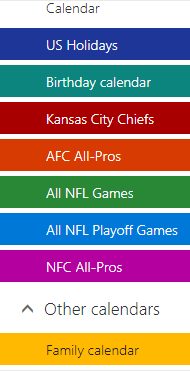
                              0_1533238944252_Screenshot (20).png

                              This might be helpful to have handy…

                              Font Awesome Cheat Sheet

                              Now the code to put in your config.js file in the calendar code:

                              "calendars": [
                                {
                                  "name": "Family Stuff",
                                  "symbol": "heart@fa",
                                  "url": "Calendar link here"
                                  "interval": 24*60*60*1000,
                                },
                                {
                                  "name": "US Holiday",
                                  "url": "Calendar link here",
                                  "symbol": "gift@fa",
                                  "interval": 24*60*60*1000,
                                  "maxEntries": 50, "maxDays":365,
                                },
                                {
                                // "name": "Birthdays",
                                   "symbol": "birthday=cake",
                                   "url": "Calendar link here",
                                },
                                {
                                // "name": "KC Chiefs",
                                   "symbol": "football-ball@fa",
                                   "url": "Calendar link here",
                                   "interval": 24*60*60*1000,
                                },
                                {
                                // "name": "NFL Games",
                                   "symbol": "calendar",
                                   "url": "football-ball@fa",
                                   "interval": 24*60*60*1000,
                                },
                                {
                                   "name": "NFL Playoff Games",
                                   "symbol": "user-secret@fa",
                                   "url": "football-ball@fa",
                                   "interval": 24*60*60*1000,
                                },
                              ],
                              

                              Let me know if this works for you.
                              I have yet to try it, but now that I found it, I think I will. :winking_face:

                              "Life's Too Short To Dance With Ugly People"
                              Jim Hallock - 1995

                              1 Reply Last reply Reply Quote 0
                              • L Offline
                                Lahim
                                last edited by

                                Thank you very much - I have it working now!!!

                                I used this post
                                https://github.com/MichMich/MagicMirror/pull/1345
                                to add font-awesome5 but I am not able to get all of them working. Anyway, now I understand all.
                                Thank you.

                                1 Reply Last reply Reply Quote 0
                                • E Offline
                                  eshwaran23
                                  last edited by

                                  i have tried all methods to change my icons for the current weather and the weather forcast modules but nothing seems to work ! i dont get any errors or warnings ! whatever changes i make the module remains the same ( like default)
                                  i use icons from amcharts ! and i refered the other post from the forum ! im a noobie kindly help me out@!!!
                                  the icons are on MagicMirror![1_1535028197192_Webp.net-resizeimage.jpg](Uploading 100%) ![0_1535028197191_Webp.net-resizeimage (1).jpg](Uploading 100%) /css/icons/
                                  i have attached images of my custom css file and my config file

                                  1 Reply Last reply Reply Quote 0

                                  Hello! It looks like you're interested in this conversation, but you don't have an account yet.

                                  Getting fed up of having to scroll through the same posts each visit? When you register for an account, you'll always come back to exactly where you were before, and choose to be notified of new replies (either via email, or push notification). You'll also be able to save bookmarks and upvote posts to show your appreciation to other community members.

                                  With your input, this post could be even better 💗

                                  Register Login

                                  • 1 / 1
                                  • First post
                                    Last post
                                  Enjoying MagicMirror? Please consider a donation!
                                  MagicMirror created by Michael Teeuw.
                                  Forum managed by Sam, technical setup by Karsten.
                                  This forum is using NodeBB as its core | Contributors
                                  Contact | Privacy Policy
