MagicMirror Forum
    • Recent
    • Tags
    • Unsolved
    • Solved
    • MagicMirror² Repository
    • Documentation
    • 3rd-Party-Modules
    • Donate
    • Discord
    • Register
    • Login
    A New Chapter for MagicMirror: The Community Takes the Lead
    Read the statement by Michael Teeuw here.

    How add transparent background to modules

    Scheduled Pinned Locked Moved Solved Custom CSS
    18 Posts 7 Posters 13.9k Views 6 Watching
    Loading More Posts
    • Oldest to Newest
    • Newest to Oldest
    • Most Votes
    Reply
    • Reply as topic
    Log in to reply
    This topic has been deleted. Only users with topic management privileges can see it.
    • ? Offline
      A Former User @johnny_swindle
      last edited by

      @johnny_swindle

      background-color: rgba(red, green, blue, alpha);
      
      • red,green,blue : 0 ~ 255
      • alpha : 0 ~ 1 (0:transparent, 1:opaque)

      ex)

      background-color: rgba(255,255,255, 0.5)
      
      J 1 Reply Last reply Reply Quote 0
      • J Offline
        johnny_swindle @Guest
        last edited by

        @sean said in How add transparent background to modules:

        @johnny_swindle
        @Sean

        Thank you for the info. I added the code to the custom CSS and nothing changed. I even changed the alpha to 1.0 with no effect.

        I am using MMM-GooglePhotos for back ground images. Do you think that this module that I am using for the backgrounds is some how “over riding” the custom CSS?

        background-color: rgba(red, green, blue, alpha);
        
        • red,green,blue : 0 ~ 255
        • alpha : 0 ~ 1 (0:transparent, 1:opaque)

        ex)

        background-color: rgba(255,255,255, 0.5)
        
        ? 2 Replies Last reply Reply Quote 0
        • ? Offline
          A Former User @johnny_swindle
          last edited by A Former User

          @johnny_swindle

          • maybe missed semicolon(;) on last of css statements;
            background-color: rgba(255,255,255, 0.5);
          • opacity is not needed. It could make confusing.
          1 Reply Last reply Reply Quote 0
          • ? Offline
            A Former User @johnny_swindle
            last edited by

            @johnny_swindle

            .region > .container {
              background-color: rgba(0,0,0,0.5);
            }
            

            Try this.

            J 1 Reply Last reply Reply Quote 0
            • J Offline
              johnny_swindle @Guest
              last edited by

              @sean

              Thank you for the examples. However neither of the two worked. If you think of anything else to try, I will implement.

              Again, thank you for all of your help.

              Johnny

              ? 1 Reply Last reply Reply Quote 0
              • ? Offline
                A Former User @johnny_swindle
                last edited by A Former User

                @johnny_swindle
                Ok. Let’s start from the first step. What did you mean ‘transparency’ of module? You said for readability, but in that case which you need is ‘non-transparency’ of modules. What did you expect and what have you got really?
                Then, all fails of your pervious trial seems somewhat weird. because those css statements are very simple so it is hard not to work.
                Other CSS worked? Like border: 1px solid #F00;? Only background transparency didn’t?

                J 1 Reply Last reply Reply Quote 0
                • J Offline
                  johnny_swindle @Guest
                  last edited by

                  @sean

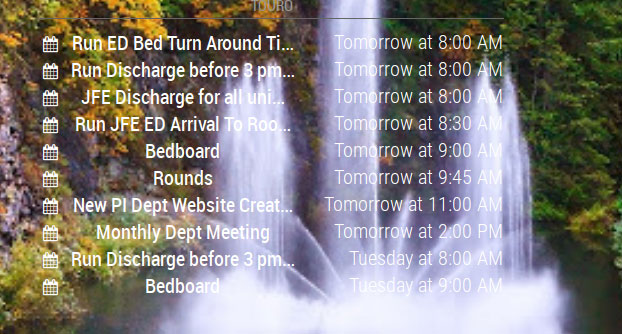
                  I have attached a screen shot of the output of one of my calendars:
                  0_1543781748679_Untitled-2.jpg

                  I would like to be able to have the “background” of the calendar a shade of a transparent gray so that I am able to read the text but still be able to tell what is under the gray “background”.

                  I hope I did a better job of explaining what I am attempting to do. I know it is very important that the appropriate verbiage is used when attempting to explain an issue. Otherwise everyone remains confused.

                  Again…

                  Thanks for all you help.

                  Johnny

                  ? 1 Reply Last reply Reply Quote 0
                  • ? Offline
                    A Former User @johnny_swindle
                    last edited by A Former User

                    @johnny_swindle
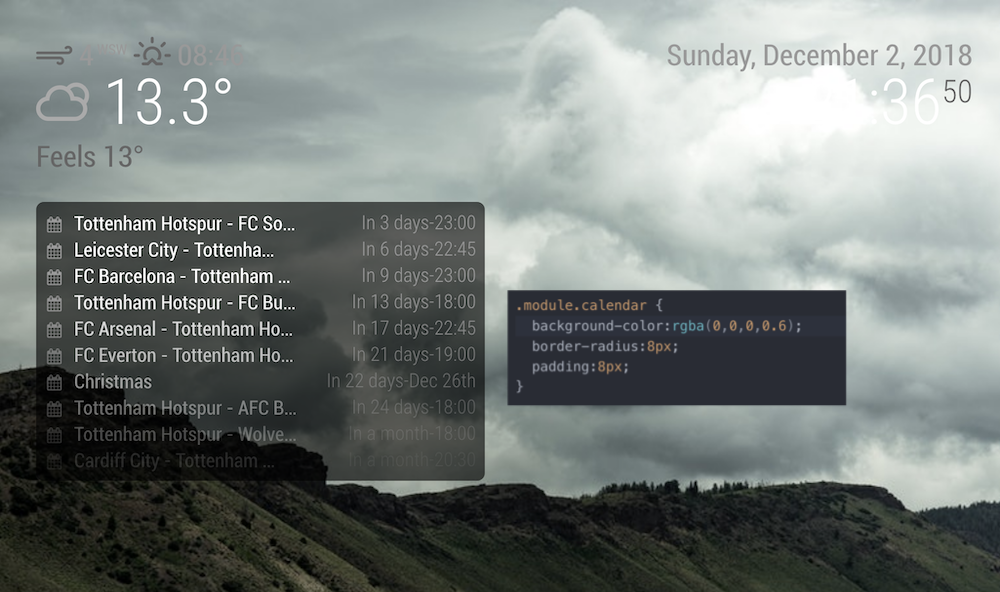
                    0_1543783267033_css.png
                    (Sorry, my captured image was too huge to upload, so I resized, but image became somewhat blurred)

                    add this into your ~/MagicMirror/css/custom.css

                    .module.calendar {
                      background-color:rgba(0,0,0,0.6);
                      border-radius:8px;
                      padding:8px;
                    }
                    

                    If it work,
                    Instead you can use this also.

                    .module {
                      background-color:rgba(0,0,0,0.6);
                      border-radius:8px;
                      padding:8px;
                    }
                    
                    J J 2 Replies Last reply Reply Quote 3
                    • K Offline
                      krishnatnl
                      last edited by

                      This bg css is working great @Sean .

                      I actually used this in the @shbatm mmm-carousel as a custom css class.

                      1 Reply Last reply Reply Quote 0
                      • J Offline
                        johnny_swindle @Guest
                        last edited by

                        @sean

                        Thank you…that did the trick.

                        1 Reply Last reply Reply Quote 0
                        • M Offline
                          MWel1977
                          last edited by

                          I have the same problem.
                          Was searching for this on the forum.
                          Will try Sean’s solution tonight.

                          1 Reply Last reply Reply Quote 0
                          • J Offline
                            JonoGee @Guest
                            last edited by

                            @Sean said in How add transparent background to modules:

                            .module.calendar {
                            background-color:rgba(0,0,0,0.6);
                            border-radius:8px;
                            padding:8px;
                            }

                            I have tried this format …

                            .module.calendar {
                              background-color:rgba(0,0,0,0.6);
                              border-radius:8px;
                              padding:8px;
                            }
                            

                            and it works perfect for most modules but simply will not work for currentweather, weatherforecast or compliments?
                            Any ideas folks?

                            brobergB 1 Reply Last reply Reply Quote 0
                            • brobergB Offline
                              broberg Project Sponsor @JonoGee
                              last edited by

                              Show us your css code that you are trying to use

                              @JonoGee said in How add transparent background to modules:

                              I have tried this format …

                              .module.calendar {
                                background-color:rgba(0,0,0,0.6);
                                border-radius:8px;
                                padding:8px;
                              }
                              

                              and it works perfect for most modules but simply will not work for currentweather, weatherforecast or compliments?
                              Any ideas folks?

                              J 1 Reply Last reply Reply Quote 0
                              • J Offline
                                JonoGee @broberg
                                last edited by

                                @broberg Hi mate. Thanks for taking the time.
                                I will copy it below… The PushBullet Notification one works fine but ones i mentioned don’t…

                                 body {


                                .module.currentweather {
                                  background-color:rgba(0,0,0,0.6);
                                  border-radius:8px;
                                  padding:8px;
                                }
                                
                                
                                 }
                                
                                .module.MMM-PushBulletNotifications {
                                  background-color:rgba(0,0,0,0.6);
                                  border-radius:8px;
                                  padding:8px;
                                }


                                 }
                                
                                .module.compliments {
                                  background-color:rgba(0,0,0,0.6);
                                  border-radius:8px;
                                  padding:8px;
                                }
                                
                                
                                 }


                                 }
                                
                                .module.weatherforecast {
                                  background-color:rgba(0,0,0,0.6);
                                  border-radius:8px;
                                  padding:8px;
                                }
                                

                                Regards

                                brobergB 1 Reply Last reply Reply Quote 0
                                • brobergB Offline
                                  broberg Project Sponsor @JonoGee
                                  last edited by broberg

                                  @JonoGee

                                  Okey,
                                  I see your problem.

                                  You have put the .module.currentweather{} within the body{ }

                                  Just remove the first line body { and the lonely } before .module.MMM-PushBulletNotifications {

                                  Then it will work just fine.

                                  And btw, You have a lot of stray }-brackets remove them aswell

                                  J 1 Reply Last reply Reply Quote 2
                                  • J Offline
                                    JonoGee @broberg
                                    last edited by

                                    @broberg I have sorted it this morning. I really appreciate your taking the time to help me, Thankyou Broberg. So many on here seem unwilling to help. Youre a legend!

                                    1 Reply Last reply Reply Quote 0
                                    • S Offline
                                      schwarem
                                      last edited by

                                      I am not having any success with this either. Here is my CSS. Can someone help me out?

                                      body {
                                      	color: #aaa;
                                      }
                                      
                                      .dimmed {
                                        color: #666;
                                      }
                                      
                                      .normal {
                                        color: #999;
                                      }
                                      
                                      .bright {
                                        color: #fff;
                                      }
                                      
                                      .module.clock {
                                        background-color:rbga(255,255,255,0.4);
                                        border-radius:8px;
                                        padding:8px;
                                      }

                                      
                                      1 Reply Last reply Reply Quote 0

                                      Hello! It looks like you're interested in this conversation, but you don't have an account yet.

                                      Getting fed up of having to scroll through the same posts each visit? When you register for an account, you'll always come back to exactly where you were before, and choose to be notified of new replies (either via email, or push notification). You'll also be able to save bookmarks and upvote posts to show your appreciation to other community members.

                                      With your input, this post could be even better 💗

                                      Register Login

                                      • 1 / 1
                                      • First post
                                        Last post
                                      Enjoying MagicMirror? Please consider a donation!
                                      MagicMirror created by Michael Teeuw.
                                      Forum managed by Sam, technical setup by Karsten.
                                      This forum is using NodeBB as its core | Contributors
                                      Contact | Privacy Policy