MagicMirror Forum
    • Recent
    • Tags
    • Unsolved
    • Solved
    • MagicMirror² Repository
    • Documentation
    • 3rd-Party-Modules
    • Donate
    • Discord
    • Register
    • Login
    A New Chapter for MagicMirror: The Community Takes the Lead
    Read the statement by Michael Teeuw here.

    Calendar Module +1 day Error

    Scheduled Pinned Locked Moved Solved Troubleshooting
    14 Posts 7 Posters 11.4k Views 7 Watching
    Loading More Posts
    • Oldest to Newest
    • Newest to Oldest
    • Most Votes
    Reply
    • Reply as topic
    Log in to reply
    This topic has been deleted. Only users with topic management privileges can see it.
    • S Offline
      StrIIker @sdetweil
      last edited by

      @sdetweil said in Calendar Module +1 day Error:

      What is the system time one set to?

      Where are u located?

      I am in New York / Eastern time zone. System time is set to Eastern / New York.

      I installed the MMM-MyCalendar module and it’s working with correct dates etc. I’d prefer to use the default one though.

      Current default time zone: ‘America/New_York’
      Local time is now: Wed Oct 3 16:09:57 EDT 2018.
      Universal Time is now: Wed Oct 3 20:09:57 UTC 2018.

      1 Reply Last reply Reply Quote 0
      • N Offline
        Nilnik Project Sponsor
        last edited by

        Hi! If you put showEnd: false, in your config for calendar solves the problem.
        Oct 9th is and nov 1st when it ends.

        S 1 Reply Last reply Reply Quote 0
        • S Offline
          StrIIker @Nilnik
          last edited by

          @nilnik said in Calendar Module +1 day Error:

          Hi! If you put showEnd: false, in your config for calendar solves the problem.
          Oct 9th is and nov 1st when it ends.

          Hi! I did try this and restarted. The problem persists. I placed that value in two locations… The config for the module and the config for the calendar. Neither has any impact. I also did not see this option mentioned in the GitHub documentation. Perhaps it’s an old value which was retired? Your observation does seem valid. I just wonder why it’s stuck in this mode for me.

          {
                                  "module": "calendar",
                                  "header": "Calendar",
                                  "position": "top_left",
                                  "showEnd": "false",
                                  "config": {
                                          "calendars": [
                                                  {
                                                          "symbol": "calendar-check-o ",
                                                          "url": "webcal://www.calendarlabs.com/templates/ical/US-Holidays.ics",
                                                          showend: "false",
                                                          "color": "#FFFFFF"
                                                  },
          
          1 Reply Last reply Reply Quote 0
          • N Offline
            Nilnik Project Sponsor
            last edited by

            Hello again!
            I Think that you shouldn’t put quotes rond false
            Here is my config:

            module: ‘calendar’,
            header: ‘Kalender, Helg-och födelsedagar’,
            position: ‘top_left’,
            config: {
            colored: true,
            timeFormat: ‘absolute’,
            maximumEntries: 12,
            urgency: 2,
            dateFormat: ‘Do MMM’,
            fullDayEventDateFormat:‘Do MMM’,
            showEnd: false,
            getRelative: 48,

            S 1 Reply Last reply Reply Quote 2
            • S Offline
              StrIIker @Nilnik
              last edited by

              @nilnik said in Calendar Module +1 day Error:

              Hello again!
              I Think that you shouldn’t put quotes rond false
              Here is my config:

              module: ‘calendar’,
              header: ‘Kalender, Helg-och födelsedagar’,
              position: ‘top_left’,
              config: {
              colored: true,
              timeFormat: ‘absolute’,
              maximumEntries: 12,
              urgency: 2,
              dateFormat: ‘Do MMM’,
              fullDayEventDateFormat:‘Do MMM’,
              showEnd: false,
              getRelative: 48,

              Hi! That did it! Thank you for your patience and help! I greatly appreciate the help and will certainly help others whenever I can.

              To get this issue resolved, I had to include the showEnd value AND set the timeFormat to absolute as you have. Now my calendar displays the date correctly…
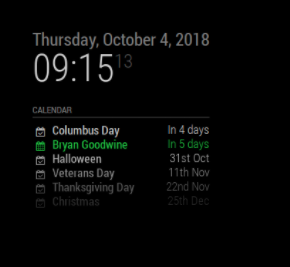
              0_1538659054639_Screen Shot 2018-10-04 at 9.17.02 AM.png

              1 Reply Last reply Reply Quote 0
              • N Offline
                Nilnik Project Sponsor
                last edited by

                Glad to help. Have a nice weekend

                1 Reply Last reply Reply Quote 0
                • F Offline
                  felafel
                  last edited by felafel

                  Edit: I thought I had this problem but I put

                  			timeFormat: 'absolute',
                  			showEnd: false,
                  

                  in the wrong section. Once I put it in the config it worked.

                  Thanks

                  1 Reply Last reply Reply Quote 0
                  • B Offline
                    Blackmirror
                    last edited by

                    Hello,
                    I have the same problem, but this fix will not solve my problem.

                                  {
                                            module: 'calendar',
                                            classes: 'default everyone',
                                         //   header: 'Termine',
                                            position: 'top_right',
                                            config: {
                                                   calendars: [
                                                            {
                                                                    url: 'https://calendar.google.com/calendar/XXX',
                                                                    symbol: 'calender',
                                                                    colored: true,
                                                                    displayRepeatingCountTitle: 'Birthday',
                                                                    timeFormat: 'absolute',
                                                                    maximumEntries: 5,
                                                                    dateFormat: 'DD MMM',
                                                                    fullDayEventDateFormat:'DD MMM',
                                                                    showEnd: false,
                                                                    getRelative: 48,
                                                                    urgency: 2
                                                            }
                                                    ]
                                            }
                                    },


                    And the chance from the date will not work.

                    The Date shows : Dec 8 and not 8 Dec.

                    Thanks

                    Blackmirror

                    1 Reply Last reply Reply Quote 0
                    • yawnsY Offline
                      yawns Moderator
                      last edited by

                      It is a bit irritating where to put the config stuff. Some needs to go to config section directly, some need to go to the calendars section.

                      Please try this:

                      {
                      	module: 'calendar',
                      	classes: 'default everyone',
                      	// header: 'Termine',
                      	position: 'top_right',
                      	config: {
                      		displayRepeatingCountTitle: true,
                      		timeFormat: 'absolute',
                      		dateFormat: 'DD MMM',
                      		fullDayEventDateFormat:'DD MMM',
                      		showEnd: false,
                      		getRelative: 48,
                      		urgency: 2,
                      		calendars: [
                      			{
                      				url: 'https://calendar.google.com/calendar/XXX',
                      				symbol: 'calender',
                      				colored: true,
                      				maximumEntries: 5,
                      				repeatingCountTitle: 'Birthday'
                      			}
                      			]
                      	}
                      },
                      
                      1 Reply Last reply Reply Quote 1
                      • B Offline
                        Blackmirror
                        last edited by

                        Thanks. It’s work fine

                        1 Reply Last reply Reply Quote 0
                        • J Offline
                          Joerg633
                          last edited by Joerg633

                          Hello again,
                          i still have the same problem with goggle calendar fullday entries.
                          For example an entry for 2 fulldays (01/19-01/20) will be:
                          ics data from the google calendar link:
                          …
                          DTSTART;VALUE=DATE:20190119
                          DTEND;VALUE=DATE:20190121

                          So the module shows
                          0_1547387176634_cfe1d622-ea2e-4194-aaf1-f781ddc5a45d-grafik.png

                          So i check all timezone / language etc. settings, in MM, modules section and raspi settings with no success.
                          Calendar views in google calendar webpage, android calendar apps and also outlook 365 are correct (2 days not 3).

                          my config

                          		module: 'calendar',
                          		header: 'Familienkalender',
                          		position: 'bottom_left',
                          		config: {
                          			maximumEntries: 13,
                          			displaySymbol: false,
                          			maxTitleLength: 24,
                          			fade: true,
                          			fadePoint: 0.7,
                          			fullDayEventDateFormat: 'Do MM k:mm',
                          			timeFormat: 'absolute',
                          			dateFormat: 'Do MMM k:mm',
                          			urgency: 0,
                          			colored: false,
                          			coloredSymbolOnly: true,
                          			calendars: [
                          				{
                          					url: 'https://calendar.google.com/calendar/ical/.../basic.ics'
                          				},
                          			],
                          		}
                          

                          Thanks for any hint
                          Joerg

                          1 Reply Last reply Reply Quote 0

                          Hello! It looks like you're interested in this conversation, but you don't have an account yet.

                          Getting fed up of having to scroll through the same posts each visit? When you register for an account, you'll always come back to exactly where you were before, and choose to be notified of new replies (either via email, or push notification). You'll also be able to save bookmarks and upvote posts to show your appreciation to other community members.

                          With your input, this post could be even better 💗

                          Register Login

                          • 1 / 1
                          • First post
                            Last post
                          Enjoying MagicMirror? Please consider a donation!
                          MagicMirror created by Michael Teeuw.
                          Forum managed by Sam, technical setup by Karsten.
                          This forum is using NodeBB as its core | Contributors
                          Contact | Privacy Policy
