MagicMirror Forum
    • Recent
    • Tags
    • Unsolved
    • Solved
    • MagicMirror² Repository
    • Documentation
    • 3rd-Party-Modules
    • Donate
    • Discord
    • Register
    • Login
    A New Chapter for MagicMirror: The Community Takes the Lead
    Read the statement by Michael Teeuw here.

    MMM-DarkSkyForecast - Yet ANOTHER weather module

    Scheduled Pinned Locked Moved Utilities
    334 Posts 67 Posters 836.1k Views 74 Watching
    Loading More Posts
    • Oldest to Newest
    • Newest to Oldest
    • Most Votes
    Reply
    • Reply as topic
    Log in to reply
    This topic has been deleted. Only users with topic management privileges can see it.
    • O Offline
      Ore77
      last edited by

      Hello,

      can someone help me out?
      I dont know how to resolve this issue.
      My console says : " …MIME type is not executable…".
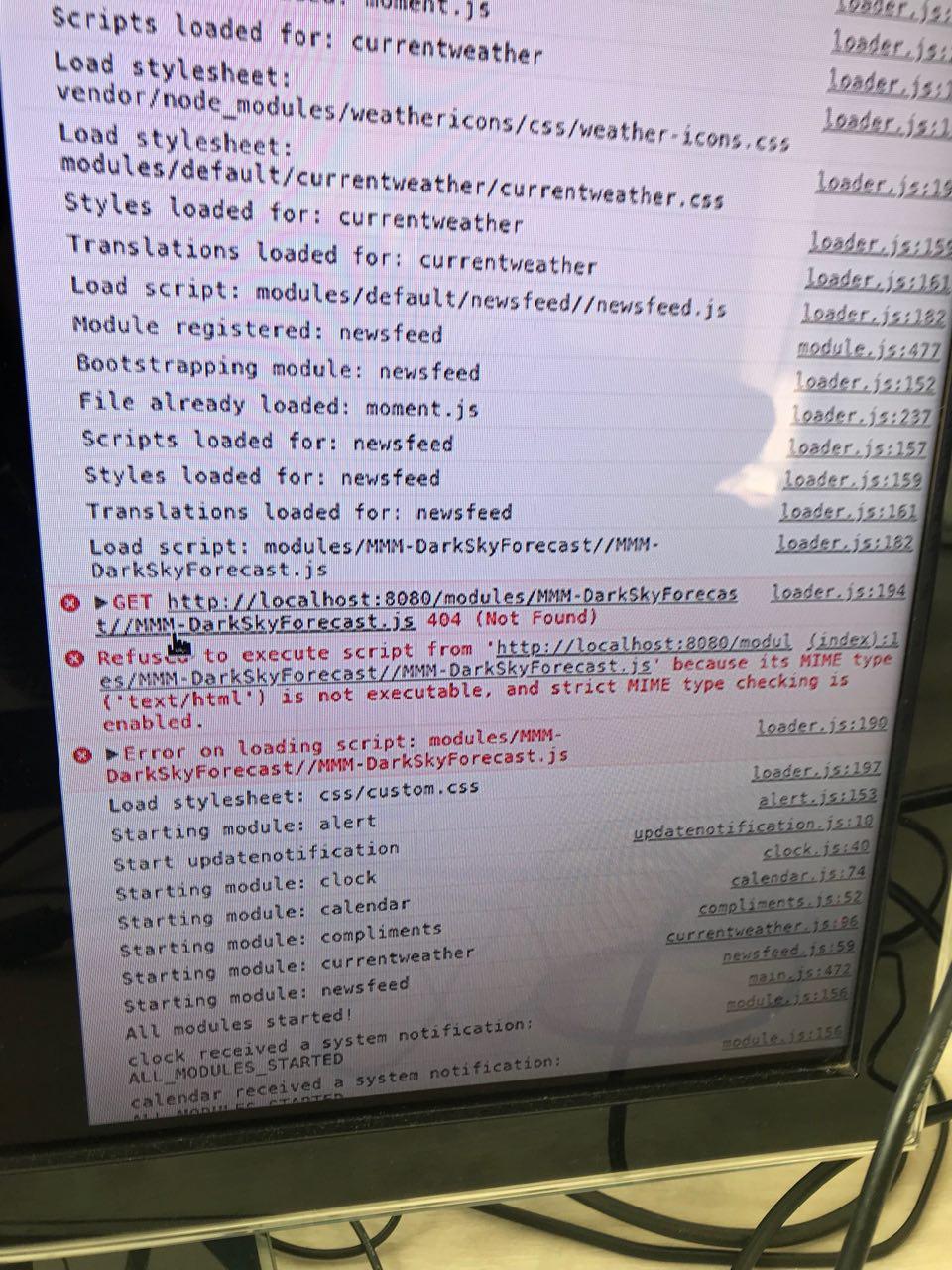
      0_1555173011787_MIME_error.jpg

      1 Reply Last reply Reply Quote 0
      • S Offline
        sdetweil
        last edited by sdetweil

        go to the MM/modules folder and do

        ls MMM-Dark*
        

        then

        cd MMM-DarkSkyForecast
        

        then

        ls
        

        the error says that MMM-DarkSkyForecast.js is not present in the MMM-DarkSkyForecast folder (error 404)

        Sam

        How to add modules

        learning how to use browser developers window for css changes

        1 Reply Last reply Reply Quote 0
        • O Offline
          Ore77
          last edited by Ore77

          thanks for you reply.
          The file is definitely in that directory.

          S 1 Reply Last reply Reply Quote 0
          • S Offline
            sdetweil @Ore77
            last edited by sdetweil

            @Ore77 is it spelled exactly like that… can u edit that file (nano MMM-DarkSkyForecast.js , ctrl-x to exit editor)

            Sam

            How to add modules

            learning how to use browser developers window for css changes

            1 Reply Last reply Reply Quote 0
            • O Offline
              Ore77
              last edited by

              yea its exactly this file. And i´m able to edit and save without issues.

              1 Reply Last reply Reply Quote 0
              • S Offline
                sdetweil
                last edited by

                is this s new install?

                Sam

                How to add modules

                learning how to use browser developers window for css changes

                1 Reply Last reply Reply Quote 0
                • O Offline
                  Ore77
                  last edited by

                  yes its a fresh install. Its the first 3rd party module i´ve installed.

                  S 2 Replies Last reply Reply Quote 0
                  • S Offline
                    sdetweil @Ore77
                    last edited by sdetweil

                    @Ore77 and the path is

                    /home/pi/MagicMirror/modules/MMM-DarkSkyForecast

                    right? u need to be in /home/pi/MagicMirror/modules before you do the git clone

                    Sam

                    How to add modules

                    learning how to use browser developers window for css changes

                    O 1 Reply Last reply Reply Quote 0
                    • S Offline
                      sdetweil @Ore77
                      last edited by

                      @Ore77 did u get it solved?

                      Sam

                      How to add modules

                      learning how to use browser developers window for css changes

                      1 Reply Last reply Reply Quote 0
                      • O Offline
                        Ore77 @sdetweil
                        last edited by

                        @sdetweil i considered the path´s in my configuration. Nevertheless after a second install of raspbian it suddenly worked.
                        I installed all updates of raspbian before i got over to MagicMirror this time.
                        Maybe it has something to do with that.

                        S 1 Reply Last reply Reply Quote 0
                        • S Offline
                          sdetweil @Ore77
                          last edited by

                          @Ore77 no idea… glad u got it fixed… can u mark your issue solved

                          Sam

                          How to add modules

                          learning how to use browser developers window for css changes

                          1 Reply Last reply Reply Quote 0
                          • S Offline
                            Smotx
                            last edited by

                            Hi here,

                            It’s possible to change only this text color ?

                            alt text

                            1 Reply Last reply Reply Quote 0
                            • H Offline
                              humdinger44
                              last edited by

                              Hey guys,
                              I too am trying to solve the “Loading…” problem. I’ve tried a number of things but the most telling clue I have is that dark sky doesn’t register any api use for my key. I’ve tried resetting the key, no difference. No errors show up in the dev tool. Does anyone see any problems with my config?

                              {
                                 	module: "MMM-DarkSkyForecast",
                                	header: "Weather",
                              	classes: "default everyone",
                                	disabled: false,
                                	position: "top_right",
                                		config:
                              			{
                                  			apikey: "**************",
                                  			latitude: "**.******",
                                  			longitude: "-**.******",
                                  			iconset: "2m",
                                  			forecastLayout: "table"
                                  			}
                              		},
                              
                              M 1 Reply Last reply Reply Quote 0
                              • M Offline
                                motdog @humdinger44
                                last edited by

                                @humdinger44 longitude should have - you have _ that could be it

                                H 1 Reply Last reply Reply Quote 0
                                • H Offline
                                  humdinger44 @motdog
                                  last edited by

                                  @motdog Thanks, I double checked that but it is the negative sign “-”

                                  1 Reply Last reply Reply Quote 0
                                  • S Offline
                                    sdetweil
                                    last edited by

                                    the ‘loading’ problem is typical of a module that displays a default message (‘Loading…’)
                                    which is replaced when the data arrives. So, the data did not arrive…

                                    can u open the developers window and select the console tab and put DarkSky in the filter box. to remove any other messages…

                                    there should be some message about the api usage, key, … something

                                    Sam

                                    How to add modules

                                    learning how to use browser developers window for css changes

                                    H 1 Reply Last reply Reply Quote 0
                                    • S Offline
                                      sdetweil
                                      last edited by

                                      I changed my key so it was invalid, and see an error in the terminal window

                                      [MMM-DarkSkyForecast] 15-May-19 09:11 ** ERROR ** null

                                      Sam

                                      How to add modules

                                      learning how to use browser developers window for css changes

                                      1 Reply Last reply Reply Quote 0
                                      • H Offline
                                        humdinger44 @sdetweil
                                        last edited by humdinger44

                                        @sdetweil https://imgur.com/d2Xeqgs.jpg I dont see anything like that
                                        https://i.imgur.com/d2Xeqgs.jpg shows the errors tab. i dont believe any of them apply to darksky

                                        S 1 Reply Last reply Reply Quote 0
                                        • S Offline
                                          sdetweil @humdinger44
                                          last edited by

                                          @humdinger44 note, this is in the terminal window where u issue npm start…

                                          Or it should appear in the pm2 logs

                                          Sam

                                          How to add modules

                                          learning how to use browser developers window for css changes

                                          H 1 Reply Last reply Reply Quote 0
                                          • H Offline
                                            humdinger44 @sdetweil
                                            last edited by humdinger44

                                            @sdetweil
                                            this?
                                            https://i.imgur.com/SZZOQHm.png?1
                                            note that my internet connection up and running

                                            S 1 Reply Last reply Reply Quote 0

                                            Hello! It looks like you're interested in this conversation, but you don't have an account yet.

                                            Getting fed up of having to scroll through the same posts each visit? When you register for an account, you'll always come back to exactly where you were before, and choose to be notified of new replies (either via email, or push notification). You'll also be able to save bookmarks and upvote posts to show your appreciation to other community members.

                                            With your input, this post could be even better 💗

                                            Register Login

                                            • 1
                                            • 2
                                            • 9
                                            • 10
                                            • 11
                                            • 12
                                            • 13
                                            • 16
                                            • 17
                                            • 11 / 17
                                            • First post
                                              Last post
                                            Enjoying MagicMirror? Please consider a donation!
                                            MagicMirror created by Michael Teeuw.
                                            Forum managed by Sam, technical setup by Karsten.
                                            This forum is using NodeBB as its core | Contributors
                                            Contact | Privacy Policy